
What changed: the screenshots are now our own iPhone 17e on iOS 27.0.1, dark mode, and the wording is checked against those screens and Apple's iOS 27 guide.
howtosimply.com/guides/how-to-stop-sharing-analytics-with-apple-on-an-iphone/ · Checked October 2026 · iPhone 17e · iOS 27.0.1
In this guide
Open Settings, tap Privacy & Security, scroll down and tap Analytics & Improvements. Switch off Share iPhone Analytics. With an Apple Watch paired, the switch is called Share iPhone & Watch Analytics and covers both.
5 of 5 steps with real screenshots · 5 official sources below
- Device
- iPhone
- Shown on
- iOS 27.0.1 (iPhone 17e)
- App
- Settings
- Path
- Settings › Privacy & Security › Analytics & Improvements
- Real screenshots
- 5 of 5 steps
- Checked
- October 2026
- Sources
- 5 official, linked below
Step by step
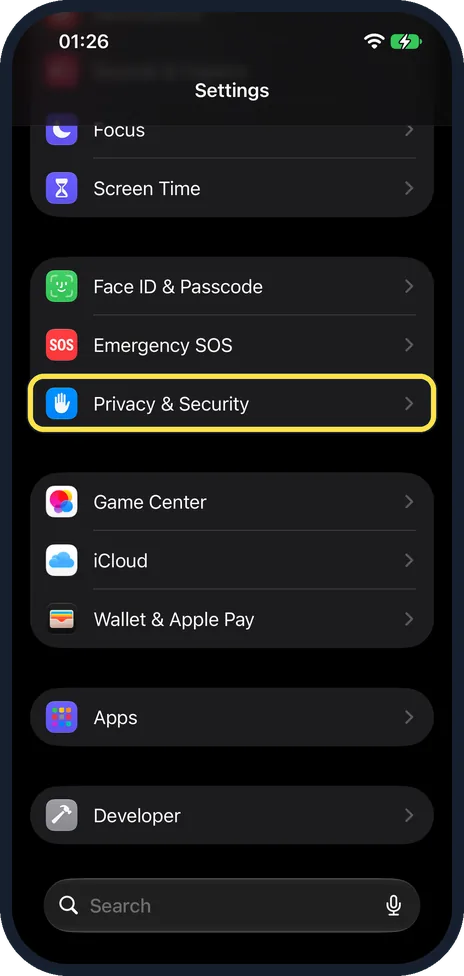
Open Settings and tap Privacy & Security
Settings opens with your account card, then any setup prompts, then Airplane Mode, Wi-Fi, Bluetooth, Mobile Service, Personal Hotspot and Battery.
Scroll down to find Privacy & Security. It is below Face ID & Passcode and Emergency SOS.
Watch these steps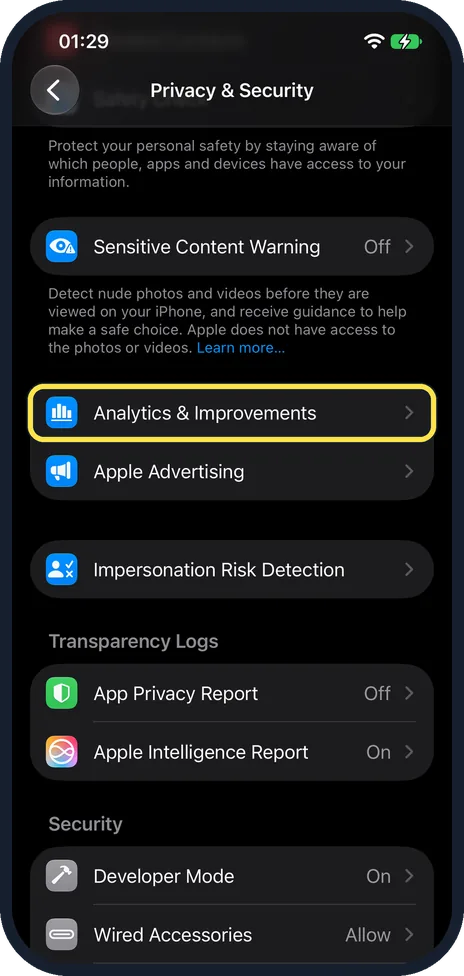
Scroll down and tap Analytics & Improvements
It is in the group below Sensitive Content Warning, just above Apple Advertising.
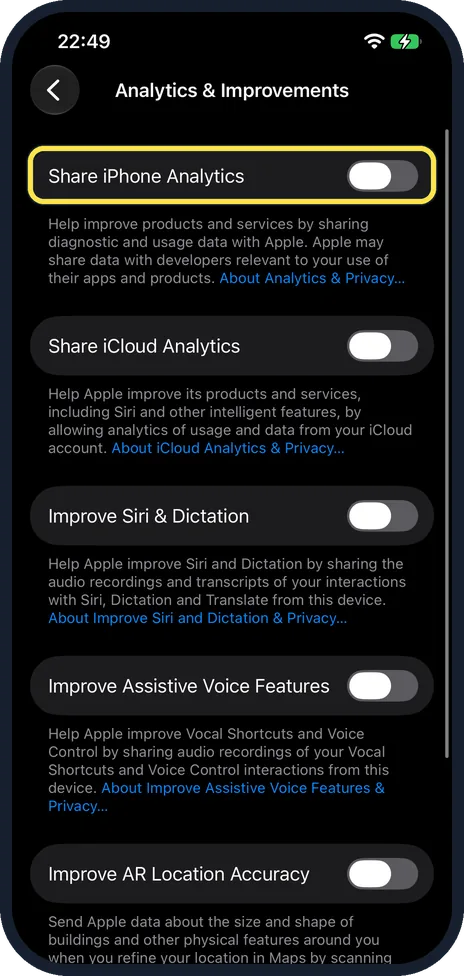
Switch off Share iPhone Analytics
Tap the switch so it turns grey. On our iPhone 17e it was already off.
The page also has Share iCloud Analytics, Improve Siri & Dictation, Improve Assistive Voice Features and Improve AR Location Accuracy, so switch off each one you do not want.
On our iPhone 17e all five switches on the page were off.
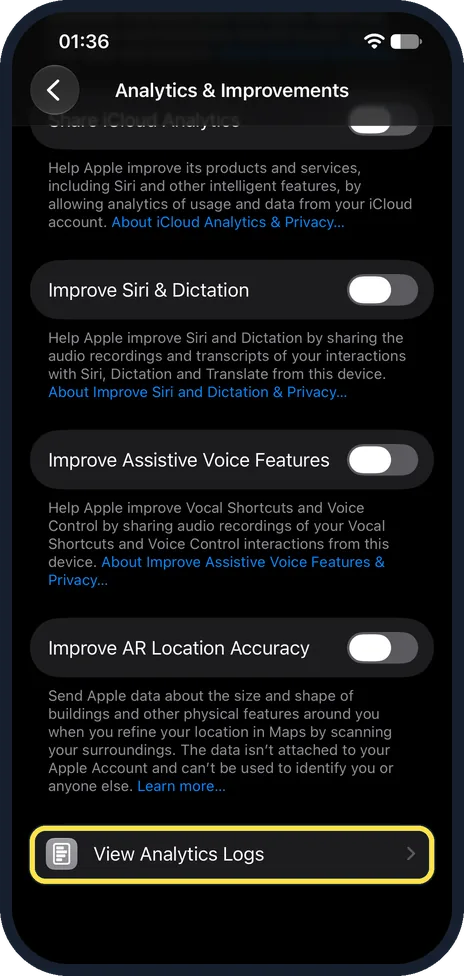
Optional: tap View Analytics Logs
Scroll to the bottom of the same page and tap View Analytics Logs, the last row, below Improve AR Location Accuracy. Apple's Device Analytics & Privacy page calls this row Analytics Data.
On our iPhone 17e, with all five switches off, the Analytics Logs page that opened still listed files under This Device, such as JetsamEvent and SiriSearchFeedback logs, with Show All 22 at the end.
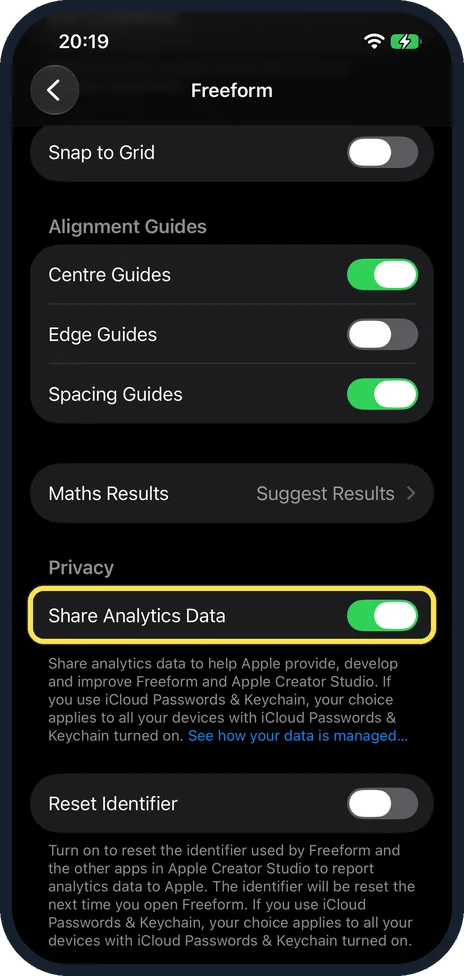
Optional: switch off Freeform’s analytics too
Open Settings, tap Apps, then Freeform, and scroll down to Privacy.
On our iPhone 17e Share Analytics Data was on there, although all five switches on the Analytics & Improvements page were off.
Tap the switch to turn it off.
What changed: the screenshots are now our own iPhone 17e on iOS 27.0.1, dark mode, and the wording is checked against those screens and Apple's iOS 27 guide.
Watch these steps
If you do not see this option
- An Apple Watch is paired. Apple's Device Analytics & Privacy page says the switch is then called Share iPhone & Watch Analytics and covers both devices. Source: Device Analytics & Privacy · Source: Get information about your iPhone · Source: iCloud Analytics & Privacy · Source: Improve Siri and Dictation & Privacy · Source: Change your Freeform settings on iPhone
- You cannot find View Analytics Logs. Scroll to the very bottom of the Analytics & Improvements page. On our iPhone 17e it was the last row, below Improve AR Location Accuracy.
- You cannot find Freeform's Share Analytics Data switch. It is not on the Analytics & Improvements page. Open Settings, Apps, Freeform and scroll down to the Privacy heading.
If this does not work
- Apple still gets analytics from your iCloud account. That is a separate switch on the same page, Share iCloud Analytics. The text under it says it covers usage and data from your iCloud account. Switch it off too, and tap About iCloud Analytics & Privacy under the switch for Apple's notice. Source: Device Analytics & Privacy · Source: Get information about your iPhone · Source: iCloud Analytics & Privacy · Source: Improve Siri and Dictation & Privacy · Source: Change your Freeform settings on iPhone
- The Analytics Logs page is not empty. That does not mean sharing is still on. On our iPhone 17e, with Share iPhone Analytics and the other four switches off, View Analytics Logs still listed 22 log files under This Device. The note on that page says certain analytics, such as daily diagnostic and usage data, will appear there.
- Freeform still shares analytics. Freeform has its own Share Analytics Data switch under Settings, Apps, Freeform. The note under it says that with iCloud Passwords & Keychain turned on, your choice applies to all your devices that have it.
About this guide
iPhone Analytics sends Apple reports about hardware and system details, performance, and how you use the device and its apps. Apple says the data is anonymous, but it may include location information. Sharing is optional.
Screenshots: iPhone 17e, iOS 27.0.1, dark mode.
Good to know
To keep the analytics but leave out your location: open Settings, Privacy & Security, Location Services, System Services and switch off iPhone Analytics.
Advertising is a separate setting. Apple Advertising is the next row on the Privacy & Security page.
Apps from other companies have their own switch: how to stop apps from tracking you on iPhone.
In short: Settings, Privacy & Security, Analytics & Improvements, Share iPhone Analytics off.
- Apple Legal: Device Analytics & Privacy
- Apple iPhone User Guide: Get information about your iPhone
- Apple Legal: iCloud Analytics & Privacy
- Apple Legal: Improve Siri and Dictation & Privacy
- Apple iPhone User Guide: Change your Freeform settings on iPhone
Links checked in October 2026. Menus and features can change after software updates. These steps match the version named at the top.
Did this guide work for you?
Sorry about that. What happened?