GOOGLE PIXEL
How to limit charging to 80% on a Google Pixel (Android 17)
Open Settings, tap Battery, then Battery health, then Charging optimisation. Turn on Use charging optimisation and tap Limit to 80 %. Adaptive Charging, the other choice, charges to 100 % just before you usually unplug.

4 of 4 steps show a real screenshot from our Pixel 10a. Each step was checked against the maker's own instructions, linked at the end.
Steps
- 1
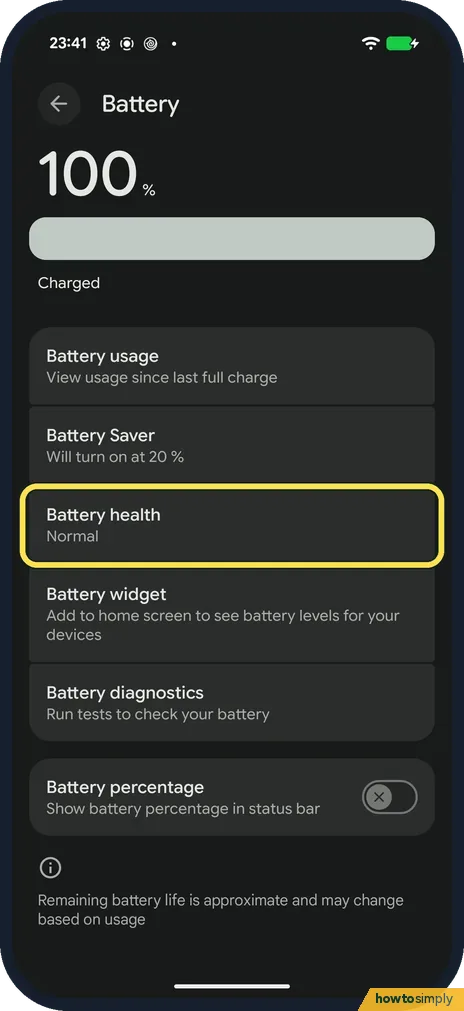
Open Battery health
Open Settings and tap Battery. Tap Battery health. There is no charging row on the Battery page itself.
- 2
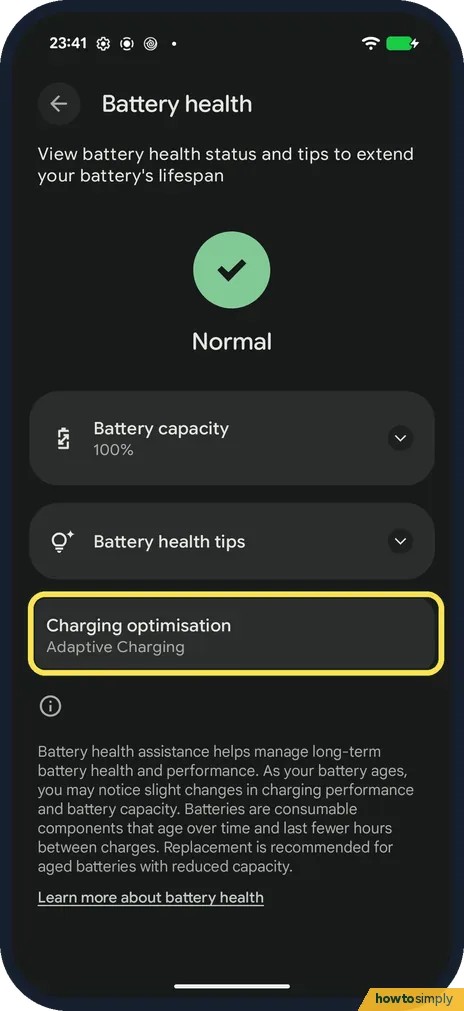
Tap Charging optimisation
Below Battery capacity and Battery health tips, tap Charging optimisation. Ours said Adaptive Charging.
- 3
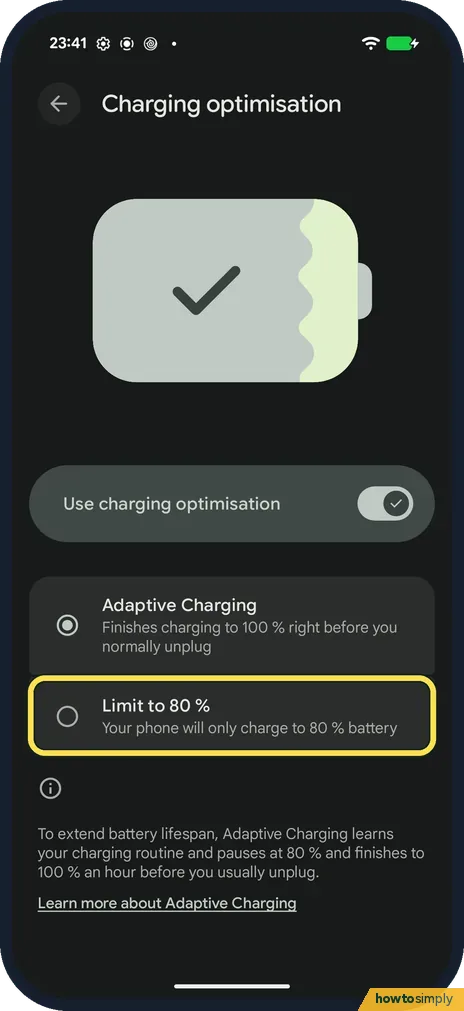
Tap Limit to 80 %
Check that Use charging optimisation is on, then tap Limit to 80 %. Your phone will only charge to 80 %.
- 4
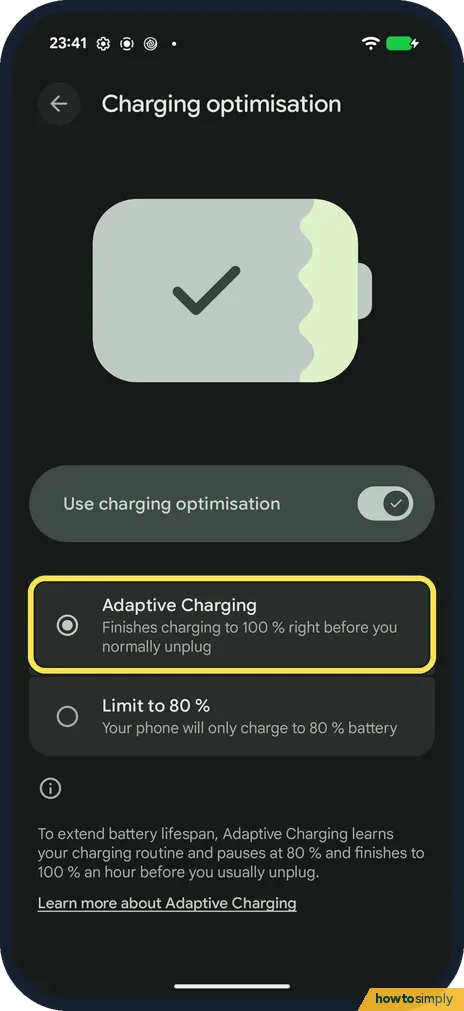
Or choose Adaptive Charging
Adaptive Charging finishes charging to 100 % right before you normally unplug. The note at the bottom says it pauses at 80 % and finishes an hour before you usually unplug. Ours is set to this.
If you do not see this option
- No charging setting on the Battery page? It is one level down, inside Battery health (step 1). Source: Get the most life from your Pixel phone battery
- Adaptive Charging not working yet? Google says it needs about 14 days to learn your charging habits, and may not turn on when your routine changes, for example when you travel. Source: Get the most life from your Pixel phone battery
- No Limit to 80% on an older Pixel? Google says Limit to 80% is on Pixel 6a and later. On older models, Google lists Adaptive Charging for Pixel 4 and later. Source: Get the most life from your Pixel phone battery
If this does not work
- Charged to 100 % with the limit on? Google says a Pixel charges fully every 10th cycle to keep its capacity readings right, even with Limit to 80 % on.
- Need a full charge today? Turn off Use charging optimisation, charge, and turn it back on afterwards.
- Stops near 70 to 80% without the limit on? Google says a Pixel may limit charging to about 70 to 80% by itself during long charging in high heat or over several days, and shows a Protecting your battery notification. Tap Charge to full under Battery in Settings, or restart the phone.
- Charging paused altogether? Google says the phone may pause charging if it gets too warm, and starts again once it cools down. Move it somewhere cooler and out of direct sun.
- Phone sits at 100% after a full cycle? Google says that for accurate capacity readings, leave the phone plugged in at least 30 minutes after it reaches 100% on that 10th cycle.
Good to know
With Limit to 80% on, you get about a fifth less charge each day in return for a battery that ages more slowly. Your other battery settings stay as they were. To undo it, tap Adaptive Charging, or turn off Use charging optimisation to charge straight to 100%.
Google also says to keep the phone in a cool spot while it charges and to use a USB-C to USB-C cable where possible, since USB-A cables charge more slowly.
To see how worn your battery already is, see how to check battery health on a Google Pixel.
About this guide
- Device
- Android
- Shown on
- Google Pixel 10a, Android 17 (build CP3A.260905.009)
- App
- Settings
- Path
- Settings › Battery › Battery health › Charging optimisation
- Real screenshots
- 4 of 4 steps
- What we did
- Observed: looked at each screen, changed nothing
- Checked
- October 2026
- Sources
- 2 official, linked below
Sources
Links checked October 2026. Menus and features can change with updates.Spotted a mistake? Menus change with updates, and we want every step to match your screen. Email us about this page or use the contact form. We read every report, and fixes are listed on What changed.
Liked this guide?
Follow us for new guides and short how-to videos.
Did this guide work for you?
Sorry about that. What happened?