GOOGLE PIXEL
How to check Emergency SOS and safety settings on a Google Pixel (Android 17)
Open Settings, Safety and emergency. It lists Medical information, Emergency contacts, Emergency SOS, Car Crash Detection, Emergency Location Service and emergency alerts. Tap a row to set it up.

6 of 6 steps show a real screenshot from our Pixel 10a. Each step was checked against the maker's own instructions, linked at the end.
Steps
- 1
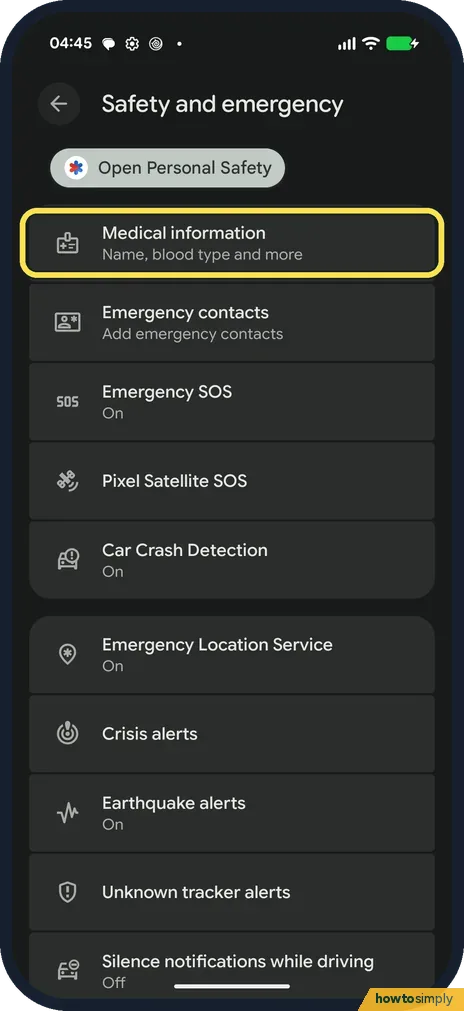
Add medical information
Open Settings, Safety and emergency. Tap Medical information to add your name, blood type and more.
- 2
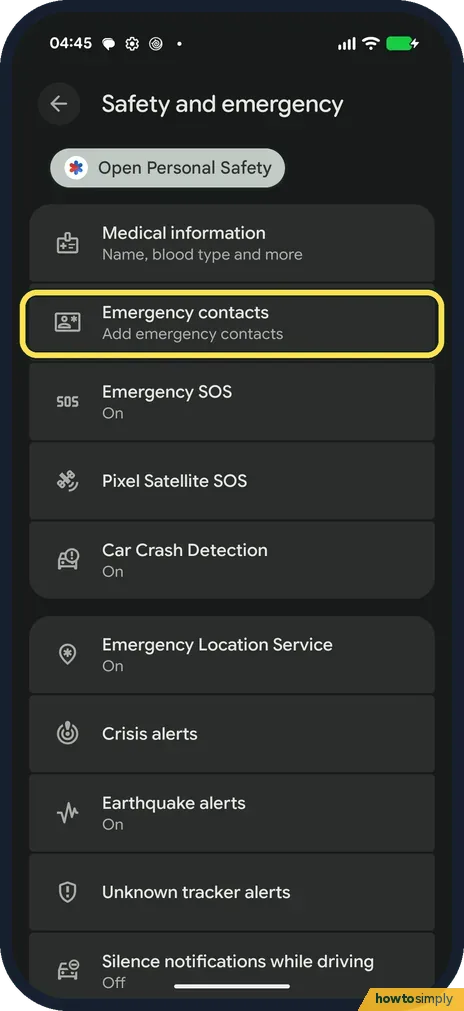
Add emergency contacts
Tap Emergency contacts to choose the people to contact.
- 3
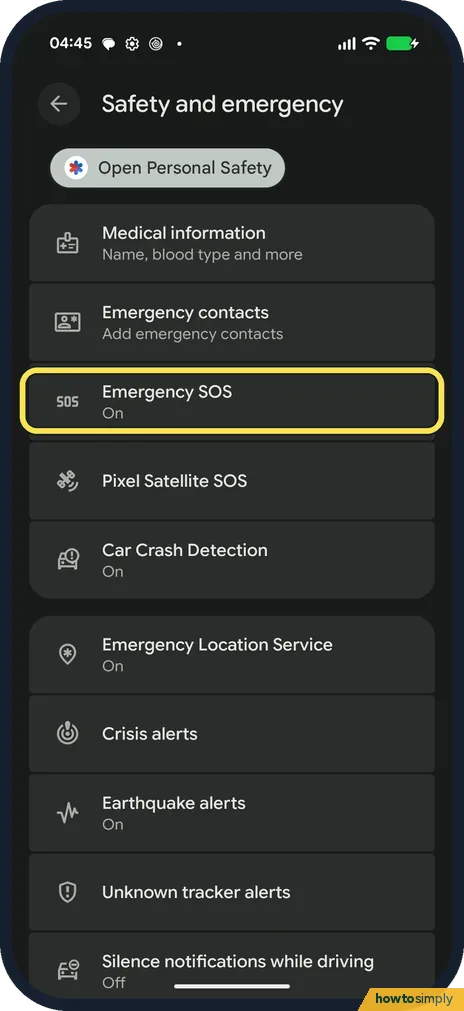
Tap Emergency SOS
Emergency SOS was On on ours. Tap it.
- 4
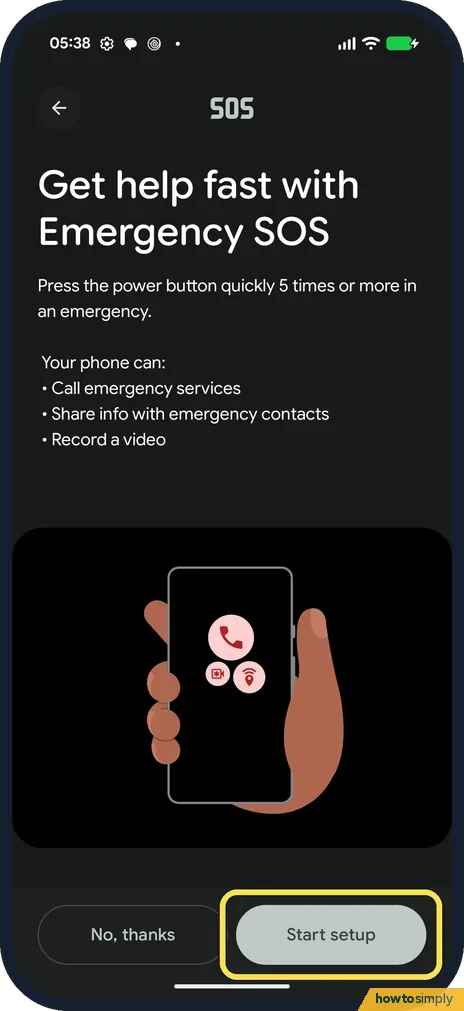
Read how SOS works and set it up
The page says to press the power button quickly 5 times or more in an emergency. Your phone can call emergency services, share info with emergency contacts and record a video. Tap Start setup to choose these. We tapped Back and set nothing up.
- 5
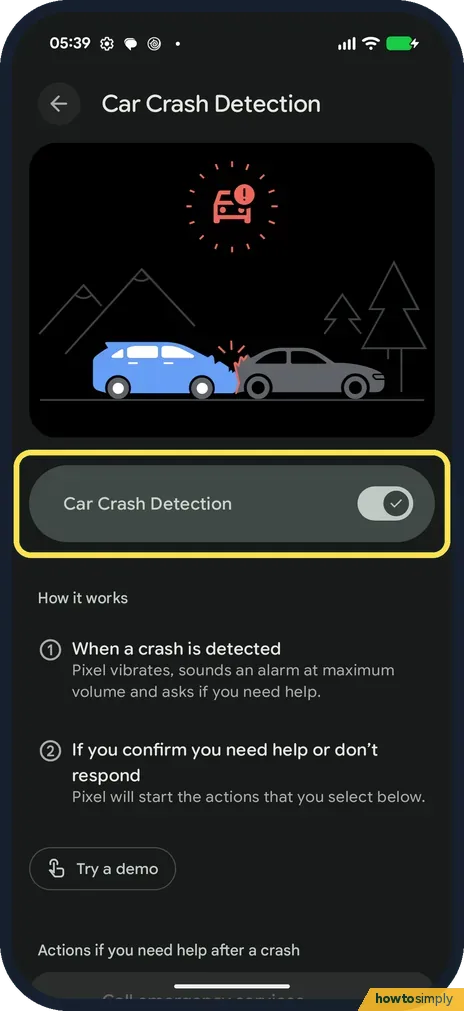
Check Car Crash Detection
Back on Safety and emergency, tap Car Crash Detection. It was on on ours. How it works says the Pixel vibrates, sounds an alarm at maximum volume and asks if you need help; if you confirm or don't respond, it starts the actions you choose further down.
- 6
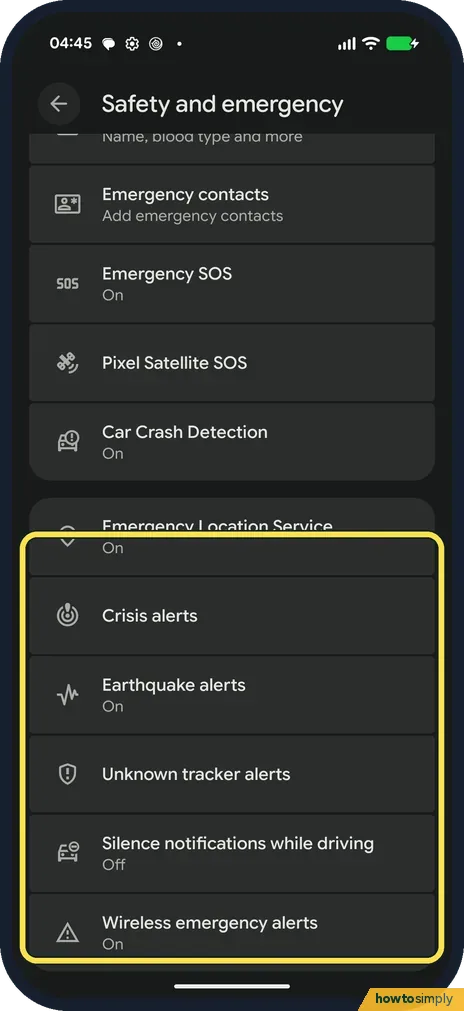
Check the alerts
Scroll down. Emergency Location Service, Earthquake alerts and Wireless emergency alerts were On on ours. Silence notifications while driving was Off.
If you do not see this option
- Feature missing? Google says some emergency features depend on your country and phone. Source: Get help in an emergency using your Android phone
- Personal Safety app? There is an Open Personal Safety button at the top of the page.
If this does not work
- Not sure SOS is set up? Tap Emergency SOS. Ours showed the setup intro with Start setup, even though the list said On.
- Want to test Car Crash Detection? Its page has a Try a demo button. We did not run it.
- Pressing the power button did nothing? Google says Emergency SOS needs Android 12 or later and doesn't work in airplane mode or when Battery Saver is on. Check both, and make sure you press quickly 5 times or more.
- Car Crash Detection won't stay on? Google says the phone must have a SIM for it to work. Without a SIM or eSIM you may still be able to call emergency services, but you can't call your emergency contacts.
- Location not shared with contacts? Google says sharing your real-time location needs a Wi-Fi or mobile internet connection. Where data is weak, a call may still connect while the location link does not.
Good to know
Block unwanted callers: how to block numbers and spam calls on a Pixel.
Once Emergency SOS is set up, five quick presses of the power button start the actions you picked, either after you touch and hold or after a short countdown, which Google says can play an alarm sound. If you choose to record video, Google says recordings can run up to 45 minutes, use about 10 MB a minute and are backed up to the cloud, with links that expire after 7 days. Every option can be changed or switched off again from Safety and emergency.
Wireless emergency alerts have their own settings: how to change wireless emergency alert settings.
About this guide
- Device
- Android
- Shown on
- Google Pixel 10a, Android 17 (build CP3A.260905.009)
- App
- Settings
- Path
- Settings › Safety and emergency: Medical information › Emergency contacts › Emergency SOS › Car Crash Detection
- Real screenshots
- 6 of 6 steps
- What we did
- Observed: looked at each screen, changed nothing
- Checked
- October 2026
- Sources
- 1 official, linked below
Sources
Links checked October 2026. Menus and features can change with updates.Spotted a mistake? Menus change with updates, and we want every step to match your screen. Email us about this page or use the contact form. We read every report, and fixes are listed on What changed.
Liked this guide?
Follow us for new guides and short how-to videos.
Did this guide work for you?
Sorry about that. What happened?