GOOGLE PIXEL
How to check Find Hub is on on a Google Pixel (Android 17)
Go to Settings, Security and privacy, Lost device protection, Find Hub. Allow device to be located should be on. Then a lost phone can be found, locked or erased from the Find Hub app or Find Hub web.

3 of 3 steps show a real screenshot from our Pixel 10a. Each step was checked against the maker's own instructions, linked at the end.
Steps
- 1
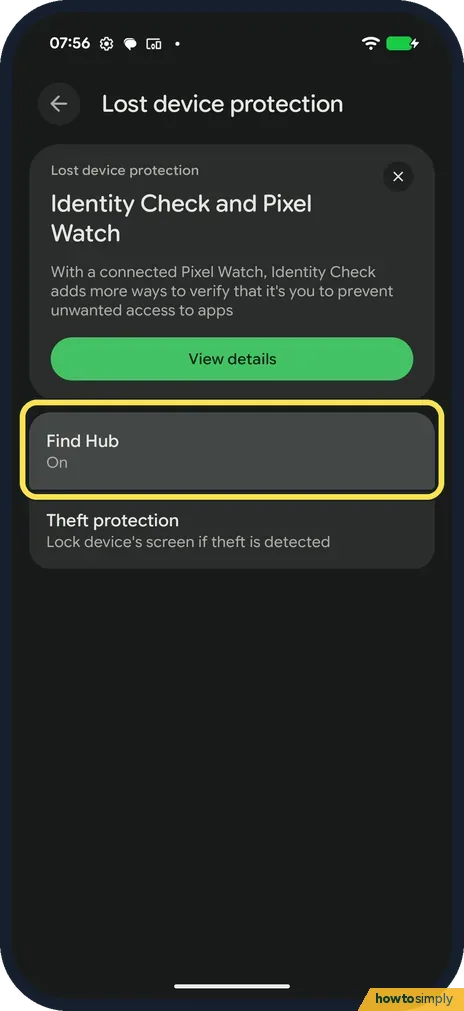
Open Lost device protection
Go to Settings, Security and privacy, Lost device protection. Find Hub said On; Theft protection is below it.
- 2
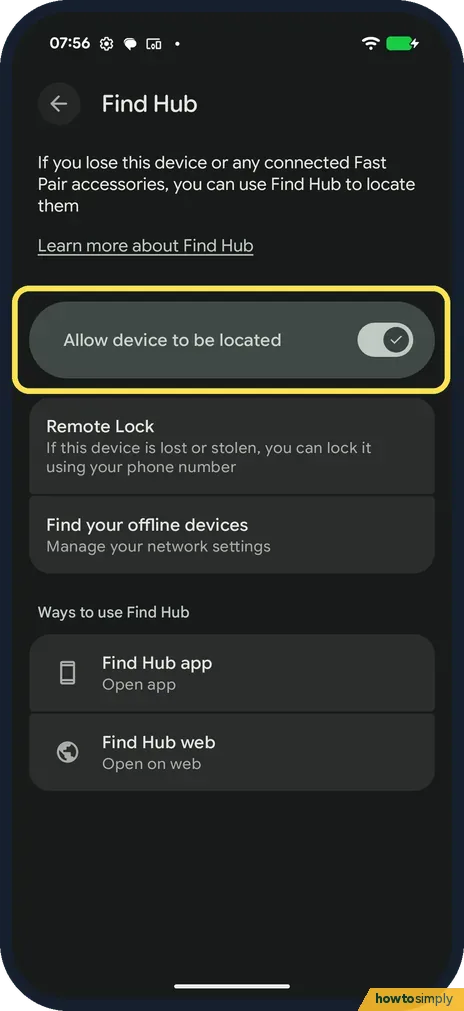
Check Allow device to be located
Tap Find Hub. Allow device to be located was on. Remote Lock lets you lock the phone using your phone number.
- 3
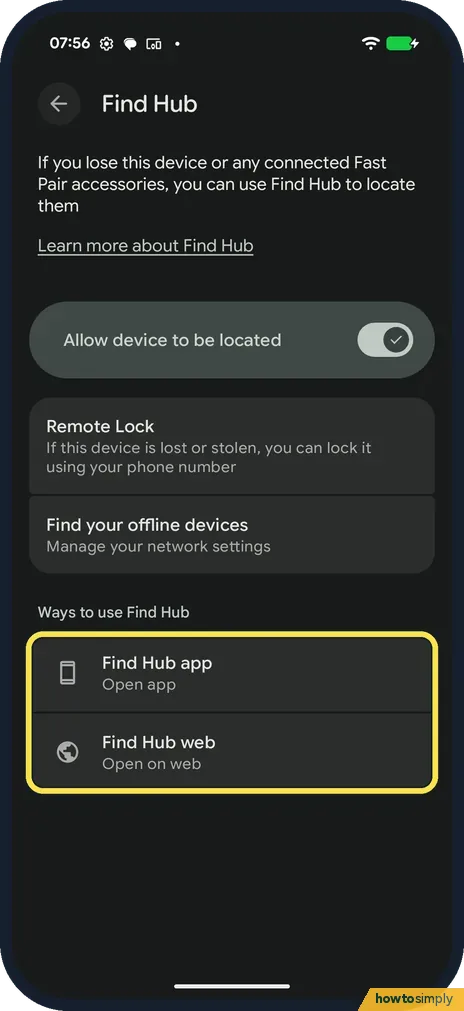
Know where to find it
Under Ways to use Find Hub: the Find Hub app (Open app) and Find Hub web (Open on web). Use either from another device if you lose this one.
If you do not see this option
- Find Hub off? Turn on Allow device to be located. Google says the phone also needs to be signed in to a Google Account and online to be found. Source: Find, secure or erase a lost Android device
- Looking for Find My Device? It is now called Find Hub. Source: Find, secure or erase a lost Android device
- No screen lock set? Google says the Find Hub network needs a PIN, pattern or password before it can help locate the phone. Set one in Settings first. Source: Be ready to find a lost Android device
If this does not work
- Phone offline? Find your offline devices, on the Find Hub page, manages network settings for finding devices that are offline.
- Erased a lost phone? Google says you will need the Google Account password to use it again.
- Phone doesn't show in Find Hub? Google says hidden devices won't appear. On play.google.com/library/devices, make sure Show in menus is ticked for the phone. A phone you removed recently may still be listed for a while.
- Several profiles on the phone? Google says to sign in to Find Hub web with the account on the main profile, not a second user's account.
- Only an old location shows? Google says that if the current location can't be found, you may still see the last known location, if one is available. The phone may be switched off or out of signal.
Good to know
Emergency and safety settings: Emergency SOS on a Pixel.
Google says the phone stores encrypted recent locations with Google and joins a crowdsourced network of Android devices, and that this location data is end-to-end encrypted. Under Find your offline devices you can choose not to join the network; you can then still find the phone from locations stored while it was online.
If you lose the phone, Play sound rings it at full volume for five minutes, even on silent or vibrate. Mark as lost locks it with your PIN, pattern or password and can show a message with your contact details on the lock screen.
For extra protection if the phone is snatched, see should you turn on Theft protection on a Google Pixel.
About this guide
- Device
- Android
- Shown on
- Google Pixel 10a, Android 17 (build CP3A.260905.009)
- App
- Settings
- Path
- Settings › Security and privacy › Lost device protection › Find Hub › Allow device to be located
- Real screenshots
- 3 of 3 steps
- What we did
- Observed: looked at each screen, changed nothing
- Checked
- October 2026
- Sources
- 1 official, linked below
Sources
Links checked October 2026. Menus and features can change with updates.Spotted a mistake? Menus change with updates, and we want every step to match your screen. Email us about this page or use the contact form. We read every report, and fixes are listed on What changed.
Liked this guide?
Follow us for new guides and short how-to videos.
Did this guide work for you?
Sorry about that. What happened?