
howtosimply.com/guides/how-to-scan-for-unknown-trackers-like-airtags-on-a-google-pixel/ · Checked October 2026 · build CP3A.260905.009 · Google Pixel 10a, Android 17
In this guide
Go to Settings, Safety and emergency, Unknown tracker alerts and make sure Allow alerts is on. Tap Scan now under Manual scan to look for trackers near you that are separated from their owner; ours listed an Apple AirTag under Near you.
3 of 3 steps with real screenshots · 1 official source below
- Device
- Android
- Shown on
- Google Pixel 10a, Android 17 (build CP3A.260905.009)
- App
- Settings
- Path
- Settings › Safety and emergency › Unknown tracker alerts
- Real screenshots
- 3 of 3 steps
- Checked
- October 2026
- Sources
- 1 official, linked below
Step by step
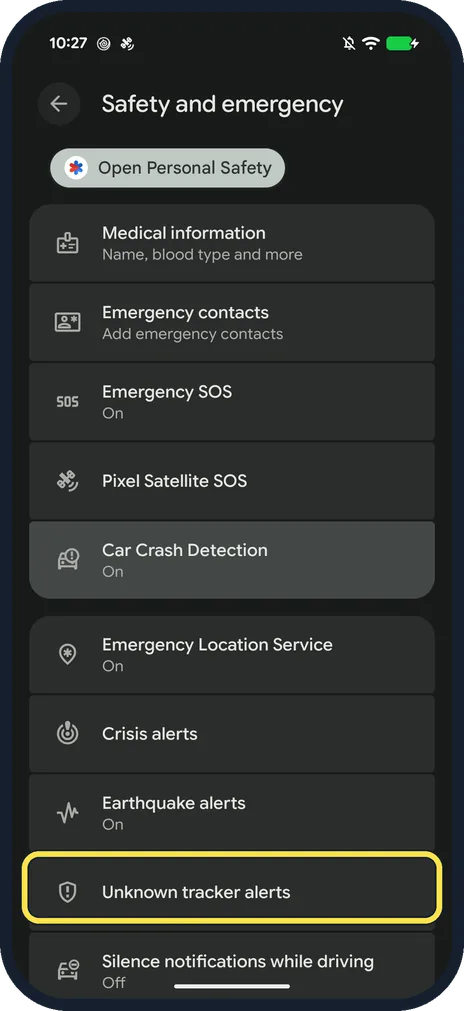
Open Unknown tracker alerts
Open Settings, tap Safety and emergency, and scroll down to Unknown tracker alerts.
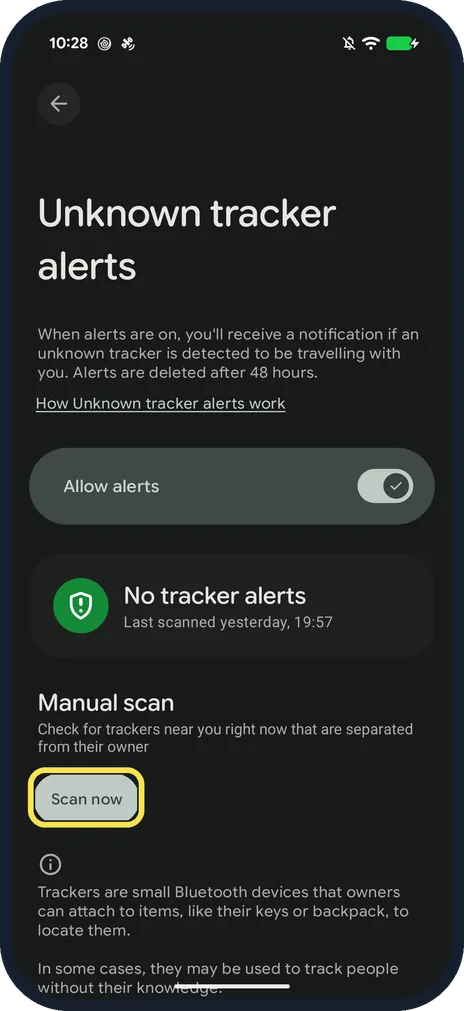
Tap Scan now
Check that Allow alerts is on (it was on ours): you then get a notification if an unknown tracker is detected travelling with you, and the page says alerts are deleted after 48 hours. Then, under Manual scan, tap Scan now.
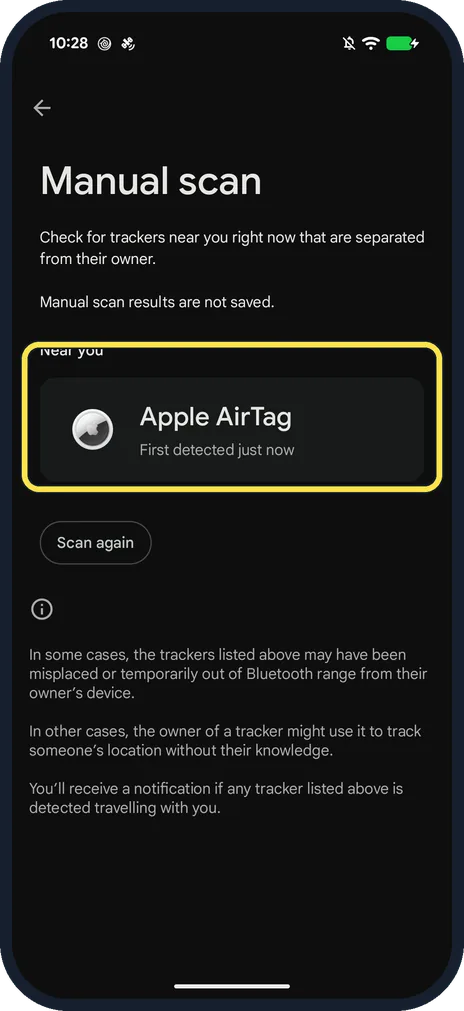
Read the results
The Manual scan page opens. Google says the scan takes about 10 seconds. Ours listed Apple AirTag, First detected just now, under Near you. Manual scan results are not saved; tap Scan again to repeat it.
If you do not see this option
- No Unknown tracker alerts row? Google says on Android 11 and lower it is under Settings, Google, Personal & device safety, Unknown tracker alerts. The feature needs Android 6 or later and arrives through a Google Play services update. Source: Find unknown trackers
- Wondering which trackers it finds? Google says alerts currently work with Find Hub network compatible tags and headphones, and Apple AirTags. Other brands of tracker may not show up. Source: Find unknown trackers
If this does not work
- Never get an automatic alert? Google says automatic alerts need Location turned on, and you have to move with the tracker over time before an alert appears; you get at most one alert per tracker a day. A manual scan on Android 11 and later works without Location. Source: Find unknown trackers
- Scan finds nothing? Before our manual scan, the page showed No tracker alerts with the last scan time. Google says Scan now only checks for trackers separated from their owners and near you at that moment, so scan again somewhere else, for example in your car or by your bag. Source: Find unknown trackers
- Found a tracker you don't recognise? The result page says a tracker may simply be lost or out of range of its owner's device, but it can also be used to track someone without their knowledge. Keep Allow alerts on so Android warns you if it travels with you. Source: Find unknown trackers
About this guide
Android can warn you if a Bluetooth tracker, such as an AirTag, that isn't yours seems to be travelling with you. You can also check by hand at any time.
The screenshots are from our Google Pixel 10a with Android 17, in Dark mode, taken on 24 October 2026. The scan found a real AirTag near our phone; we did not open or disable it.
Good to know
The same page holds Car Crash Detection and Emergency SOS: Emergency SOS and safety settings on a Pixel.
In short: Settings, Safety and emergency, Unknown tracker alerts, Allow alerts on, Scan now (about 10 seconds).
Links checked in October 2026. Menus and features can change after software updates. These steps match the version named at the top.
📷 See real photos from the Pixel 10a in our Camera Lab, next to 10 other phones.
Did this guide work for you?
Sorry about that. What happened?