
What changed: the screenshots are now our own iPhone 17e on iOS 27.0.1, dark mode, and the wording is checked against those screens.
howtosimply.com/guides/how-to-remove-stickers-from-the-emoji-keyboard-on-an-iphone/ · Checked October 2026 · iPhone 17e · iOS 27.0.1
In this guide
Open Settings, tap General, then Keyboard, scroll to the bottom and switch off Stickers under Emoji. The note on the page adds that stickers are always shown in apps that support typing them as emoji.
3 of 3 steps with real screenshots · 1 official source below
- Device
- iPhone
- Shown on
- iOS 27.0.1 (iPhone 17e)
- App
- Settings
- Path
- Settings › General › Keyboard
- Real screenshots
- 3 of 3 steps
- What we did
- Performed: we made the change on our device and show the result
- Checked
- October 2026
- Sources
- 1 official, linked below
Step by step
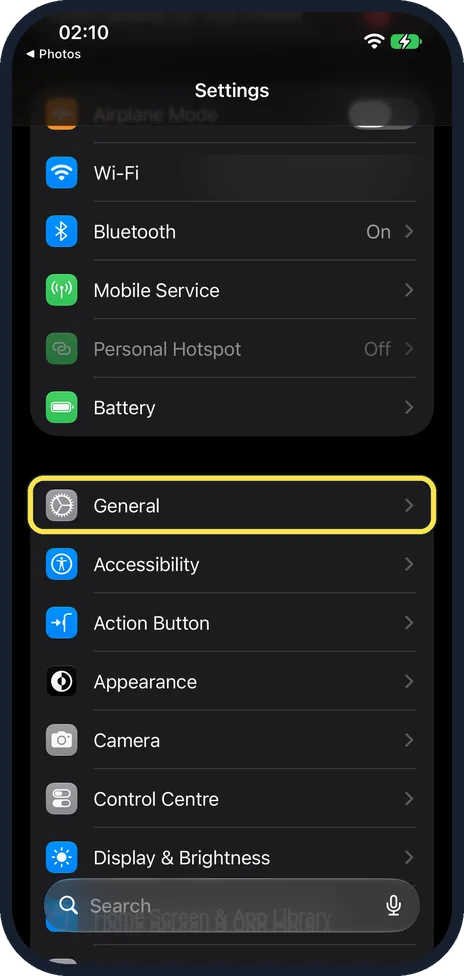
Open Settings and tap General
General is the first row of the group below Battery, after Airplane Mode, Wi-Fi and Bluetooth.
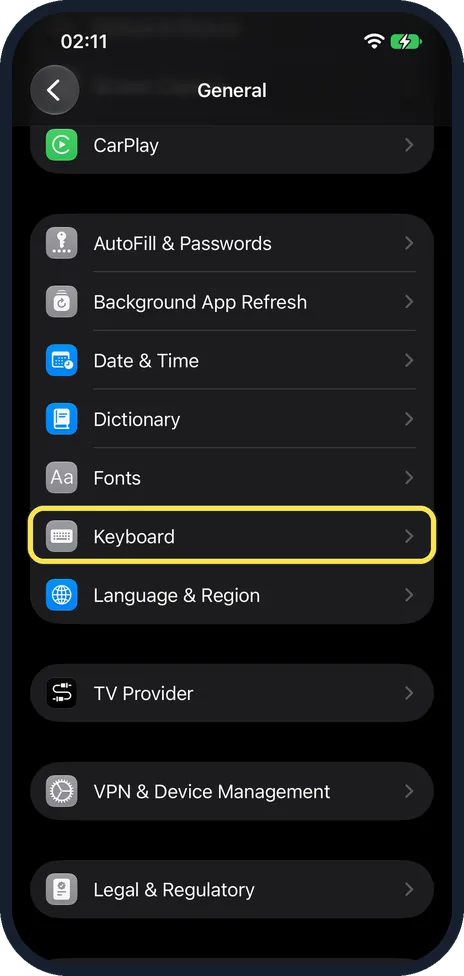
Tap Keyboard
It is just below Fonts, in the group that starts with AutoFill & Passwords.
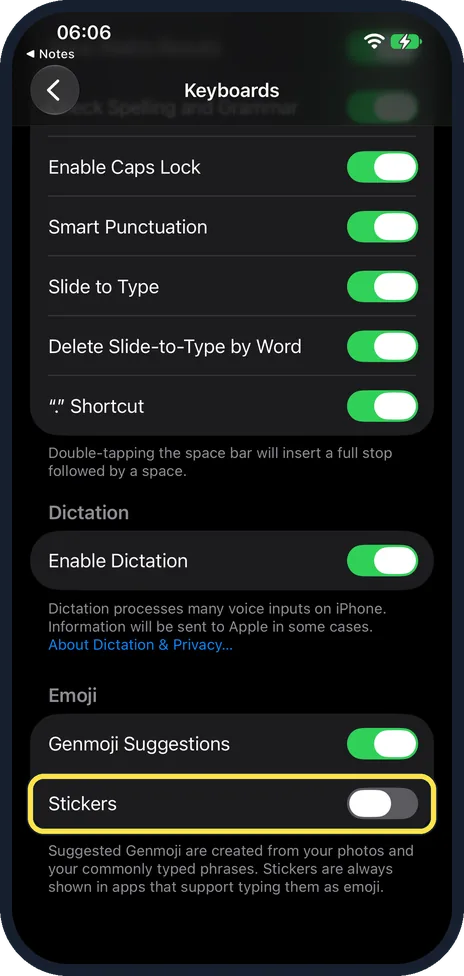
Scroll to the bottom and switch off Stickers
It is the last switch on the page, under the heading Emoji. It was on on our iPhone 17e; the picture shows ours after we switched it off.
What changed: the screenshots are now our own iPhone 17e on iOS 27.0.1, dark mode, and the wording is checked against those screens.
If you do not see this option
- Change it from the keyboard. While typing, touch and hold the emoji or globe key and tap Keyboard Settings. On our iPhone 17e the menu listed Keyboard Settings, English (US) and Emoji. Source: Type with the onscreen keyboard on iPhone
- Search for it. Open Settings, tap the search field at the bottom and type Stickers. Apple notes that the sections in Settings depend on the iPhone model. Source: Find settings on iPhone
If this does not work
- Stickers still show in some apps. The note on the page says stickers are always shown in apps that support typing them as emoji.
- You also see Genmoji suggestions. That is Genmoji Suggestions, the switch just above, which was on on ours. The note says suggested Genmoji are created from your photos and your commonly typed phrases.
About this guide
The emoji keyboard on an iPhone can also send stickers. If you never use them, one switch takes them out. On iOS 27 the switch sits in the Emoji group, below Genmoji Suggestions.
The screenshots are our own, taken on an iPhone 17e running iOS 27.0.1, in dark mode.
In short: Settings, General, Keyboard, Stickers off.
Links checked in October 2026. Menus and features can change after software updates. These steps match the version named at the top.
Did this guide work for you?
Sorry about that. What happened?