
howtosimply.com/guides/how-to-clear-the-whatsapp-cache-on-a-google-pixel/ · Checked October 2026 · Google Pixel 10a, Android 17 (build CP3A.261005.005), WhatsApp 2.26.41.77
In this guide
Open the Pixel's Settings, Apps, WhatsApp, Storage and cache, and tap Clear cache. Do not tap Clear storage. Ours showed WhatsApp 2.26.41.77 with an 8,27 MB cache; after Clear cache it read 0 byte.
4 of 4 steps with real screenshots · 1 official source below
- Device
- Android
- Shown on
- Google Pixel 10a, Android 17 (build CP3A.261005.005), WhatsApp 2.26.41.77
- App
- Settings
- Path
- Settings › Apps › WhatsApp › Storage and cache › Clear cache
- Real screenshots
- 4 of 4 steps
- Checked
- October 2026
- Sources
- 1 official, linked below
Step by step
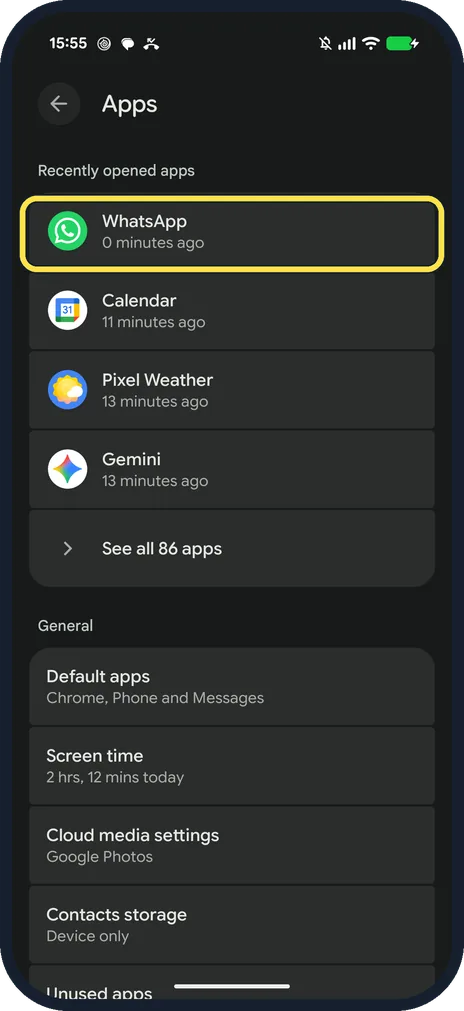
Open the Pixel's Settings, then Apps, then WhatsApp
This is the phone's Settings app, not WhatsApp's own settings. Ours had WhatsApp first under Recently opened apps; otherwise tap See all apps.
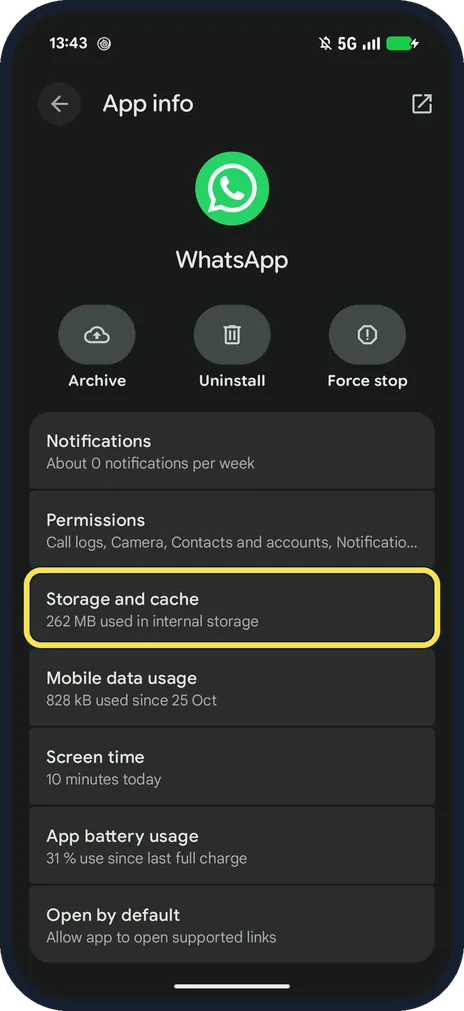
Tap Storage and cache
App info shows Archive, Uninstall and Force stop at the top. Ours said 262 MB used in internal storage.
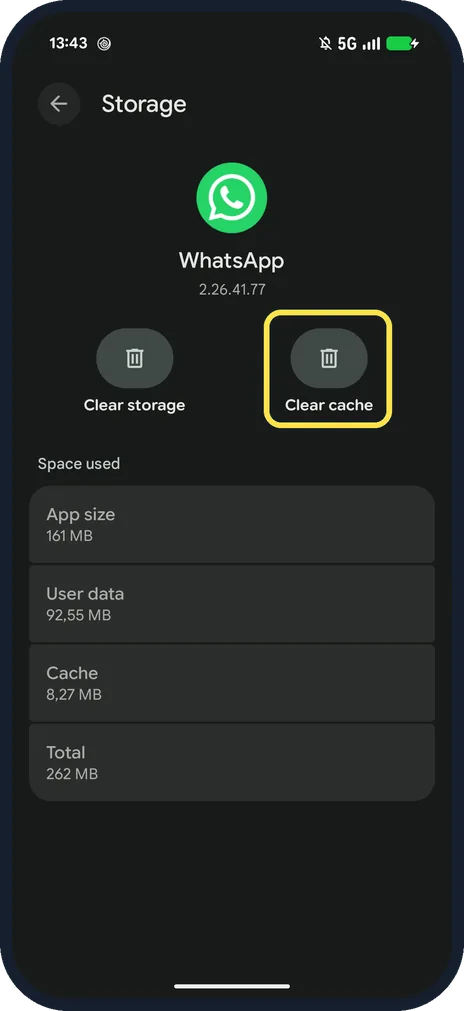
Tap Clear cache
It is the right-hand button. Ours: version 2.26.41.77, App size 161 MB, User data 92,55 MB, Cache 8,27 MB.
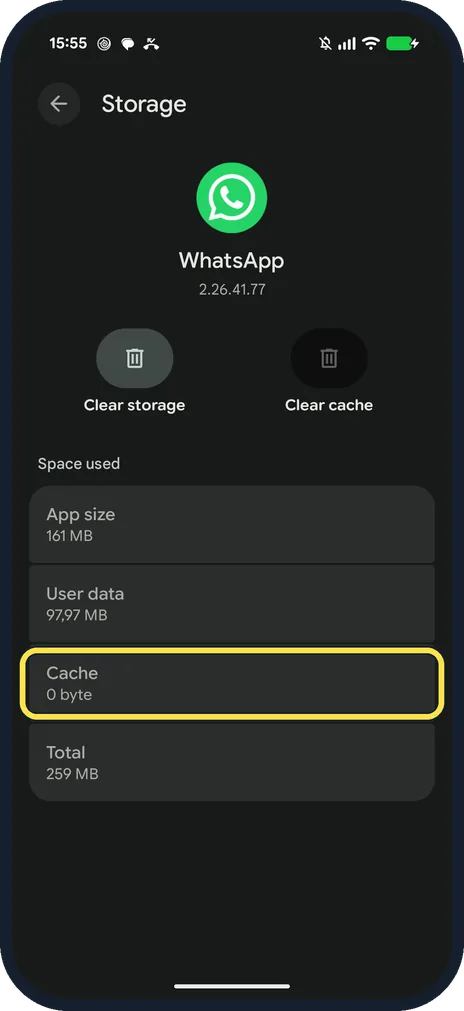
Check the cache is empty
Ours read Cache 0 byte and Total 259 MB. There is no confirmation box.
If you do not see this option
- WhatsApp not in the list? Ours showed four recently opened apps (step 1). Tap See all 86 apps under them to list every app.
- Clear storage instead? Clear storage is the left-hand button. WhatsApp's help only says that clearing the cache won't delete your messages or chats, so use Clear cache. Source: Fixing issues on WhatsApp
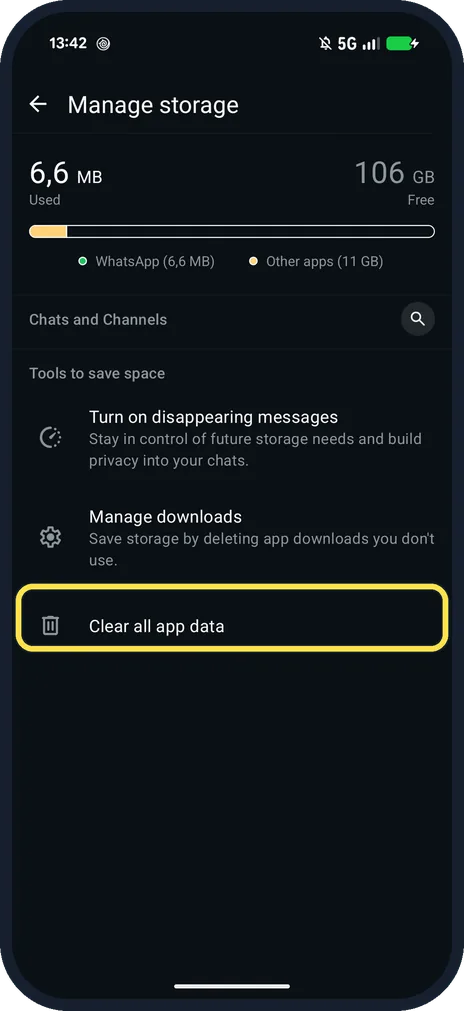
- Inside WhatsApp? WhatsApp's own Manage storage has Clear all app data under Tools to save space; that is not the cache.
If this does not work
- WhatsApp still slow? WhatsApp suggests checking your connection, closing and reopening the app, and freeing up storage. Source: Fixing issues on WhatsApp
- Custom notification sound reverts? WhatsApp suggests clearing the cache, then setting the sound again. Source: Can't see or hear notifications
About this guide
Clear cache removes temporary files. WhatsApp says it won't delete your messages or chats.
The screenshots are from our Google Pixel 10a with Android 17 and WhatsApp 2.26.41.77, in Dark mode, taken on 25 October 2026. We cleared the cache for the last shot; our chats stayed.
Good to know
To update WhatsApp and other apps, see update a Google Pixel and its apps.
In short: Settings, Apps, WhatsApp, Storage and cache, Clear cache.
Links checked in October 2026. Menus and features can change after software updates. These steps match the version named at the top.
📷 See real photos from the Pixel 10a in our Camera Lab, next to 10 other phones.
Did this guide work for you?
Sorry about that. What happened?