
howtosimply.com/guides/how-to-transfer-photos-from-a-nothing-phone-to-a-mac/ · Checked October 2026 · Nothing Phone (4a) Pro (A069P (EEA), Nothing OS 4.1, Android 16 (build FroggerPro-B4.1-260907-1153-EEA)) and Intel Mac with Image Capture (and Nothing Phone (4a) Pro (A069P, EEA), Nothing OS 4.1 (build FroggerPro-B4.1-260907-1153-EEA))
In this guide
Connect the phone to the Mac with a USB cable, open Settings, Connected devices, USB on the phone and choose PTP. Open Image Capture on the Mac, click the phone (ours was listed as A069P), pick a folder under Import To and click Download All.
4 of 4 steps with real screenshots · 2 official sources below
- Device
- Android
- Shown on
- Nothing Phone (4a) Pro (A069P, EEA), Nothing OS 4.1, Android 16 (build FroggerPro-B4.1-260907-1153-EEA), Intel Mac with Image Capture, and Nothing Phone (4a) Pro (A069P, EEA), Nothing OS 4.1 (build FroggerPro-B4.1-260907-1153-EEA)
- App
- Settings
- Path
- Settings › Connected devices › USB › PTP
- Real screenshots
- 4 of 4 steps
- What we did
- Performed: we made the change on our device and show the result
- Checked
- October 2026
- Sources
- 2 official, linked below
Step by step
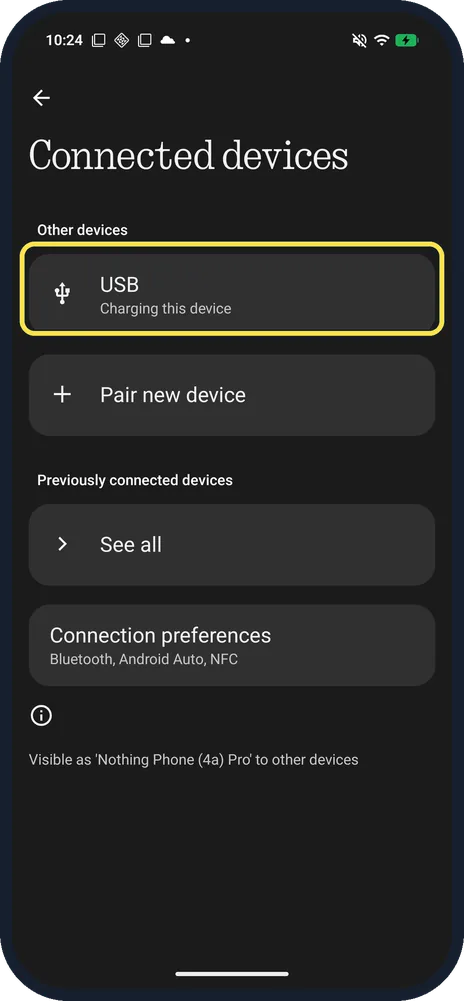
Open Connected devices, USB
Plug the phone into the Mac first. Ours said Charging this device.
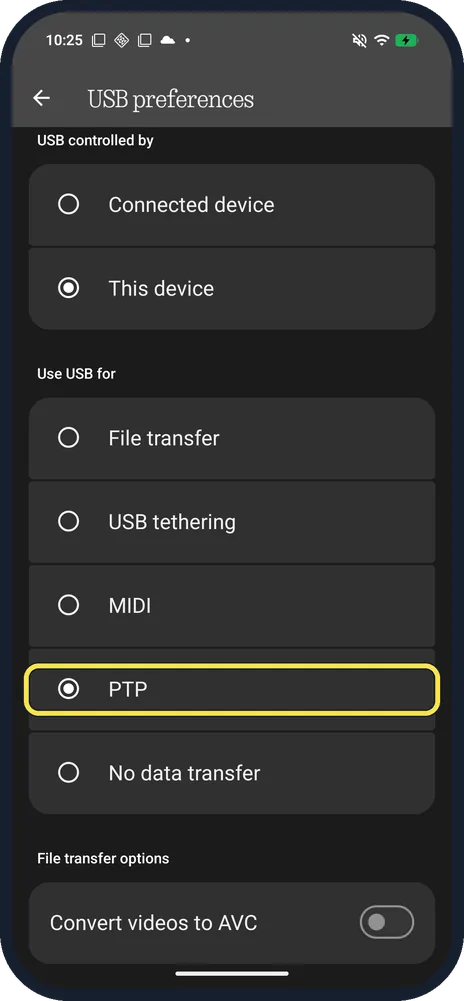
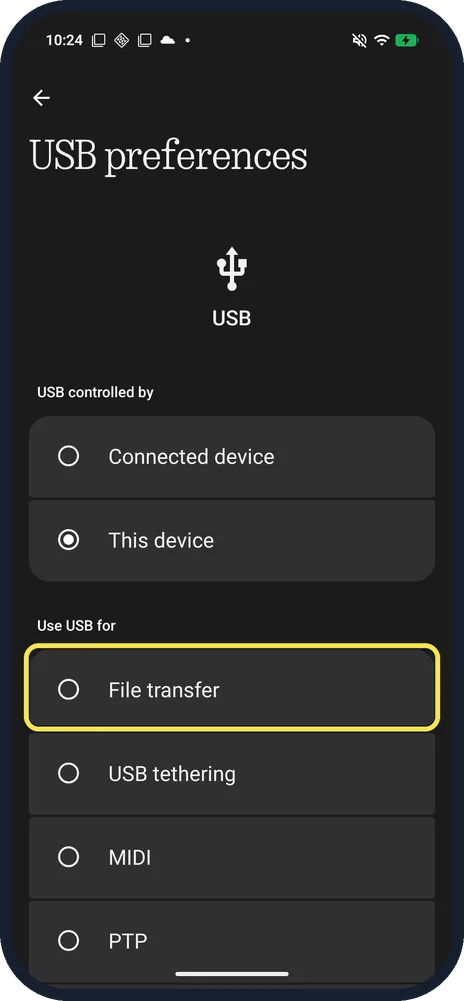
Choose PTP
Under Use USB for: File transfer, USB tethering, MIDI, PTP and No data transfer. Ours started on No data transfer; the shot shows PTP after we tapped it. File transfer options below has Convert videos to AVC, off on ours.
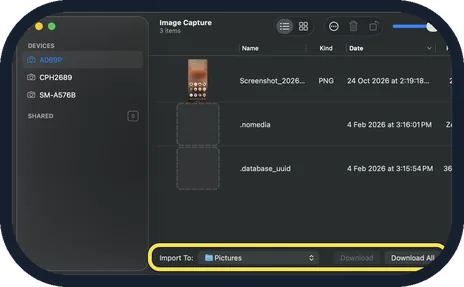
Click the phone in Image Capture, then Download All
On the Mac, open Image Capture. The phone shows under Devices by its model number (ours A069P). Choose a folder under Import To (ours: Pictures), then click Download All, or select items and click Download.
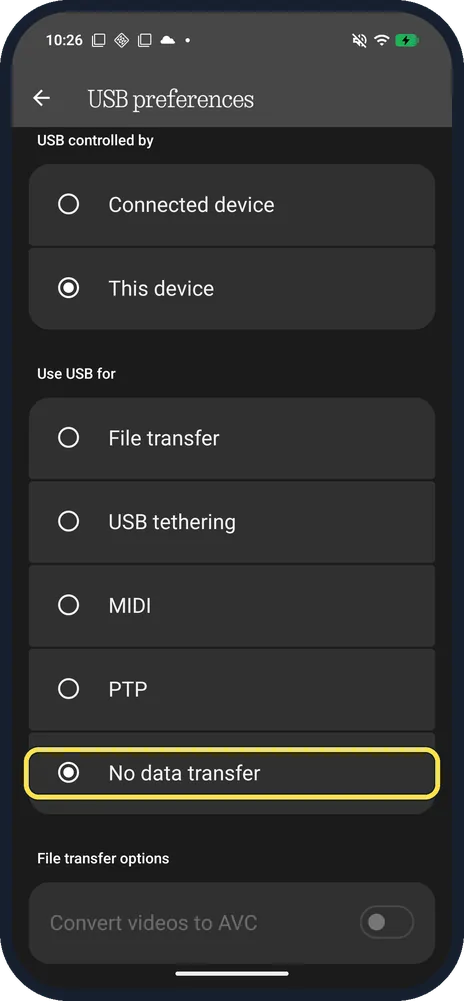
Set USB back when you are done
We picked No data transfer again, so the phone only charges from the Mac.
If you do not see this option
- Phone not under Devices? Apple says to connect the device with a cable and turn it on. Check the phone is still on PTP, and unlock it. Source: Image Capture User Guide for Mac
- Want folders, not just photos? File transfer is the other choice on the same page. Google gives File transfer for Windows and Chromebook; we used PTP because the Mac's own Image Capture reads it. Source: Transfer files between your computer and Android device
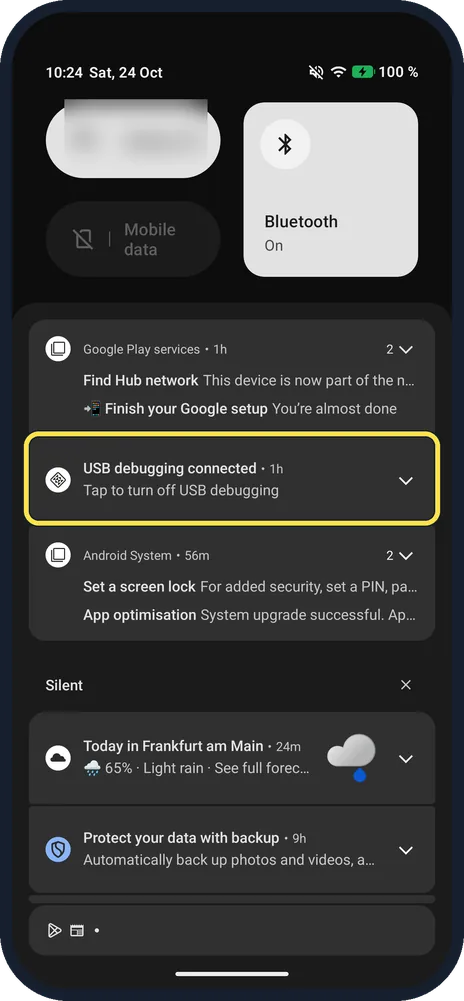
- No USB notification? With USB debugging on, ours only showed USB debugging connected. Use Settings, Connected devices, USB instead.
If this does not work
- Only charging? Under USB controlled by, keep This device, and use a data cable rather than a charge-only one. Source: Transfer files between your computer and Android device
- Mac shows other phones too? Each phone in PTP mode appears by its model number; ours listed two other phones as well. Click the one that matches your phone.
- Odd files such as .nomedia in the list? Ours listed a screenshot plus .nomedia and .database_uuid. Those are system files: select only the photos and click Download instead of Download All.
About this guide
Macs have no built-in app for Android files, but Image Capture reads a phone set to PTP (photo transfer) like a camera. We plugged our Nothing phone into our Mac to check.
The screenshots are from our Nothing Phone (4a) Pro, the European model A069P, with Nothing OS 4.1 and Android 16 (build FroggerPro-B4.1-260907-1153-EEA), in Dark theme. The Mac picture is from our Mac in Dark appearance. We set the phone back to No data transfer afterwards.
Good to know
To send a file to a phone nearby instead, see Quick Share and iPhone.
To make room after copying, see free up storage.
In short: Phone: Settings, Connected devices, USB, PTP. Mac: Image Capture, the phone, Download All.
- Apple Image Capture User Guide: Image Capture User Guide for Mac
- Google Android Help: Transfer files between your computer and Android device
Links checked in October 2026. Menus and features can change after software updates. These steps match the version named at the top.
Did this guide work for you?
Sorry about that. What happened?