
howtosimply.com/guides/how-to-transfer-photos-from-an-honor-phone-to-a-mac/ · Checked October 2026 · HONOR Magic7 Lite (MagicOS 10.0, Android 16 (build 10.0.0.169(C430E7R2P1))) and Intel Mac with Image Capture (and HONOR Magic7 Lite (BRP-NX1M, EEA), MagicOS 10.0)
In this guide
Connect the phone to the Mac with a USB cable and choose Transfer photos in the Use USB to box on the phone. On the Mac, open Image Capture, click the phone (ours: BRP-NX1M), pick a folder under Import To and click Download All.
3 of 3 steps with real screenshots · 2 official sources below
- Device
- Android
- Shown on
- HONOR Magic7 Lite (BRP-NX1M, EEA), MagicOS 10.0, Android 16 (build 10.0.0.169(C430E7R2P1)), Intel Mac with Image Capture, and HONOR Magic7 Lite (BRP-NX1M, EEA), MagicOS 10.0
- Real screenshots
- 3 of 3 steps
- Checked
- October 2026
- Sources
- 2 official, linked below
Step by step
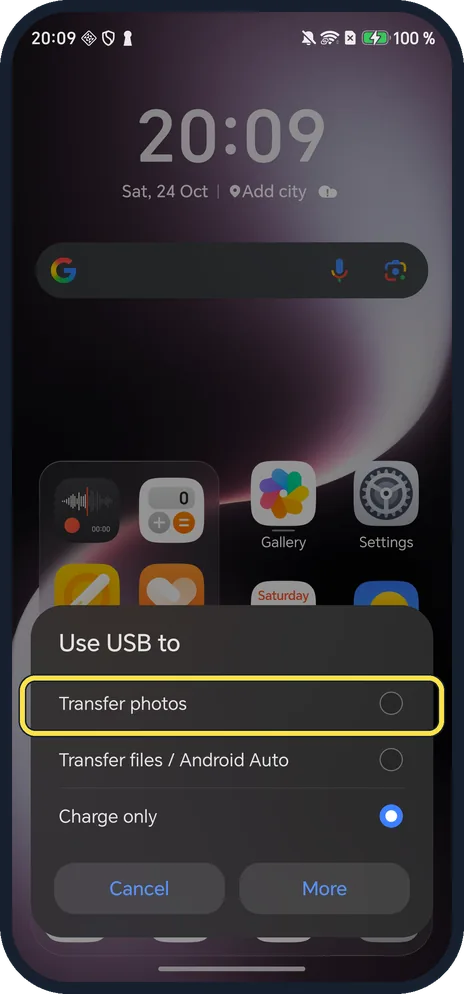
Plug in and choose Transfer photos
Ours showed Use USB to when the cable was plugged in: Transfer photos, Transfer files / Android Auto, Charge only (selected). Tap Transfer photos.
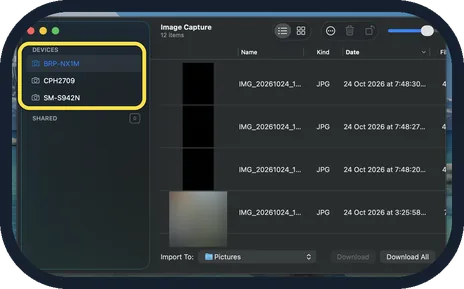
Open Image Capture and click the phone
On the Mac, open Image Capture and click the phone under Devices by its model number (ours: BRP-NX1M). Ours listed 12 items, newest first, as IMG_2026… JPG rows, with no system files.
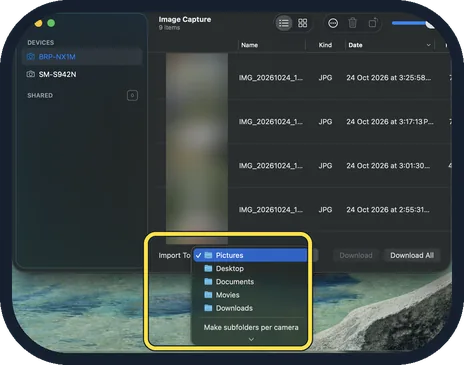
Pick a folder under Import To, then click Download All
The Import To menu at the bottom lists Pictures (ticked on ours), Desktop, Documents, Movies and Downloads. Pick one, then click Download All, or select photos first and click Download.
If you do not see this option
- No Use USB to box? Ours showed no USB notification in the notification shade, in either mode; the box appeared when we unplugged the cable and plugged it in again.
- Want folders, not just photos? Transfer files / Android Auto is the other choice in the same box. Google gives File transfer for Windows and Chromebook; Image Capture reads Transfer photos on a Mac. Source: Transfer files between your computer and Android device
- Mac doesn't list the phone? Apple says connect the device with a cable and turn it on. Unlock the phone and pick Transfer photos again. Source: Image Capture User Guide for Mac
If this does not work
- Only charging? Google says to pick the file transfer option on the phone; use a USB cable that carries data, not a charge-only one. Source: Transfer files between your computer and Android device
- Other phones listed too? Image Capture lists every phone plugged in; ours also showed CPH2709 and SM-S942N. Click the one that matches your model number. Source: Image Capture User Guide for Mac
About this guide
Macs have no built-in Android file app, but Image Capture reads an HONOR phone set to Transfer photos like a camera. We took three test photos, plugged the phone into our Mac, and deleted the photos afterwards.
The screenshots are from our HONOR Magic7 Lite, the European model BRP-NX1M, with MagicOS 10.0 and Android 16 (build 10.0.0.169(C430E7R2P1)), in Dark mode. The Mac picture is from our Mac in Dark appearance. Nothing was downloaded, and we set USB back to Charge only afterwards.
Good to know
To free space after copying, see free up storage.
In short: Phone: plug in, Use USB to, Transfer photos. Mac: Image Capture, the phone, Import To folder, Download All.
- Apple Image Capture User Guide: Image Capture User Guide for Mac
- Google Android Help: Transfer files between your computer and Android device
Links checked in October 2026. Menus and features can change after software updates. These steps match the version named at the top.
📷 See real photos from the HONOR Magic7 Lite in our Camera Lab, next to 10 other phones.
Did this guide work for you?
Sorry about that. What happened?