GOOGLE PIXEL
How to clear an app's cache on a Google Pixel (Android 17)
Go to Settings, Apps, pick the app, tap Storage and cache, then Clear cache. It removes temporary files only: on our Pixel, Chrome's cache went from 20.34 MB to 0 byte while its User data stayed at 20.41 MB. Clear storage deletes everything the app saved.

3 of 3 steps show a real screenshot from our Pixel 10a. Each step was checked against the maker's own instructions, linked at the end.
Steps
- 1
Open the app
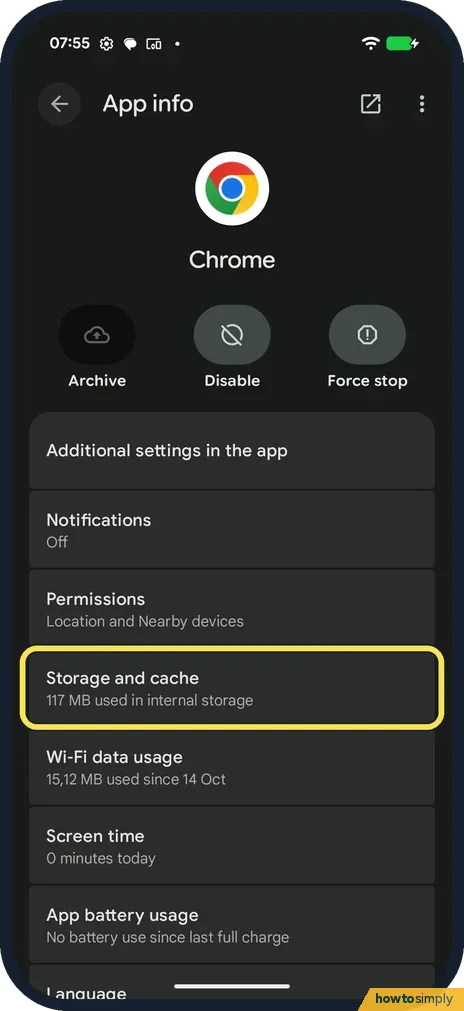
Go to Settings, Apps and tap the app. Ours is Chrome. Tap Storage and cache.
- 2
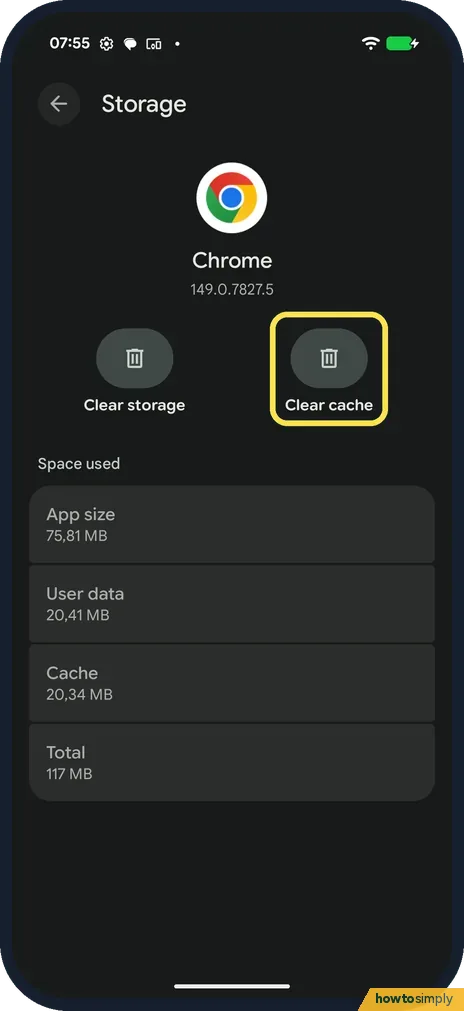
Tap Clear cache
Cache showed 20.34 MB. Tap Clear cache, on the right.
- 3
Check the result
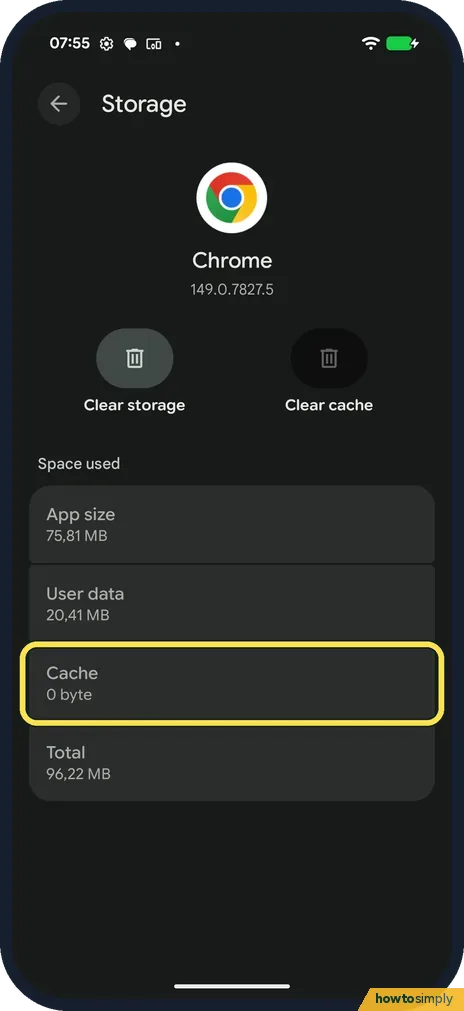
Cache now reads 0 byte and Total dropped from 117 MB to 96.22 MB. User data stayed at 20.41 MB, so nothing you saved was lost.
If you do not see this option
- No Clear cache button? It is on the Storage and cache page, next to Clear storage, not on App info.
- Clear storage instead? Clear storage deletes the app's data, including sign-ins. Use it only if clearing the cache didn't help.
If this does not work
- App still not working? Force stop it on App info, then open it again.
- Phone still full? Google suggests deleting apps and files you don't use.
- App slow to open after clearing? That is expected. Google says that after you clear the cache, an app may load slowly the next time you open it, because it has to rebuild the temporary files it removed.
- Cache fills up again quickly? Google describes clearing the cache as temporary, since the cache rebuilds over time. If an app grows back to the same size within days, clearing it again only buys a little space for a short while.
- Still crashing after clearing the cache? Google's order is restart the phone, check for a system update, update the app in the Play Store, force stop it, clear the cache, and only then clear storage. If it still fails, contact the app's developer.
- A Google app went wrong after an update? For Pixel's own apps, Google lists Uninstall updates on the app's App info page under More. It also erases the app's data, so back up first, then reinstall the latest update from the Play Store.
Good to know
Battery draining too? Pixel battery draining fast.
Clearing the cache does not sign you out or remove your settings, messages or saved files: they are counted under User data, which stays the same. What does change is that the app may feel slower for the first few launches while it builds its cache again, and it may use a little mobile data to download images it had stored. There is nothing to undo, because the cache refills on its own as you use the app.
If you are clearing caches because the phone is short of space, deleting large files and unused apps usually frees far more. See how to free up storage on a Google Pixel.
About this guide
- Device
- Android
- Shown on
- Google Pixel 10a, Android 17 (build CP3A.260905.009)
- App
- Settings
- Path
- Settings › Apps › Storage and cache
- Real screenshots
- 3 of 3 steps
- Checked
- October 2026
- Sources
- 1 official, linked below
Sources
Links checked October 2026. Menus and features can change with updates.Spotted a mistake? Menus change with updates, and we want every step to match your screen. Email us about this page or use the contact form. We read every report, and fixes are listed on What changed.
Liked this guide?
Follow us for new guides and short how-to videos.
Did this guide work for you?
Sorry about that. What happened?