
howtosimply.com/guides/what-the-iphone-17e-cant-do/ · Checked October 2026 · iPhone 17e · iOS 27.2
In this guide
On our iPhone 17e with iOS 27.2, Settings has no Always On Display switch, no refresh-rate setting, no Camera Control and no macro or lens options. It does have the Action Button, True Tone, Night Shift and Raise to Wake. Apple lists one rear camera for the 17e.
5 of 5 steps with real screenshots · 2 official sources below
- Device
- iPhone
- Shown on
- iOS 27.2 (iPhone 17e)
- App
- Settings
- Path
- Settings › Display & Brightness
- Real screenshots
- 5 of 5 steps
- Checked
- October 2026
- Sources
- 2 official, linked below
Step by step
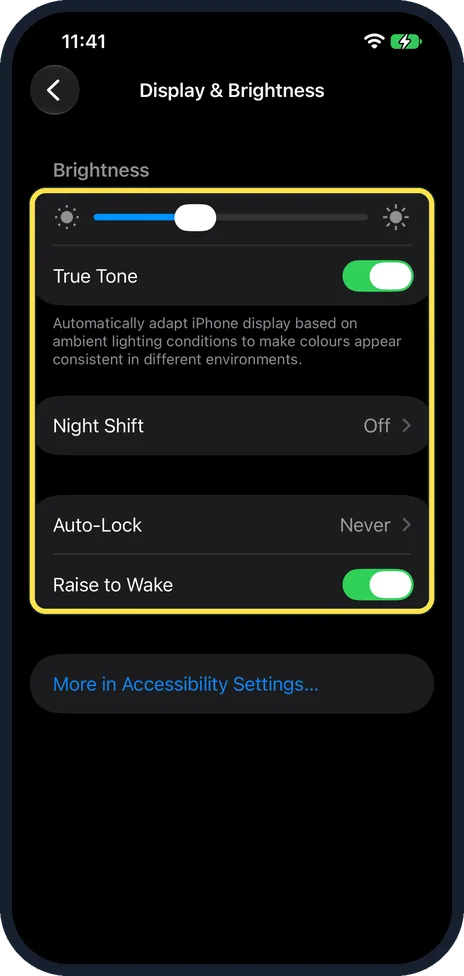
No Always On Display or refresh-rate setting
Open Settings, Display & Brightness. Ours lists Brightness, True Tone, Night Shift, Auto-Lock and Raise to Wake, then a More in Accessibility Settings link. There is no Always On Display switch and no setting for the refresh rate. True Tone and Raise to Wake were on.
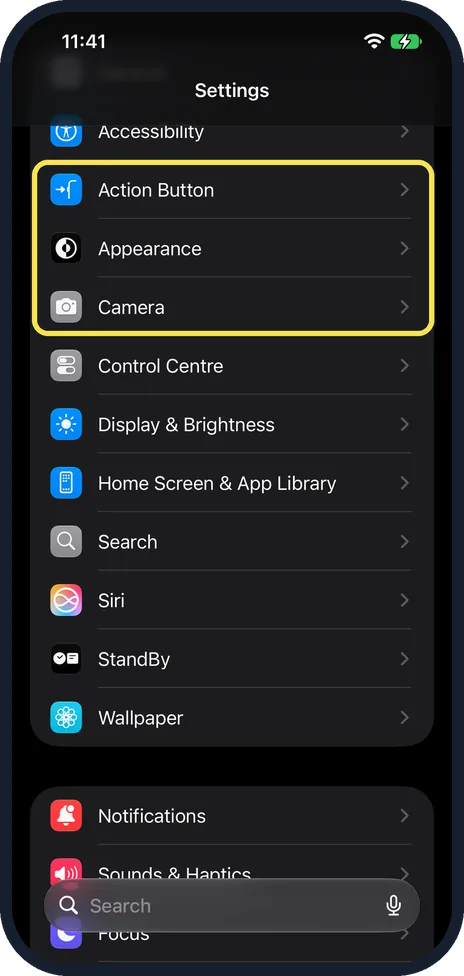
No Camera Control row in Settings
In the main Settings list, Action Button sits between Accessibility and Appearance, and Camera comes after Appearance. There is no Camera Control row. Apple's 17e specs list the volume buttons, the Action button and the side button, but no Camera Control.
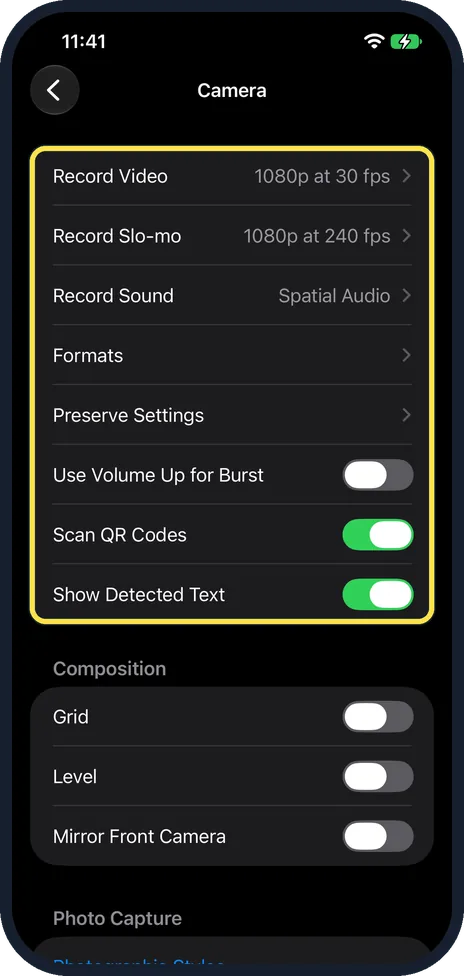
Camera settings: no macro or lens options
Settings, Camera starts with Record Video (1080p at 30 fps on ours), Record Slo-mo (1080p at 240 fps), Record Sound, Formats and Preserve Settings. We found no macro row and no choice of lens. Apple lists one rear camera, the 48MP Fusion camera, which also enables a 12MP 2x Telephoto.
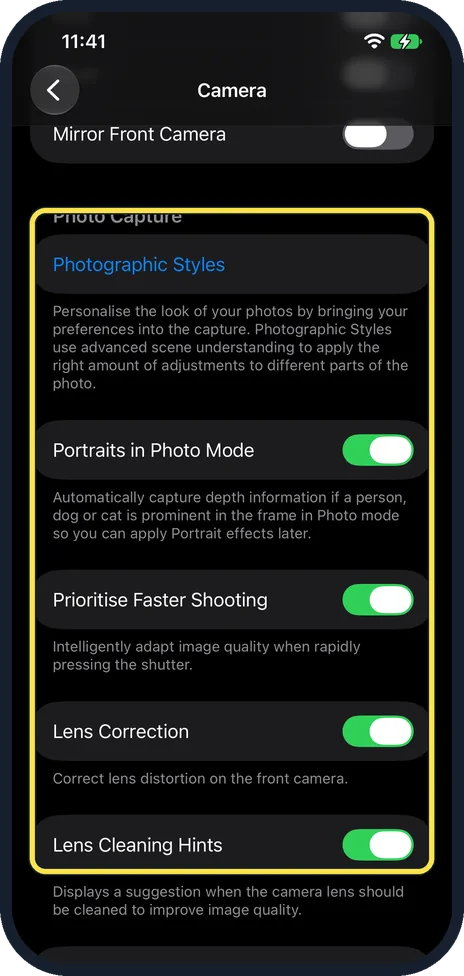
Photo Capture has no lens rows either
Further down, Photo Capture has Photographic Styles, Portraits in Photo Mode, Prioritise Faster Shooting, Lens Correction (for the front camera) and Lens Cleaning Hints.
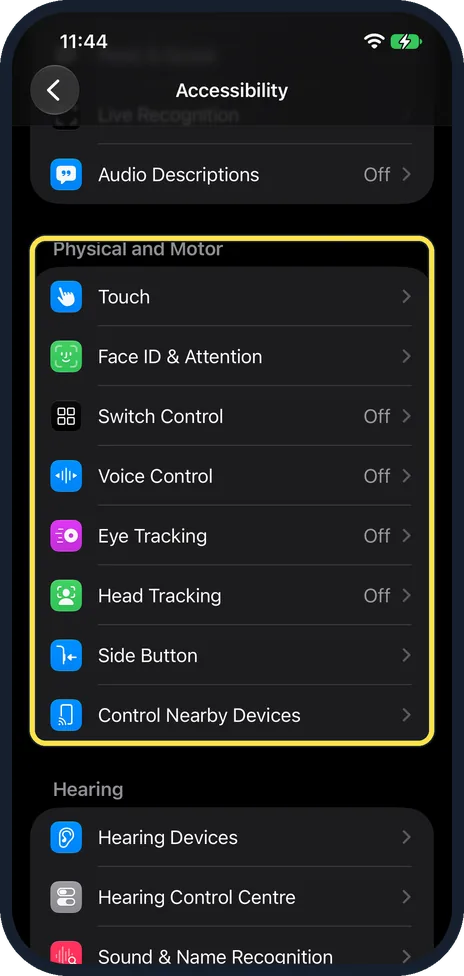
No Camera Control in Accessibility
Settings, Accessibility, Physical and Motor lists Touch, Face ID & Attention, Switch Control, Voice Control, Eye Tracking, Head Tracking, Side Button and Control Nearby Devices. There is no Camera Control entry.
If you do not see this option
- Expecting a Dynamic Island? Apple's iPhone 17 specs list a Dynamic Island; the 17e specs do not mention one. Where Live Activities show instead: Live Activities on an iPhone 17e without a Dynamic Island. Sources: iPhone 17 Technical Specifications, iPhone 17e Technical Specifications
- Expecting macro photos or an Ultra Wide lens? Apple lists 48MP macro photography and a 48MP Fusion Ultra Wide camera for the iPhone 17. For the 17e it lists only the 48MP Fusion Main camera, with a 12MP 2x Telephoto option. Our Camera settings had no macro row. Sources: iPhone 17 Technical Specifications, iPhone 17e Technical Specifications
If this does not work
- Looking for a 120Hz setting? There is none to turn on. Apple lists ProMotion up to 120Hz for the iPhone 17. For the 17e it gives a 6.1-inch Super Retina XDR OLED display with 800 nits max brightness (typical) and no refresh rate. Sources: iPhone 17 Technical Specifications, iPhone 17e Technical Specifications
- Want a camera shortcut without Camera Control? Apple lists Camera among the 17e Action button choices, with Silent Mode, Focus, Visual Intelligence, Flashlight and more. Steps: how to change what the Action button does. Source: iPhone 17e Technical Specifications
- Want the screen to stay on longer? There is no Always On Display switch, but Auto-Lock sets when the screen turns off. Ours was set to Never. See how to change how long an iPhone screen stays on.
About this guide
We looked for each feature where it would sit in Settings on our iPhone 17e with iOS 27.2 (build 24B119), on 27 October 2026, in Dark mode. We did not have an iPhone 17 next to it, so for the other model we quote Apple's spec pages.
Apple's iPhone 17 specs list ProMotion with refresh rates up to 120Hz, an Always-On display, Camera Control, a 48MP Fusion Ultra Wide camera and 48MP macro photography. Apple's iPhone 17e specs mention none of these.
Good to know
Set up the button the 17e does have: how to change what the Action button does on an iPhone.
On a Mac: what the MacBook Neo can't do.
In short: No Always On Display, no refresh-rate setting, no Camera Control and no macro or lens rows on our 17e (iOS 27.2). It has the Action Button, True Tone, Night Shift and Raise to Wake.
Links checked in October 2026. Menus and features can change after software updates. These steps match the version named at the top.
📷 See real photos from the iPhone 17e in our Camera Lab, next to 10 other phones.
Did this guide work for you?
Sorry about that. What happened?