
howtosimply.com/guides/how-to-check-and-set-up-whatsapp-chat-backup-on-android/ · Checked October 2026 · Google Pixel 10a, Android 17 (build CP3A.261005.005), WhatsApp 2.26.41.77
In this guide
Open WhatsApp Settings, Chats, Chat backup. Local and Last Backup show when you last backed up (ours: Never). To back up to Google, tap Google Account, choose your account, then tap Back up and set Automatic backups. WhatsApp 2.26.41.77.
5 of 5 steps with real screenshots · 1 official source below
- Device
- Android
- Shown on
- Google Pixel 10a, Android 17 (build CP3A.261005.005), WhatsApp 2.26.41.77
- App
- Real screenshots
- 5 of 5 steps
- Checked
- October 2026
- Sources
- 1 official, linked below
Step by step
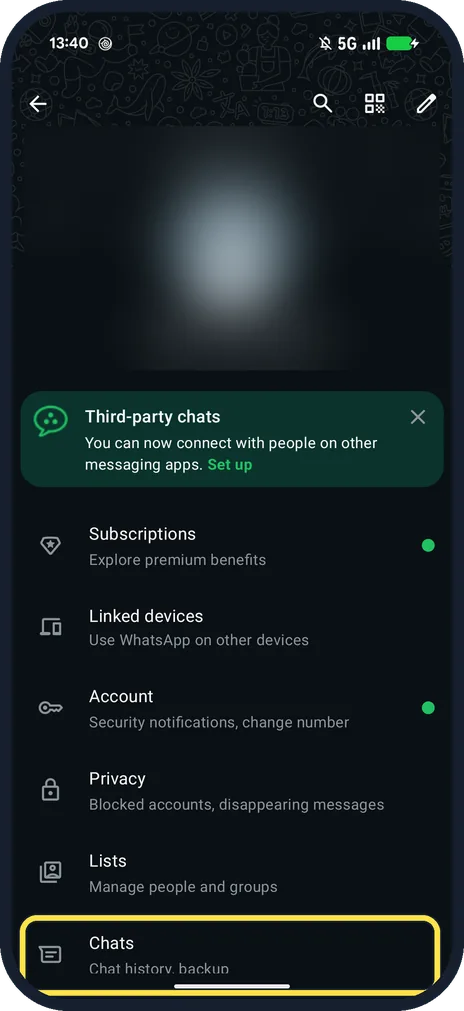
Open WhatsApp Settings, then Chats
Three dots on the Chats tab, Settings. Chats is below Lists: Chat history, backup.
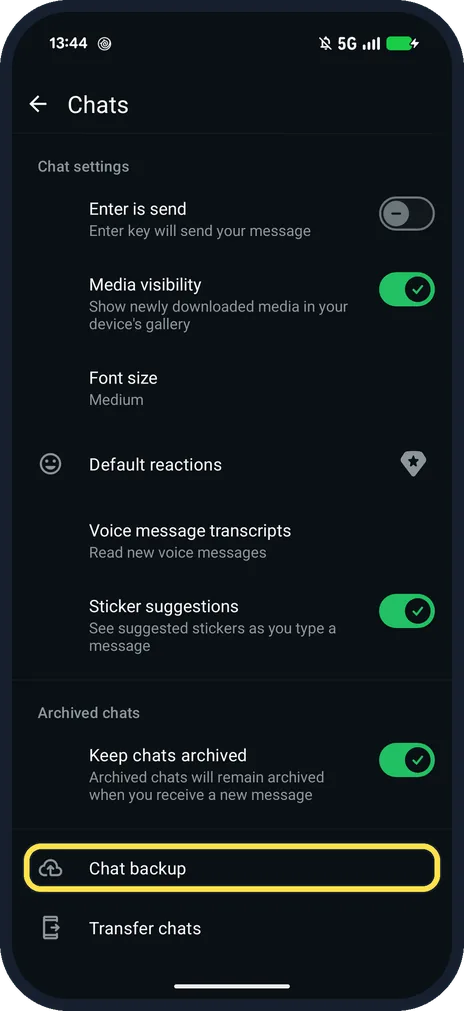
Tap Chat backup
Under Archived chats, above Transfer chats.
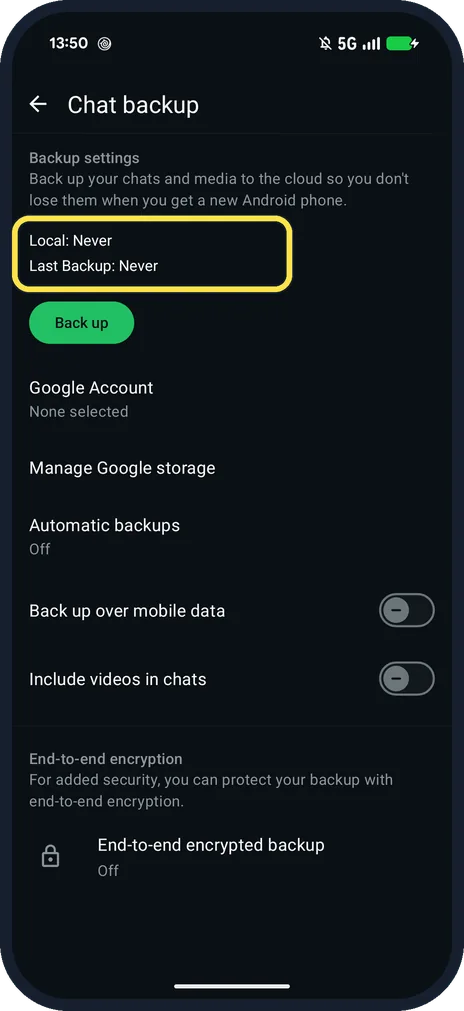
Check Last Backup
Ours said Local: Never and Last Backup: Never, with Google Account: None selected and Automatic backups: Off.
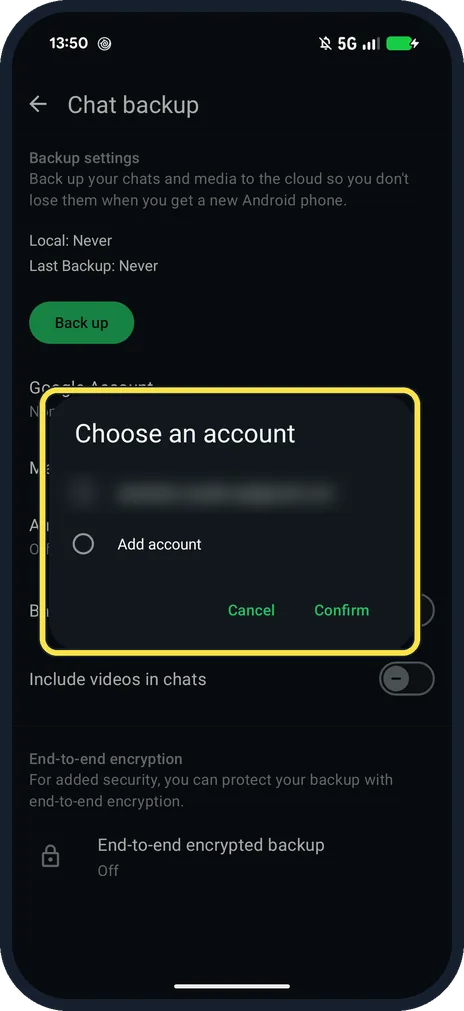
Tap Google Account and choose one
Choose an account lists the accounts on the phone, with Add account. Then tap Back up.
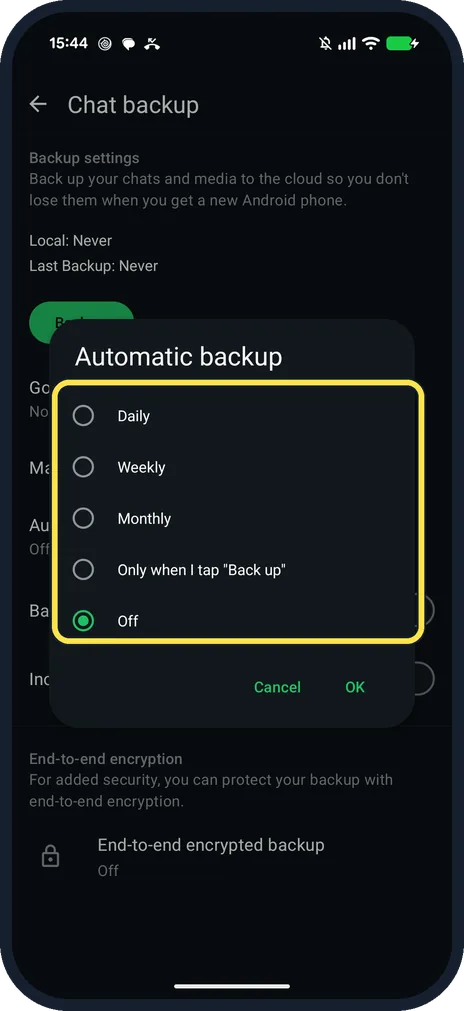
Tap Automatic backups and pick how often
Ours offered Daily, Weekly, Monthly, Only when I tap "Back up" and Off (selected). We tapped Cancel.
If you do not see this option
- Videos and mobile data? Back up over mobile data and Include videos in chats were off on ours. WhatsApp recommends Wi-Fi because backups can be large. Source: How to back up your chat history
- No Cloud backup choice? WhatsApp says its own cloud storage backup is being tested and may not be available yet. Ours showed Google Account. Source: How to back up your chat history
If this does not work
- Restoring on a new phone? WhatsApp says chats can only be restored from the last successful backup, so check Last Backup first. Source: How to back up your chat history
- Backup won't run? WhatsApp says you need enough free space on the phone, a strong and stable internet connection, Google Play services and enough free space in your Google Account. Source: How to back up your chat history
- Encrypted backup? End-to-end encrypted backup was Off on ours. WhatsApp says the password or key is the only way into it later. Source: How to back up your chat history
About this guide
Chat backup is the only way to move chats to a new Android phone from the cloud. Export chat makes a text file, not a backup.
The screenshots are from our Google Pixel 10a with Android 17 and WhatsApp 2.26.41.77, in Dark mode, taken on 25 October 2026. We opened the account chooser and the Automatic backups choices and cancelled both, so no backup was made. The account is blurred.
Good to know
For a readable copy of one chat, see export a WhatsApp chat.
In short: WhatsApp, three dots, Settings, Chats, Chat backup, Google Account, Back up, Automatic backups.
Links checked in October 2026. Menus and features can change after software updates. These steps match the version named at the top.
📷 See real photos from the Pixel 10a in our Camera Lab, next to 10 other phones.
Did this guide work for you?
Sorry about that. What happened?