
howtosimply.com/guides/how-to-choose-who-sees-your-whatsapp-status-on-android/ · Checked October 2026 · Google Pixel 10a, Android 17 (build CP3A.261005.005), WhatsApp 2.26.41.77
In this guide
Open the Updates tab, tap the three dots, then Status privacy, and choose My contacts, My contacts except..., Only share with... or Group status. The change applies to statuses you post after it, not to ones already shared.
3 of 3 steps with real screenshots · 2 official sources below
- Device
- Android
- Shown on
- Google Pixel 10a, Android 17 (build CP3A.261005.005), WhatsApp 2.26.41.77
- App
- Real screenshots
- 3 of 3 steps
- Checked
- October 2026
- Sources
- 2 official, linked below
Step by step
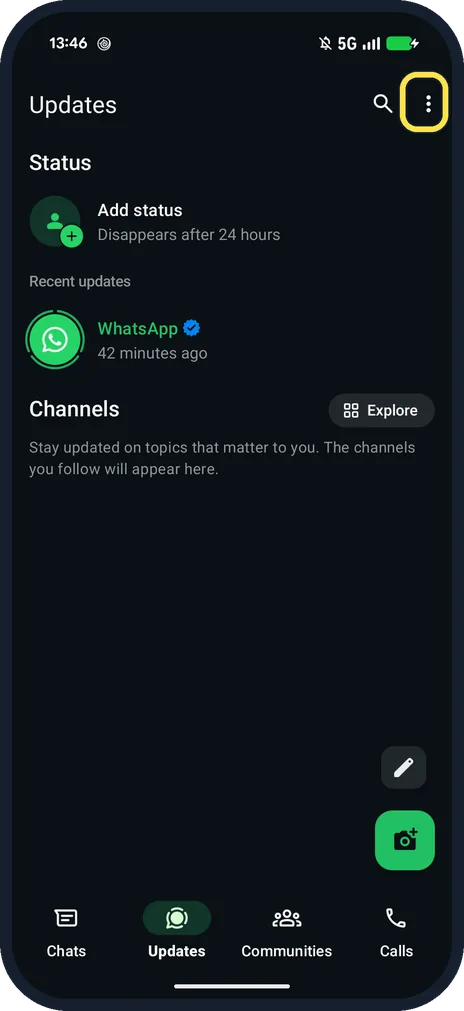
Open Updates and tap the three dots
Updates has Status at the top and Channels below.
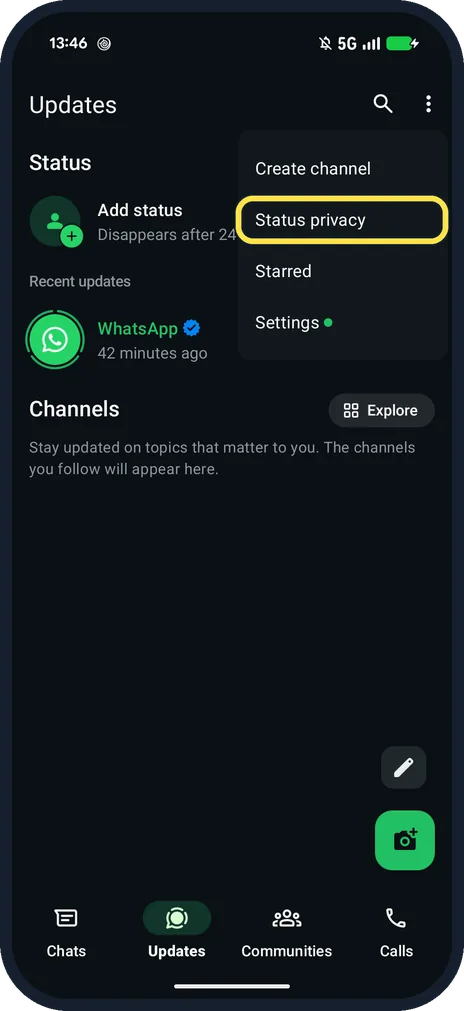
Tap Status privacy
The menu has Create channel, Status privacy, Starred and Settings.
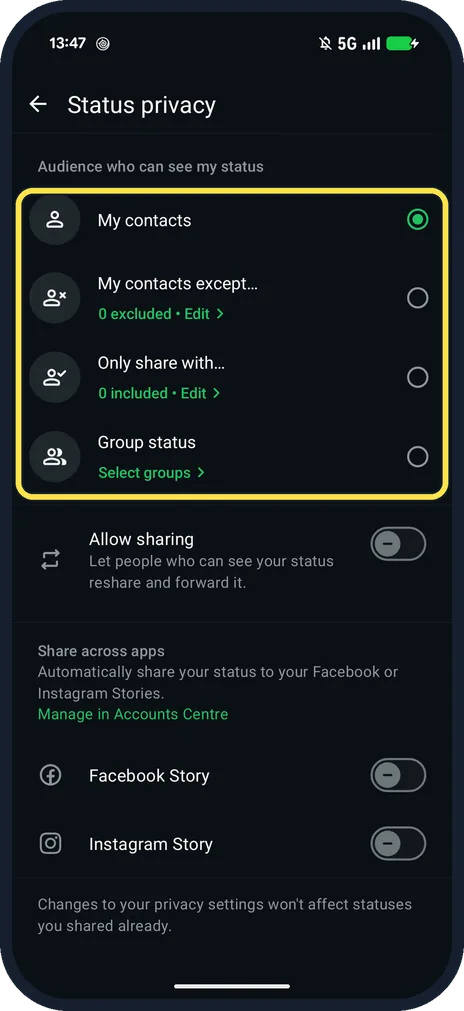
Choose your audience
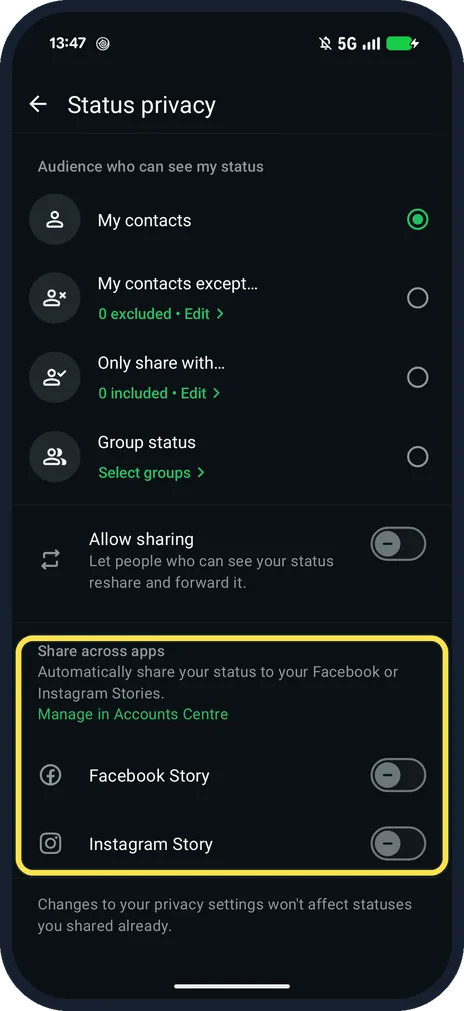
My contacts, My contacts except... (0 excluded on ours), Only share with... and Group status. Allow sharing lets viewers reshare it.
If you do not see this option
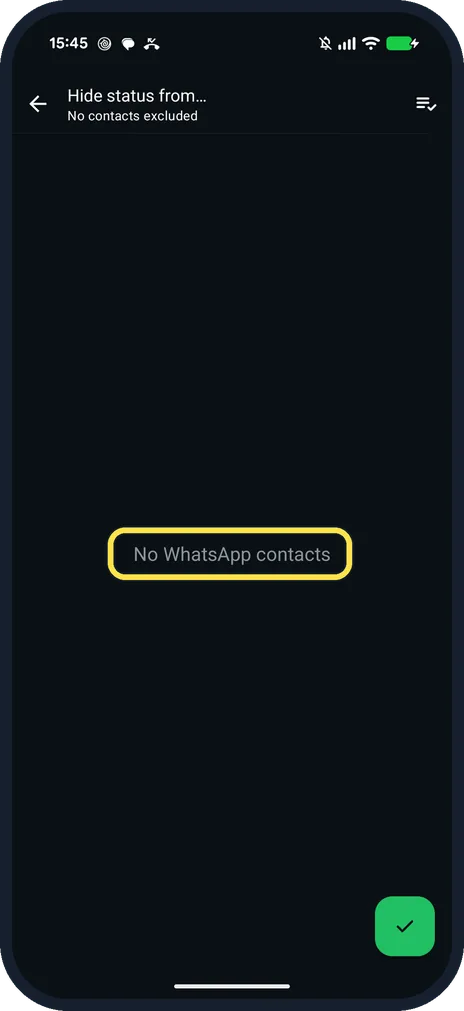
- Want to leave a few people out? Tap My contacts except...: ours opened Hide status from..., No contacts excluded, with a list of contacts to tick. Our test account had none, so it said No WhatsApp contacts.
- No Everyone choice? WhatsApp says you can't set status privacy to Everyone or share it with people who don't have your number. Source: How to change your privacy settings
- Facebook or Instagram? The same page has Facebook Story and Instagram Story switches under Share across apps. Ours were off.
If this does not work
- Someone you excluded still saw it? The page says: Changes to your privacy settings won't affect statuses you shared already. Source: How to create and share a status
- Can't see who viewed it? WhatsApp says that if read receipts are off, you can't see who viewed your status. Source: How to change your privacy settings
About this guide
There is no Everyone option for Status: WhatsApp says only people with your number can see it.
The screenshots are from our Google Pixel 10a with Android 17 and WhatsApp 2.26.41.77, in Dark mode, taken on 25 October 2026. Ours was set to My contacts. We did not post a status.
Good to know
To post one, WhatsApp says to tap Add status on the Updates tab; see also turn off read receipts.
In short: Updates, three dots, Status privacy, choose.
- WhatsApp Help Center: How to create and share a status
- WhatsApp Help Center: How to change your privacy settings
Links checked in October 2026. Menus and features can change after software updates. These steps match the version named at the top.
📷 See real photos from the Pixel 10a in our Camera Lab, next to 10 other phones.
Did this guide work for you?
Sorry about that. What happened?