
howtosimply.com/guides/how-to-use-sleep-mode-on-a-samsung-galaxy-modes-and-routines/ · Checked October 2026 · Samsung Galaxy A57 5G (SM-A576B), One UI 8.5, Android 16
In this guide
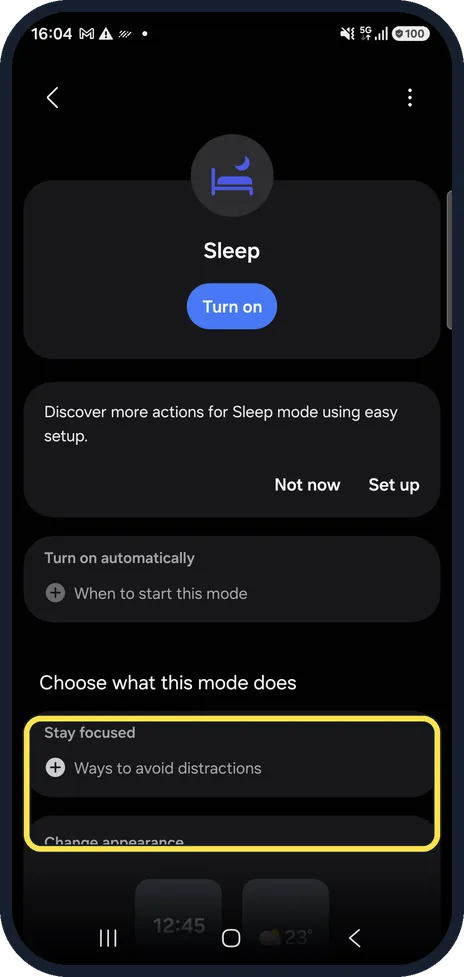
Open Settings, Modes and Routines, tap Sleep, then Turn on. Under Choose what this mode does, set Stay focused to silence distractions and Change appearance to dim the screen. Starting it from your activity needs a Samsung account; a start time can be set under Turn on automatically.
5 of 5 steps with real screenshots · 1 official source below
- Device
- Android
- Shown on
- Samsung Galaxy A57 5G (SM-A576B), One UI 8.5, Android 16
- App
- Settings
- Path
- Settings › Modes and Routines › Sleep
- Real screenshots
- 5 of 5 steps
- What we did
- Observed: looked at each screen, changed nothing
- Our phone
- Shown on Galaxy A57, One UI 8.5
- Checked
- October 2026
- Sources
- 1 official, linked below
Step by step
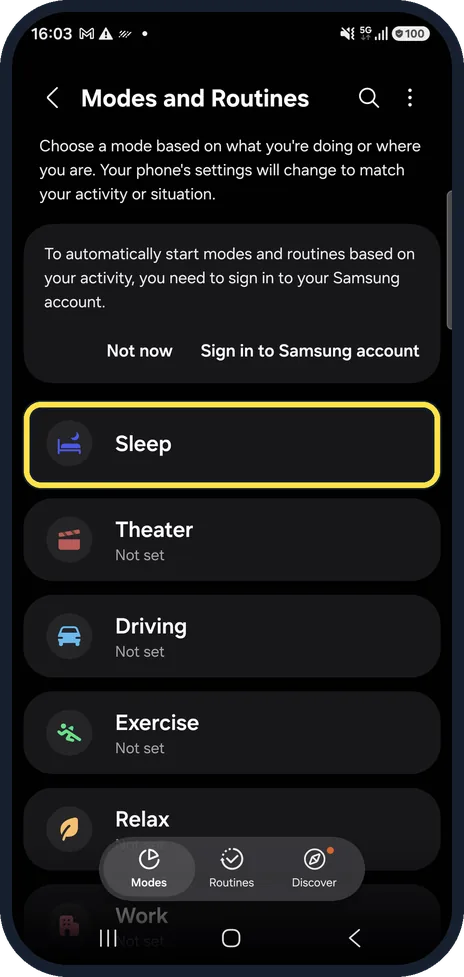
Open Modes and Routines
Open Settings and tap Modes and Routines. The Modes tab lists the ready-made modes.
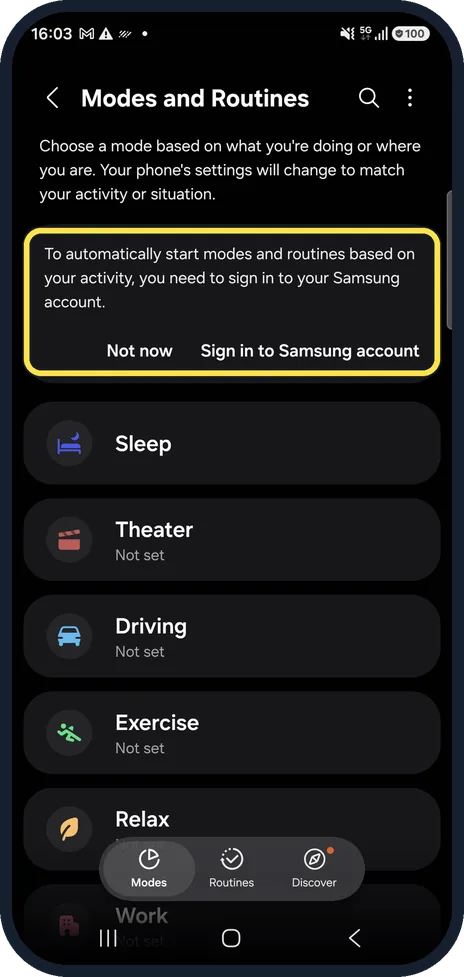
Note the sign-in banner
Our phone showed that starting modes and routines based on your activity needs a Samsung account. Turn on automatically, in step 4, was still offered without signing in.
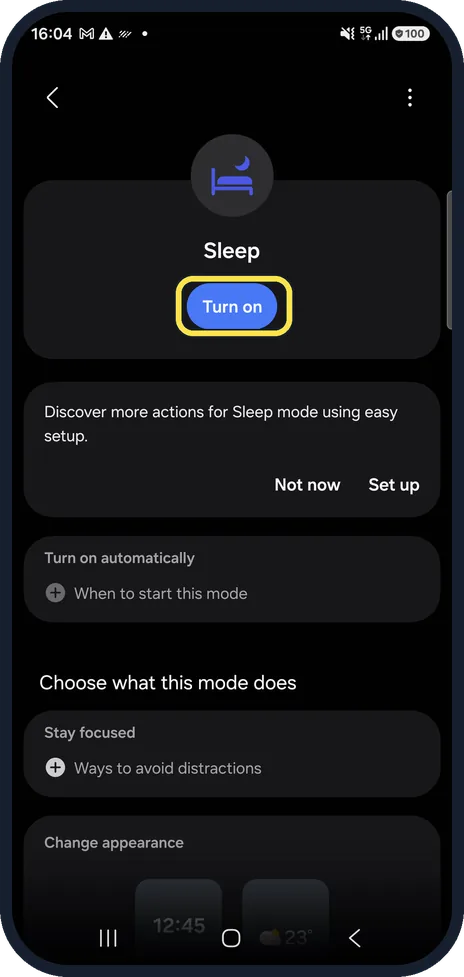
Tap Sleep, then Turn on
Turn on starts the mode now.
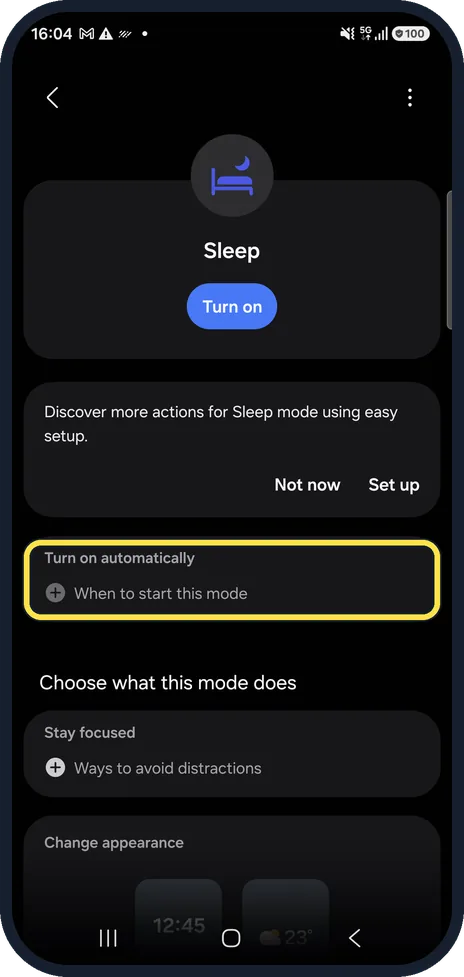
Set when it starts
Turn on automatically, When to start this mode lets you pick a time, for example your bedtime.
Choose what it does
Stay focused, Ways to avoid distractions works like Do Not Disturb. Change appearance below sets how the screen looks while the mode is on.
If you do not see this option
- There is no Modes and Routines Samsung says that on Android 11 and 12 routines are in the Bixby Routines app. Android 13 and 14 moved them to Settings, Modes and Routines. Source: How to use Routines on your Samsung Galaxy device
- You cannot find the Routines app Samsung says you can show it on the Apps screen: Settings, Modes and Routines, the More icon, Settings, then turn on the option to show it. Source: How to use Routines on your Samsung Galaxy device
If this does not work
- A mode or routine starts when you do not expect it Samsung says to check what is running: the Now bar on the lock screen shows an active mode such as Sleep, and the quick panel shows a routine notification. Source: How to use Routines on your Samsung Galaxy device
- You want to see which routines run Samsung says to open Modes and Routines, tap Routines and check the running routines. Source: How to use Routines on your Samsung Galaxy device
About this guide
One UI groups Sleep, Theater, Driving, Exercise, Relax and Work under Modes. Each changes several settings at once. None was set up on our phone.
Good to know
Just want silence at night? how to use Do Not Disturb on a Samsung Galaxy phone.
The Routines tab builds your own if-this-then-that rules; it was empty on ours.
In short: Settings, Modes and Routines, Sleep, Turn on; set the start time and what it does.
Links checked in October 2026. Menus and features can change after software updates. These steps match the version named at the top.
📷 See real photos from the Galaxy A57 in our Camera Lab, next to 10 other phones.
Did this guide work for you?
Sorry about that. What happened?