
howtosimply.com/guides/how-to-block-ads-in-firefox-on-android-with-ublock-origin/ · Checked October 2026 · build CP3A.261005.005 · Google Pixel 10a, Android 17
In this guide
In Firefox, tap the three dots, then Extensions, and tap + next to uBlock Origin. Tap Add on the permissions box, then OK. Mozilla says extensions stay off in private tabs unless you allow them.
4 of 4 steps with real screenshots · 1 official source below
- Device
- Android
- Shown on
- Google Pixel 10a, Android 17 (build CP3A.261005.005)
- App
- Firefox
- Real screenshots
- 4 of 4 steps
- Checked
- October 2026
- Sources
- 1 official, linked below
Step by step
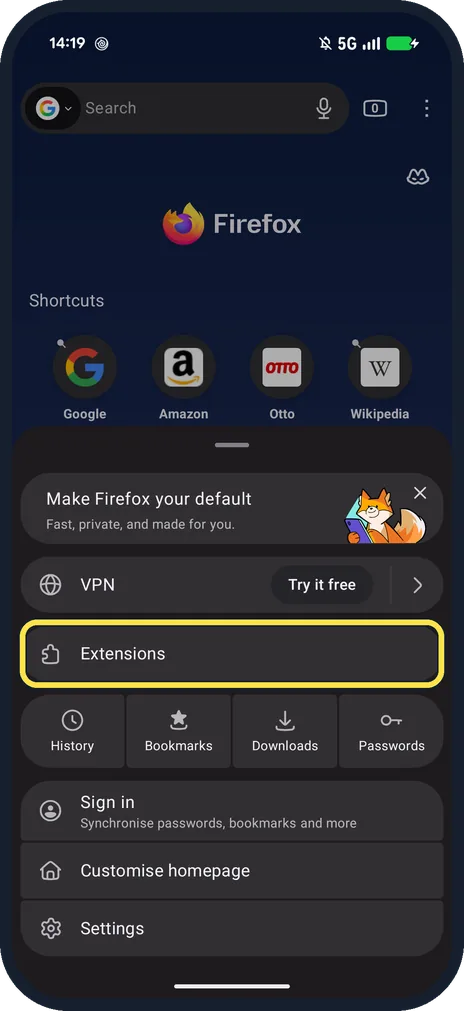
Tap the three dots, then Extensions
The menu also has VPN, History, Bookmarks, Downloads, Passwords, Sign in and Settings.
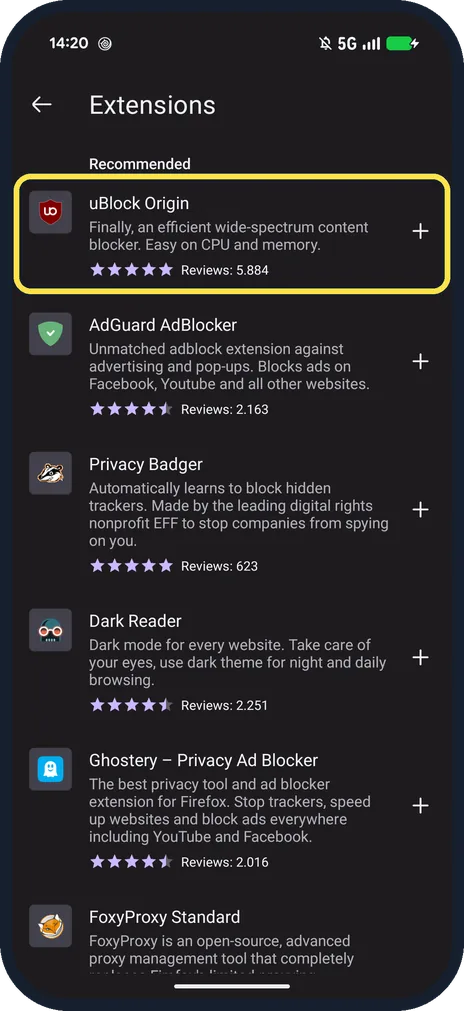
Tap + next to uBlock Origin
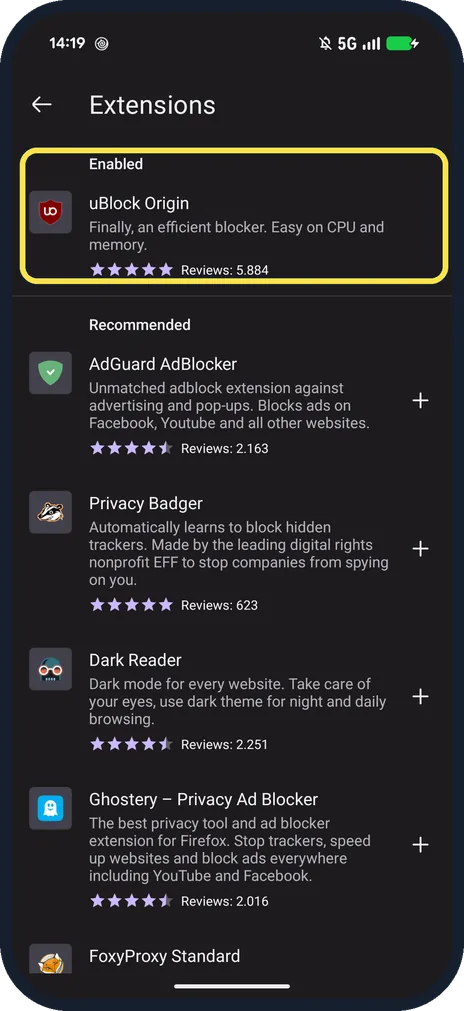
Under Recommended: uBlock Origin, AdGuard AdBlocker, Privacy Badger, Dark Reader and Ghostery.
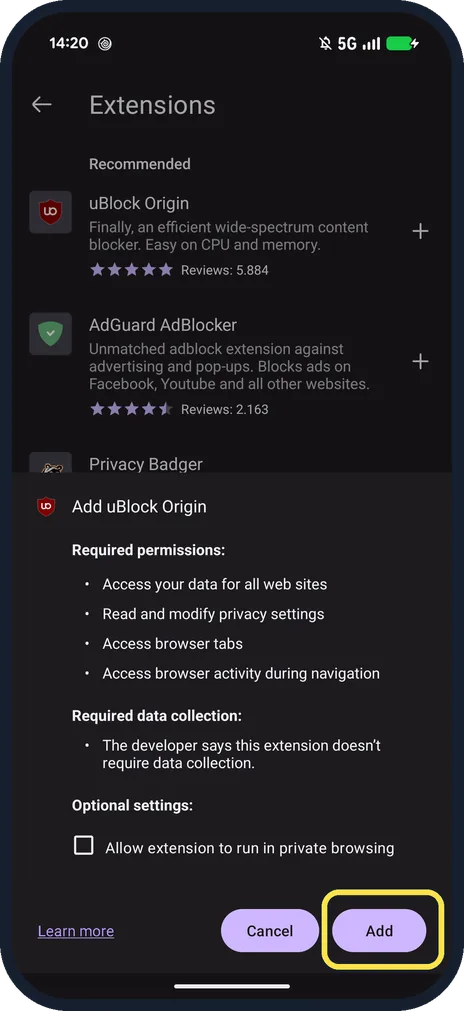
Check the permissions and tap Add
It asks to access your data for all web sites and browser tabs. The developer says it doesn't require data collection.
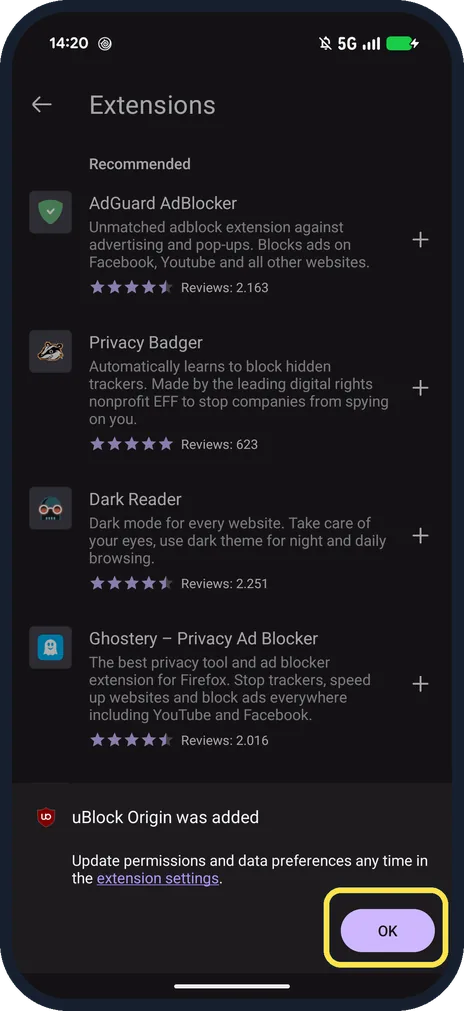
Tap OK
uBlock Origin was added. You can change permissions later in the extension settings.
If you do not see this option
- Is it on? Extensions lists it under Enabled with its rating and reviews.
- Want it in private tabs too? Mozilla says extensions are off in private browsing by default. Tick Allow extension to run in private browsing when adding it, or turn on Run in private browsing later. Source: Find and install extensions on Firefox for Android
If this does not work
- A site breaks with it on? Tap uBlock Origin in Extensions and switch off Enabled. Remove is on the same page. Source: Find and install extensions on Firefox for Android
- Extension won't install? Mozilla says some extensions may not be compatible with Firefox for Android. When you update Firefox, it updates extensions to compatible versions. Source: Find and install extensions on Firefox for Android
About this guide
Firefox for Android can run extensions, and uBlock Origin was the first one Recommended on ours. It is free and needs no account.
The screenshots are from our Google Pixel 10a with Android 17 and Firefox 158.0.2, taken on 25 October 2026. We installed uBlock Origin, removed it and added it again for the screenshots.
Good to know
To open links in Firefox, see make Firefox the default browser on Android.
In short: Three dots, Extensions, + uBlock Origin, Add, OK.
Links checked in October 2026. Menus and features can change after software updates. These steps match the version named at the top.
📷 See real photos from the Pixel 10a in our Camera Lab, next to 10 other phones.
Did this guide work for you?
Sorry about that. What happened?