
What changed: the screenshots are now our own iPhone 17e on iOS 27.0.1, dark mode, and the wording is checked against those screens and Apple's iOS 27 guide.
howtosimply.com/guides/facetime-not-working-on-an-iphone-8-fixes-to-try/ · Checked October 2026 · iPhone 17e · iOS 27.0.1
In this guide
Open Settings, tap Apps, then FaceTime, switch FaceTime off and on again, and check that your number or email address is ticked. Then make sure Screen Time allows Camera, set the date and time to automatic, and restart the iPhone.
8 of 8 steps with real screenshots · 7 official sources below
- Device
- iPhone
- Shown on
- iOS 27.0.1 (iPhone 17e)
- App
- FaceTime
- Real screenshots
- 8 of 8 steps
- Checked
- October 2026
- Sources
- 7 official, linked below
Step by step
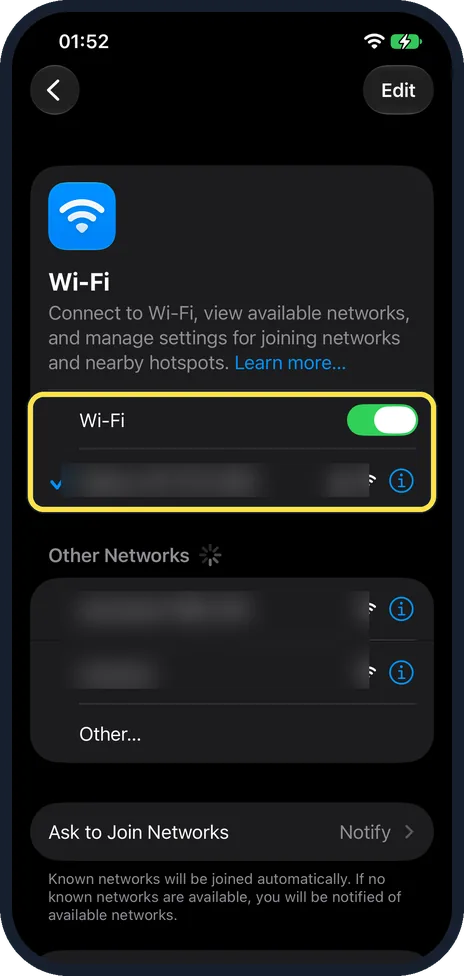
Check the internet connection
FaceTime works over Wi-Fi or mobile data. Open a web page to test the connection. In Settings, Wi-Fi, the network you are on has a tick next to it; on our iPhone 17e Wi-Fi was on and the joined network was ticked. Apple says a slow Wi-Fi or mobile connection can cause choppy video, a black screen or dropped calls, and that both you and the person you call need a fast connection.
Watch these steps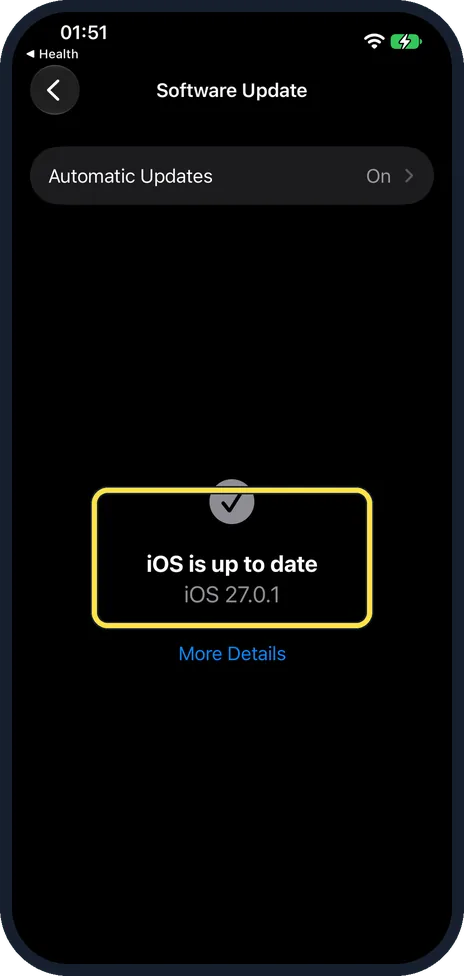
Update the iPhone
Apple's first step is the latest version of iOS. Open Settings, tap General, then Software Update. If it says "iOS is up to date", move on. Ours showed iOS 27.0.1 with Automatic Updates on.
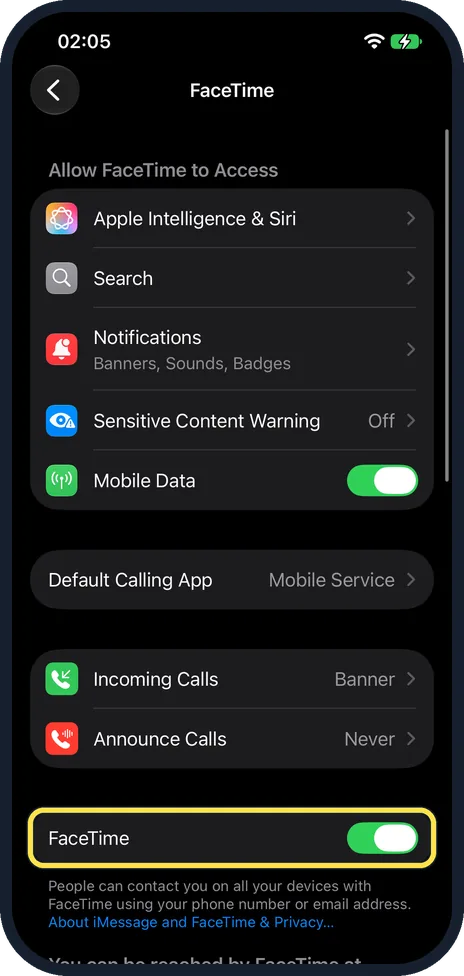
Switch FaceTime off and on
Open Settings, tap Apps, then FaceTime. Scroll down to the FaceTime switch, switch it off, wait a moment and switch it on again. On our iPhone 17e it was on.
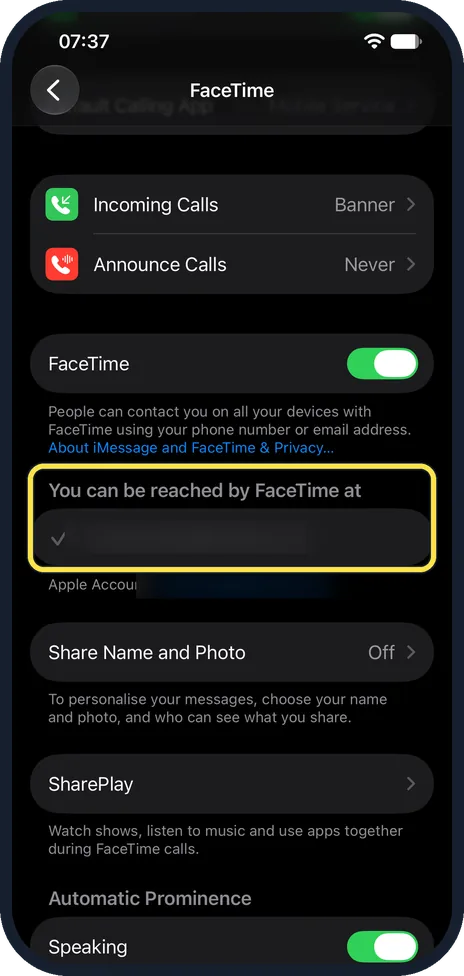
Choose the right number or address
On the FaceTime page, below "You can be reached by FaceTime at", make sure your phone number or email address has a tick. If you use two SIMs, also open Settings, Mobile Service (Cellular in some regions) and check that the line is switched on. Our iPhone 17e had no SIM card, so only an email address was listed there. In the picture the address is blurred and its tick shows on the left of the row.
Check Screen Time
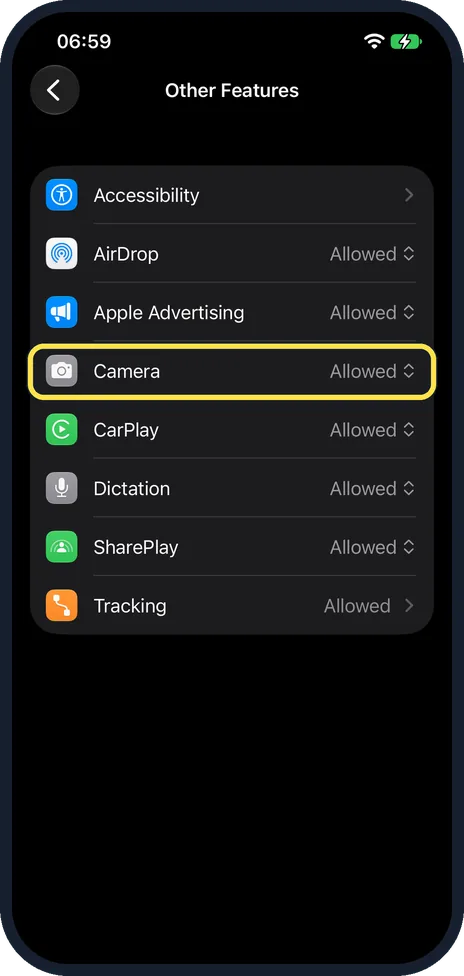
Open Settings, tap Screen Time, then Content & Privacy Restrictions. If All Restrictions is on, check what is blocked. iOS 27 has no Allowed Apps list here. Apple says built-in apps and features such as Camera are under Other Features, in the Feature Restrictions group. On iOS 26, tap Allowed Apps & Features instead. On our iPhone 17e, All Restrictions was on and Siri was allowed. Other Features listed Accessibility, AirDrop, Apple Advertising, Camera, CarPlay, Dictation, SharePlay and Tracking, and Camera showed Allowed. FaceTime was not in that list.
Set the date and time automatically
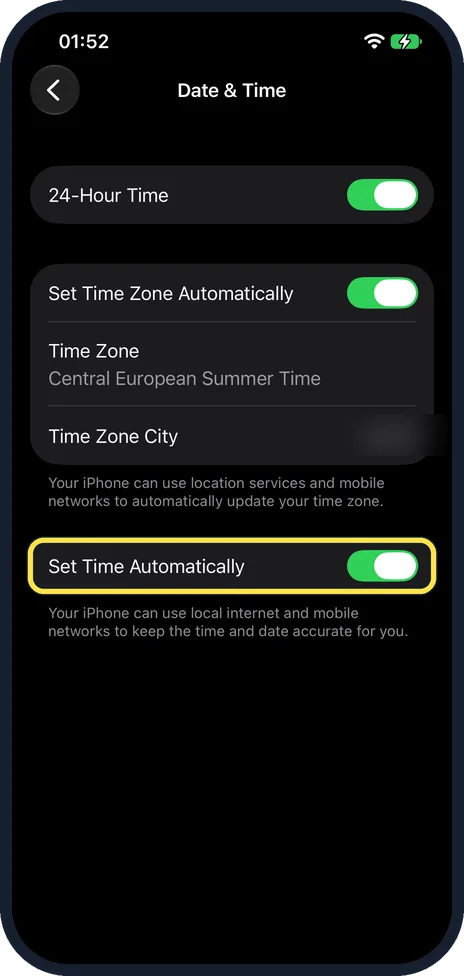
Open Settings, tap General, then Date & Time, and switch on Set Time Automatically (Set Automatically on iOS 26 and earlier). On our iPhone 17e it was on, as was Set Time Zone Automatically. Apple lists this check if you have trouble receiving calls after setting up a device.
Restart the iPhone
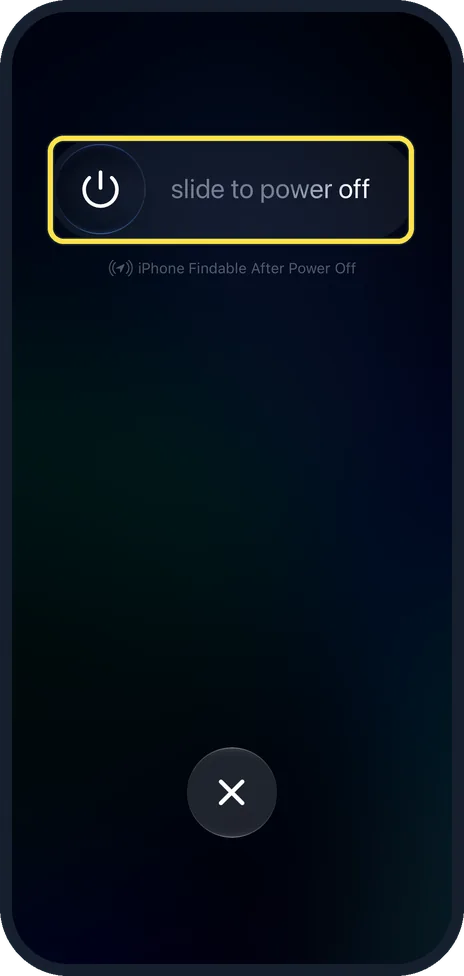
Press and hold the side button and either volume button until the slider appears, drag slide to power off, wait until the screen is black, then switch it on again. On our iPhone 17e the slider screen also shows iPhone Findable After Power Off below it, and an X button to cancel. Then try the call once more.
Check the network you are on
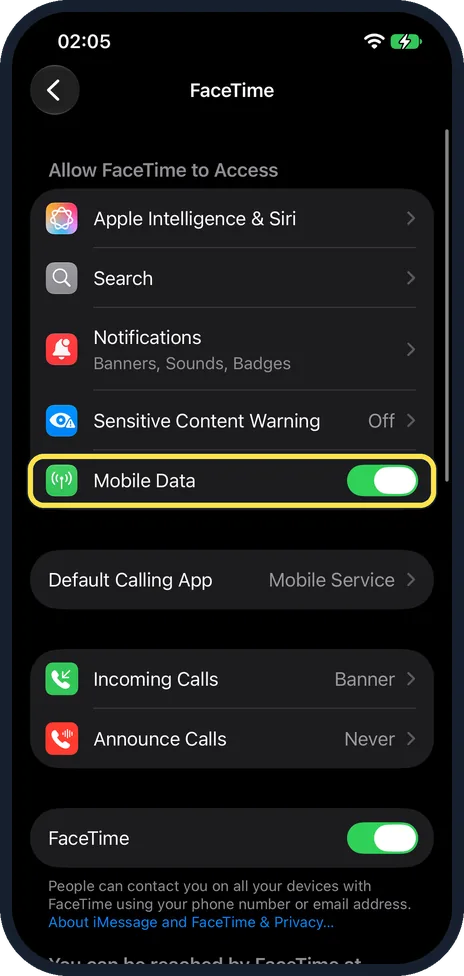
Apple says a router, firewall or security software that restricts internet access can interfere with FaceTime. Try the call on mobile data. For that, the Mobile Data switch on the FaceTime settings page must be on. On our iPhone 17e it was on. Apple also publishes a System Status page that shows whether FaceTime itself has an outage.
What changed: the screenshots are now our own iPhone 17e on iOS 27.0.1, dark mode, and the wording is checked against those screens and Apple's iOS 27 guide.
Watch these steps
If you do not see this option
- No FaceTime row under Settings, Apps Apple says that if the FaceTime app was removed, Settings and contact cards show no FaceTime options until you download it again from the App Store. On our iPhone 17e, FaceTime was also not in the Screen Time Other Features list, so it cannot be blocked there. Source: Make FaceTime calls on iPhone · Source: Block features or content with Screen Time on iPhone
- No Allowed Apps & Features That row is from iOS 26. In iOS 27, Content & Privacy Restrictions shows Feature Restrictions (Siri, Screen Distance, Other Features), and Apple puts Camera under Other Features. Source: Block features or content with Screen Time on iPhone · Source: Block apps, app downloads, websites, and purchases on iPhone (iOS 26)
- Only one switch, Set Automatically On iOS 26 and earlier, Date & Time has a single Set Automatically switch instead of Set Time Automatically and Set Time Zone Automatically. Source: Change the date and time on iPhone (iOS 26) · Source: Change the date and time on iPhone
- No FaceTime audio or Group FaceTime Apple says FaceTime audio calls and Group FaceTime calls are not available in all countries or regions. Source: Make FaceTime calls on iPhone
If this does not work
- Calls work on Wi-Fi only Check the Mobile Data switch on the FaceTime settings page. Apple also lets you turn FaceTime off for mobile data in the Mobile Service settings. Calling and data rates may apply. Source: Make FaceTime calls on iPhone
- Video calls have no picture If Camera is blocked under Content & Privacy Restrictions, Other Features, FaceTime cannot use it. Ask whoever set up Screen Time to allow it. Source: Block features or content with Screen Time on iPhone
- A sign-in screen appears Apple says to sign in with your Apple Account to use your email address, or skip it and use FaceTime with your phone number only. Source: Set up FaceTime on iPhone
About this guide
Apple's checks cover the connection, the FaceTime settings, Screen Time, the date and time, and a restart. Work through them from the top. Screenshots: iPhone 17e, iOS 27.0.1, dark mode.
Good to know
Apple says FaceTime might not be available in all countries, regions or with all carriers.
Call forwarding does not work with FaceTime, and a running FaceTime call cannot be turned into a normal phone call. End it and dial again.
If the FaceTime page says Waiting for Activation, Apple has separate steps for that. Ours for iMessage cover the same checks: iPhone iMessage waiting for activation: 8 fixes to try.
If the clock keeps going wrong: how to fix the date and time on an iPhone.
In short: Connection, update, FaceTime off and on, right number, Screen Time, automatic time, restart, other network.
- Apple Support: If you can't make or receive a FaceTime call on your iPhone or iPad
- Apple iPhone User Guide: Set up FaceTime on iPhone
- Apple iPhone User Guide: Make FaceTime calls on iPhone
- Apple iPhone User Guide: Block features or content with Screen Time on iPhone
- Apple iPhone User Guide: Block apps, app downloads, websites, and purchases on iPhone (iOS 26)
- Apple iPhone User Guide: Change the date and time on iPhone
- Apple iPhone User Guide: Change the date and time on iPhone (iOS 26)
Links checked in October 2026. Menus and features can change after software updates. These steps match the version named at the top.
Did this guide work for you?
Sorry about that. What happened?