
What changed: the screenshots are now our own iPhone 17e on iOS 27.0.1, dark mode, and the wording is checked against those screens and Apple's iOS 27 guide.
howtosimply.com/guides/iphone-imessage-waiting-for-activation-8-fixes-to-try/ · Checked October 2026 · iPhone 17e · iOS 27.0.1
In this guide
Check the iPhone is online, iOS is updated and the date and time are correct. Then turn iMessage and FaceTime off in Settings, Apps, restart and turn both back on. If it still fails, activate online at apple.co/IMFT-mac. Activation can take up to 24 hours.
6 of 6 steps with real screenshots · 6 official sources below
- Device
- iPhone
- Shown on
- iOS 27.0.1 (iPhone 17e)
- App
- Settings
- Real screenshots
- 6 of 6 steps
- Checked
- October 2026
- Sources
- 6 official, linked below
Step by step
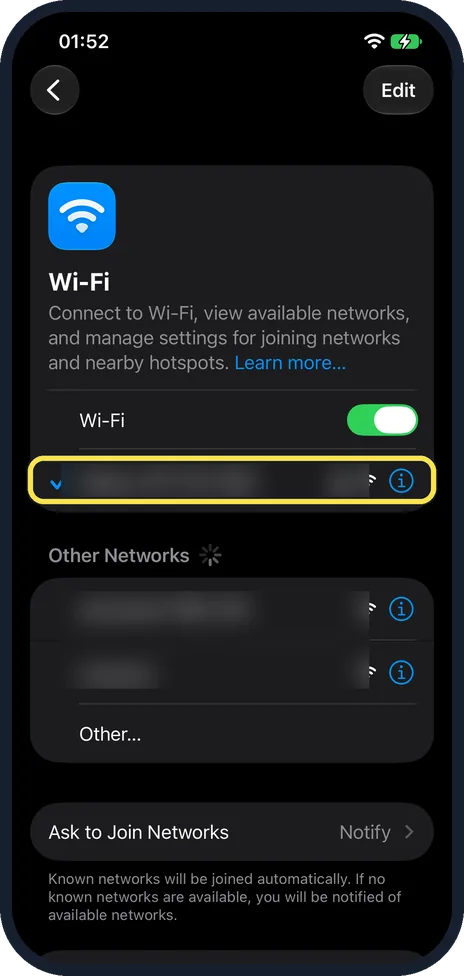
Check the internet connection
Make sure the iPhone is connected to Wi-Fi or mobile data, and open a website in Safari to confirm.
In Settings, Wi-Fi, a tick marks the network you are joined to.
Watch these steps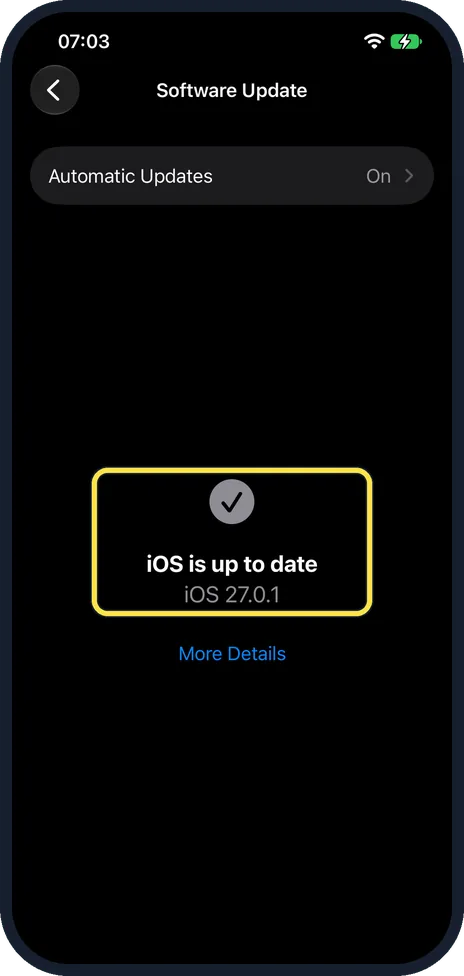
Update iOS
Open Settings, General, Software Update and install any waiting update.
If it says "iOS is up to date", move on. On our iPhone 17e it showed iOS 27.0.1, with Automatic Updates On.
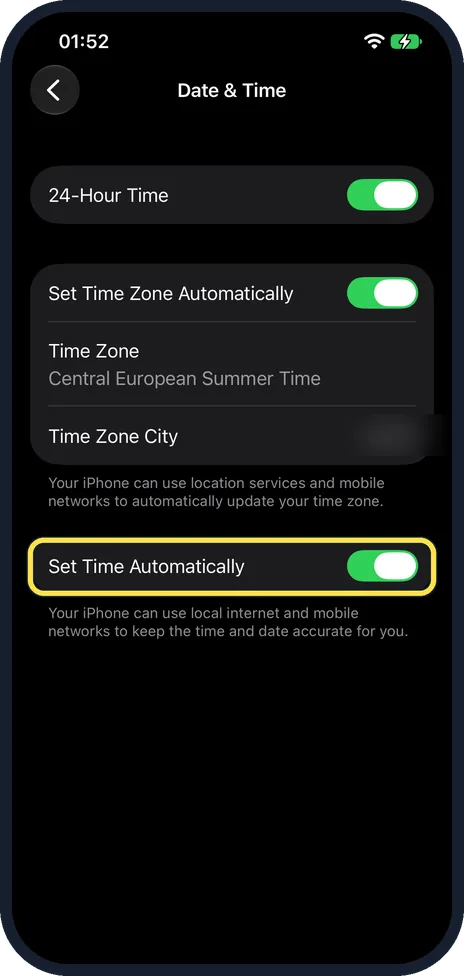
Set the date and time automatically
Open Settings, General, Date & Time and switch on Set Time Automatically.
Also switch on Set Time Zone Automatically, or check that the Time Zone shown is correct.
On iOS 26 and earlier there is one switch, Set Automatically.
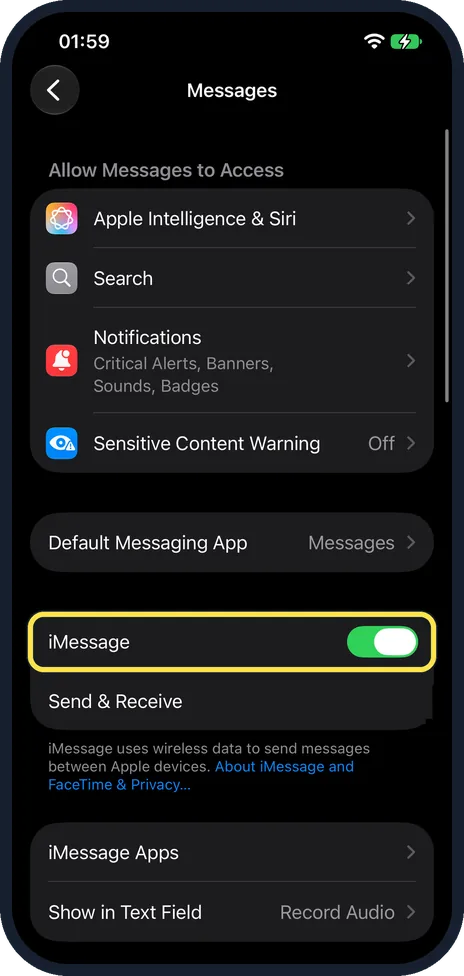
Turn iMessage and FaceTime off and on
Open Settings, Apps, Messages and switch iMessage off, then switch FaceTime off in Settings, Apps, FaceTime.
Restart the iPhone and switch both back on.
On our iPhone 17e the iMessage switch is below Default Messaging App and above Send & Receive, and it is On.
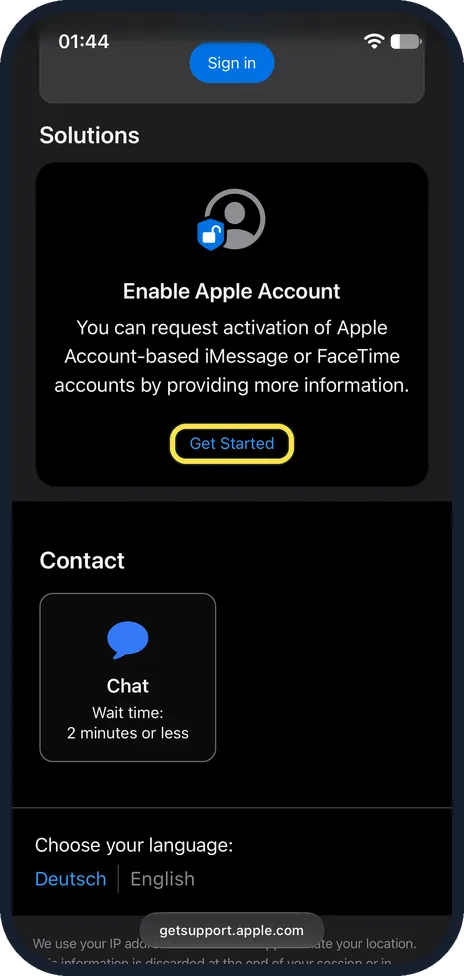
Activate iMessage online
If it still will not activate, go to apple.co/IMFT-mac, scroll to Enable Apple Account under Solutions and tap Get Started.
Apple says to sign in with your Apple Account, follow the onscreen instructions and enter your phone number if you use one with iMessage and FaceTime.
You receive an email if your account is ready for iMessage and FaceTime.
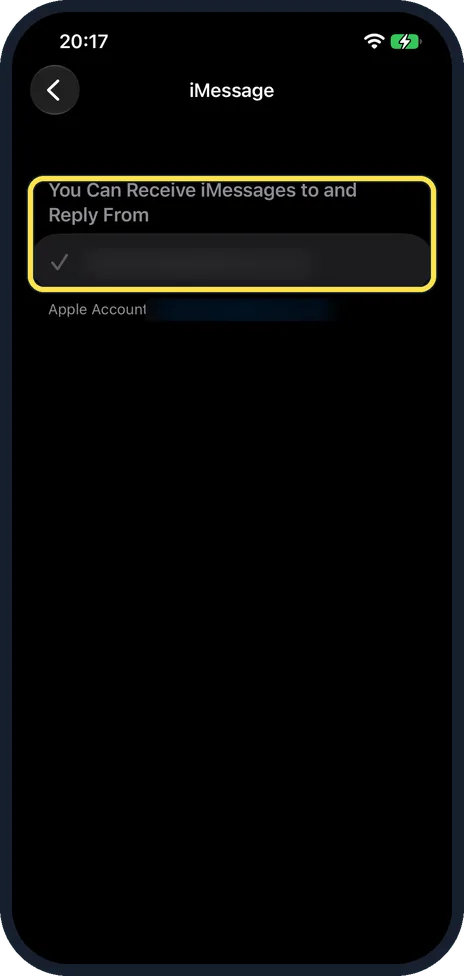
Use your email address for now
Open Settings, Apps, Messages, tap Send & Receive and tick your Apple Account email address under "You Can Receive iMessages to and Reply From".
On our iPhone 17e, which had no SIM card, the page was titled iMessage and listed only the email address, ticked.
You can then use iMessage with that address while the number is waiting.
What changed: the screenshots are now our own iPhone 17e on iOS 27.0.1, dark mode, and the wording is checked against those screens and Apple's iOS 27 guide.
Watch these steps
If you do not see this option
- Only one switch, Set Automatically According to Apple's iPhone User Guide, iOS 26 and earlier have a single Set Automatically switch in Date & Time. On iOS 27 there are two: Set Time Automatically and Set Time Zone Automatically. Source: If you can't turn on or sign in to iMessage or FaceTime on your iPhone · Source: If you can't activate iMessage with your phone number in iOS 26 · Source: Change the date and time on iPhone · Source: Change the date and time on iPhone (iOS 26) · Source: Set up Messages on iPhone · Source: Set up FaceTime on iPhone
- No phone number under Send & Receive Without an active SIM, there is no number to tick. Our iPhone 17e had no SIM card and listed only an email address. Apple says you choose from the numbers and addresses shown there. Source: If you can't turn on or sign in to iMessage or FaceTime on your iPhone · Source: If you can't activate iMessage with your phone number in iOS 26 · Source: Change the date and time on iPhone · Source: Change the date and time on iPhone (iOS 26) · Source: Set up Messages on iPhone · Source: Set up FaceTime on iPhone
If this does not work
- Activation is still waiting Apple says it might take up to 24 hours for your carrier to verify your phone number with Apple. Leave iMessage switched on and keep the phone connected, and do not keep switching it off and on. Source: If you can't turn on or sign in to iMessage or FaceTime on your iPhone · Source: If you can't activate iMessage with your phone number in iOS 26 · Source: Change the date and time on iPhone · Source: Change the date and time on iPhone (iOS 26) · Source: Set up Messages on iPhone · Source: Set up FaceTime on iPhone
- Your plan cannot send texts Apple says the iPhone needs SMS to activate your number. If you are asked whether to allow it, with a note that your network provider may charge for the SMS, tap Turn On. If your plan cannot send texts, ask your network. Source: If you can't turn on or sign in to iMessage or FaceTime on your iPhone · Source: If you can't activate iMessage with your phone number in iOS 26 · Source: Change the date and time on iPhone · Source: Change the date and time on iPhone (iOS 26) · Source: Set up Messages on iPhone · Source: Set up FaceTime on iPhone
- FaceTime shows the same error FaceTime uses the same activation. Apple says to switch FaceTime on under Settings, Apps, FaceTime and choose your number or email under "You can be reached by FaceTime at". Source: If you can't turn on or sign in to iMessage or FaceTime on your iPhone · Source: If you can't activate iMessage with your phone number in iOS 26 · Source: Change the date and time on iPhone · Source: Change the date and time on iPhone (iOS 26) · Source: Set up Messages on iPhone · Source: Set up FaceTime on iPhone
- No email after asking Apple to activate it Apple says that if no email arrives after you request activation at apple.co/IMFT-mac (step 5), your account is likely blocked. Apple suggests turning iMessage off to keep using SMS, MMS or RCS on a mobile plan, or using your email address for iMessage and FaceTime instead (step 6). Source: If you can't turn on or sign in to iMessage or FaceTime on your iPhone · Source: If you can't activate iMessage with your phone number in iOS 26 · Source: Change the date and time on iPhone · Source: Change the date and time on iPhone (iOS 26) · Source: Set up Messages on iPhone · Source: Set up FaceTime on iPhone
- The same number is listed twice (iOS 26) Apple says that on iOS 26 an inactive SIM with the same phone number can stop activation. Update to iOS 26.1 or later, or remove only the inactive physical SIM or delete only the inactive eSIM. Then go to Settings, Apps, Messages, Send & Receive and tap your number. Source: If you can't turn on or sign in to iMessage or FaceTime on your iPhone · Source: If you can't activate iMessage with your phone number in iOS 26 · Source: Change the date and time on iPhone · Source: Change the date and time on iPhone (iOS 26) · Source: Set up Messages on iPhone · Source: Set up FaceTime on iPhone
About this guide
To activate iMessage with your phone number, the iPhone needs to send an SMS. If it cannot, or the phone is offline, you see "Waiting for activation", "Activation unsuccessful" or "An error occurred during activation". Screenshots: iPhone 17e, iOS 27.0.1, dark mode.
Good to know
If it has not activated after 24 hours, ask your mobile network whether your plan can send text messages, including international ones. Then contact Apple Support.
How to tell it worked: Apple says a tick next to your number under Send & Receive means it is verified, and a spinning gear means it is still being verified. If there is still no tick after 24 hours, contact your network. iMessage working with your email address alone does not mean your number is active.
If iMessage is not active for your number, messages sent from that number go as ordinary texts in green bubbles, which your network may charge for. iMessage can still work with your email address (step 6).
On iOS 17 and earlier, the settings are under Settings, Messages and Settings, FaceTime, without the Apps step.
In short: Online, iOS updated, date and time automatic, texts allowed, then iMessage and FaceTime off, restart, back on, or activate online.
- Apple Support: If you can't turn on or sign in to iMessage or FaceTime on your iPhone
- Apple Support: If you can't activate iMessage with your phone number in iOS 26
- Apple iPhone User Guide: Change the date and time on iPhone
- Apple iPhone User Guide: Change the date and time on iPhone (iOS 26)
- Apple iPhone User Guide: Set up Messages on iPhone
- Apple iPhone User Guide: Set up FaceTime on iPhone
Links checked in October 2026. Menus and features can change after software updates. These steps match the version named at the top.
Did this guide work for you?
Sorry about that. What happened?