
howtosimply.com/guides/how-to-turn-on-wi-fi-calling-on-a-samsung-galaxy/ · Checked October 2026 · Samsung Galaxy A57 5G (SM-A576B), One UI 8.5, Android 16
In this guide
Open the Phone app, tap the three dots, Settings, and switch on Wi-Fi Calling. The switch only appears if your carrier supports Wi-Fi Calling on your plan. Your phone then calls over Wi-Fi where the mobile signal is weak.
2 of 4 steps with real screenshots · 2 official sources below
- Device
- Android
- Shown on
- Samsung Galaxy A57 5G (SM-A576B), One UI 8.5, Android 16
- App
- Phone
- Real screenshots
- 2 of 4 steps
- What we did
- Observed: looked at each screen, changed nothing
- Our phone
- Shown on Galaxy A57, One UI 8.5
- Checked
- October 2026
- Sources
- 2 official, linked below
Step by step
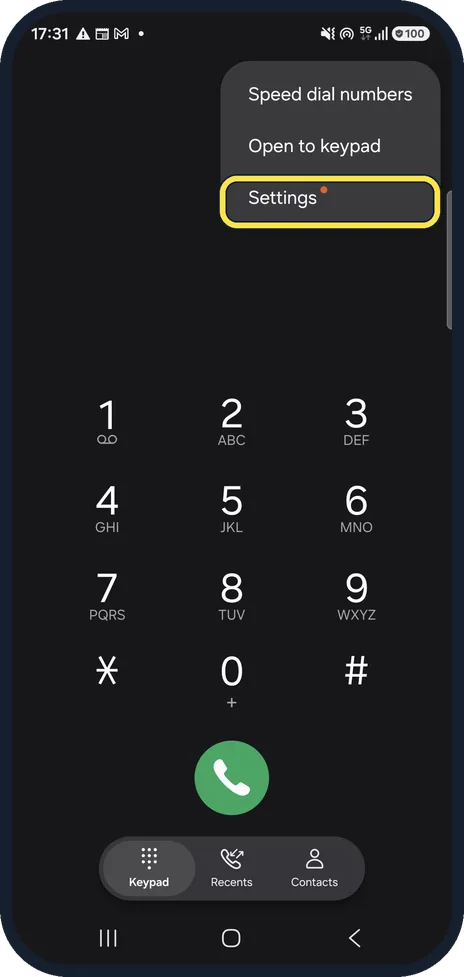
Open the Phone app's settings
Open Phone, tap the three dots at the top right and tap Settings.
Watch these steps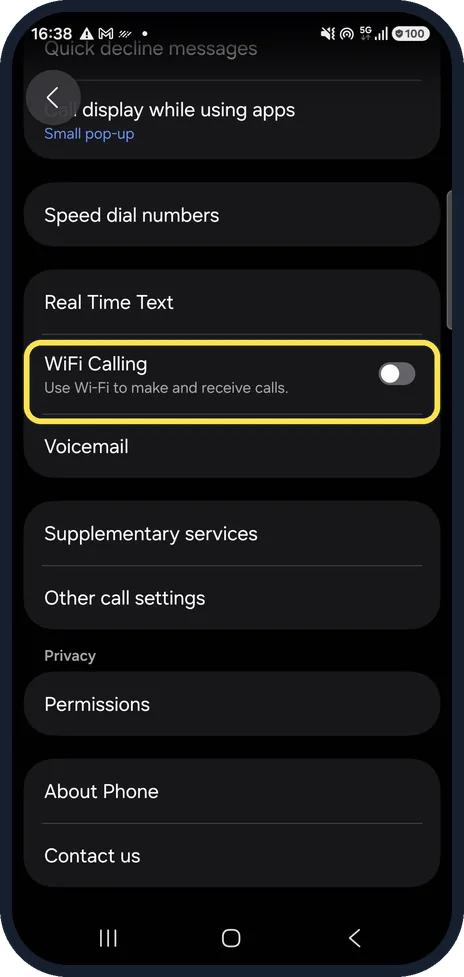
Switch on Wi-Fi Calling
Scroll down to Wi-Fi Calling (written WiFi Calling on our phone) and tap the switch. It was off on our phone.
Choose when Wi-Fi is used
Tap Wi-Fi Calling itself to choose between Wi-Fi preferred and Mobile network preferred. Samsung lists these two options; we left the feature off and did not open them.
Or use the quick panel
Samsung's guide also shows a Wi-Fi Calling button in the quick panel: swipe down twice from the top and tap it. It appears only where the carrier supports the feature.
Watch these steps
If you do not see this option
- You are asked for an emergency address Samsung says a pop-up can ask for your emergency contact information when you switch it on. Enter it and tap Save; you can change it later under Wi-Fi Calling, Emergency address. Sources: Turn on Wi-Fi Calling on Galaxy phones, How to activate Wi-Fi Calling on a Galaxy smartphone
- You are on AT&T in the US Samsung says that on AT&T phones VoLTE must be on before Wi-Fi Calling can be switched on. Source: Turn on Wi-Fi Calling on Galaxy phones
If this does not work
- The switch is on, but calls still use the mobile network Samsung says calls follow the preference: with Mobile network preferred, Wi-Fi is only used when there is no mobile network. Choose Wi-Fi preferred. Source: How to activate Wi-Fi Calling on a Galaxy smartphone
- It does not work at all Samsung says the phone must be connected to Wi-Fi with a strong signal and have an active SIM or eSIM, and the carrier must have Wi-Fi Calling activated on your account. Sources: Turn on Wi-Fi Calling on Galaxy phones, How to activate Wi-Fi Calling on a Galaxy smartphone
About this guide
Wi-Fi Calling routes calls over a Wi-Fi network, which helps in basements and buildings with a poor signal. Your carrier has to support it, so the switch is missing on some phones.
Good to know
No Wi-Fi Calling switch? Your carrier has not enabled it for your plan or this phone; ask them to switch it on.
Samsung's US guide puts the switch under Settings, Connections, Wi-Fi Calling instead; look there if the Phone app has none.
Wi-Fi Calling needs an active SIM and a stable Wi-Fi connection. Wi-Fi dropping? Samsung Galaxy Wi-Fi keeps disconnecting? 6 things to check.
In short: Phone app, three dots, Settings, Wi-Fi Calling on. No switch means no carrier support.
- Samsung UK: How to activate Wi-Fi Calling on a Galaxy smartphone
- Samsung US: Turn on Wi-Fi Calling on Galaxy phones
Links checked in October 2026. Menus and features can change after software updates. These steps match the version named at the top.
📷 See real photos from the Galaxy A57 in our Camera Lab, next to 10 other phones.
Did this guide work for you?
Sorry about that. What happened?