
howtosimply.com/guides/bluetooth-audio-cutting-out-or-stuttering-on-a-samsung-galaxy-fixes/ · Checked October 2026 · Samsung Galaxy A57 5G (SM-A576B), One UI 8.5, Android 16
In this guide
Keep the phone and headphones close with nothing between them, turn Bluetooth off and on, then forget the headphones and pair them again. If it still stutters, close apps that use Bluetooth or Wi-Fi heavily. In Developer options you can also try a different Bluetooth audio codec.
3 of 5 steps with real screenshots · 2 official sources below
- Device
- Android
- Shown on
- Samsung Galaxy A57 5G (SM-A576B), One UI 8.5, Android 16
- App
- Settings
- Real screenshots
- 3 of 5 steps
- What we did
- Observed: looked at each screen, changed nothing
- Our phone
- Shown on Galaxy A57, One UI 8.5
- Checked
- October 2026
- Sources
- 2 official, linked below
Step by step
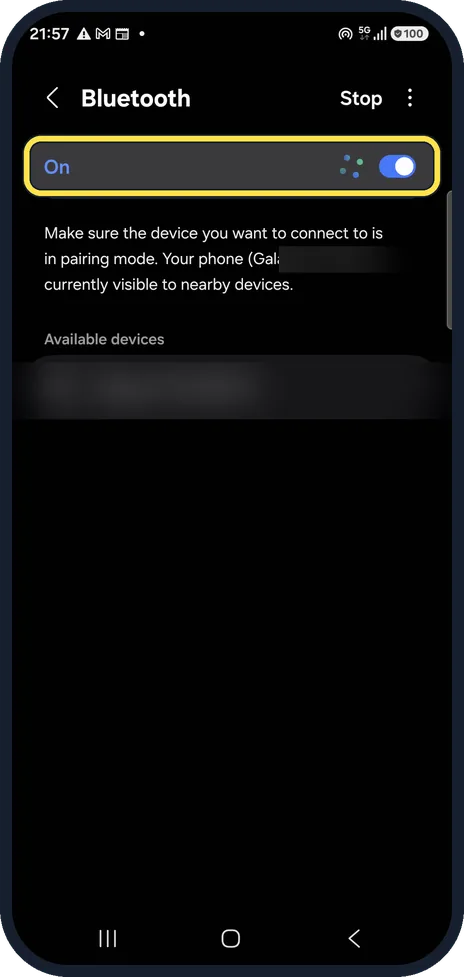
Turn Bluetooth off and on
Open Settings, Connections, Bluetooth and switch it off and on. We blurred our phone's name and a nearby device.
Keep the phone close
Keep the phone on the same side of your body as the headphones, out of a back pocket, and away from microwaves and Wi-Fi routers.
Forget and pair again
In the Bluetooth list, tap the gear next to the headphones, then Unpair. Put the headphones in pairing mode and tap them in Available devices.
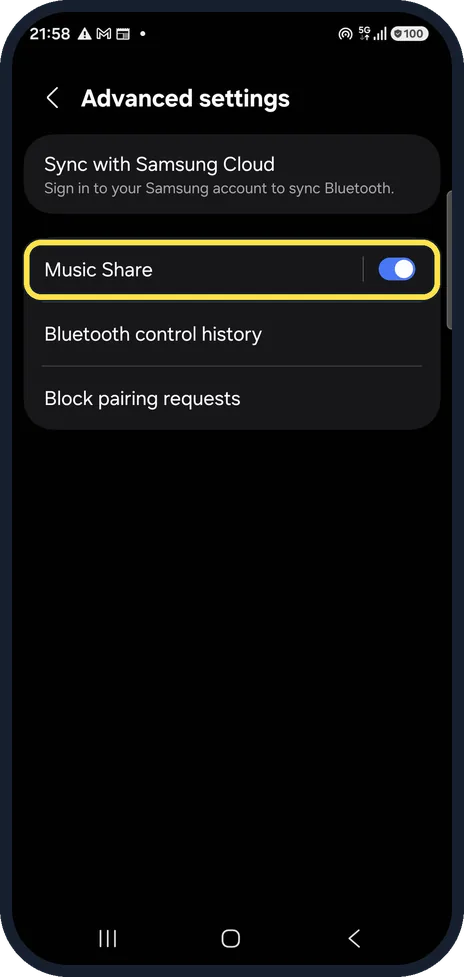
Check the advanced settings
In Bluetooth, tap the three dots, Advanced settings. Music Share lets a friend's phone play through your speaker; turn it off if you do not use it.
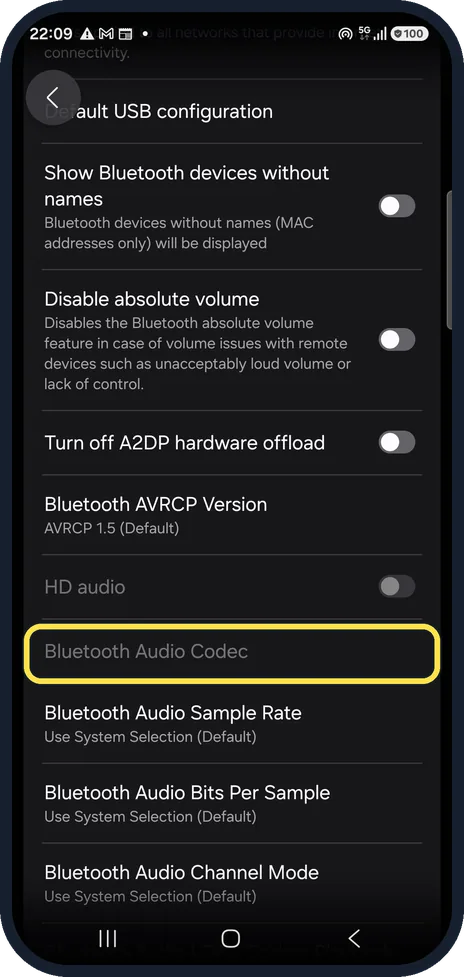
Try another codec
If Developer options is on, open it and scroll to Bluetooth Audio Codec. A simpler codec such as SBC or AAC can be steadier than a high-quality one. On ours it is greyed out, because no headphones were connected.
If you do not see this option
- There is no Bluetooth Audio Codec row It is in Developer options, which is hidden until you turn it on. On our phone the row was greyed out until headphones were connected. Source: How to troubleshoot when Bluetooth headset audio is unstable
If this does not work
- It only stutters when streaming Samsung says the connection can affect quality while streaming music online. Download the music and play it from the phone to test. Source: How to troubleshoot when Bluetooth headset audio is unstable
- It cuts out in busy places Samsung says crowded areas, frequent Wi-Fi use, bare cables, microwave ovens, wireless speakers, and metallic stickers or covers near the antenna can all interrupt the connection. Source: How to troubleshoot when Bluetooth headset audio is unstable
- It keeps disconnecting completely Samsung says that if the headset keeps disconnecting after these steps, have the phone checked at a service centre. Source: How to troubleshoot when Bluetooth headset audio is unstable
About this guide
Bluetooth reaches a few metres and does not pass well through bodies, walls or pockets. Most dropouts are distance or interference; a pairing that went wrong is the next most common cause.
Good to know
If the headphones will not connect at all, see Samsung Galaxy Bluetooth not connecting. Developer options is hidden by default: how to turn on Developer options.
Update the headphones' firmware with their own app; many audio dropouts are fixed there.
In short: Bluetooth off and on, phone closer, unpair and pair again, then try another codec in Developer options.
- Samsung Latin: How to troubleshoot when Bluetooth headset audio is unstable
- Samsung UK: How to troubleshoot when Bluetooth headset audio is unstable
Links checked in October 2026. Menus and features can change after software updates. These steps match the version named at the top.
📷 See real photos from the Galaxy A57 in our Camera Lab, next to 10 other phones.
Did this guide work for you?
Sorry about that. What happened?