
howtosimply.com/guides/samsung-galaxy-keeps-restarting-7-things-to-check/ · Checked October 2026 · Samsung Galaxy A57 5G (SM-A576B), One UI 8.5, Android 16
In this guide
Often the phone restarts on purpose. Check Settings, Device care, Auto optimization, Auto restart, and Settings, Security and privacy, More security settings, Inactivity restart. If neither is on, remove recently installed apps one at a time, update the software and run Samsung Members diagnostics.
6 of 7 steps with real screenshots · 2 official sources below
- Device
- Android
- Shown on
- Samsung Galaxy A57 5G (SM-A576B), One UI 8.5, Android 16
- App
- Settings
- Real screenshots
- 6 of 7 steps
- What we did
- Observed: looked at each screen, changed nothing
- Our phone
- Shown on Galaxy A57, One UI 8.5
- Checked
- October 2026
- Sources
- 2 official, linked below
Step by step
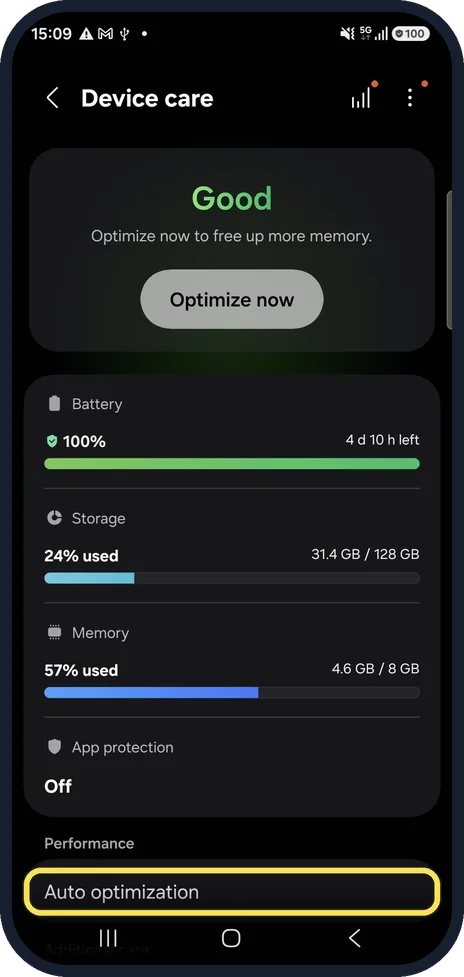
Open Auto optimization
Open Settings, Device care and scroll down to Auto optimization.
Watch these steps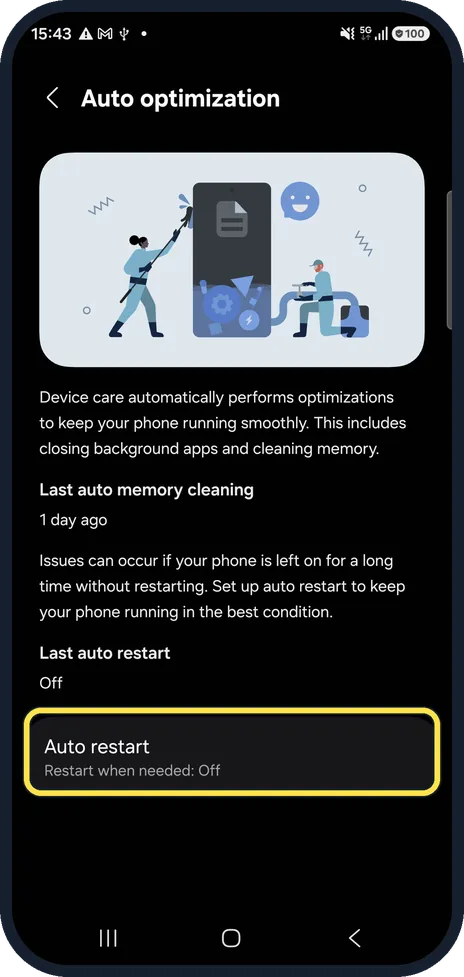
Check Auto restart
It restarts the phone when it is idle, on a schedule or when memory runs low. Ours was off. Samsung recommends leaving it on if you never restart the phone yourself, so expect night-time restarts while it is on.
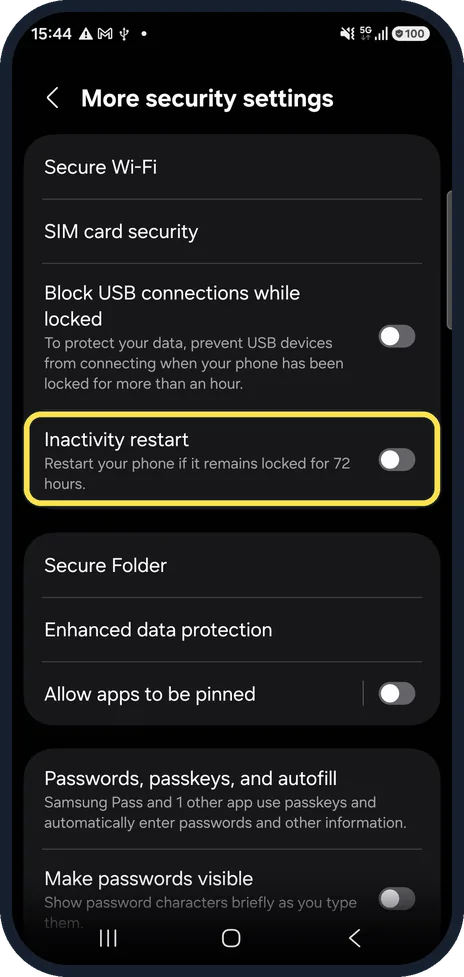
Check Inactivity restart
Settings, Security and privacy, More security settings. When on, a phone that stays locked for 72 hours restarts itself for security. It was off on ours.
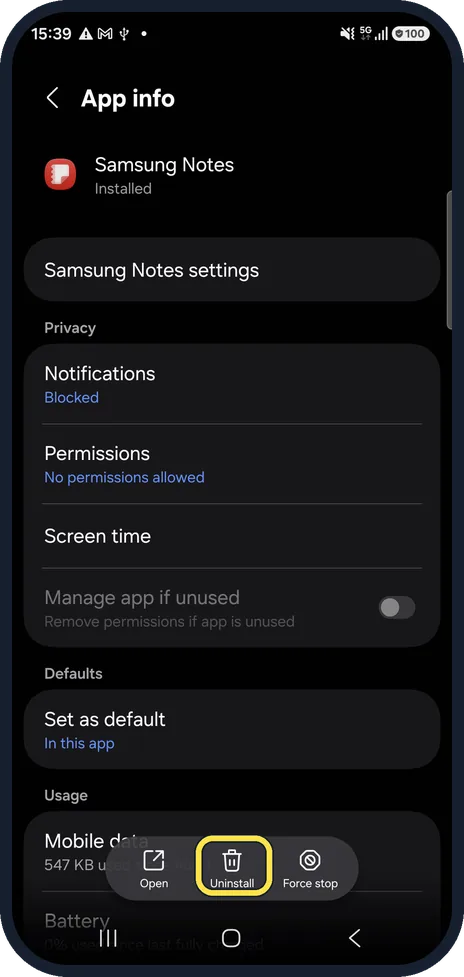
Remove recently installed apps
Samsung says third-party apps can trigger unexpected restarts. Open Settings, Apps, the app, and tap Uninstall at the bottom of its App info page (Samsung Notes in our picture). Uninstall the apps you added just before the restarts began, one at a time, and test after each one.
Install the latest software
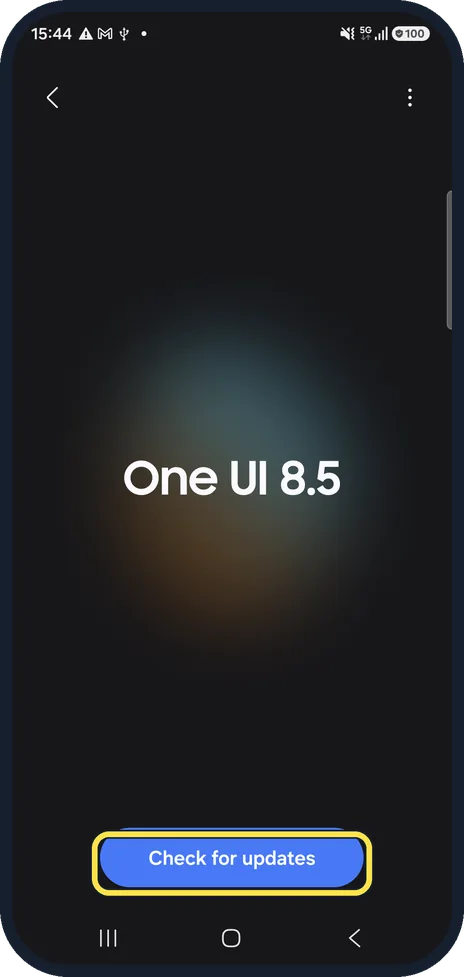
Settings, Software update, Check for updates. Our phone was on One UI 8.5.
Run a diagnostic test
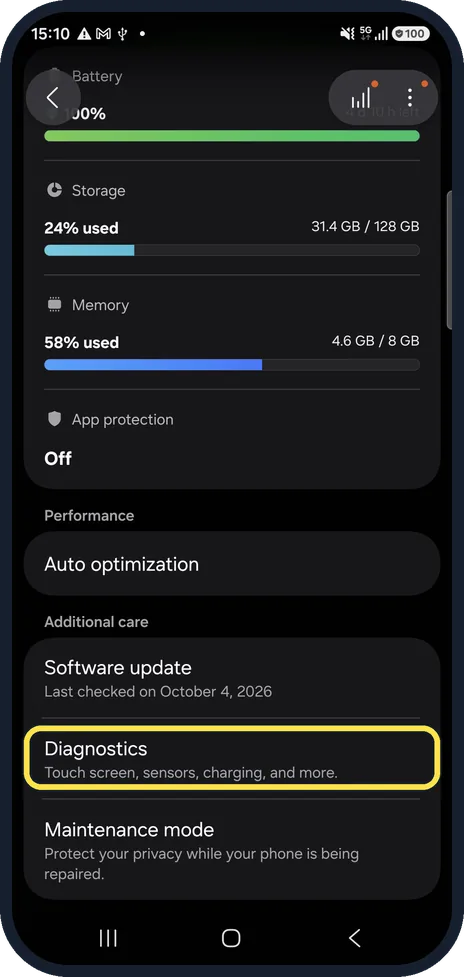
On One UI 8.5, open Settings, Device care and tap Diagnostics under Additional care, between Software update and Maintenance mode: it tests the touch screen, sensors, charging and more. The Samsung Members app has the same tests under Support, Phone diagnostics.
Still restarting? Back up and get it checked
Back up your data. If the restarts continue with no new apps installed, a battery or hardware fault is likely, and a Samsung service centre can test it.
Watch these steps
If you do not see this option
- There is no Inactivity restart switch Samsung says Inactivity restart arrived with One UI 8.0, so phones on older software do not have it. Source: Samsung Galaxy device appears to keep restarting
- Auto restart shows two switches Samsung names them Restart when needed (when memory use rises or the phone has not restarted for a while) and Restart on schedule. Turn off both to stop these restarts. Source: Samsung Galaxy device appears to keep restarting
If this does not work
- It still restarts with Auto restart off Samsung says a restart can still happen depending on the phone's condition. If it keeps happening, uninstall recent third-party apps: Settings, Apps, the app, Uninstall. Source: Samsung Galaxy device appears to keep restarting
- It restarted overnight after an update Samsung says emergency security updates can restart the phone even with automatic downloads turned off, depending on your country or region. Source: Samsung Galaxy device appears to keep restarting
About this guide
Samsung lists three features that restart a Galaxy by design: Auto optimization, Auto restart and, from One UI 8, Inactivity restart. Rule those out before looking for a fault. A restart right after a security update is also normal.
Good to know
A worn battery can switch the phone off under load: how to check battery health on a Samsung Galaxy phone.
Before handing the phone in: how to use Maintenance mode on a Samsung Galaxy before a repair.
In short: Auto restart (Device care, Auto optimization) and Inactivity restart (More security settings) off or expected; then remove new apps, update, run diagnostics.
- Samsung US: Samsung Galaxy device appears to keep restarting
- Samsung UK: What to do if your Samsung phone keeps restarting
Links checked in October 2026. Menus and features can change after software updates. These steps match the version named at the top.
📷 See real photos from the Galaxy A57 in our Camera Lab, next to 10 other phones.
Did this guide work for you?
Sorry about that. What happened?