
What changed: a note on what our Galaxy S26 (Korean model SM-S942N, One UI 9) shows here, with its screenshot.
howtosimply.com/guides/samsung-galaxy-charging-slowly-6-fixes/ · Checked October 2026 · Samsung Galaxy A57 5G (SM-A576B), One UI 8.5, Android 16
In this guide
Open Settings, Battery, Charging settings and make sure Fast charging is on. Then reconnect the cable firmly, clean the USB-C port without metal or liquid, check Battery protection and let a hot phone cool down. Samsung says fast charging may not work from a computer.
4 of 4 steps with real screenshots · 3 official sources below
- Device
- Android
- Shown on
- Samsung Galaxy A57 5G (SM-A576B), One UI 8.5, Android 16
- App
- Settings
- Real screenshots
- 4 of 4 steps
- What we did
- Observed: looked at each screen, changed nothing
- Checked
- October 2026
- Sources
- 3 official, linked below
Step by step
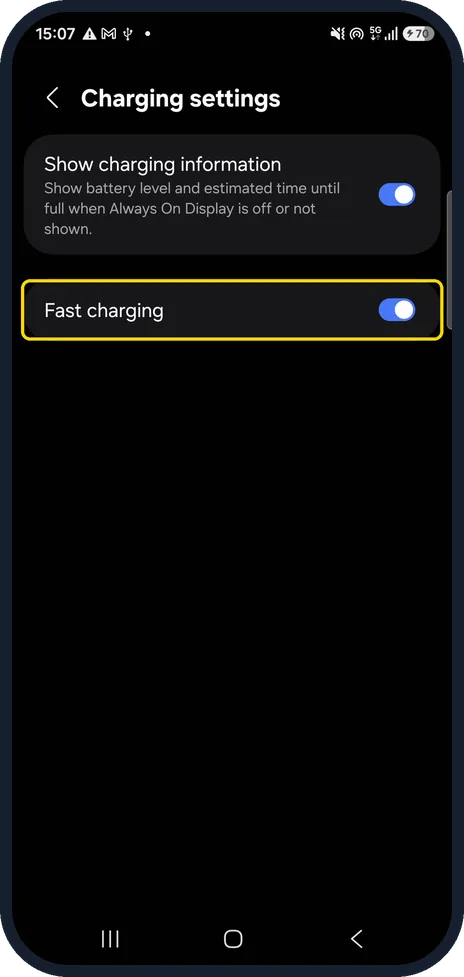
Open Charging settings and switch on Fast charging
Open Settings, Battery and tap Charging settings, below Battery information on our Galaxy A57. Samsung says to turn on Fast charging and Fast wireless charging. Our Galaxy A57 has only Fast charging; it was on, and not greyed out while charging.
Watch these steps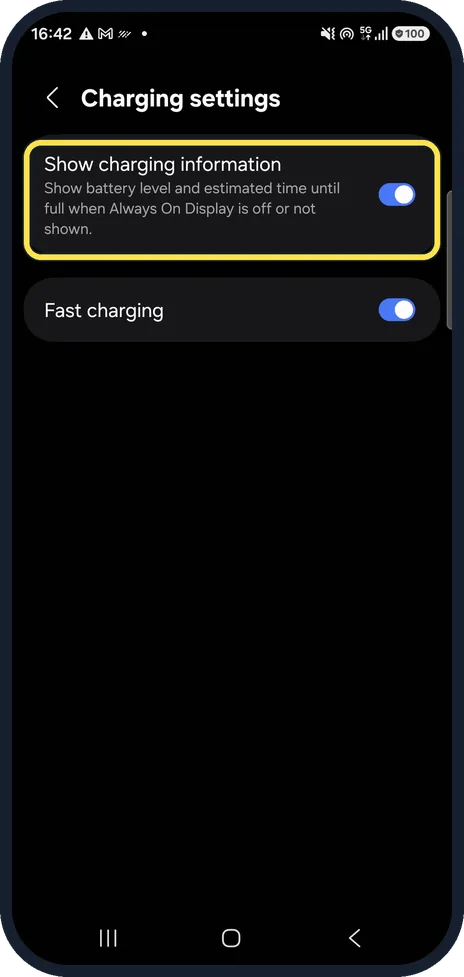
Watch the charging estimate
Show charging information shows the battery level and the estimated time until full when Always On Display is off or not shown, so you can tell whether a charger is slow. It was on on our Galaxy A57.
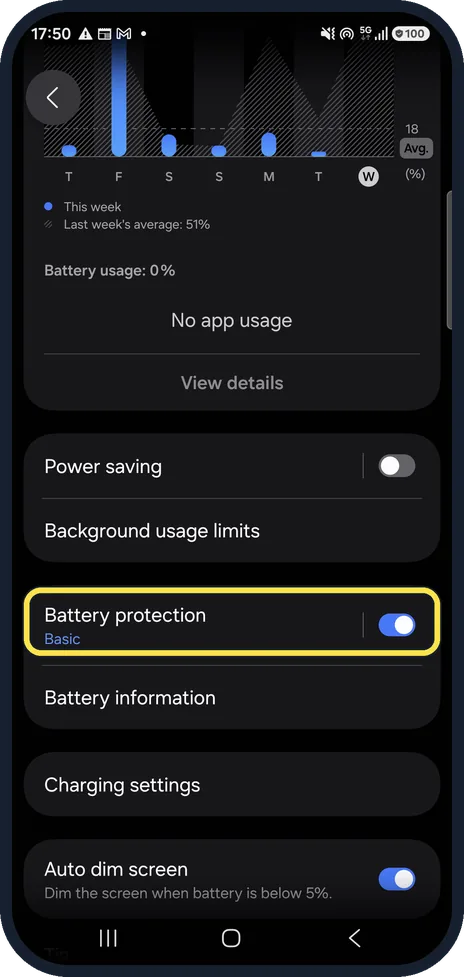
Check Battery protection
Settings, Battery, Battery protection. Samsung says to select a different option or turn Battery protection off if charging stops early. On our Galaxy A57 it was on, with Basic.
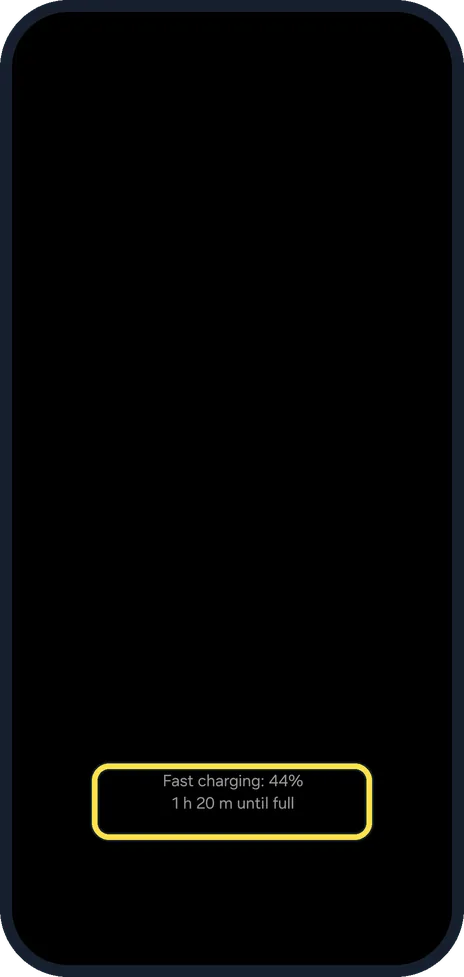
Read the charging text
Samsung says fast charging may not work when connected to a PC or a standard USB device. On our Galaxy A57, plugged into a Mac, the Always On Display still read Fast charging: 44% and 1 h 20 m until full.
What changed: a note on what our Galaxy S26 (Korean model SM-S942N, One UI 9) shows here, with its screenshot.
Watch these steps
If you do not see this option
- You also see Fast wireless charging. Our Galaxy S26 (Korean model SM-S942N, One UI 9) has a second switch, Fast wireless charging, under Fast charging. It affects only charging on a wireless pad; both were on.
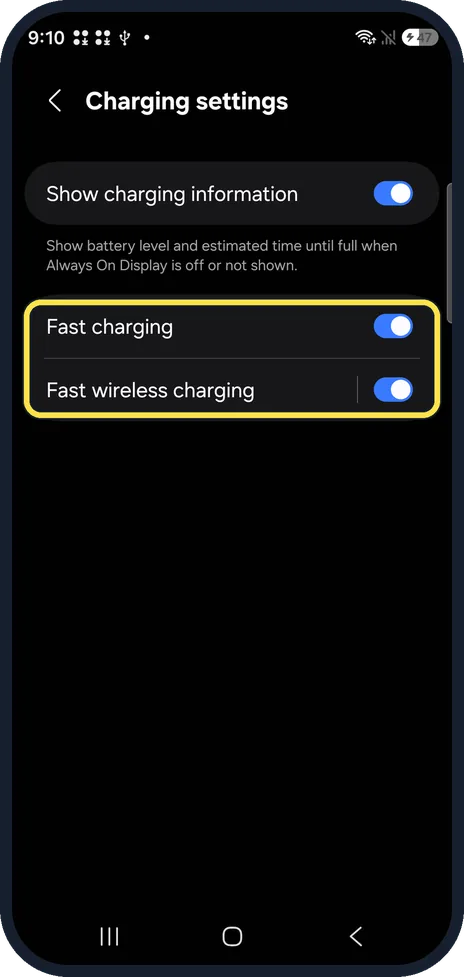
- No Fast wireless charging switch Our Galaxy A57 lists only Show charging information and Fast charging under Charging settings. Samsung names the wireless switch on models that charge wirelessly. Source: How to enable fast charging and fast wireless charging on your Samsung Galaxy device
- Fast charging is greyed out Samsung's older fast-charge page says you cannot change it while charging: unplug first. On our Galaxy A57, charging from a Mac, it was not greyed out; we did not try to change it. Source: How to fast charge on your Galaxy device
If this does not work
- Still slow: the cable or charger Samsung says to disconnect the charger and reconnect the cable firmly. It also says third-party cables that do not meet the required specifications can stop charging now and then, and suggests a genuine Samsung cable. Sources: Samsung Galaxy device may appear to be charging slowly or not charging at all, How to enable fast charging and fast wireless charging on your Samsung Galaxy device
- Lint in the port Samsung says to remove visible dust or debris carefully, without metal objects or liquids. Source: Samsung Galaxy device may appear to be charging slowly or not charging at all
- The phone is hot Samsung says charging may stop for a while or slow down when the phone gets too hot. Source: Samsung Galaxy device may appear to be charging slowly or not charging at all
About this guide
Samsung's page for slow charging checks the connection, the port, heat, Battery protection and the Fast charging switch.
The screenshots are from a Samsung Galaxy A57 5G with One UI 8.5 and Android 16, in Dark mode, while it charged from the USB port of a Mac.
Good to know
Stops at 80% or 95%? Samsung Galaxy won't charge to 100%: Battery protection explained.
If the phone shows a moisture warning, Samsung says to shake it gently to get the moisture out of the port and wipe it with a soft, clean cloth.
In short: Fast charging on, a firm cable connection, a clean port, a cool phone, Battery protection checked. From a computer, fast charging may not work.
- Samsung US: Samsung Galaxy device may appear to be charging slowly or not charging at all
- Samsung Latin: How to enable fast charging and fast wireless charging on your Samsung Galaxy device
- Samsung Latin: How to fast charge on your Galaxy device
Links checked in October 2026. Menus and features can change after software updates. These steps match the version named at the top.
📷 See real photos from the Galaxy A57 in our Camera Lab, next to 10 other phones.
Did this guide work for you?
Sorry about that. What happened?