ANDROID
OPPO battery draining fast? What to check (ColorOS 16)
Open Settings, Battery and look at Battery usage by app. Tap a heavy app to see its background time, set its Power consumption control, then check Power saving settings and the screen refresh rate. OPPO also advises lower brightness and turning off what you do not use.

7 of 7 steps show a real screenshot from our Reno13 5G. Each step was checked against the maker's own instructions, linked at the end.
Steps
- 1
Open Battery and check the mode
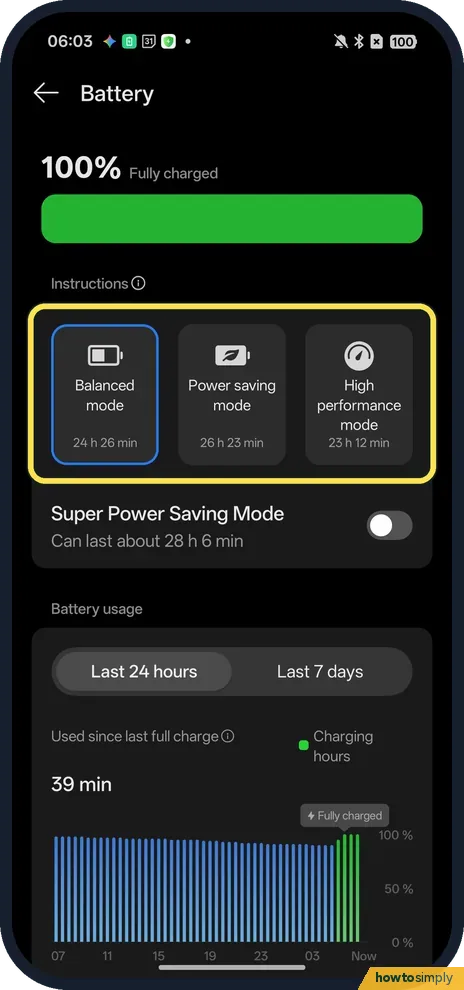
Open Settings and tap Battery. Ours was on Balanced mode, with estimates for each mode: Balanced 24 h 26 min, Power saving 26 h 23 min, High performance 23 h 12 min. Super Power Saving Mode is the switch below.
- 2
See which apps use the most
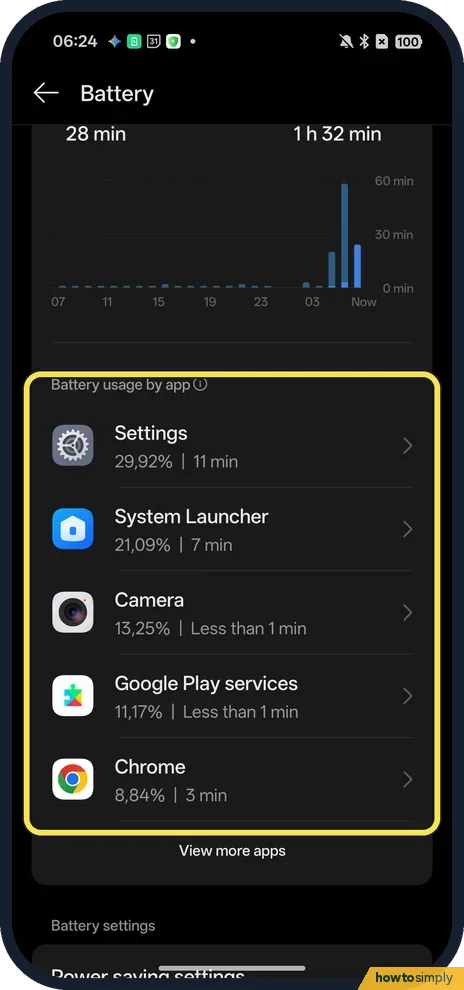
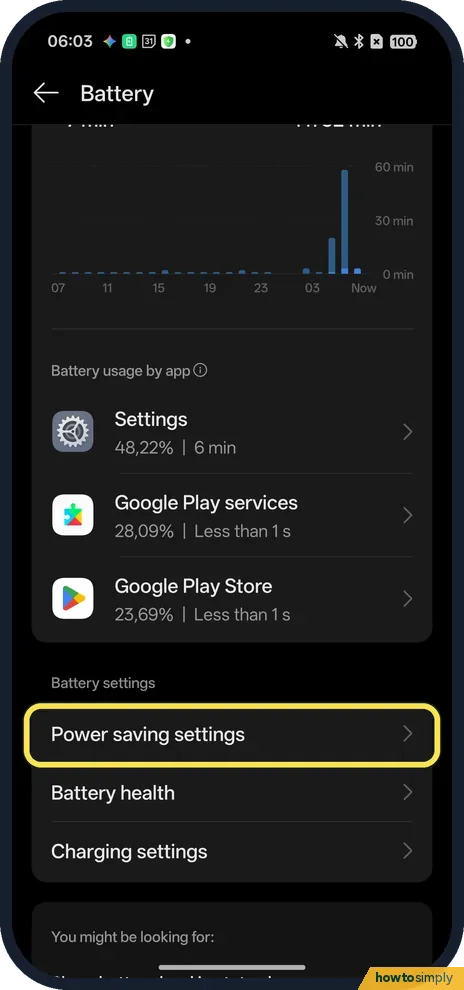
Scroll down to Battery usage by app. Ours listed Settings 29,92%, System Launcher 21,09%, Camera 13,25%, Google Play services 11,17% and Chrome 8,84%, with View more apps for the rest.
- 3
Tap an app to see its background time
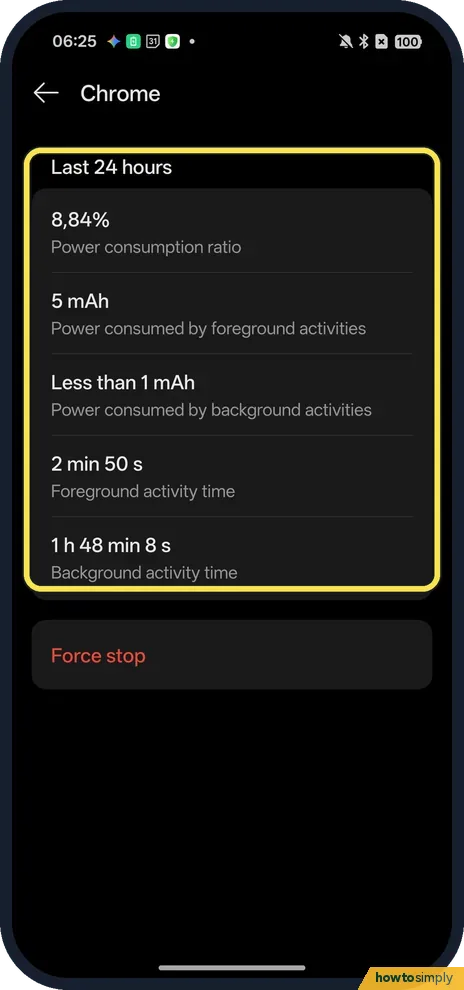
Tap an app in the list. For Chrome ours showed a power consumption ratio of 8,84%, Foreground activity time 2 min 50 s and Background activity time 1 h 48 min 8 s. A long background time for an app you hardly opened is the thing to look for.
- 4
Set the app's Power consumption control
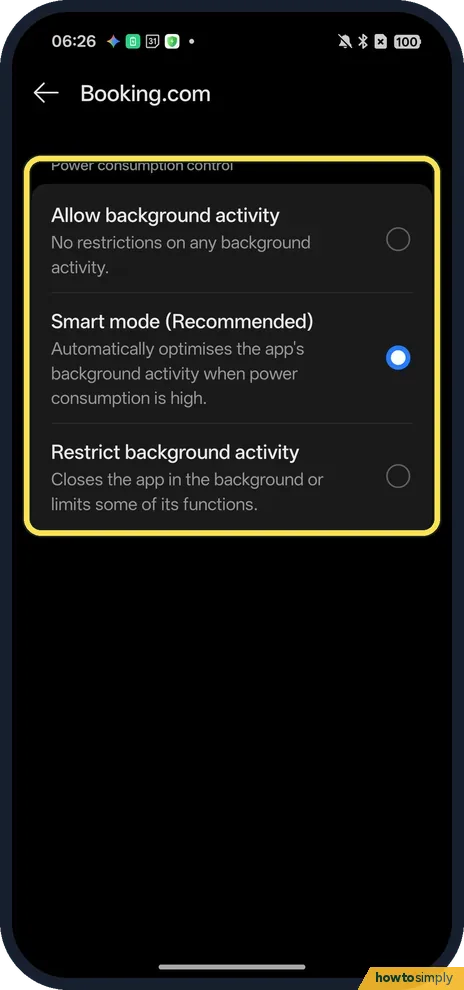
Open Settings, Apps, App management, tap the app, then Battery usage, which opens Power consumption control (shown). It offers Allow background activity, Smart mode (Recommended) and Restrict background activity, which closes the app in the background or limits some of its functions. Ours (Booking.com) was on Smart mode.
- 5
Open Power saving settings
Go back to Settings, Battery and scroll to Battery settings. Tap Power saving settings; Battery health and Charging settings are below it.
- 6
Check the automatic switches
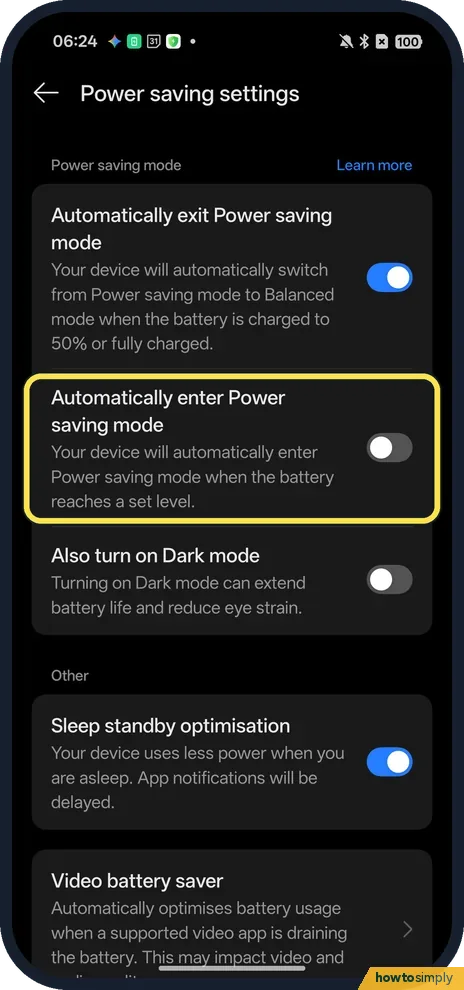
Automatically enter Power saving mode turns it on when the battery reaches a set level; it was off on ours. Automatically exit Power saving mode (on) switches back to Balanced when the battery is charged to 50% or fully charged. Also turn on Dark mode was off.
- 7
Check the screen refresh rate
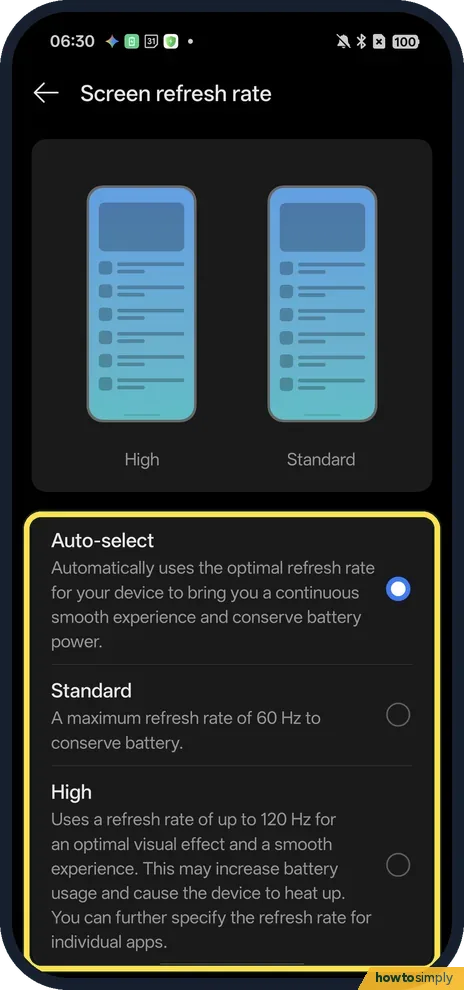
In Settings, Display & brightness, Screen refresh rate, ours was on Auto-select. Standard keeps a maximum of 60 Hz to conserve battery; High uses up to 120 Hz, which the page says may increase battery usage and cause the device to heat up.
If you do not see this option
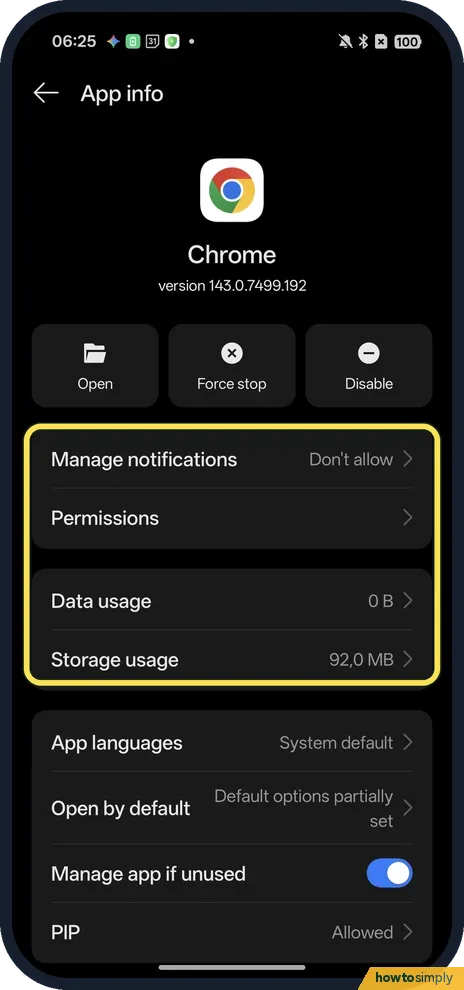
- No Battery usage row on App info? Our Chrome, which came with the phone, had no Battery usage row on App info; Booking.com, which also came preinstalled, had one. Without the row, use the app's entry in Battery usage by app instead.
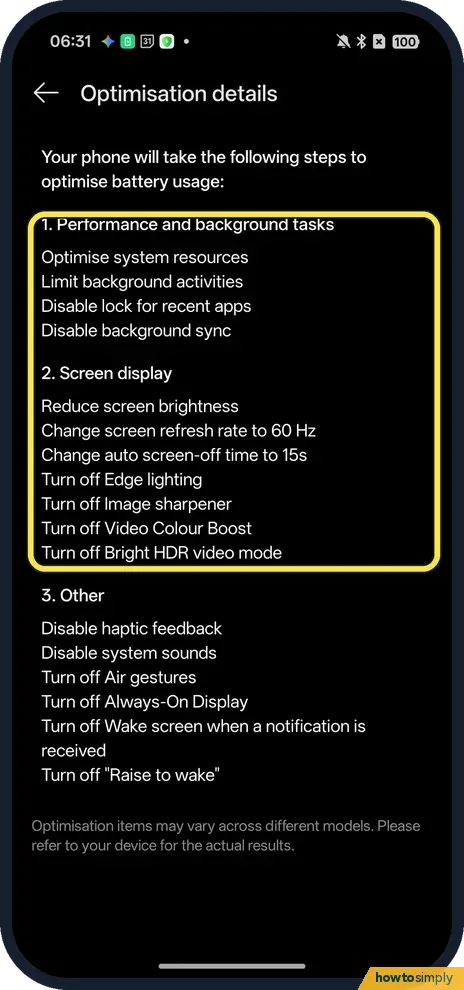
- Want to know what Power saving mode changes? On Power saving settings, Learn more opens Optimisation details. Ours listed limit background activities, disable background sync, reduce screen brightness, change screen refresh rate to 60 Hz and change auto screen-off time to 15s. See how to turn on Power saving mode.
If this does not work
- Battery drains even when idle? OPPO says to switch off Bluetooth, Wi-Fi and location services when they aren't needed, and to use Airplane mode where the signal is weak, since the phone keeps searching for networks. Google adds that the battery drains much faster when it's hot, even when not in use.
- An app stops notifying after you restrict it? Restrict background activity can close the app in the background. For chat or email apps, OPPO says to enable Allow background activity instead: OPPO not getting notifications.
- Nothing helps? OPPO suggests restarting the phone now and then. Then check the battery itself: how to check battery health on an OPPO phone.
Good to know
The percentages are each app's share of the battery used in the period shown, not a measure of how bad an app is. Ours were read on a day spent in Settings, so Settings topped the list. Look again after a normal day before you limit anything.
Google's quick wins are to let your screen turn off sooner, reduce screen brightness and restrict apps with high battery use; OPPO also points to screen brightness first. For the screen timeout, see how to change the screen timeout on an OPPO phone; for the rate itself, how to change the refresh rate.
Sleep standby optimisation, also on Power saving settings, was on on ours. The page says the device uses less power when you are asleep and that app notifications will be delayed.
About this guide
- Device
- Android
- Shown on
- OPPO Reno13 5G (CPH2689, EEA), ColorOS 16.0.5, Android 16 (build CPH2689_16.0.5.1001(EX01))
- App
- Camera
- Real screenshots
- 7 of 7 steps
- Checked
- October 2026
- Sources
- 3 official, linked below
Sources
Links checked October 2026. Menus and features can change with updates.Spotted a mistake? Menus change with updates, and we want every step to match your screen. Email us about this page or use the contact form. We read every report, and fixes are listed on What changed.
Liked this guide?
Follow us for new guides and short how-to videos.
Did this guide work for you?
Sorry about that. What happened?