ANDROID
HONOR battery draining fast? What to check (MagicOS 10)
Open Settings, Battery: check which apps use the most, keep Battery mode on Balanced, leave App launch on Manage all automatically, set Power saving mode to switch on by itself, and pick Dynamic or Standard under Refresh rate.

6 of 6 steps show a real screenshot from our Magic7 Lite. Each step was checked against the maker's own instructions, linked at the end.
Steps
- 1
Open Battery
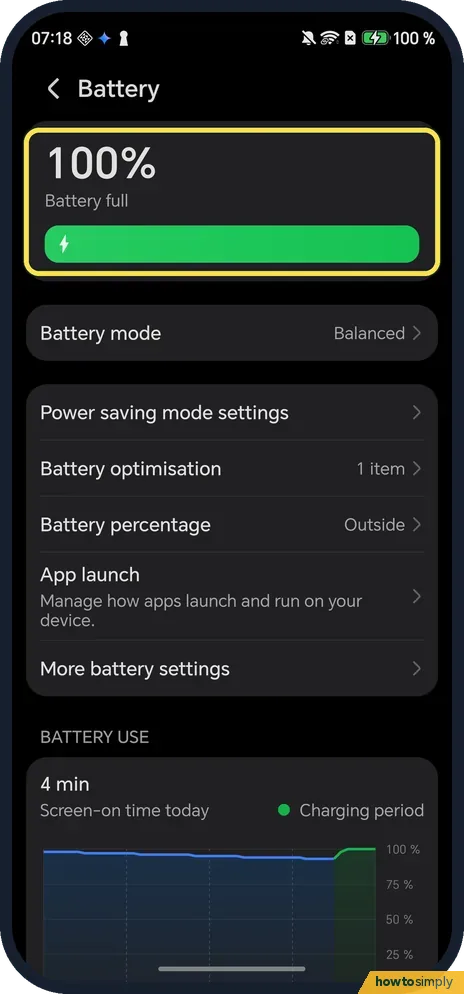
Open Settings and tap Battery. The top card shows the level; ours said 100 % and Battery full. Battery mode, Power saving mode settings, App launch and More battery settings are all on this page.
- 2
See which apps use the most
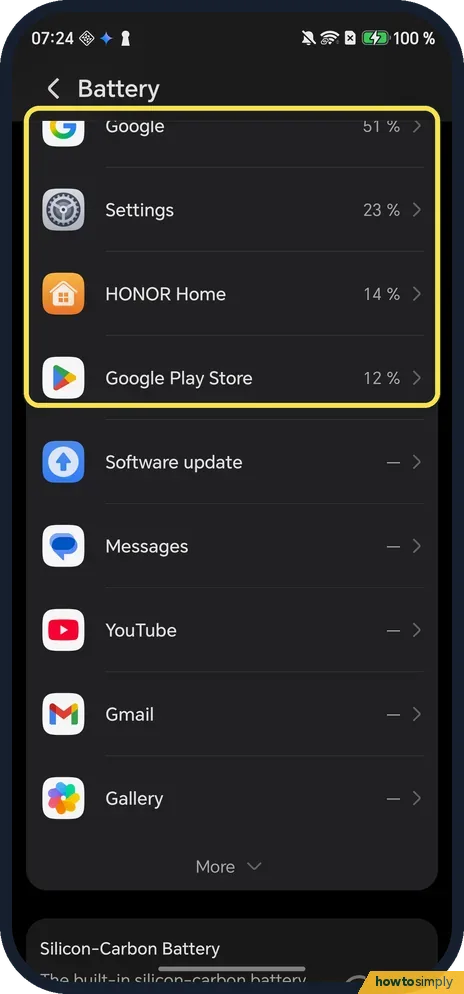
Scroll down to BATTERY USE and past the chart. Each app shows its share. Ours: Google 51 %, Settings 23 %, HONOR Home 14 % and Google Play Store 12 %; More opens the rest. HONOR says to tap an app to check whether its use is normal, and force stop one you do not need right now (HONOR Support (MY): How to check power usage details).
- 3
Keep Battery mode on Balanced
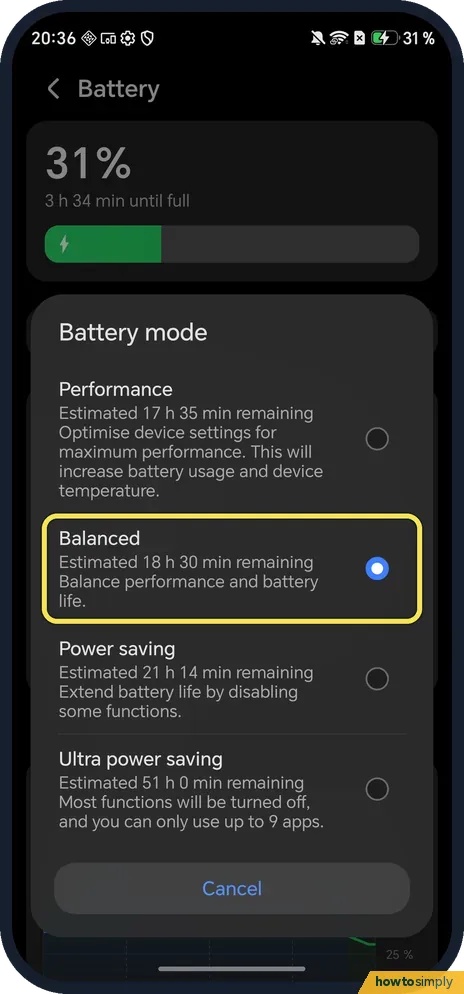
Tap Battery mode. Performance optimises the phone for maximum performance, and the list itself says it will increase battery usage and device temperature. Balanced was picked on ours. This screenshot is from 21 October 2026, same phone and build.
- 4
Leave App launch on automatic
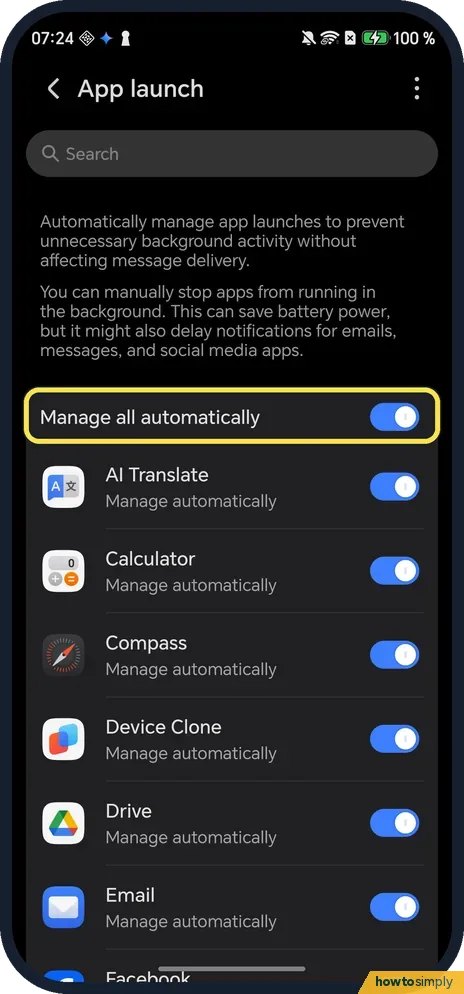
Back on Battery, tap App launch. The page says it automatically manages app launches to prevent unnecessary background activity without affecting message delivery. Manage all automatically was on, and every app said Manage automatically.
- 5
Let Power saving mode switch on by itself
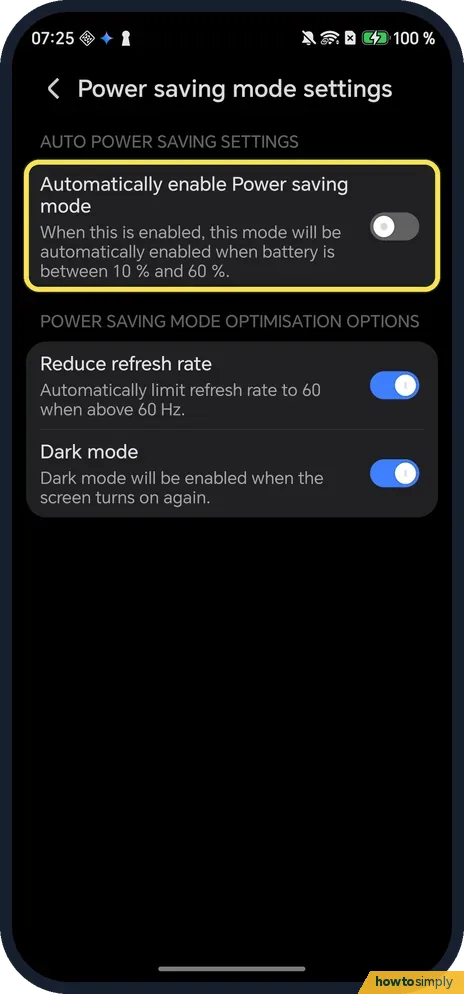
Tap Power saving mode settings. Automatically enable Power saving mode turns it on when the battery is between 10 % and 60 % (it was off on ours). Below it, Reduce refresh rate and Dark mode are what Power saving changes; both were on.
- 6
Pick Dynamic or Standard refresh rate
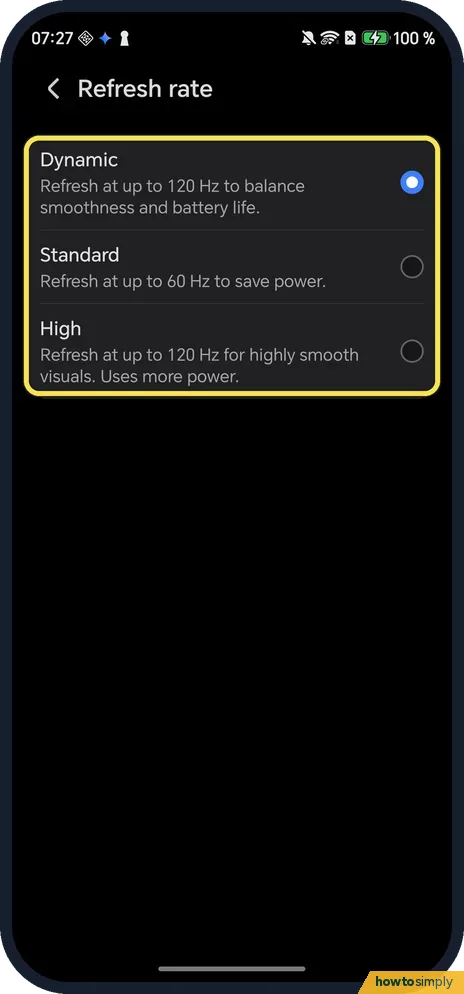
Open Settings, Display & brightness, Refresh rate. Dynamic goes up to 120 Hz to balance smoothness and battery life (ours), Standard refreshes at up to 60 Hz to save power, and High says it uses more power.
If you do not see this option
- No Battery mode row on another HONOR? HONOR's Performance mode page for other models shows Performance mode and Battery Saver as switches under Settings, Battery instead of one list. Source: Performance mode vs Battery saving mode
- Looking for Power consumption details? That is HONOR's older name. On ours the per-app list is BATTERY USE, lower on the Battery page, as in step 2. Sources: The battery drains quickly and has a short standby time, How to check power usage details
- An app missing from the usage list? Our list showed the top apps first; tap More under it for the rest.
If this does not work
- Messages arrive late after changing App launch? HONOR says changing an app's launch settings may affect the notifications you receive from apps running in the background. Put that app back on Manage automatically; see HONOR not getting notifications.
- Still drains with good settings? Check the battery itself: More battery settings shows Maximum capacity and the cycle count. See check battery health on an HONOR phone. If the drain persists, HONOR says to back up your data and take the phone and proof of purchase to an HONOR authorised service centre.
- Battery worse when the phone is warm? Google says your battery drains much faster when it is hot, even when not in use. See HONOR phone overheating.
- Drains overnight with the screen off? More battery settings has Stay connected while asleep, which keeps the internet on after the screen turns off. HONOR notes this may increase power consumption, but turning it off can delay messages while the phone sleeps.
Good to know
For the modes themselves, see turn on Power saving mode on an HONOR phone; for the screen rate, change the refresh rate on an HONOR phone.
The usage percentages are each app's share of the battery used in the period shown, not a measure of how bad an app is. Ours were read on a charger early in the morning, so Google and Settings could top the list. Look at it after a normal day before you limit anything.
Google's quick wins work on HONOR too: let your screen turn off sooner, reduce screen brightness or set it to change automatically, turn on dark theme, and restrict apps with high battery use. For the timeout see change the screen timeout on an HONOR phone; for dark theme, turn on dark mode on an HONOR phone.
Location and mobile data also cost power. Google suggests turning off Location access when you do not need it, Wi-Fi instead of mobile data, and Airplane mode if you do not need your mobile network at all.
About this guide
- Device
- Android
- Shown on
- HONOR Magic7 Lite (BRP-NX1M, EEA), MagicOS 10.0, Android 16 (build 10.0.0.169(C430E7R2P1))
- App
- Settings
- Path
- Settings › Battery: usage by app › Battery mode Balanced › App launch automatic › Power saving mode settings
- Real screenshots
- 6 of 6 steps
- Checked
- October 2026
- Sources
- 5 official, linked below
Sources
Links checked October 2026. Menus and features can change with updates.Spotted a mistake? Menus change with updates, and we want every step to match your screen. Email us about this page or use the contact form. We read every report, and fixes are listed on What changed.
Liked this guide?
Follow us for new guides and short how-to videos.
Did this guide work for you?
Sorry about that. What happened?