
What changed: new screenshots from an iPhone 17e with iOS 27.0.1 and a MacBook Neo with macOS 27.0.1, including the Handoff banner in the iPhone App Switcher.
macOS 27 compared with macOS 26: We rewrote this guide on macOS 27.0.1 (MacBook Neo): it now has 4 steps instead of 6. The macOS 26 page keeps the steps and screenshots as they were.
howtosimply.com/guides/how-to-use-handoff-between-a-mac-and-an-iphone/ · Checked October 2026 · MacBook Neo (macOS 27.0.1) and iPhone 17e (iOS 27.0.1)
In this guide
On the Mac, open System Settings, General, AirDrop & Continuity and turn on Allow Handoff. On the iPhone, open Settings, General, AirPlay & Continuity and turn on Handoff. Then open the App Switcher on the iPhone and tap the banner at the bottom.
4 of 4 steps with real screenshots · 1 official source below
- Device
- Mac
- Shown on
- macOS 27.0.1 (MacBook Neo), iOS 27.0.1 (iPhone 17e)
- App
- System Settings
- Real screenshots
- 4 of 4 steps
- Checked
- October 2026
- Sources
- 1 official, linked below
Step by step
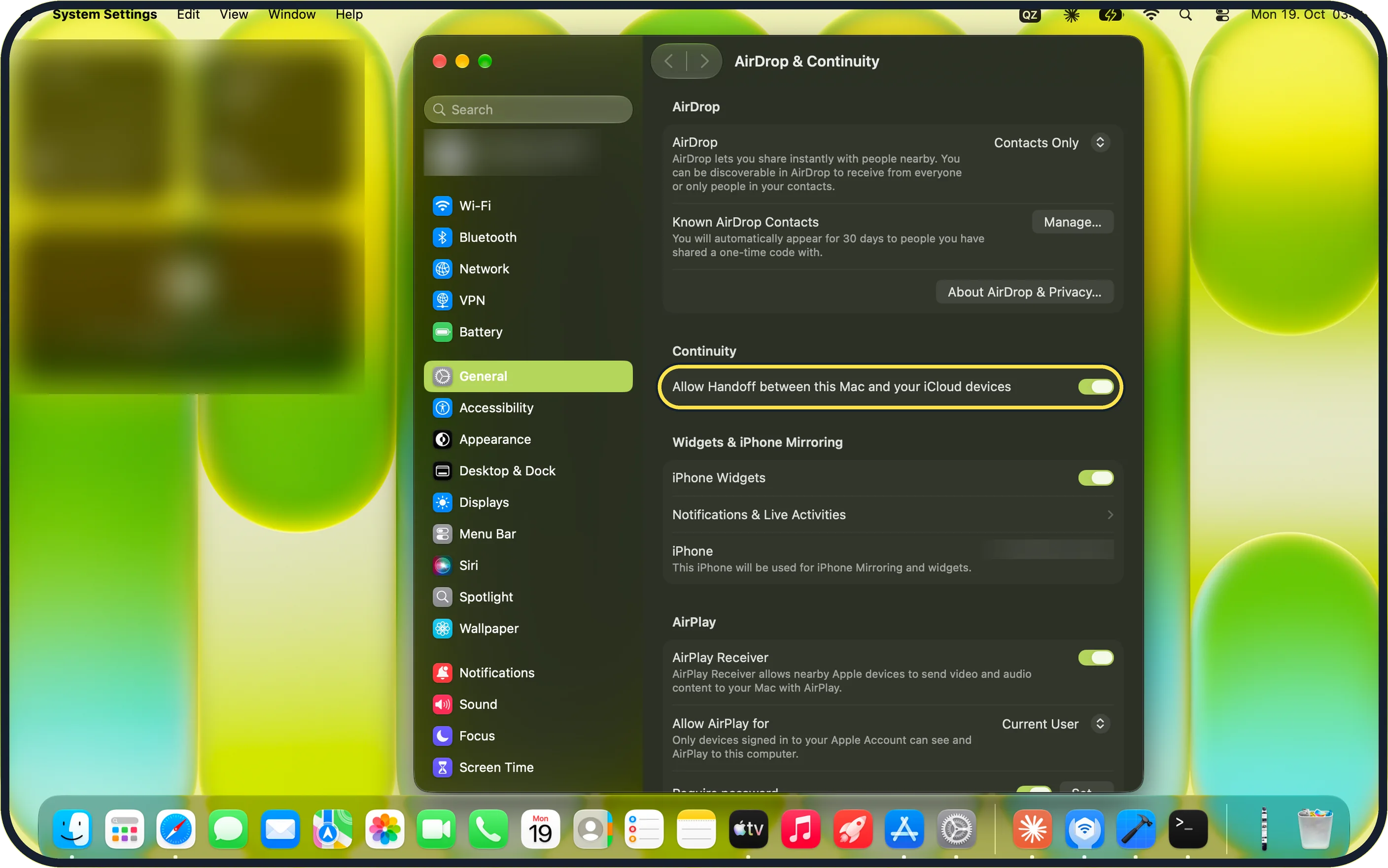
Zoomed in on the setting. Tap to see the whole screenTap the picture to see it full size Mac: turn on Allow Handoff
Open System Settings, click General, then AirDrop & Continuity.
Under Continuity, switch on Allow Handoff between this Mac and your iCloud devices. Apple says it is on by default; it was on for our MacBook Neo.
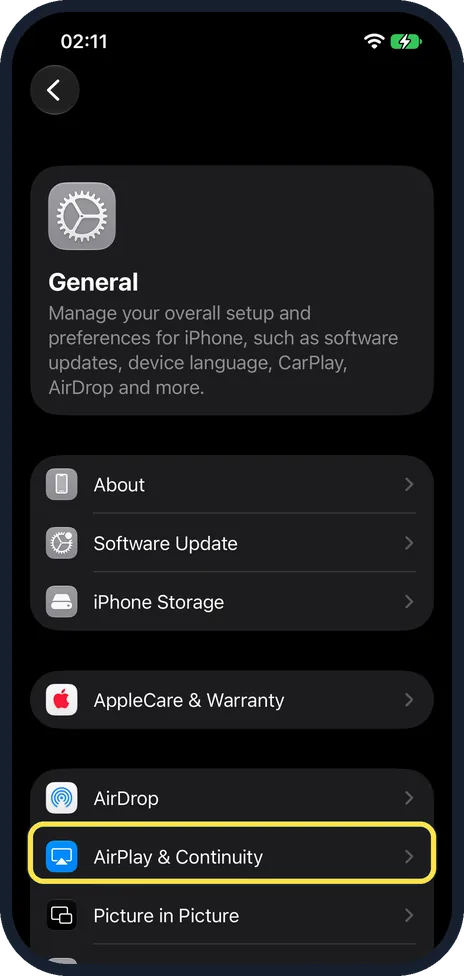
iPhone: open AirPlay & Continuity
Open Settings, tap General, then AirPlay & Continuity.
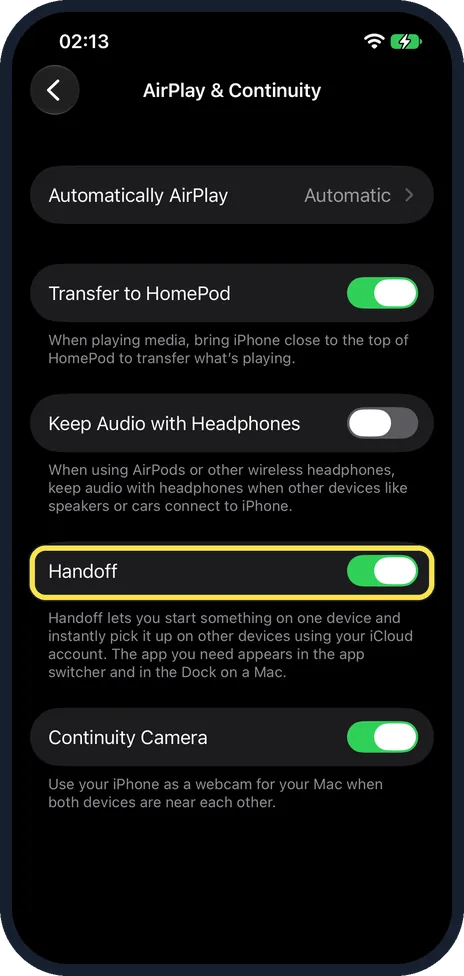
iPhone: turn on Handoff
Switch on Handoff. It was on for our iPhone 17e.
The note under the switch says the app you need appears in the app switcher and in the Dock on a Mac.
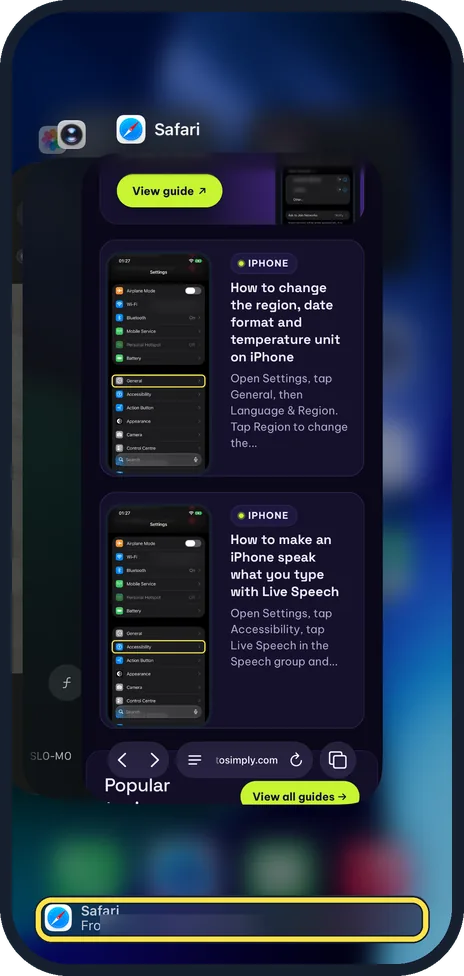
Continue a Mac task on the iPhone
Open a web page in Safari on the Mac and keep Safari in front.
On the iPhone, swipe up from the bottom of the screen and pause to open the App Switcher. Tap the banner at the bottom. On ours it read Safari, From and the name of our Mac.
What changed: new screenshots from an iPhone 17e with iOS 27.0.1 and a MacBook Neo with macOS 27.0.1, including the Handoff banner in the iPhone App Switcher.
If you do not see this option
- There is no banner in the App Switcher Apple says the device handing off must be unlocked, near the other one and show the task in progress. Keep the app open and in front on the Mac, then open the App Switcher again. Source: Use Handoff to continue tasks on your other Apple devices
- The Mac setting has another name Apple says the screen is AirDrop & Continuity or AirDrop & Handoff on macOS Ventura or later. On earlier macOS it is System Preferences, General. Source: Use Handoff to continue tasks on your other Apple devices
- The iPhone setting has another name Apple says the screen may be called AirPlay & Handoff instead of AirPlay & Continuity. On our iPhone 17e it was AirPlay & Continuity. Source: Use Handoff to continue tasks on your other Apple devices
If this does not work
- Nothing appears on the other device Apple says to check that Bluetooth and Wi-Fi are on and that both devices use the same Apple Account in iCloud. Keep them near each other. Source: Use Handoff to continue tasks on your other Apple devices
- The app does not hand off The app must work with Handoff and be installed on both devices (Apple). Keep it open and in front on the device you started on. Source: Use Handoff to continue tasks on your other Apple devices
About this guide
With Handoff you start a web page, an email or a note on one Apple device and carry on with it on another. Apple says both need Bluetooth and Wi-Fi on, the same Apple Account in iCloud, and must be near each other.
Screenshots: iPhone 17e with iOS 27.0.1 and MacBook Neo with macOS 27.0.1, both in dark mode.
Good to know
The other way round, from iPhone to Mac: open an app that works with Handoff on the iPhone, keep it in front and the iPhone unlocked. Apple says an extra icon then appears in the Mac Dock, marked with a small iPhone symbol. Click it, or press Command-Tab and choose it.
Apple lists Calendar, Clock, Contacts, FaceTime, Freeform, Keynote, Mail, Maps, News, Notes, Numbers, Pages, Reminders, Safari and Stocks as apps that work with Handoff, plus many apps from other makers. The app must be installed on both devices.
Handoff is also needed for Universal Clipboard, so copy on one device and paste on the other.
To show iPhone photos on the Mac screen instead: how to AirPlay from an iPhone to a Mac.
In short: Mac: General > AirDrop & Continuity > Allow Handoff. iPhone: General > AirPlay & Continuity > Handoff. App Switcher banner on the iPhone, Handoff icon in the Mac Dock.
Links checked in October 2026. Menus and features can change after software updates. These steps match the version named at the top.
Did this guide work for you?
Sorry about that. What happened?