
You are viewing the macOS 26 version of this guide, recorded on macOS Tahoe 26 (MacBook Pro) on 2 October 2026. It is kept as it was and not updated. See the macOS 27 version.
howtosimply.com/guides/how-to-use-handoff-between-a-mac-and-an-iphone/ · Checked 2 October 2026 · MacBook Pro · macOS Tahoe 26
In this guide
On the Mac, open System Settings, General, AirDrop & Continuity and turn on Allow Handoff between this Mac and your iCloud devices. On the iPhone, open Settings, General, AirPlay & Continuity and turn on Handoff. Then start something on one device and click the Handoff icon in the Dock of the Mac.
2 of 6 steps with real screenshots · 1 official source below
- Device
- Mac
- Shown on
- macOS Tahoe 26 (MacBook Pro)
- App
- System Settings
- Real screenshots
- 2 of 6 steps
- Checked
- 2 October 2026
- Sources
- 1 official, linked below
Step by step
Check the basics
Both devices need Bluetooth and Wi-Fi switched on, and both must be signed in to iCloud with the same Apple Account. They must be near each other.
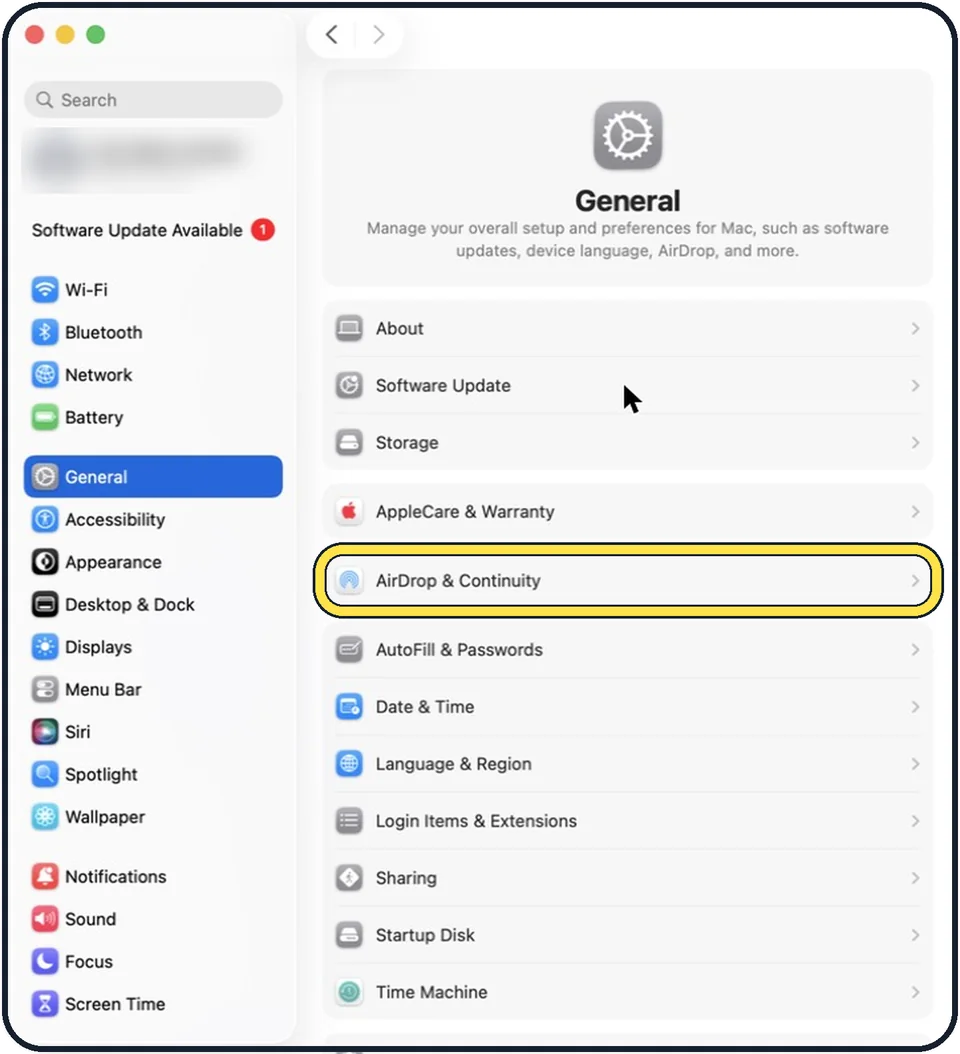
Tap the picture to see it full size Mac: open General, then AirDrop & Continuity
Click the Apple menu, System Settings, General, and then AirDrop & Continuity.
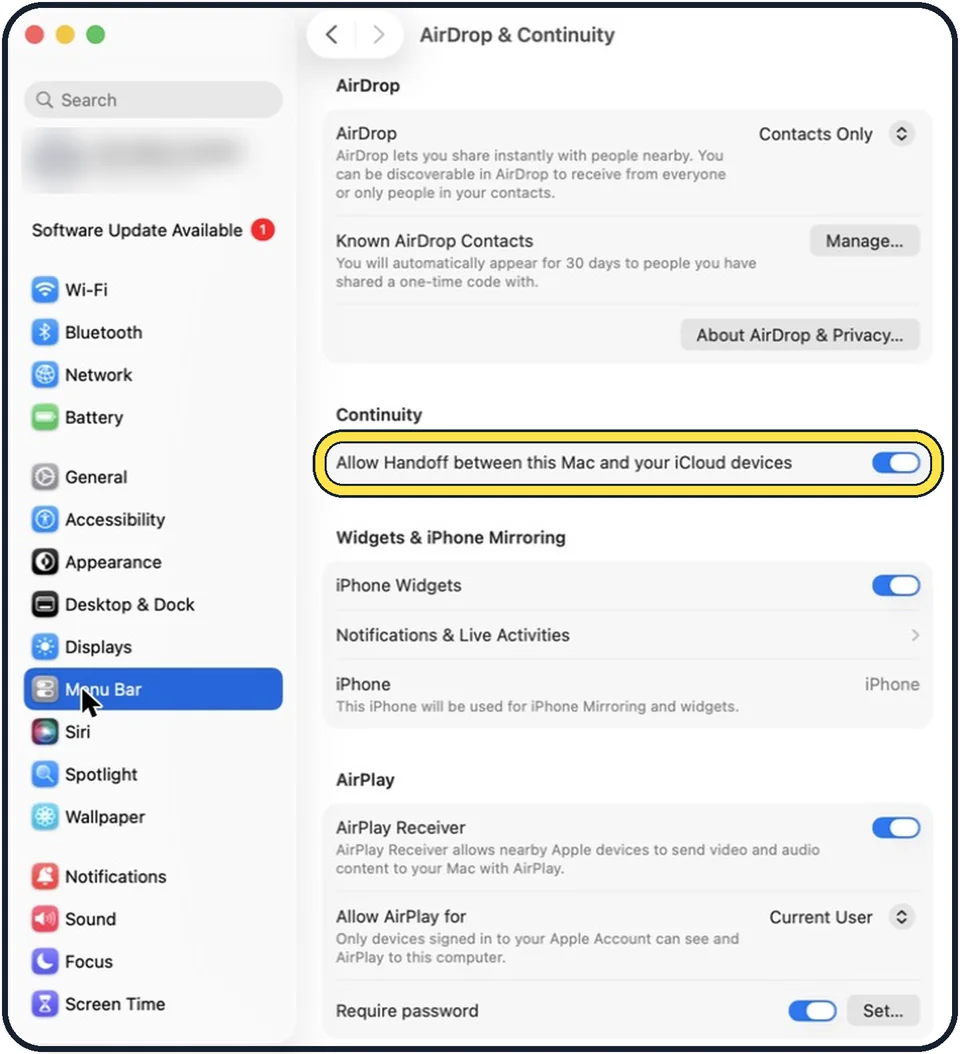
Tap the picture to see it full size Mac: turn on Handoff
The switch is called Allow Handoff between this Mac and your iCloud devices. It is in the Continuity section.
iPhone: turn on Handoff
Open Settings, tap General, tap AirPlay & Continuity and switch on Handoff.
Continue on the Mac
Open a web page in Safari on the iPhone, for example. On the Mac an extra icon appears in the Dock, marked with a small symbol of the iPhone. Click it. You can also press Command and Tab and choose it in the app switcher.
Continue on the iPhone
Swipe up from the bottom of the screen to open the App Switcher. Tap the banner of the app at the bottom.
About this guide
With Handoff you start an email, a note or a web page on one Apple device and continue on another, at the same place. It works between Mac, iPhone and iPad.
These steps are for recent versions of macOS, where the settings app is called System Settings. The pictures are our own screenshots from macOS Tahoe 26 on a MacBook Pro.
Some pictures are simplified diagrams of the screen, not screenshots.
Good to know
Apps that support Handoff include Safari, Mail, Notes, Maps, Reminders, Calendar, Contacts, Pages, Numbers and Keynote, and many apps from other makers.
If the icon does not appear, switch Bluetooth and Wi-Fi off and on again on both devices and check that both use the same Apple Account.
A related feature: how to use AirDrop on a Mac.
In short: Mac: General > AirDrop & Continuity > Allow Handoff. iPhone: General > AirPlay & Continuity > Handoff. App Switcher banner on the iPhone, Handoff icon in the Mac Dock.
Links checked in October 2026. Menus and features can change after software updates. These steps match the version named at the top.
Did this guide work for you?
Sorry about that. What happened?