
What changed: the screenshots are now our own iPhone 17e on iOS 27.0.1, dark mode, and the wording is checked against those screens and Apple's iOS 27 guide.
howtosimply.com/guides/how-to-turn-off-background-app-refresh-on-an-iphone/ · Checked October 2026 · iPhone 17e · iOS 27.0.1
In this guide
Open Settings, tap General and tap Background App Refresh. Switch off the apps that do not need it, or tap Background App Refresh at the top and choose Off or Wi-Fi.
5 of 5 steps with real screenshots · 5 official sources below
- Device
- iPhone
- Shown on
- iOS 27.0.1 (iPhone 17e)
- App
- Settings
- Path
- Settings › General › Background App Refresh
- Real screenshots
- 5 of 5 steps
- Checked
- October 2026
- Sources
- 5 official, linked below
Step by step
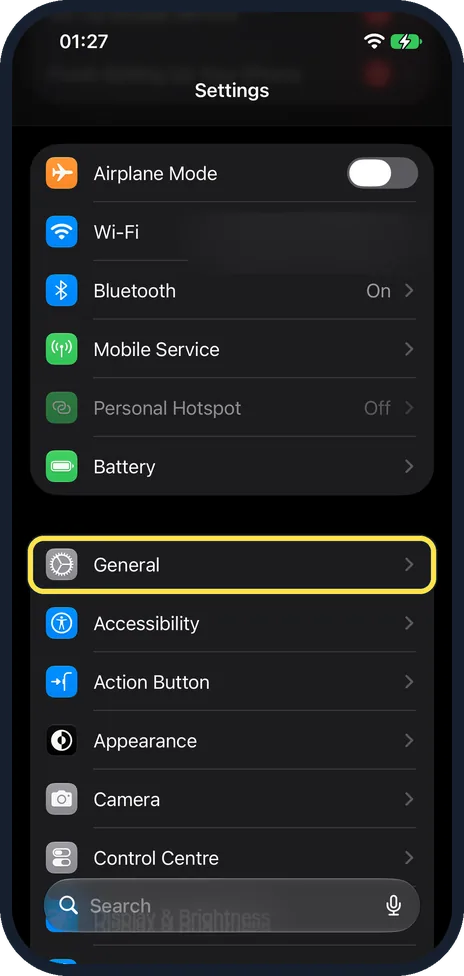
Open Settings and tap General
Scroll down past Wi-Fi, Bluetooth and Battery. General starts the next group of the main Settings list. On our iPhone 17e with iOS 27, it sits above Accessibility and Action Button.
Watch these steps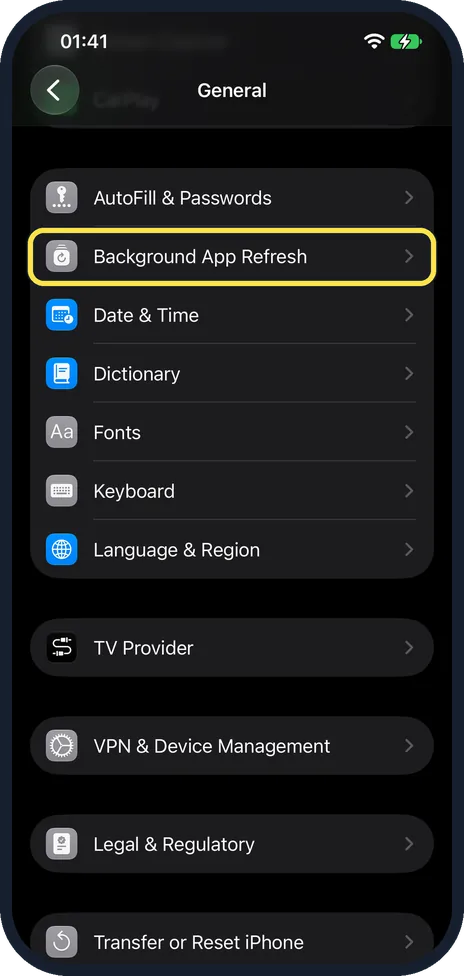
Tap Background App Refresh
Scroll down the General page. On our iPhone 17e with iOS 27, it is right below AutoFill & Passwords and above Date & Time.
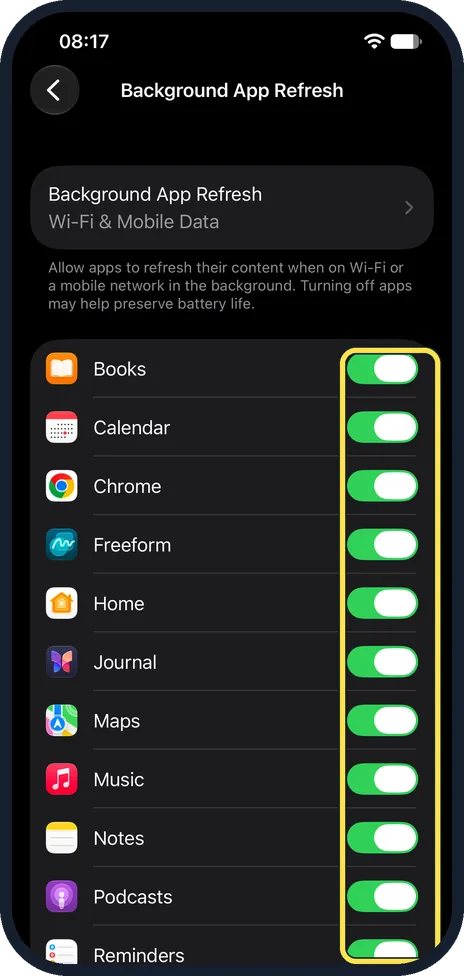
Switch off single apps
The page lists every app that can refresh in the background, in alphabetical order. On our iPhone 17e with iOS 27 it started with Books, Calendar, Chrome, Freeform and Home, all switched on. Turn off the switch next to apps you seldom use, such as shopping apps and games. Leave it on for apps where fresh content matters, such as navigation or a messenger from another company.
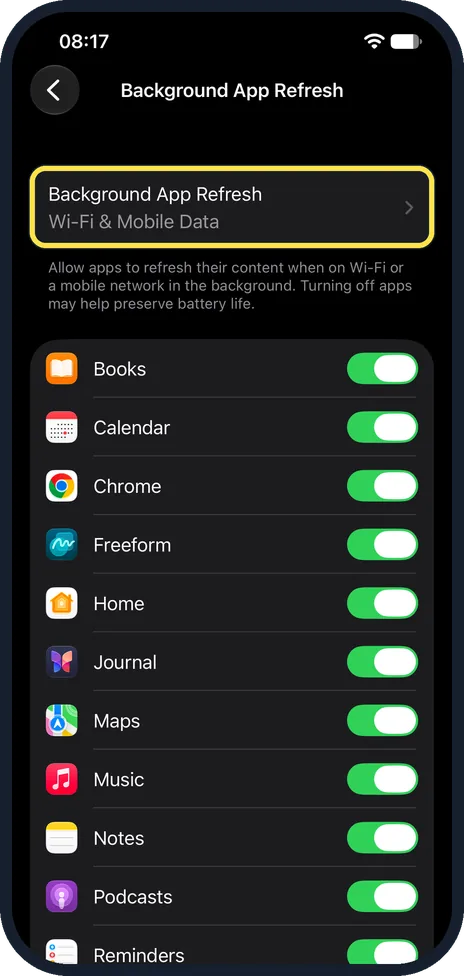
Or change it for all apps at once
Tap Background App Refresh at the top of the page. The grey line under it shows the current choice. On our iPhone 17e with iOS 27, it read Wi-Fi & Mobile Data.
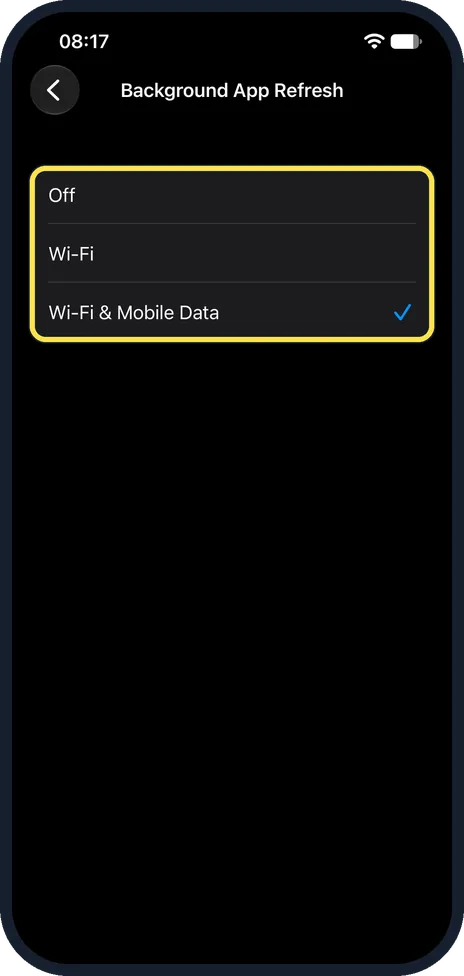
Choose Off, Wi-Fi, or Wi-Fi & Mobile Data
With Wi-Fi, apps refresh in the background only on Wi-Fi. Off stops it for every app. On our iPhone 17e with iOS 27, Wi-Fi & Mobile Data was ticked.
What changed: the screenshots are now our own iPhone 17e on iOS 27.0.1, dark mode, and the wording is checked against those screens and Apple's iOS 27 guide.
Watch these steps
If you do not see this option
- No Background App Refresh row On our iPhone 17e with iOS 27, it is on the General page, right below AutoFill & Passwords and above Date & Time. Scroll down past About, Software Update, iPhone Storage, AppleCare & Warranty and AirDrop to reach it.
- An app is not in the list The page lists only apps that can refresh in the background. On our iPhone 17e with iOS 27, it started with Books, Calendar, Chrome, Freeform, Home, Journal and Maps.
If this does not work
- Apps do not refresh away from Wi-Fi Apple says Low Data Mode pauses automatic updates and background tasks when the iPhone is not connected to Wi-Fi. Low Data Mode is set per network: on our iPhone 17e with iOS 27, the info page of the Wi-Fi network had a Low Data Mode switch, which was off. Source: View or change cellular data settings on iPhone
- The battery still drains quickly Apple says the iPhone manages how apps run in the background, so quitting apps you are not using does not prolong battery life. Turning off Background App Refresh is one step; Apple puts Low Power Mode under Settings, Battery, Power Mode on iPhone 15 or later. Source: Quit and reopen an app on iPhone · Source: Save battery life with Power Modes on iPhone
About this guide
Background App Refresh lets apps that you are not using check for new content, so that it is ready when you open them. On our iPhone 17e with iOS 27, the page itself says: Turning off apps may help preserve battery life.
Screenshots: our own iPhone 17e with iOS 27.0.1, dark mode.
Good to know
You do not need to swipe apps away in the App Switcher to save battery. Apple says the iPhone manages how apps run in the background, so quitting apps you are not using does not prolong battery life.
Apple says Low Data Mode pauses automatic updates and background tasks when the iPhone is not connected to Wi-Fi, and that Adaptive Power can limit background activity to save battery.
More ways to save energy: how to turn on Low Power Mode on an iPhone.
In short: Settings, General, Background App Refresh, switch off apps or choose Off or Wi-Fi.
- Apple Support: Switch apps on your iPhone, iPad or iPod touch
- Apple Support: Use Low Data Mode on your iPhone and iPad
- Apple iPhone User Guide: Quit and reopen an app on iPhone
- Apple iPhone User Guide: View or change cellular data settings on iPhone
- Apple iPhone User Guide: Save battery life with Power Modes on iPhone
Links checked in October 2026. Menus and features can change after software updates. These steps match the version named at the top.
Did this guide work for you?
Sorry about that. What happened?