
howtosimply.com/guides/how-to-record-a-phone-call-on-a-samsung-galaxy/ · Checked October 2026 · Samsung Galaxy A57 5G (SM-A576B), One UI 8.5, Android 16
In this guide
During a call in the Samsung Phone app, tap the Record button. Everyone on the call hears that recording has started. Recordings are under Phone, More options, Settings, Record calls, Recorded calls. Samsung's US guide says it needs One UI 7 or later.
4 of 5 steps with real screenshots · 1 official source below
- Device
- Android
- Shown on
- Samsung Galaxy A57 5G (SM-A576B), One UI 8.5, Android 16
- App
- Phone
- Path
- Phone › Settings › Record calls › Recorded calls
- Real screenshots
- 4 of 5 steps
- What we did
- Observed: looked at each screen, changed nothing
- Our phone
- Shown on Galaxy A57, One UI 8.5
- Checked
- October 2026
- Sources
- 1 official, linked below
Step by step
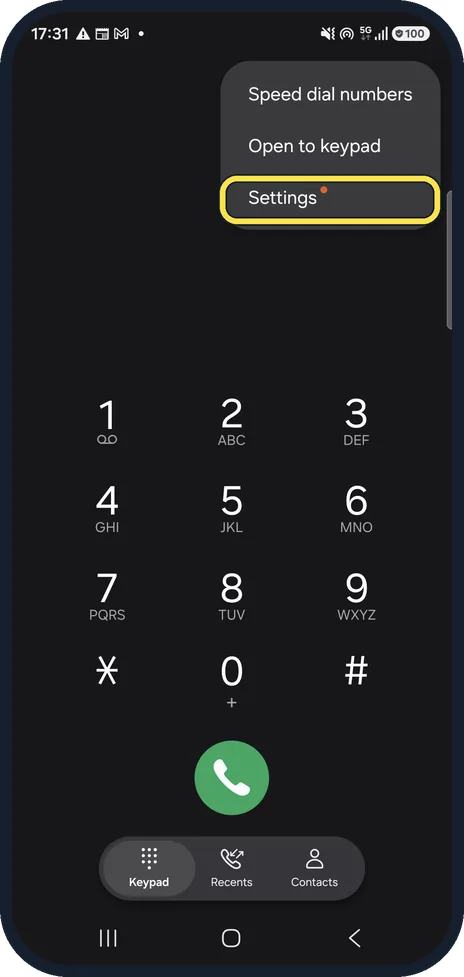
Open the Phone app settings
Open the Phone app, tap the three dots (More options) and tap Settings.
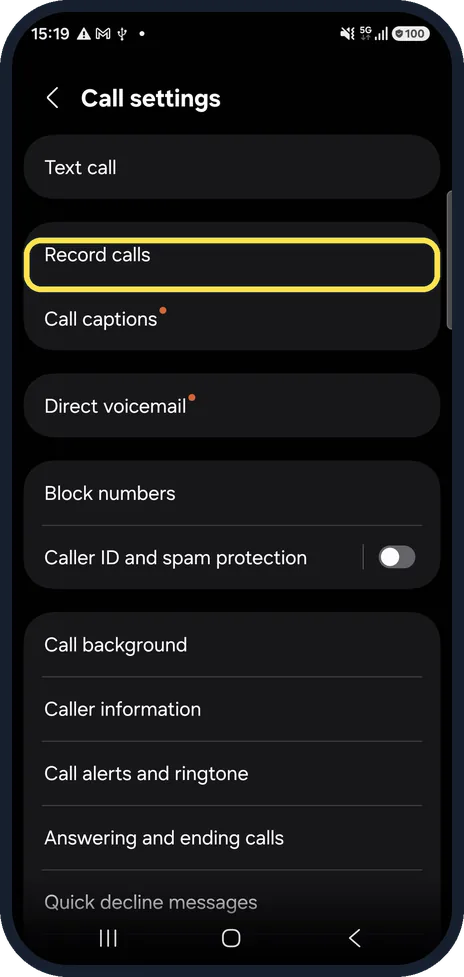
Tap Record calls
Ours was on One UI 8.5 in the Samsung Phone app. If a banner offers a new version of the Calls app, the page may look slightly different after the update.
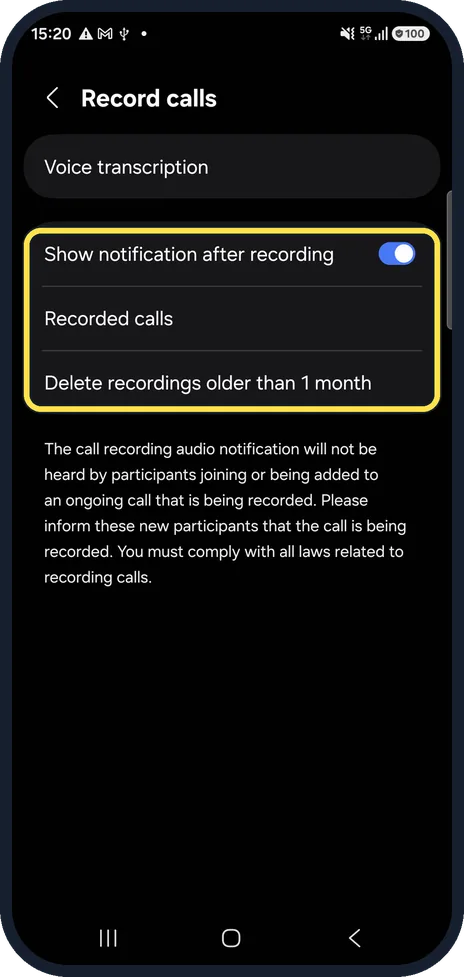
Check the recording options
Show notification after recording tells you when a recording is saved. Delete recordings older than 1 month tidies up automatically.
Record during a call
In a call, tap the Record icon on the call screen. Tap it again to stop. The other people hear an announcement, as the note on the settings page explains.
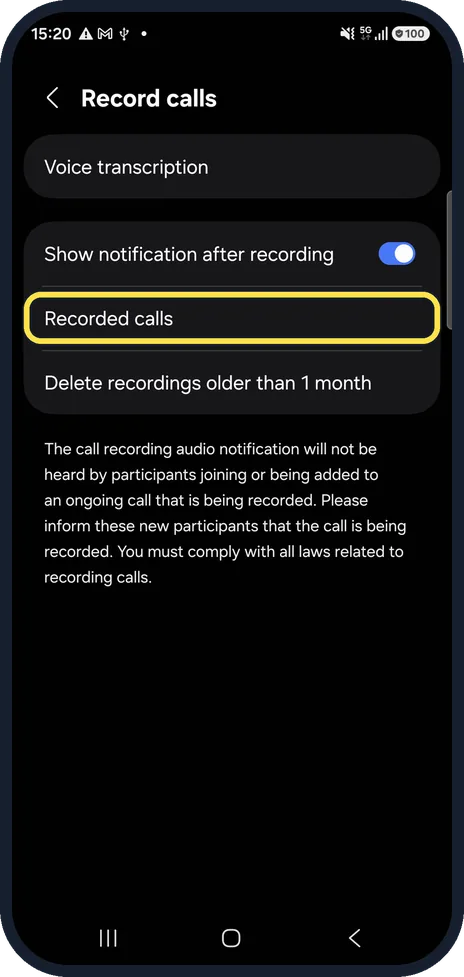
Find your recordings
Phone, More options, Settings, Record calls, Recorded calls.
If you do not see this option
- There is no Transcript assist Samsung US says call transcripts and summaries are not offered on the Galaxy A56, A36, A26 and A17, and that Transcript assist needs a Samsung account sign-in. Source: How to record phone calls on Galaxy phones
- Your language is not transcribed Samsung US says some regions and languages are not supported for call transcription, and lists the ones that are, such as English, German, Hindi, Korean and Spanish. Source: How to record phone calls on Galaxy phones
- There is no Record button during a call Samsung says the Record icon is on the left of the call screen, and on some phones you need to tap More first. Call recording needs the Samsung Phone app with One UI 7 or later. Source: How to record phone calls on Galaxy phones
If this does not work
- You cannot find a recording Samsung says recorded calls show a small microphone icon in the Recents tab of the Phone app. Tap the call, then the microphone icon to play it. They are also under Settings, Record calls, Recorded calls. Source: How to record phone calls on Galaxy phones
- Someone joined later and did not hear the announcement Samsung says people added to a group call are not told that it is being recorded, so tell them yourself. Source: How to record phone calls on Galaxy phones
About this guide
Samsung's own Phone app can record calls, for example to keep a record of an agreement. The other people are told by an announcement. Recording laws differ by country: in many places everyone must agree, so tell people anyway.
Good to know
If you see no Record button, check the One UI version: Samsung says call recording needs One UI 7 or later.
Voice transcription, at the top of the Record calls page, can turn recordings into text. Samsung says it needs a Samsung account and is not offered on some A-series phones.
In short: During a call: Record. Recordings: Phone, Settings, Record calls, Recorded calls.
Links checked in October 2026. Menus and features can change after software updates. These steps match the version named at the top.
📷 See real photos from the Galaxy A57 in our Camera Lab, next to 10 other phones.
Did this guide work for you?
Sorry about that. What happened?