
You are viewing the iOS 26 version of this guide, recorded on iOS 26.7.1 (iPhone 14 Pro) on 5 October 2026. It is kept as it was and not updated. See the iOS 27 version.
howtosimply.com/guides/how-to-turn-on-low-power-mode-on-an-iphone/ · Checked 5 October 2026 · iPhone 14 Pro · iOS 26.7.1
In this guide
Open Settings, tap Battery and switch on Low Power Mode at the bottom of the page. The battery icon turns yellow, and the mode switches off by itself when the phone is charged to 80%.
2 of 3 steps with real screenshots · 1 official source below
- Device
- iPhone
- Shown on
- iOS 26.7.1 (iPhone 14 Pro)
- App
- Settings
- Path
- Settings › Battery › Low Power Mode
- Real screenshots
- 2 of 3 steps
- Checked
- 5 October 2026
- Sources
- 1 official, linked below
Step by step
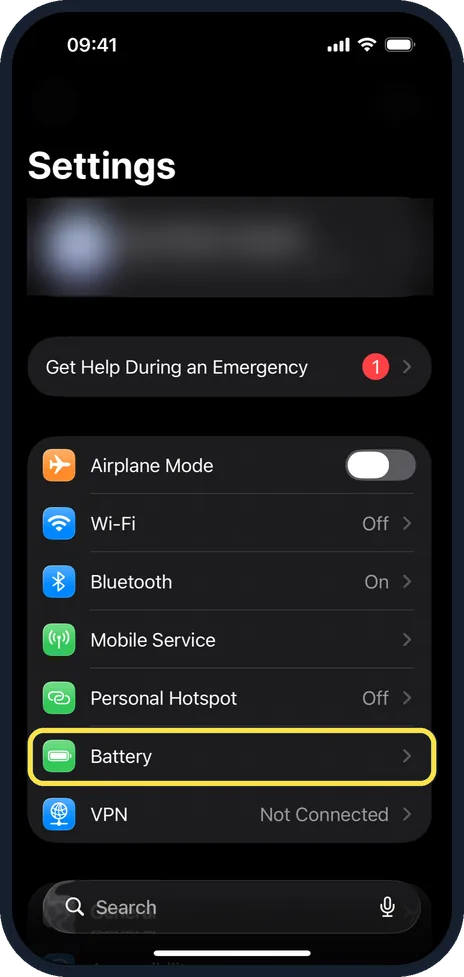
Open Settings and tap Battery
Battery has a green icon in the main list.
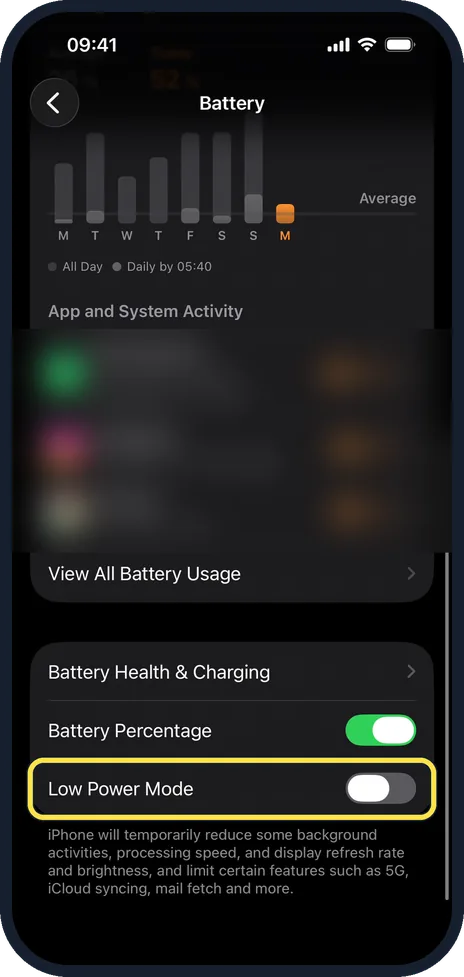
Tap Power Mode and switch on Low Power Mode
On our iPhone 14 Pro with iOS 26.7.1 the Low Power Mode switch is at the bottom of the Battery page. The battery symbol in the status bar turns yellow.
Add it to Control Centre
Open Control Centre, touch and hold an empty area, tap Add a Control and choose Low Power Mode. After that it is one tap away.
If this does not work
- Low Power Mode turned itself off. Apple says it turns off when the iPhone is charged to 80% or higher. Source: Use Low Power Mode to save battery life on your iPhone
- Low Power Mode turns on by itself below 20%. Apple says that happens when the iPhone supports Adaptive Power and Adaptive Power is on. Source: Use Low Power Mode to save battery life on your iPhone
About this guide
Low Power Mode makes a charge last noticeably longer by reducing background activity, mail fetching, some visual effects and screen brightness. Use it whenever you will be away from a charger for a long time. The pictures are our own, from an iPhone 14 Pro and an iPhone 17e, both on iOS 27.0.1 in dark mode.
Good to know
The iPhone offers Low Power Mode by itself at 20% and again at 10%.
While it is on, the screen locks after 30 seconds, 5G is limited on some models, and iCloud Photos pauses syncing.
To turn it on automatically, open the Shortcuts app, tap Automation, choose Battery Level and add the action Set Low Power Mode.
If the battery drains fast all the time, see why your phone battery drains fast and how to check battery health.
In short: Settings, Battery, Power Mode, Low Power Mode.
Links checked in October 2026. Menus and features can change after software updates. These steps match the version named at the top.
Did this guide work for you?
Sorry about that. What happened?