
What changed: the screenshots are now our own iPhone 17e on iOS 27.0.1, dark mode, and the wording is checked against those screens and Apple's iOS 27 guide.
howtosimply.com/guides/how-to-change-the-first-day-of-the-week-in-the-iphone-calendar/ · Checked October 2026 · iPhone 17e · iOS 27.0.1
In this guide
Open Settings, tap Apps, then Calendar, scroll down and tap Start Week On. Tap a weekday under Calendar App Only. On our iPhone 17e the tick was on System Setting, which follows the region set under Language & Region.
If you do not see this option
- You are looking in the Calendar app. The choice is in the Settings app, not in Calendar. Apple's iOS 26 and iOS 27 guides both give the path Settings, Apps, Calendar, Start Week On. Source: Change your Calendar settings on iPhone · Source: Change your Calendar settings on iPhone (iOS 26)
- You are on iOS 26. Apple's iOS 26 guide gives the same path: Settings, Apps, Calendar, Start Week On. Source: Change your Calendar settings on iPhone · Source: Change your Calendar settings on iPhone (iOS 26)
6 of 6 steps with real screenshots · 2 official sources below
- Device
- iPhone
- Shown on
- iOS 27.0.1 (iPhone 17e)
- App
- Settings
- Path
- Settings › Apps › Calendar › Start Week On
- Real screenshots
- 6 of 6 steps
- Checked
- October 2026
- Sources
- 2 official, linked below
Step by step
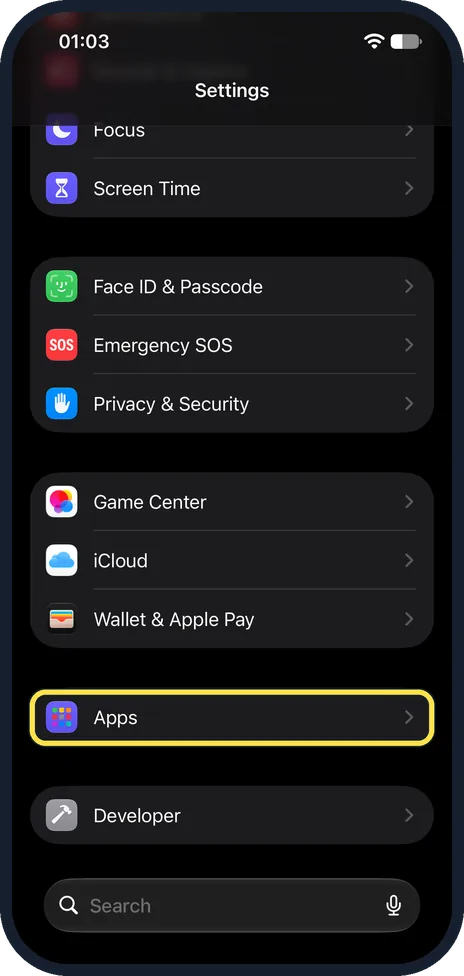
Open Settings and tap Apps
Scroll down and tap Apps.
On our iPhone 17e it is in its own group below Game Center, iCloud and Wallet & Apple Pay.
Watch these steps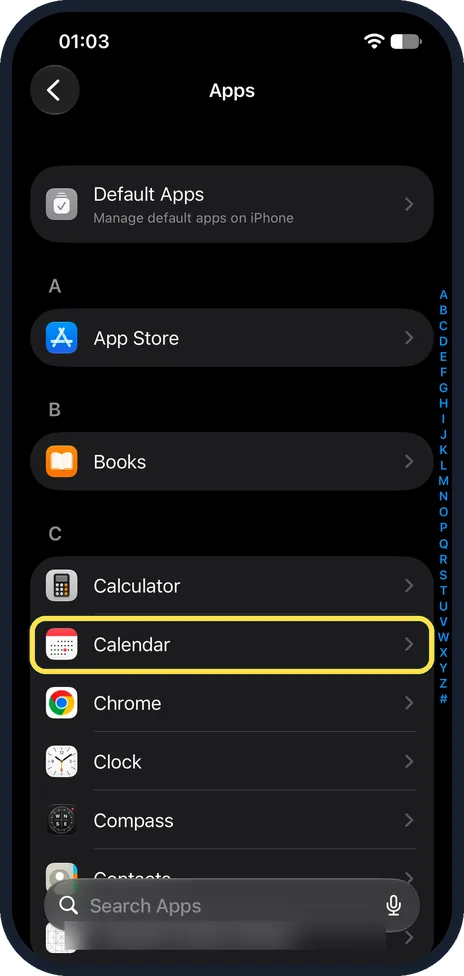
Tap Calendar
The apps are in alphabetical order.
On our iPhone 17e Calendar is the second row under C, after Calculator.
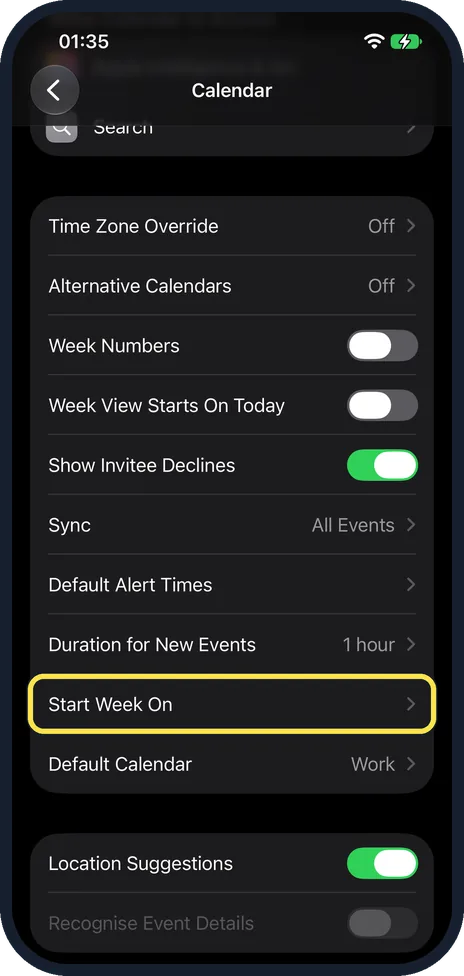
Scroll down and tap Start Week On
It is further down the page than Week Numbers and Week View Starts On Today, below Duration for New Events and above Default Calendar.
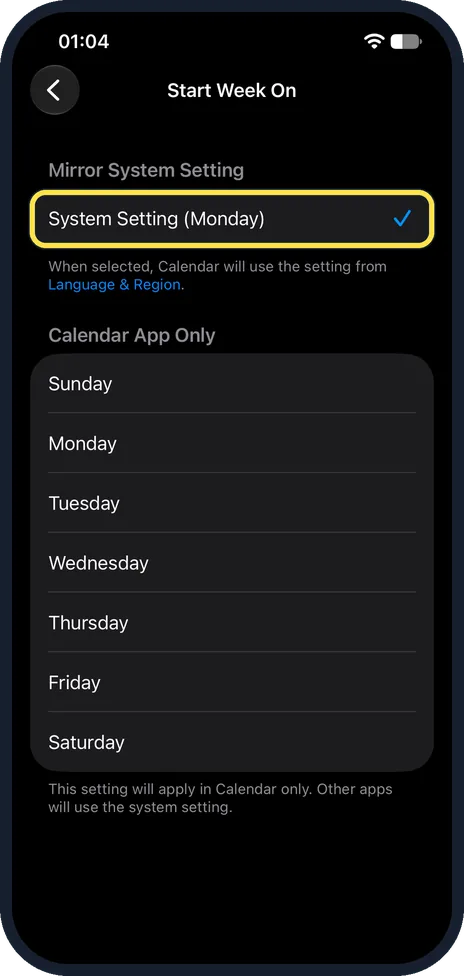
See what is selected now
The tick is on System Setting, under Mirror System Setting, with the region's first day in brackets. On our iPhone 17e it read System Setting (Monday).
The note below says the Calendar then uses the setting from Language & Region.
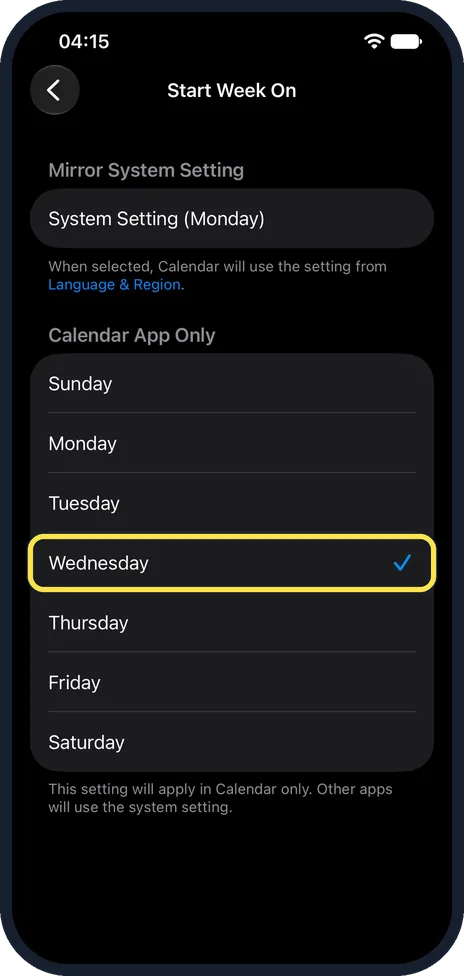
Tap the day you want
Choose any day from Sunday to Saturday under Calendar App Only. The note at the bottom says the choice applies in Calendar only, and other apps keep the system setting.
On our iPhone 17e, when we tapped Wednesday, the tick moved there and left System Setting.
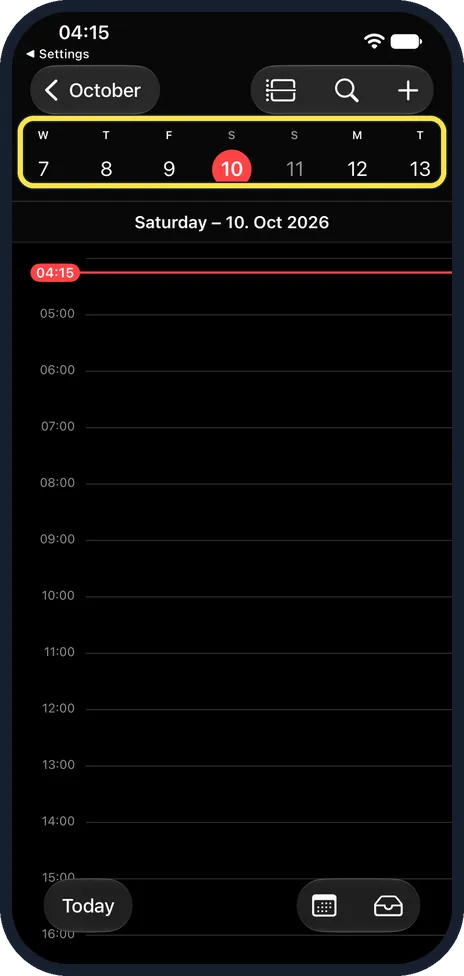
Check the result in Calendar
Open the Calendar app and tap a day.
On our iPhone 17e, with Wednesday picked, the week strip at the top of the day view started on Wednesday: W T F S S M T, from 7 to 13 October.
Language & Region still showed First Day of Week: Monday, so other apps kept Monday. We set Calendar back to System Setting afterwards.
What changed: the screenshots are now our own iPhone 17e on iOS 27.0.1, dark mode, and the wording is checked against those screens and Apple's iOS 27 guide.
Watch these steps
If this does not work
- Other apps still start the week on the old day. The choice under Calendar App Only applies in Calendar only, as the note on the page says. On our iPhone 17e, with Wednesday picked, Language & Region still showed Monday. To change it for the whole phone, tap the blue Language & Region link on the Start Week On page.
- Week view starts on today instead. According to Apple, Week View Starts On Today on the Calendar settings page shows the current day as the first day in Week view. Switch it off if you want Week view to follow Start Week On. On our iPhone 17e it was off. Source: Change your Calendar settings on iPhone · Source: Change your Calendar settings on iPhone (iOS 26)
About this guide
Whether a week starts on Sunday or Monday depends on the region the iPhone is set to. If the Calendar shows the wrong first day for you, you can change it for the Calendar alone, without changing the region of the whole phone.
Screenshots: iPhone 17e, iOS 27.0.1, dark mode.
Good to know
To change the first day for every app, tap the blue Language & Region link on the Start Week On page.
Week View Starts On Today, on the Calendar settings page, makes Week view start on the current day instead. It was off on our iPhone 17e.
Week numbers are on the same Calendar page: how to show week numbers in the Calendar on an iPhone.
In short: Settings, Apps, Calendar, Start Week On, tap a day.
- Apple Support: Change your Calendar settings on iPhone
- Apple iPhone User Guide: Change your Calendar settings on iPhone (iOS 26)
Links checked in October 2026. Menus and features can change after software updates. These steps match the version named at the top.
Did this guide work for you?
Sorry about that. What happened?