
What changed: new screenshots from our own iPhone 17e on iOS 27.0.1, dark mode, and the wording checked against those screens.
howtosimply.com/guides/how-to-change-the-search-engine-in-safari-on-an-iphone/ · Checked October 2026 · iPhone 17e · iOS 27.0.1
In this guide
Open Settings, tap Apps, then Safari, then Search Engine, and tap the one you want: Google, Yahoo, Bing, DuckDuckGo or Ecosia. Searches typed into the Safari address bar then go to that search engine.
4 of 5 steps with real screenshots · 1 official source below
- Device
- iPhone
- Shown on
- iOS 27.0.1 (iPhone 17e)
- App
- Settings
- Path
- Settings › Apps › Safari › Search Engine
- Real screenshots
- 4 of 5 steps
- Checked
- October 2026
- Sources
- 1 official, linked below
Step by step
Open Settings and tap Apps
Apps is near the bottom of the main Settings list. On iOS 17 and earlier, Safari is in the main list itself.
Watch these steps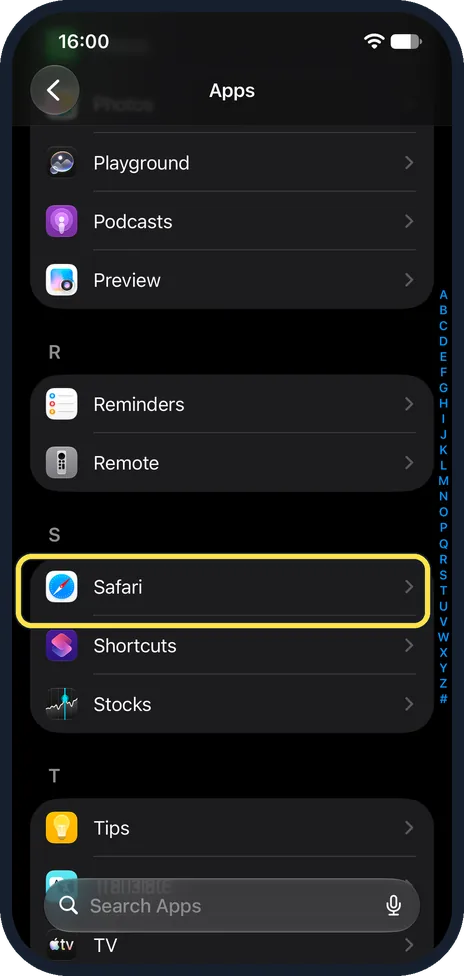
Tap Safari
The apps are in alphabetical order, so Safari is under S. The letters at the right edge jump there.
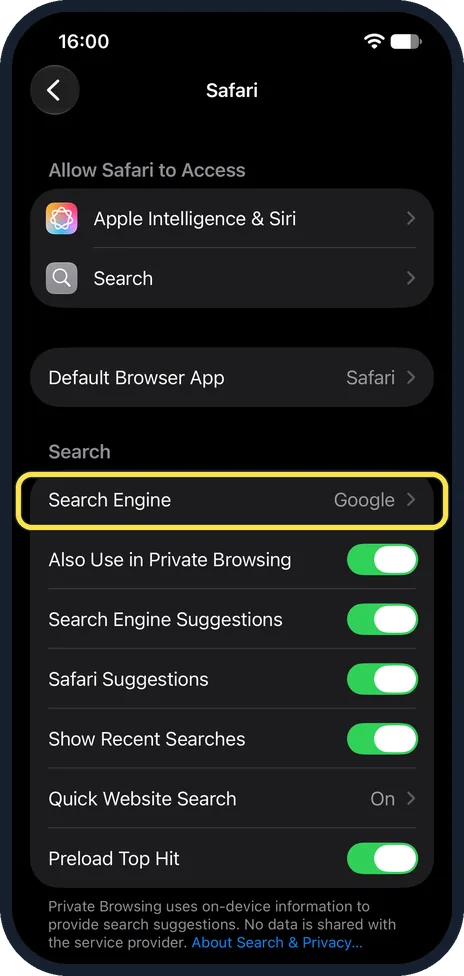
Tap Search Engine
It is the first row of the Search section and shows the current choice at the right.
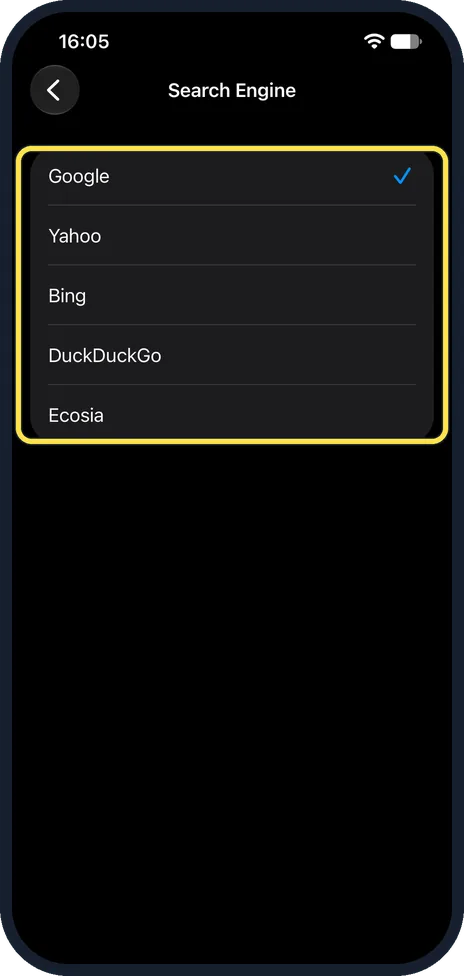
Tap the search engine you want
On our iPhone with iOS 27.0.1 the choices were Google, Yahoo, Bing, DuckDuckGo and Ecosia. The tick moves to your choice. There is nothing to save: go back or close Settings.
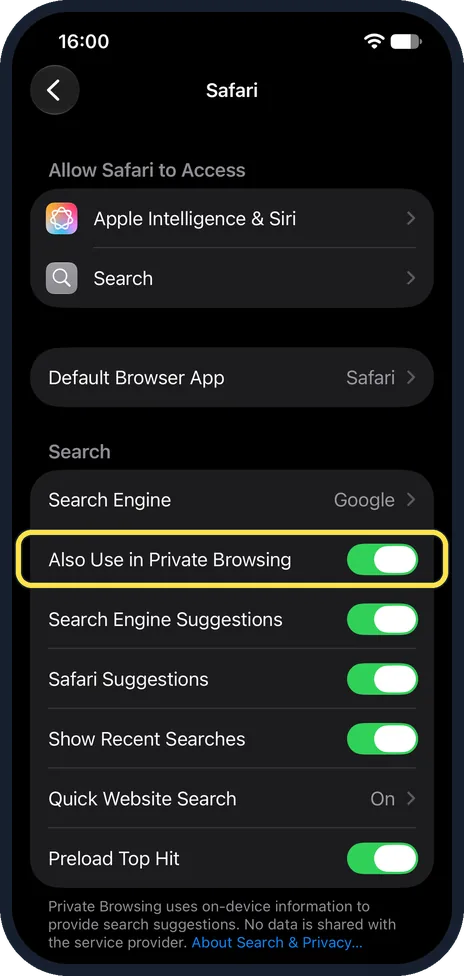
Choose separately for Private Browsing if you like
Back on the Safari page, Also Use in Private Browsing is on at first. Switch it off to choose a different search engine for private tabs.
What changed: new screenshots from our own iPhone 17e on iOS 27.0.1, dark mode, and the wording checked against those screens.
Watch these steps
If you do not see this option
- Apple's guide shows a different route? Apple's iOS 27 User Guide says Settings, Search, Search Engine. On our iPhone 17e with iOS 27.0.1, Search Engine was on the Safari page, as in the pictures, and the same page had a Search row under Allow Safari to Access. Source: Change your default search engine on iPhone
About this guide
Safari sends what you type into the address bar to Google unless you choose otherwise. The setting is not in Safari itself but in the Settings app, and it takes four taps. The list of search engines shown here is the one an iPhone set to the United States offers; in other regions it can differ.
The screenshots are our own, taken on an iPhone 17e running iOS 27.0.1, in dark mode.
Good to know
The same page has Search Engine Suggestions and Safari Suggestions. They decide whether suggestions appear while you type.
To change the browser itself, not only the search engine: how to change the default browser and other default apps on an iPhone.
For searches that leave no history on the phone: how to use Private Browsing in Safari on an iPhone.
In short: Settings, Apps, Safari, Search Engine, tap your choice.
Links checked in October 2026. Menus and features can change after software updates. These steps match the version named at the top.
Did this guide work for you?
Sorry about that. What happened?