
howtosimply.com/guides/how-to-turn-off-smart-features-in-the-gmail-app-on-android/ · Checked October 2026 · Samsung Galaxy A57 5G (SM-A576B), One UI 8.5, Android 16
In this guide
In Gmail open Settings, tap your account and untick Smart features. Then tap Google Workspace smart features and untick the two boxes there. Smart Compose, Smart Reply and package tracking stop working when these are off.
3 of 3 steps with real screenshots · 1 official source below
- Device
- Android
- Shown on
- Samsung Galaxy A57 5G (SM-A576B), One UI 8.5, Android 16
- App
- Gmail
- Path
- Gmail › Settings
- Real screenshots
- 3 of 3 steps
- Checked
- October 2026
- Sources
- 1 official, linked below
Step by step
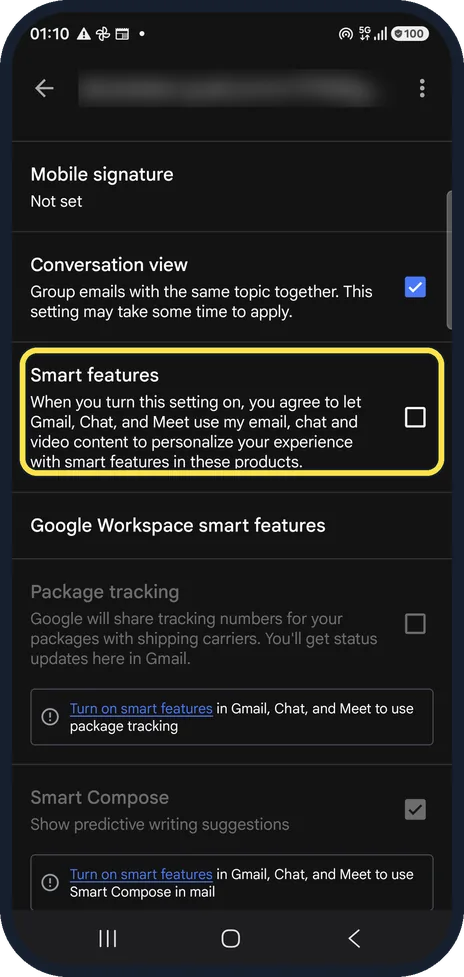
Find Smart features
Gmail, menu, Settings, tap your account and scroll to General. Smart features has a tick box; ours was off.
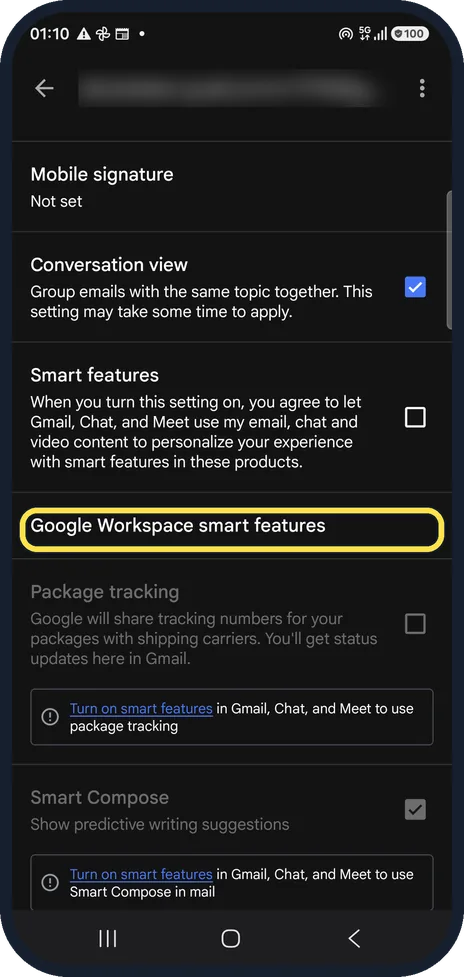
Open Google Workspace smart features
The row below opens the second set of switches.
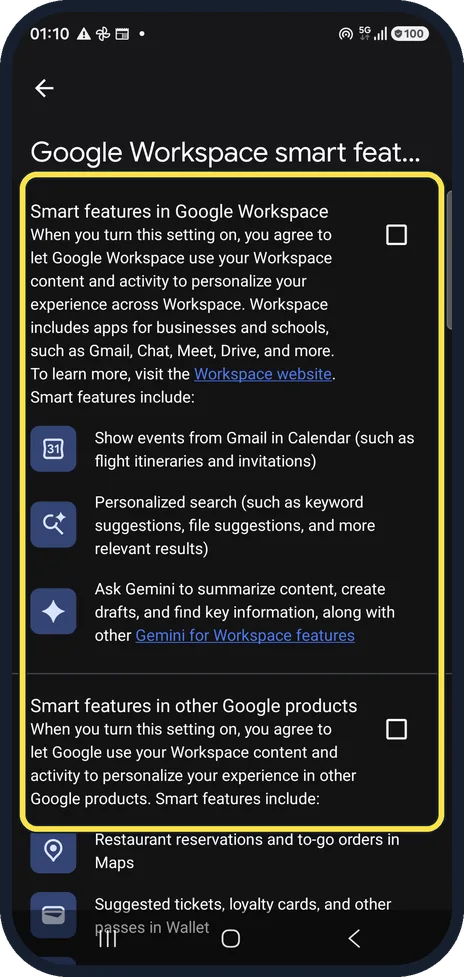
Untick both boxes
Smart features in Google Workspace covers Gmail, Chat, Meet and Drive; Smart features in other Google products covers things like Maps and Wallet. Each lists examples of what stops.
If you do not see this option
- Your boxes are already unticked Google says smart feature settings are off by default for people who live in the European Economic Area, so there may be nothing to turn off. Ours were off too. Source: Smart features and personalisation in Gmail, Chat and Meet
- You want to change Calendar, Drive or Meet Google's table marks the Workspace settings in Calendar, Chat, Drive, Meet and Voice as web-browser only. In the Android app, change them from Gmail's own settings as shown above. Source: Smart features and personalisation in Gmail, Chat and Meet
If this does not work
- Smart features are still on in the app Google says some changes made on your computer don't show in the mobile app. Check the setting in the Gmail app itself, under Settings and your account. Source: Smart features and personalisation in Gmail, Chat and Meet
About this guide
Smart features let Google use your mail to personalise things like Smart Compose and package tracking. Turning them off is a privacy choice. Our Gmail account is a real one, so addresses, senders and subjects are blurred; the only mail we touched was a test message we sent to ourselves. We did not change ours.
The screenshots are from the Gmail app on a Samsung Galaxy A57 5G with Android 16 and One UI 8.5, in dark mode. The app looks the same on other Android phones; only the phone's own settings screens differ by brand.
Good to know
With smart features off, Smart Compose and Smart Reply appear greyed out with a link to turn smart features on, as on our phone.
The settings belong to your Google Account, but Google notes that some changes made on a computer don't show in the mobile app, so check both if you use Gmail on a computer.
In short: Gmail, Settings, account: untick Smart features; Google Workspace smart features: untick both.
Links checked in October 2026. Menus and features can change after software updates. These steps match the version named at the top.
📷 See real photos from the Galaxy A57 in our Camera Lab, next to 10 other phones.
Did this guide work for you?
Sorry about that. What happened?