
What changed: the screenshots are now our own iPhone 17e on iOS 27.0.1, dark mode, and the wording is checked against those screens and Apple's iOS 27 guide.
howtosimply.com/guides/how-to-create-a-shared-album-on-an-iphone/ · Checked October 2026 · iPhone 17e · iOS 27.0.1
In this guide
Turn on Shared Albums under Settings, your name, iCloud, Photos. Then open Photos, tap Collections and go to Shared Albums. Create the album (on our iPhone 17e, with no shared albums yet, the button was Start Sharing), add photos, give it a name and choose who can see it. Then invite people with Invite Participants.
5 of 5 steps with real screenshots · 4 official sources below
- Device
- iPhone
- Shown on
- iOS 27.0.1 (iPhone 17e)
- App
- Settings
- Real screenshots
- 5 of 5 steps
- Checked
- October 2026
- Sources
- 4 official, linked below
Step by step
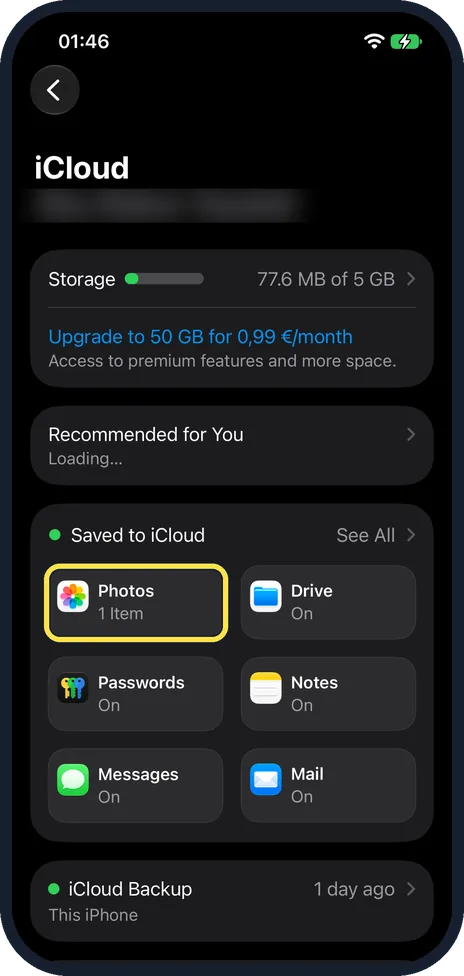
Open Settings, tap your name, then iCloud and Photos
On our iPhone 17e with iOS 27, the iCloud page showed Photos as a tile under Saved to iCloud, reading 1 Item, next to Drive, Passwords, Notes, Messages and Mail. Tap Photos. Our account name is blurred in the picture.
Watch these steps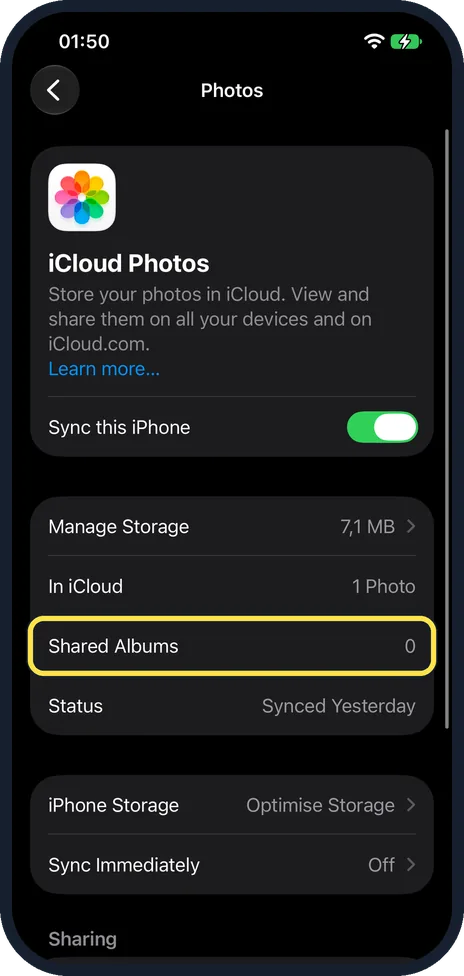
Check Shared Albums on the iCloud Photos page
Apple's iOS 27 guide says to turn on Shared Albums here. On our iPhone 17e with iOS 27.0.1 the switch at the top was called Sync this iPhone and was on, and Shared Albums appeared as a row reading 0, between In iCloud and Status, with no switch on that screen. We have not photographed a separate Shared Albums switch.
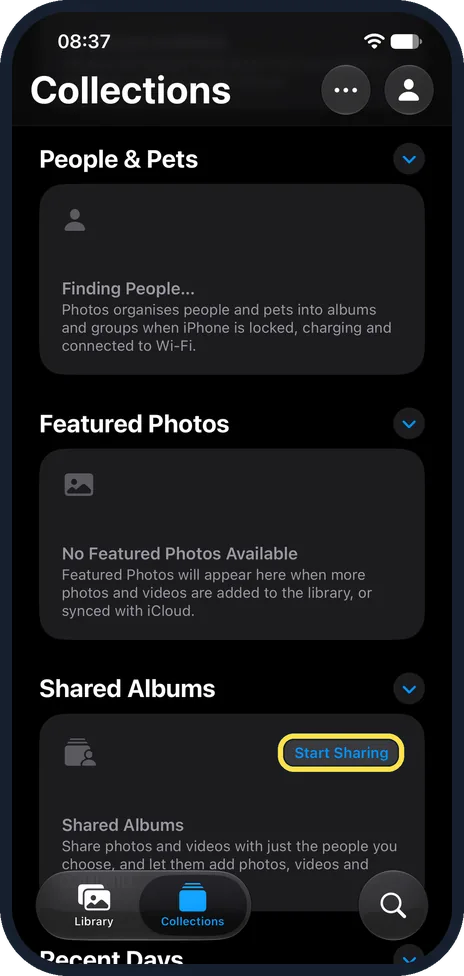
Open Photos, tap Collections, then Start Sharing
Tap Collections at the bottom of Photos and scroll down to Shared Albums. On our iPhone 17e with iOS 27, Shared Albums was the third section of Collections, below People & Pets and Featured Photos. Apple's iOS 27 guide says to tap the Add button there. Our iPhone 17e had no shared albums yet, and the Shared Albums card showed a Start Sharing button instead, with the text Share photos and videos with just the people you choose.
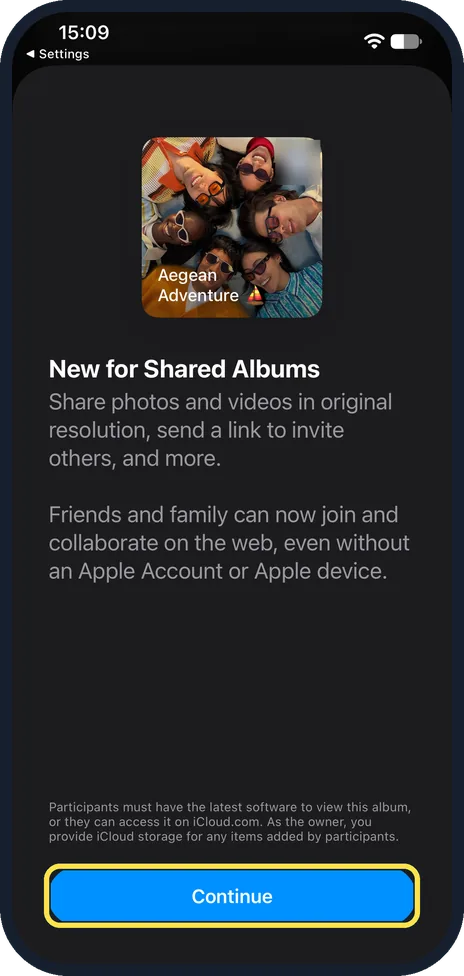
Tap Continue
On our iPhone 17e with iOS 27.0.1, Start Sharing opened a page headed New for Shared Albums. It says you can share photos and videos in original resolution and send a link to invite others, and that friends and family can now join and collaborate on the web, even without an Apple Account or Apple device. Tap Continue at the bottom of that page.
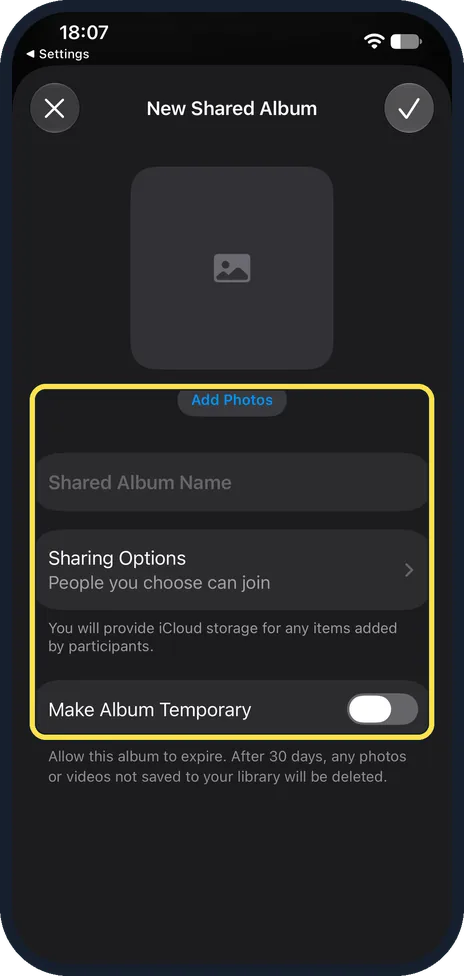
Add photos, name the album and choose who can join
On our iPhone 17e, Continue opened the New Shared Album sheet: an Add Photos button, a Shared Album Name field, Sharing Options reading People you choose can join, with the note You will provide iCloud storage for any items added by participants, and a Make Album Temporary switch, off. Its note reads: Allow this album to expire. After 30 days, any photos or videos not saved to your library will be deleted. Apple says to tap Add Photos and select the items, type a name, and tap Sharing Options to select People You Choose or Anyone with the Link. Apple adds that albums set to expire do not use any iCloud storage. Then tap the tick at the top right to create the album. We closed the sheet with the X and did not create an album, so the finished album is not shown.
What changed: the screenshots are now our own iPhone 17e on iOS 27.0.1, dark mode, and the wording is checked against those screens and Apple's iOS 27 guide.
Watch these steps
If you do not see this option
- No Shared Albums section in Collections Apple's iOS 27 guide says to turn on Shared Albums in Settings, your name, iCloud, Photos first. On our iPhone 17e the section came third in Collections, below People & Pets and Featured Photos. Source: Create shared albums in Photos on iPhone
- No Add button in Shared Albums On our iPhone 17e, which had no shared albums yet, the Shared Albums card showed a Start Sharing button instead.
- You cannot find an invitation you were sent Apple says pending invitations are under Collections: tap your Apple Account profile. On our iPhone 17e that is the round person button at the top right of Collections. Source: Create shared albums in Photos on iPhone
If this does not work
- Items Not Shared after you add photos Apple says to ask the album organiser to make sure they have enough iCloud storage for new content; the organiser provides the iCloud storage for the album. On our iPhone 17e, the iCloud Photos page in Settings showed the storage in use next to Manage Storage. Source: Contribute to a shared album on iPhone · Source: Create shared albums in Photos on iPhone
- A participant cannot add photos Apple says the organiser opens the album, taps the participant and chooses Can Add Photos, which lets them share photos and videos and remove what they added. Our iPhone 17e had no shared albums, so we have not photographed this menu. Source: Add and remove people in a shared album on iPhone
- You cannot invite people to someone else's album Apple says the organiser can give a participant Can Manage Album and Photos, which lets them invite other participants. Our iPhone 17e had no shared albums, so we have not photographed this menu. Source: Add and remove people in a shared album on iPhone
About this guide
A shared album holds photos and videos that you share with people you choose. Apple says they can add their own photos, videos and comments for everyone to see.
Screenshots: iPhone 17e, iOS 27.0.1, dark mode. Menu names follow Apple's iOS 27 guide.
Good to know
People you invite have to accept the invitation before they see the album. They can add their own photos if you leave that option on.
Apple says photos you saved or downloaded from a shared album to your library stay in your library even if the shared album is deleted. Save pictures you want to keep first.
To invite people later, Apple says to open the album, tap the Manage Shared Album button, then Invite Participants, choose a share method and send the invite.
For a few pictures to one person nearby: how to use AirDrop on an iPhone. To keep pictures out of sight: how to hide photos on an iPhone.
In short: Settings, your name, iCloud, Photos, Shared Albums. Photos, Collections, Shared Albums, Add (Start Sharing on our 17e), Add Photos, name, Sharing Options, create, then Invite Participants.
- Apple Support: How to use Shared Albums in Photos on your iPhone, iPad, or Apple Vision Pro
- Apple iPhone User Guide: Create shared albums in Photos on iPhone
- Apple iPhone User Guide: Add and remove people in a shared album on iPhone
- Apple iPhone User Guide: Contribute to a shared album on iPhone
Links checked in October 2026. Menus and features can change after software updates. These steps match the version named at the top.
Did this guide work for you?
Sorry about that. What happened?