
What changed: the screenshots are now our own iPhone 17e on iOS 27.0.1, dark mode, and the wording is checked against those screens and Apple's iOS 27 guide.
iOS 27 compared with iOS 26: iOS 27 moved Ringtone up. It is now the row right below the volume slider, in a section called Ringtone. On iOS 26 the section was called Ringtone and Alerts, and Ringtone sat further down, above Text Tone.
howtosimply.com/guides/how-to-change-the-ringtone-on-an-iphone/ · Checked October 2026 · iPhone 17e · iOS 27.0.1
In this guide
Open Settings, tap Sounds & Haptics, then Ringtone, and tap a sound to hear and select it. You can give single contacts their own ringtone in the Contacts app.
3 of 3 steps with real screenshots · 1 official source below
- Device
- iPhone
- Shown on
- iOS 27.0.1 (iPhone 17e)
- App
- Settings
- Path
- Settings › Sounds & Haptics › Ringtone
- Real screenshots
- 3 of 3 steps
- Checked
- October 2026
- Sources
- 1 official, linked below
Step by step
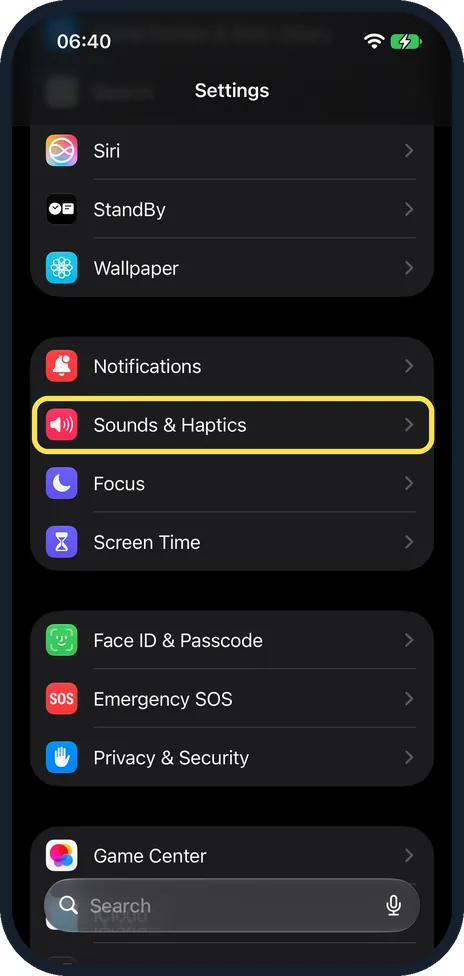
Open Settings and tap Sounds & Haptics
On our iPhone 17e with iOS 27, Sounds & Haptics was in the group with Notifications, Focus and Screen Time, a scroll down the main Settings list.
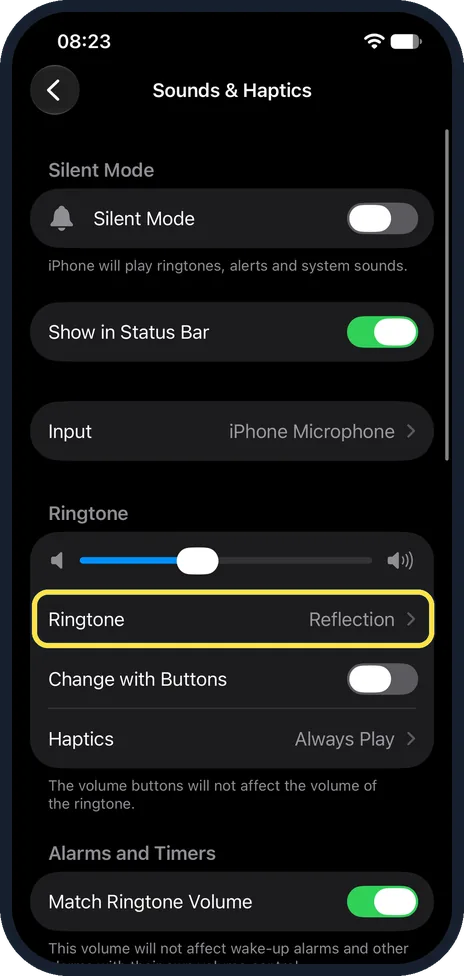
Tap Ringtone
On iOS 27 Ringtone is in the Ringtone section, right below the volume slider. The tone name at the right is the current one. On our iPhone 17e with iOS 27 it read Reflection. Above it the page showed Silent Mode (off), Show in Status Bar and Input; below it came Change with Buttons and Haptics, set to Always Play.
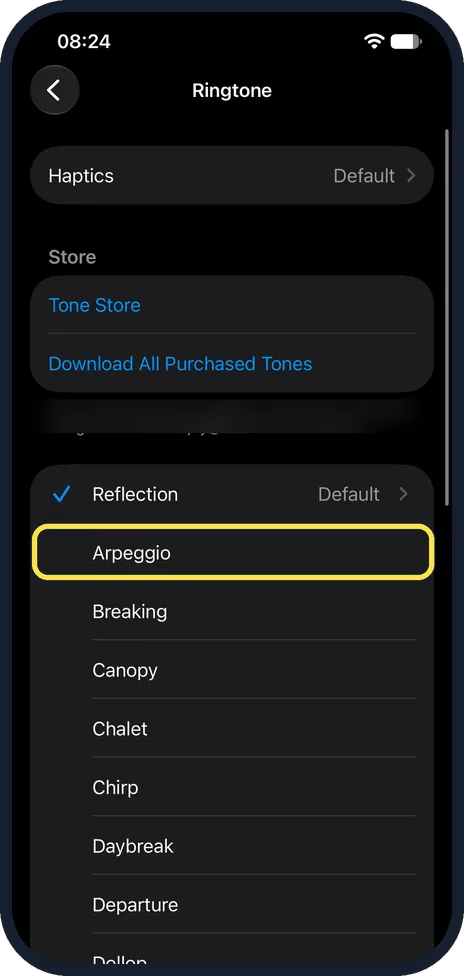
Tap a tone to try it
Each tap plays the sound and selects it. On our iPhone 17e with iOS 27, Reflection was ticked and marked Default, with Arpeggio, Breaking and Canopy below it, and Tone Store above the list. Above Tone Store, a Haptics row read Default, and Download All Purchased Tones sat just below Tone Store on our iPhone.
What changed: the screenshots are now our own iPhone 17e on iOS 27.0.1, dark mode, and the wording is checked against those screens and Apple's iOS 27 guide.
What we saw on our device
- Open Settings and tap Sounds & Haptics: On our iPhone 17e with iOS 27, Sounds & Haptics was in the group with Notifications, Focus and Screen Time, a scroll down the main Settings list.
- Tap Ringtone: On our iPhone 17e with iOS 27 it read Reflection.
- Tap a tone to try it: On our iPhone 17e with iOS 27, Reflection was ticked and marked Default, with Arpeggio, Breaking and Canopy below it, and Tone Store above the list.
If you do not see this option
- No Sounds & Haptics in Settings Apple says the menu is called Sounds & Haptics on supported models and Sounds on other iPhone models. Our iPhone 17e with iOS 27 shows Sounds & Haptics.
- No Download All Purchased Tones on the Ringtone page Apple says you might not see this option if you already downloaded all the tones you bought, or if you have not bought any. Our iPhone 17e showed it below Tone Store.
If this does not work
- The iPhone does not ring at all Apple says that when Silent mode is on, the iPhone does not ring or play alerts. Turn Silent Mode off at the top of Sounds & Haptics, or with the Action button. On our iPhone 17e it was off, with the note iPhone will play ringtones, alerts and system sounds. Source: Silence iPhone
- The volume buttons do not change the ringtone volume Turn on Change with Buttons below the Ringtone row, or drag the volume slider above it. On our iPhone 17e Change with Buttons was off, and the note read: The volume buttons will not affect the volume of the ringtone. Source: Change iPhone sounds and vibrations
- One caller does not use your new ringtone Apple says you can give certain people their own sounds: in the Contacts app, tap the person's name, tap Edit, then choose a ringtone and text tone. Check that person's card if one caller sounds different. Source: Change iPhone sounds and vibrations
About this guide
The default ringtone sounds like everyone else's. Changing it takes a few taps, and a different tone for close family tells you who is calling without looking. The screenshots are our own, taken on an iPhone 17e running iOS 27.0.1.
Good to know
Text Tone, on the same page, changes the sound for messages.
The Tone Store link on the Ringtone page leads to the iTunes Store, where Apple says you can buy ringtones, text tones and alert tones.
If the phone does not ring at all, see iPhone not ringing for calls: settings to check.
In short: Settings, Sounds & Haptics, Ringtone.
Links checked in October 2026. Menus and features can change after software updates. These steps match the version named at the top.
Did this guide work for you?
Sorry about that. What happened?