
What changed: the screenshots are now our own iPhone 17e on iOS 27.0.1, dark mode, and the wording is checked against those screens.
howtosimply.com/guides/how-to-change-the-default-browser-and-other-default-apps-on-an-iphone/ · Checked October 2026 · iPhone 17e · iOS 27.0.1
In this guide
Open Settings, tap Apps and tap Default Apps at the top of the list. Tap Browser App and choose the browser you want, for example Chrome or Firefox. The same page changes the default app for email, calls, navigation and more.
4 of 4 steps with real screenshots · 1 official source below
- Device
- iPhone
- Shown on
- iOS 27.0.1 (iPhone 17e)
- App
- Settings
- Path
- Settings › Apps › Default Apps › Browser App
- Real screenshots
- 4 of 4 steps
- What we did
- Performed: we made the change on our device and show the result
- Checked
- October 2026
- Sources
- 1 official, linked below
Step by step
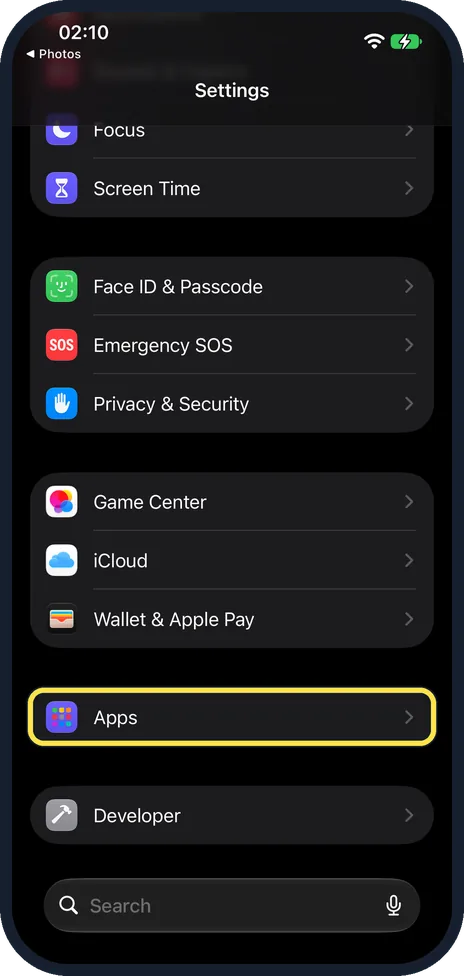
Open Settings and tap Apps
Apps is near the bottom of the main Settings list.
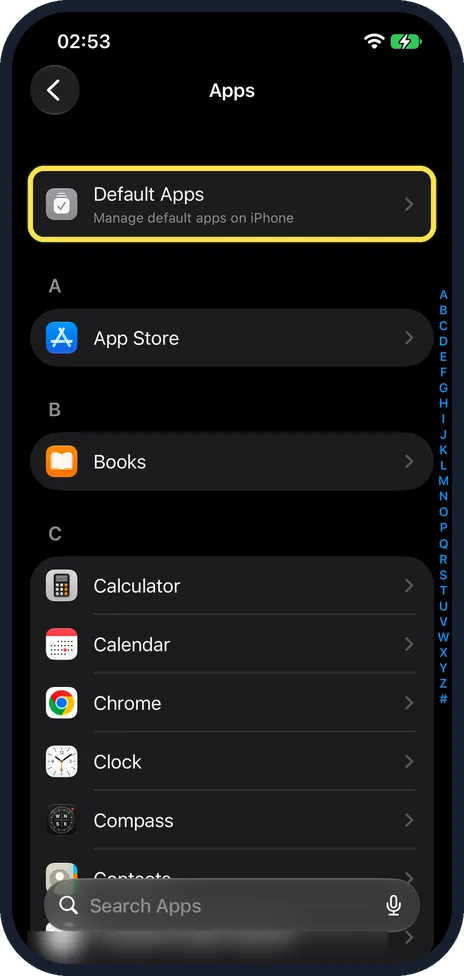
Tap Default Apps
It is the first entry, above the alphabetical list of your apps.
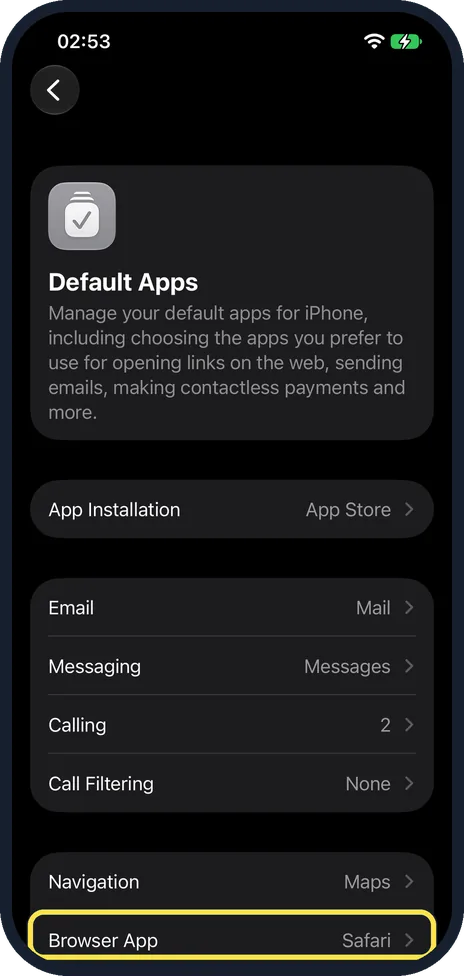
Tap the feature you want to change
For the browser, tap Browser App. The other rows work the same way. Ours was set to Safari. Calling showed 2: Apple explains that some features let you put several apps in order of priority.
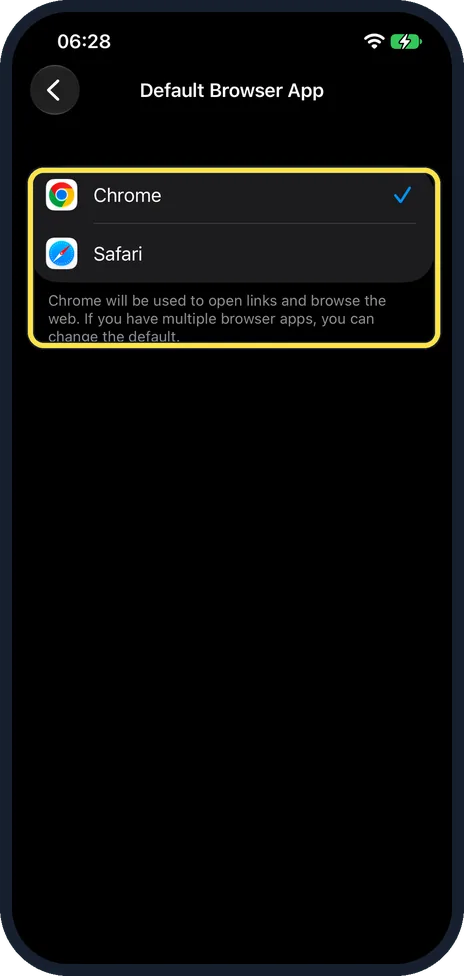
Choose the app
Tap the app in the list. A tick shows the new default. Some choices ask you to confirm on screen. Ours offered Chrome and Safari. After we tapped Chrome, the note below read: "Chrome will be used to open links and browse the web. If you have multiple browser apps, you can change the default."
What changed: the screenshots are now our own iPhone 17e on iOS 27.0.1, dark mode, and the wording is checked against those screens.
If this does not work
- The app you want is not offered. Update it in the App Store first. If it is still not listed, Apple says to contact the app developer. Source: Change your default apps for features on iPhone and iPad
- You picked a browser during setup. In the European Union and Japan, the iPhone may show a browser choice screen. You can change that choice later on this same page. Source: Change your default apps for features on iPhone and iPad
About this guide
Links open in Safari and addresses open in Apple Maps until you choose something else. An iPhone lets you replace several of these standard apps. The other app must be installed first: download it from the App Store and open it once.
The screenshots are our own, taken on an iPhone 17e running iOS 27.0.1, in dark mode.
Good to know
Apple lists these features: Browser App, Email, Calling, Call Filtering, Messaging, Keyboards, Navigation, Passwords & Codes, Translation, Contactless Apps and App Installation.
Not every row appears on every phone. Navigation, Contactless Apps and App Installation depend on your country. App Installation, for other app marketplaces, exists in the European Union and Japan.
A row only offers apps that are installed and support the feature. If your app is missing from the list, update it in the App Store.
To test a new browser, tap a link in an email or a message. It opens in the browser you chose.
If the Default Apps entry is missing, update the iPhone to the latest iOS version.
The same on a computer: how to change the default browser on a Mac.
In short: Settings, Apps, Default Apps, Browser App, choose the app.
Links checked in October 2026. Menus and features can change after software updates. These steps match the version named at the top.
Did this guide work for you?
Sorry about that. What happened?