
What changed: the screenshots are now our own iPhone 17e on iOS 27.0.1, dark mode, and the wording is checked against those screens and Apple's iOS 27 guide.
howtosimply.com/guides/how-to-screen-or-silence-unknown-callers-on-an-iphone/ · Checked October 2026 · iPhone 17e · iOS 27.0.1
In this guide
Open Settings, tap Apps, then Phone. Switch on Silence Unknown Callers to send unsaved numbers to voicemail. If your iPhone shows Apple's Screen Unknown Callers choices instead, choose Ask Reason for Calling or Silence. Under Call Filtering, switch on Unknown Callers to sort their missed calls into a separate list.
3 of 3 steps with real screenshots · 1 official source below
- Device
- iPhone
- Shown on
- iOS 27.0.1 (iPhone 17e)
- App
- Settings
- Path
- Settings › Apps
- Real screenshots
- 3 of 3 steps
- Checked
- October 2026
- Sources
- 1 official, linked below
Step by step
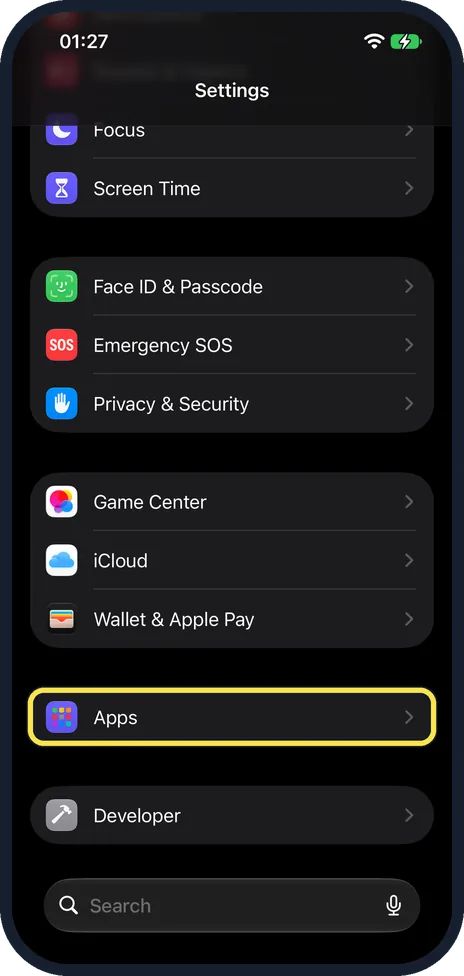
Open Settings and tap Apps
On our iPhone 17e with iOS 27, Apps has its own group below Wallet & Apple Pay, near the bottom of the main Settings list.
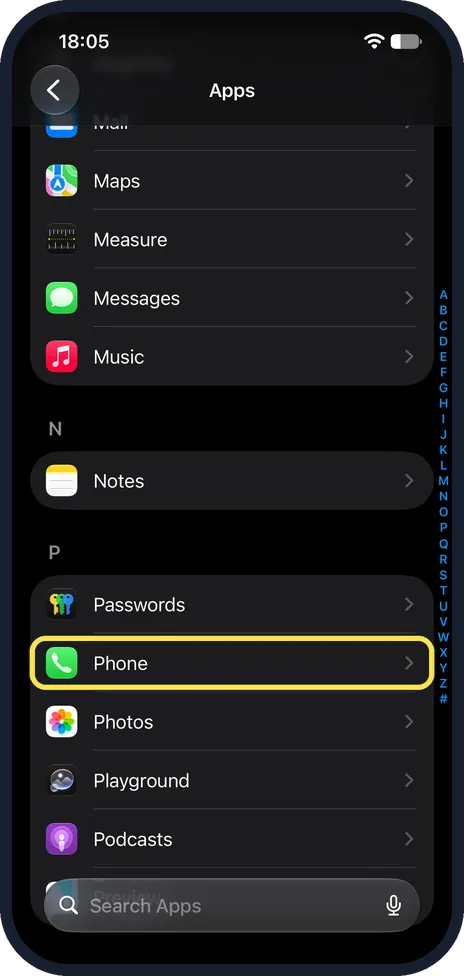
Tap Phone
The apps are listed from A to Z. Use the letters on the right edge to jump to P. On our iPhone 17e with iOS 27.0.1, Phone was the second row under P, between Passwords and Photos.
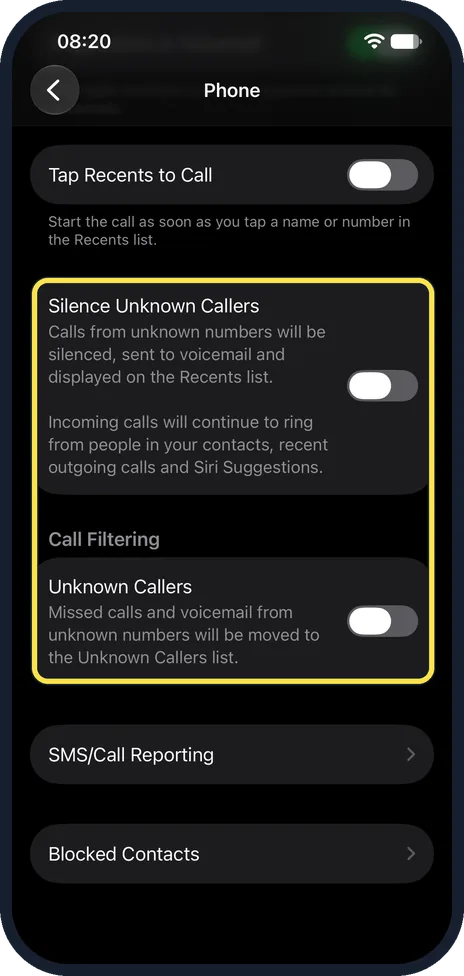
Switch on Silence Unknown Callers and Unknown Callers
With Silence Unknown Callers on, calls from unknown numbers do not ring. They go to voicemail and are displayed on the Recents list. People in your contacts, recent outgoing calls and Siri Suggestions still ring through, as the note on our iPhone 17e says. Further down, under Call Filtering, switch on Unknown Callers: missed calls and voicemail from unknown numbers are then moved to a separate Unknown Callers list. On our iPhone 17e with iOS 27, both switches were off, and SMS/Call Reporting and Blocked Contacts followed below.
What changed: the screenshots are now our own iPhone 17e on iOS 27.0.1, dark mode, and the wording is checked against those screens and Apple's iOS 27 guide.
If you do not see this option
- You only see Silence Unknown Callers. Apple lists Call Screening only for certain language and region pairs, such as English (United Kingdom) or German (Germany). If your iPhone's language and region are not a listed pair, you may get only the Silence option, as on our iPhone. Source: iOS and iPadOS feature availability
- No Silence Unknown Callers switch, but three choices Apple's article Manage unknown callers on iPhone lists Screen Unknown Callers under Settings, Apps, Phone, with Never, Ask Reason for Calling and Silence. With Ask Reason for Calling, the caller is asked why they are calling before the phone rings; Silence silences these calls and sends them to voicemail. Our iPhone 17e, with no SIM card, showed only the single switch. We could not test why. Source: Manage unknown callers on iPhone
- FaceTime calls from unknown numbers still ring The switch on the Phone page covers phone calls. Apple says FaceTime has its own: go to Settings, Apps, FaceTime and turn on Silence Unknown Callers. Calls from unknown numbers are then silenced and sent to voicemail. Source: Manage unknown callers on iPhone
If this does not work
- A wanted call went to voicemail With Silence Unknown Callers on, only people in your contacts, recent outgoing calls and Siri Suggestions ring through, as the note on our iPhone 17e says. Save the number in Contacts. Source: Manage unknown callers on iPhone
- Calls are not screened while you travel Apple says calls are not screened while roaming, and after you call emergency services, call screening turns off for 24 hours. Our iPhone 17e had no SIM card, so we could not test this. Source: Manage unknown callers on iPhone
- One number keeps calling Silencing only affects unknown numbers. To stop one number for good, block it: in the Phone app, tap Contacts, tap the contact and tap Block Contact. Blocked numbers are listed under Blocked Contacts on the Phone settings page of our iPhone 17e.
About this guide
Calls from numbers that are not in your contacts can be spam. The iPhone can keep them from ringing, or question them first, while everyone in your contacts gets through as usual.
The screenshots are our own, taken on an iPhone 17e running iOS 27.0.1 with no SIM card. It shows a single Silence Unknown Callers switch. Apple's article Manage unknown callers on iPhone describes three choices instead: Never, Ask Reason for Calling and Silence. We could not test why our iPhone 17e, which has no SIM card, shows only the switch.
Good to know
Save important numbers in Contacts before you turn this on: the doctor, the school, a delivery service. A call you are waiting for from an unsaved number would otherwise go to voicemail.
FaceTime has its own switch: Settings, Apps, FaceTime, Silence Unknown Callers.
Lower on the Phone page of our iPhone 17e are SMS/Call Reporting and Blocked Contacts. To stop one particular number for good, block it under Blocked Contacts, or from the contact in the Phone app.
In short: Settings, Apps, Phone: Silence Unknown Callers on (or Apple's three choices: Never, Ask Reason for Calling, Silence). Call Filtering, Unknown Callers sorts the rest.
Links checked in October 2026. Menus and features can change after software updates. These steps match the version named at the top.
Did this guide work for you?
Sorry about that. What happened?