
howtosimply.com/guides/how-to-block-numbers-and-spam-calls-on-a-samsung-galaxy/ · Checked October 2026 · Samsung Galaxy A57 5G (SM-A576B), One UI 8.5, Android 16
In this guide
Open the Phone app, tap More options, Settings, Block numbers. Type a number and tap +, or pick one from Recents or Contacts. Switch on Block calls from unknown numbers to stop hidden numbers. Caller ID and spam protection flags spam calls.
6 of 6 steps with real screenshots · 1 official source below
- Device
- Android
- Shown on
- Samsung Galaxy A57 5G (SM-A576B), One UI 8.5, Android 16
- App
- Phone
- Path
- Phone › More options › Settings › Block numbers: add the number
- Real screenshots
- 6 of 6 steps
- What we did
- Observed: looked at each screen, changed nothing
- Our phone
- Shown on Galaxy A57, One UI 8.5
- Checked
- October 2026
- Sources
- 1 official, linked below
Step by step
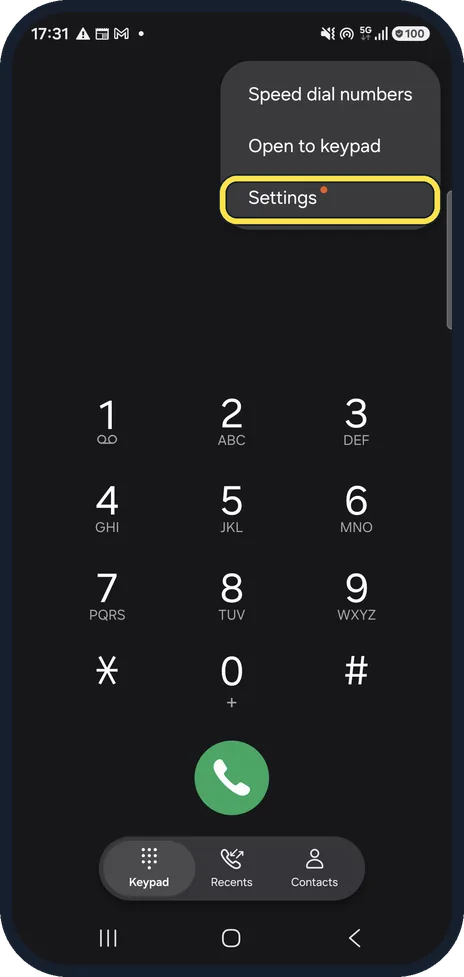
Open the Phone app settings
Open the Phone app, tap the three dots (More options) and tap Settings.
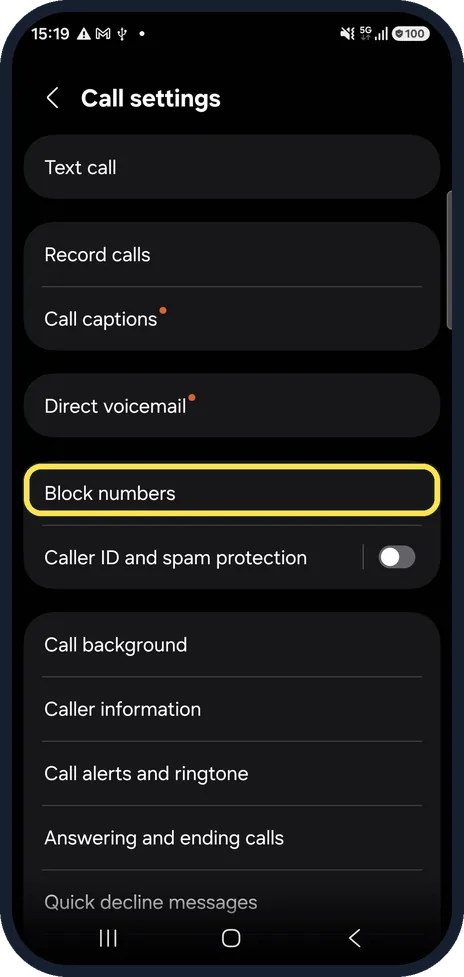
Tap Block numbers
It is in the middle of Call settings.
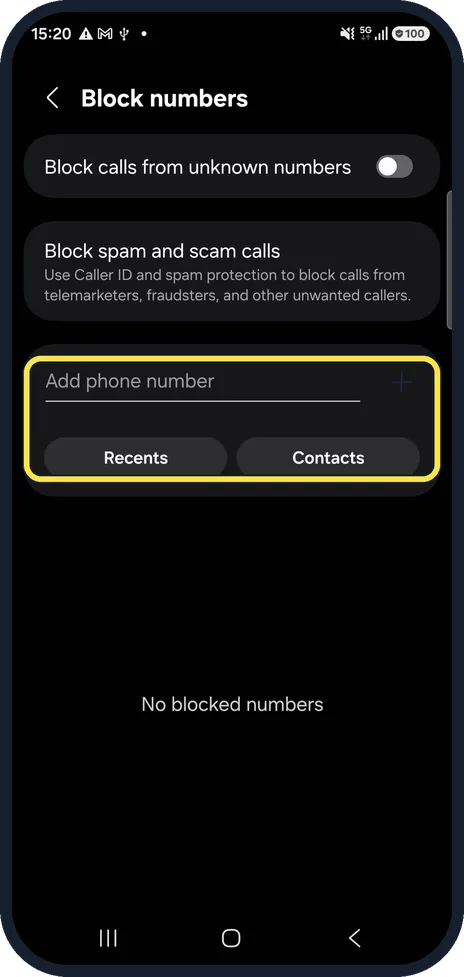
Add a number
Type the number in Add phone number and tap +. Or tap Recents or Contacts and pick it from the list.
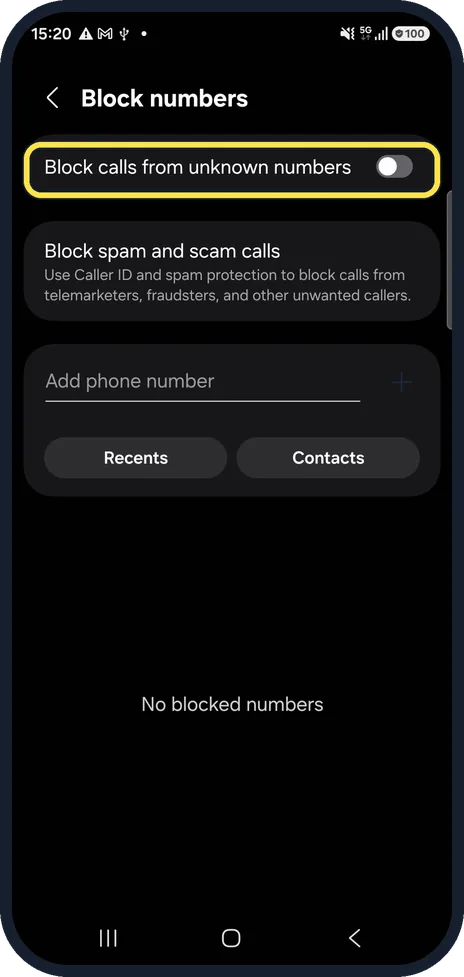
Block unknown numbers
Block calls from unknown numbers is meant for callers who hide their number. Switch it on if those calls bother you.
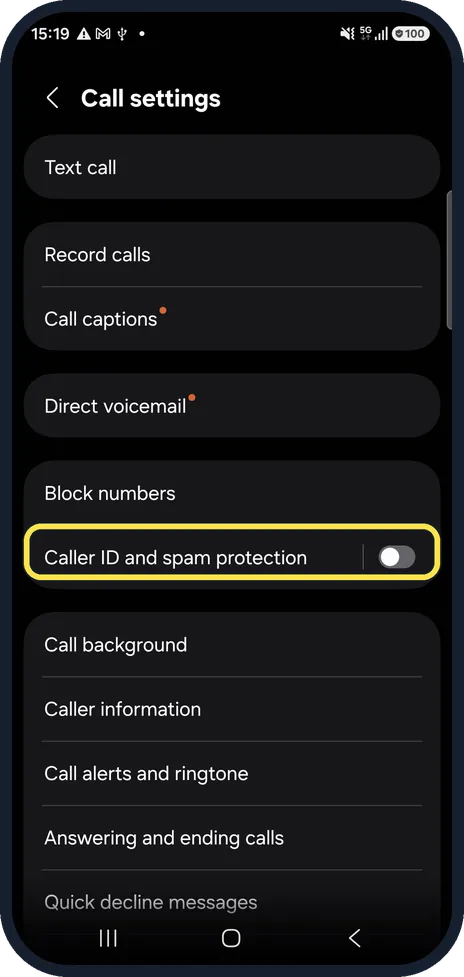
Turn on Caller ID and spam protection
Back in Call settings, tap Caller ID and spam protection. It uses Hiya to name unknown callers and can block spam and scam calls.
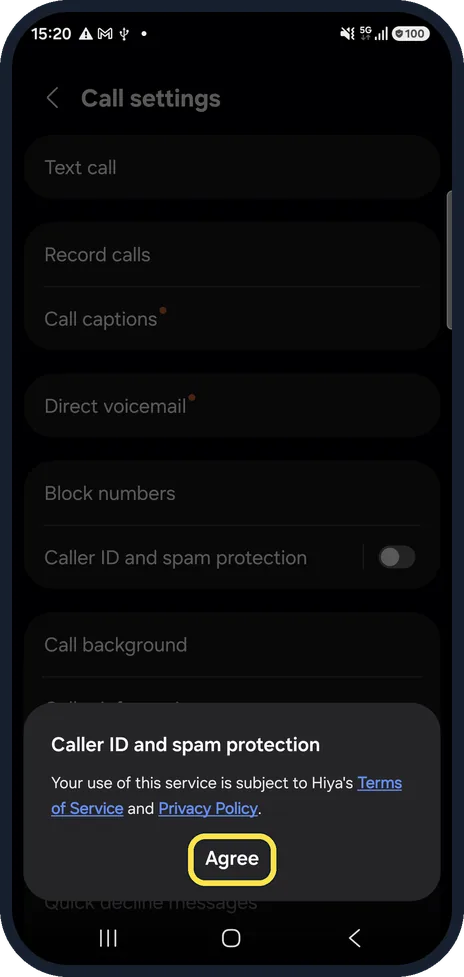
Read the Hiya terms
On our phone, tapping the Caller ID and spam protection switch opened a box saying the service is subject to Hiya's Terms of Service and Privacy Policy. Tap Agree only if you accept them. We did not tap Agree on our test phone, so its switch is still off in these pictures.
If you do not see this option
- The number is already a contact Samsung says to open Contacts, tap the contact, then More, Block contact and Block. The contact stays in your list but cannot reach you. Source: Block a phone number or contact on your Galaxy phone
- The spam came as a text Samsung says that in Samsung Messages you touch and hold the conversation, tap More, Block and confirm. Its blocked list is under Settings, Block numbers and spam. Source: Block a phone number or contact on your Galaxy phone
If this does not work
- Unknown callers still get through Samsung says Block calls from unknown numbers (Smart Call) may not be available with every carrier. If it does not work, Samsung suggests clearing the Phone app's data under Settings, Apps, Phone, Storage, Clear data, then switching it on again. Source: Block a phone number or contact on your Galaxy phone
- Blocked callers still leave voicemail Samsung says to contact your carrier to block voicemails from specific callers. Source: Block a phone number or contact on your Galaxy phone
- You blocked someone by mistake Samsung says to open Phone, More options, Settings, Block numbers and tap the red minus next to the number. A contact can also be unblocked from Contacts, More, Unblock contact. Source: Block a phone number or contact on your Galaxy phone
About this guide
The Samsung Phone app has its own blocking page, separate from Google's Phone app. Blocked numbers cannot call you, and you get no notification when they try.
Both blocking switches were off on our phone.
Good to know
Spam that still gets through can be blocked one by one: open the call in Recents and block the number from there.
In short: Phone, More options, Settings, Block numbers: add the number. Caller ID and spam protection for spam.
Links checked in October 2026. Menus and features can change after software updates. These steps match the version named at the top.
📷 See real photos from the Galaxy A57 in our Camera Lab, next to 10 other phones.
Did this guide work for you?
Sorry about that. What happened?