
howtosimply.com/guides/how-to-reopen-closed-tabs-in-chrome-on-android/ · Checked October 2026 · Samsung Galaxy A57 (One UI 9, Android 17 (build A576BXXU6BZIE)) and Samsung Galaxy A57 5G (One UI 8.5, Android 16)
In this guide
Tap the three dots in Chrome and choose Recent tabs. Under Recently closed, tap the tab you want back. Other devices on the same page shows open tabs from your computer if you sync Chrome.
If you do not see this option
- You cannot find Recent tabs in the menu Google says you can also tap Switch tabs, next to the address bar, and use the Search your tabs field: it finds recently closed tabs and tabs from other devices as well as open ones. Source: Manage tabs in Chrome (Android)
- You closed a whole tab group Google says a closed group is not deleted. It is saved, and you can open it again from Tab groups in the tab switcher. Source: Manage tabs in Chrome (Android)
3 of 3 steps with real screenshots · 1 official source below
- Device
- Android
- Shown on
- Samsung Galaxy A57 (SM-A576B), One UI 9, Android 17 (build A576BXXU6BZIE), Samsung Galaxy A57 5G (SM-A576B), One UI 8.5, Android 16
- App
- Chrome
- Real screenshots
- 3 of 3 steps
- Checked
- October 2026
- Sources
- 1 official, linked below
Step by step
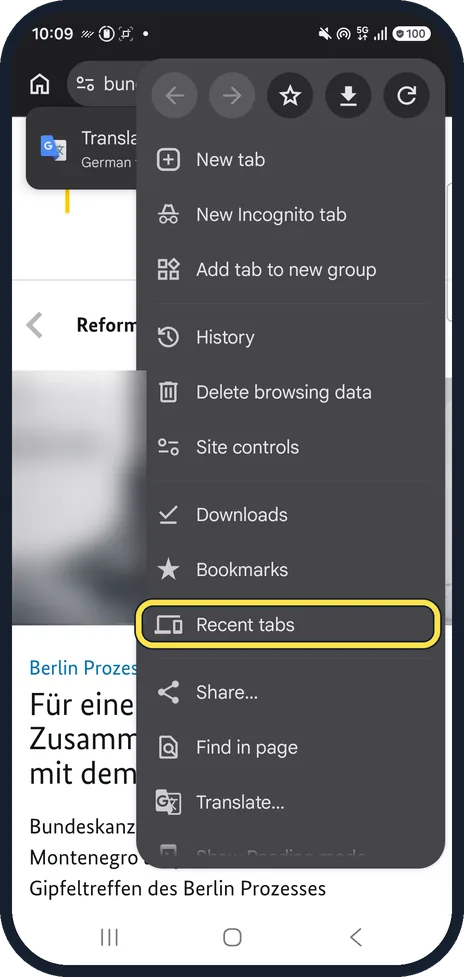
Open Recent tabs
Tap the three dots at the top right and choose Recent tabs.
In our menu it was below Bookmarks, above Share.
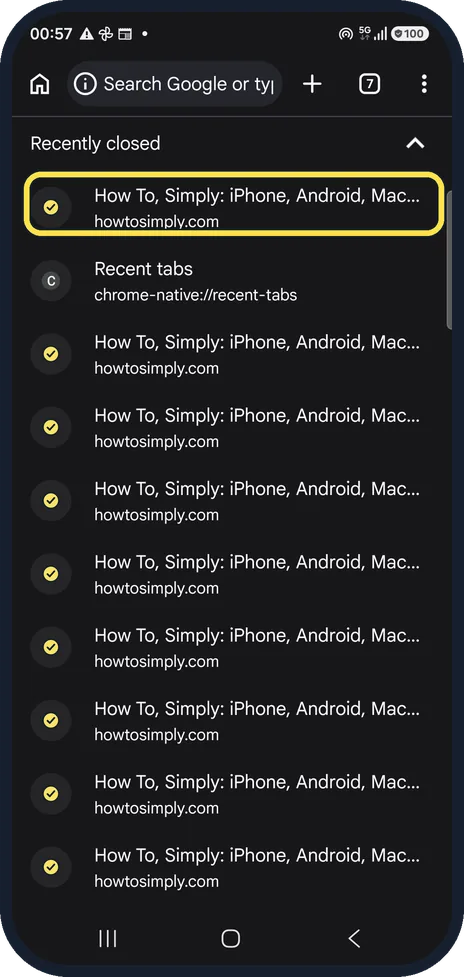
Tap a recently closed tab
The newest closed tab is at the top. Tap it and it opens again in a new tab. Our list shows the How To, Simply pages we had closed.
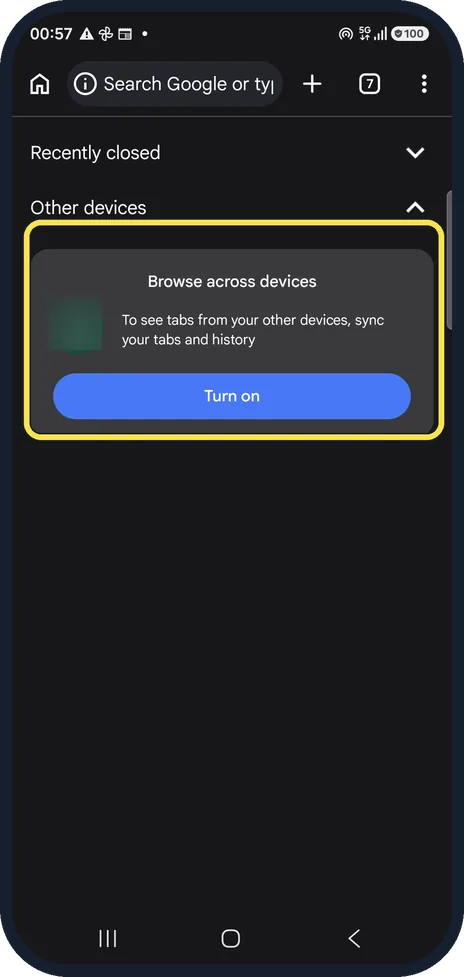
Find tabs from your other devices
Other devices lists tabs open on your computer or tablet, but only if you turn on sync. Ours offered Turn on, because sync is off on our test phone.
If this does not work
- Recently closed is empty Recently closed lists normal tabs only. Incognito tabs are never kept, so they cannot be reopened. Source: Manage tabs in Chrome (Android)
- Old tabs disappeared without you closing them Google says tabs you have not used for 14 days or more move to Inactive tabs. Tap Switch tabs, Inactive tabs, and tap a tab to open it again. After 6 months there they are closed. Source: Manage tabs in Chrome (Android)
About this guide
Closed a tab by mistake? Chrome on a phone has no Ctrl + Shift + T, but Recent tabs keeps a list of what you closed.
The screenshots are from Chrome on a Samsung Galaxy A57 5G with Android 16 and One UI 8.5, in dark mode. The app looks the same on other Android phones; only the phone's own settings screens differ by brand. Step 1 is from Chrome on the same phone after its One UI 9 update (Android 17).
Good to know
Recently closed only covers normal tabs. Incognito tabs are not kept.
In short: Chrome, three dots, Recent tabs: tap a tab under Recently closed.
Links checked in October 2026. Menus and features can change after software updates. These steps match the version named at the top.
📷 See real photos from the Galaxy A57 in our Camera Lab, next to 10 other phones.
Did this guide work for you?
Sorry about that. What happened?