GOOGLE PIXEL
How to use Do Not Disturb and Modes on a Google Pixel (Android 17)
Go to Settings, Modes, Do Not Disturb and tap Turn on now. People and Apps on the same page decide who can still reach you. On Android 17, Do Not Disturb has no schedule of its own: to silence the phone at set times, use the Bedtime mode or Create your own mode in Modes.

5 of 5 steps show a real screenshot from our Pixel 10a. Each step was checked against the maker's own instructions, linked at the end.
Steps
- 1
Open Modes
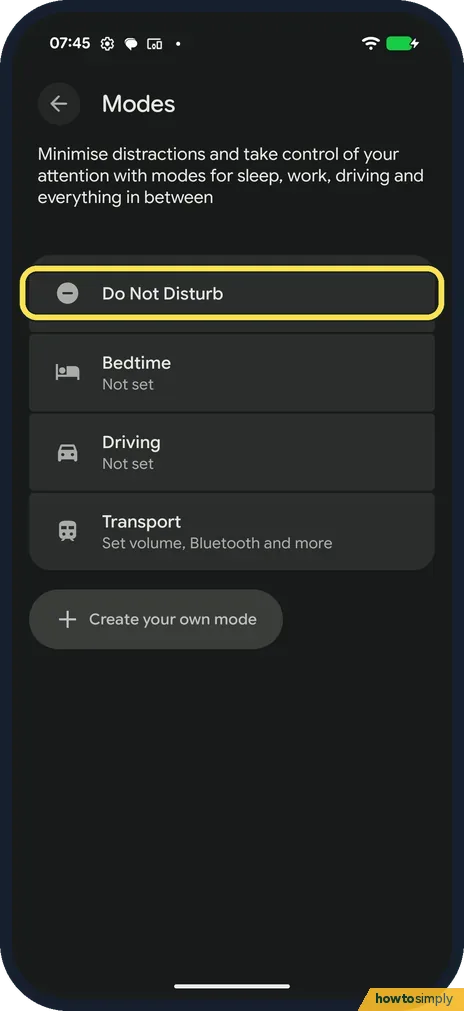
Go to Settings, Modes. Ours listed Do Not Disturb, Bedtime (Not set), Driving (Not set), Transport and Create your own mode.
- 2
Turn on Do Not Disturb
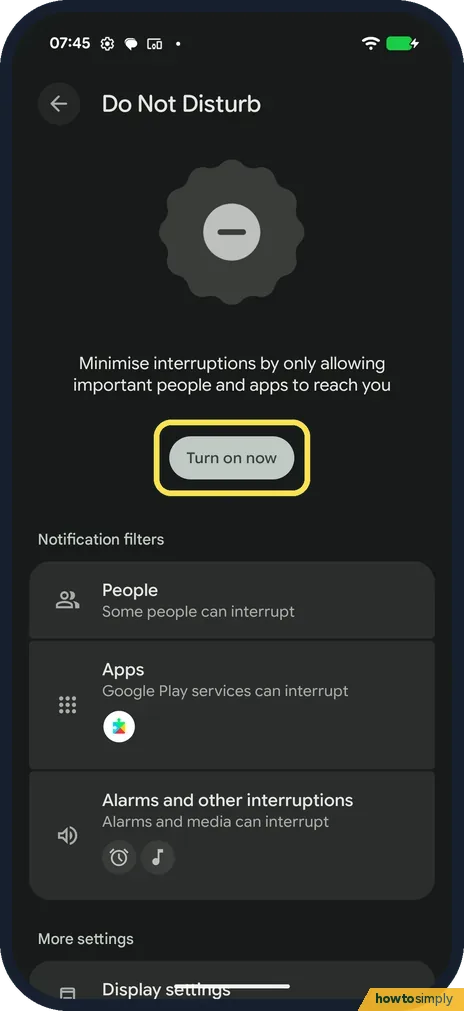
Tap Do Not Disturb, then Turn on now.
- 3
Choose who can reach you
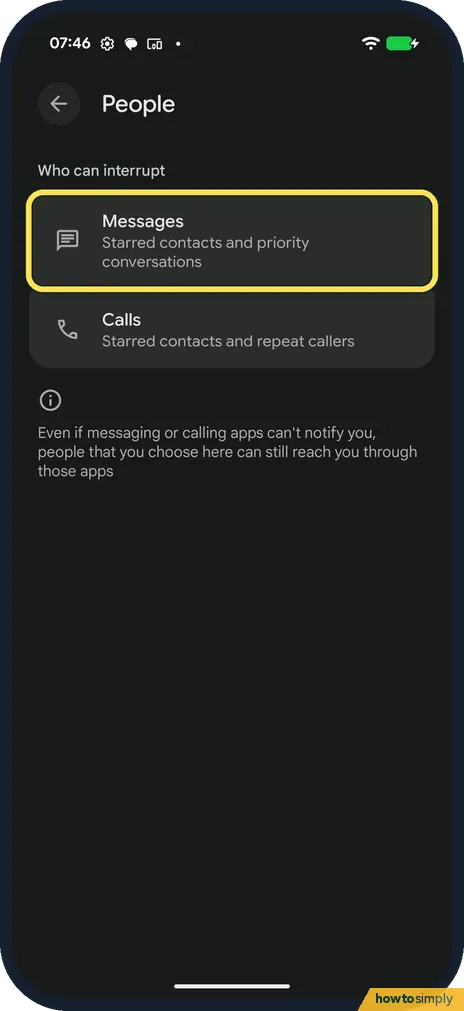
Tap People. Messages: Starred contacts and priority conversations. Calls: Starred contacts and repeat callers.
- 4
Choose which apps can interrupt
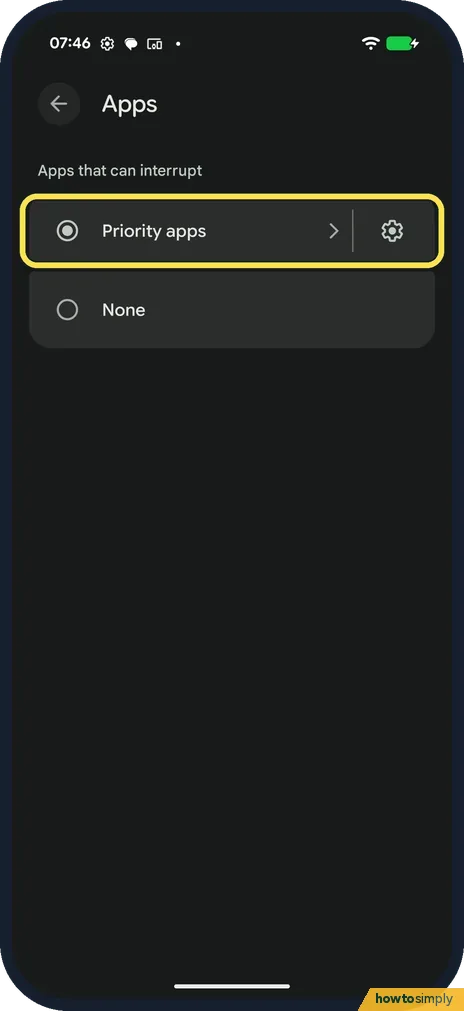
Back on Do Not Disturb, tap Apps. Choose Priority apps or None. On ours Google Play services could interrupt.
- 5
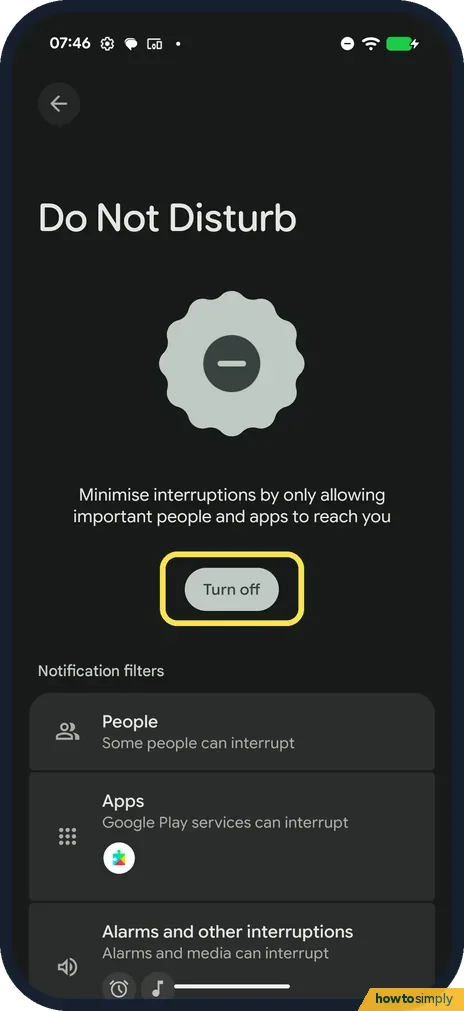
Check it is on
The button now says Turn off, and a minus icon shows in the status bar at the top.
If you do not see this option
- No schedule in Do Not Disturb? On our Android 17 phone, Do Not Disturb has no schedule of its own. Google says to set times for Bedtime in Modes, or create your own mode. Source: Limit interruptions with Do Not Disturb on Android
- No Do Not Disturb in Sound settings? It is under Settings, Modes on Android 17.
- Want it on faster? Google says to swipe down from the top of the screen, tap Modes, then Do Not Disturb, then Done. Source: Limit interruptions with Modes & Do Not Disturb on Pixel phone or Pixel Tablet
If this does not work
- Still getting calls? Repeat callers are allowed by default on ours: a second call from the same number within minutes gets through.
- Alarms still ring? Alarms and other interruptions said Alarms and media can interrupt on ours. That is by design.
- Phone not ringing at all? See Pixel not ringing.
- Do Not Disturb stays on for hours? Google says Duration for Quick Settings, under Modes, Do Not Disturb, decides how long it runs when you turn it on from Quick Settings: until you turn it off, for a set time, or ask every time.
- Security alert came through anyway? Google says critical notifications, such as system security alerts, still appear whatever your settings are. That is not a fault in Do Not Disturb.
- Calendar reminders still sound? Google says Alarms and other interruptions can block or allow alarms, media, touch sounds, reminders and calendar events separately. Check each one.
Good to know
Phone silent when it shouldn't be: Pixel not ringing.
While Do Not Disturb is on, notifications still arrive; they are only kept quiet, and missed calls still show in the Phone app. Google says a mode's More settings include Display settings, where you choose how filtered notifications are shown. Turning it off with Turn off brings back normal sound straight away.
Google says Allow repeat callers lets a call through if the same person calls twice within 15 minutes. That is useful in an emergency, so leave it on unless one caller keeps disturbing you.
For quiet nights on a timetable, see how to set up Bedtime mode on a Google Pixel.
About this guide
- Device
- Android
- Shown on
- Google Pixel 10a, Android 17 (build CP3A.260905.009)
- App
- Settings
- Path
- Settings › Modes › Do Not Disturb
- Real screenshots
- 5 of 5 steps
- Checked
- October 2026
- Sources
- 1 official, linked below
Sources
Links checked October 2026. Menus and features can change with updates.Spotted a mistake? Menus change with updates, and we want every step to match your screen. Email us about this page or use the contact form. We read every report, and fixes are listed on What changed.
Liked this guide?
Follow us for new guides and short how-to videos.
Did this guide work for you?
Sorry about that. What happened?