
What changed: the screenshots are now our own iPhone 17e on iOS 27.0.1, dark mode, and the wording is checked against those screens.
howtosimply.com/guides/how-to-turn-on-lockdown-mode-on-an-iphone/ · Checked October 2026 · iPhone 17e · iOS 27.0.1
In this guide
Open Settings, tap Privacy & Security, scroll down to Lockdown Mode and tap Turn On Lockdown Mode. Confirm with Turn On & Restart and enter your passcode. It needs iOS 16 or later.
5 of 5 steps with real screenshots · 1 official source below
- Device
- iPhone
- Shown on
- iOS 27.0.1 (iPhone 17e)
- App
- Settings
- Path
- Settings › Privacy & Security › Lockdown Mode › Turn On › Turn On & Restart
- Real screenshots
- 5 of 5 steps
- Checked
- October 2026
- Sources
- 1 official, linked below
Step by step
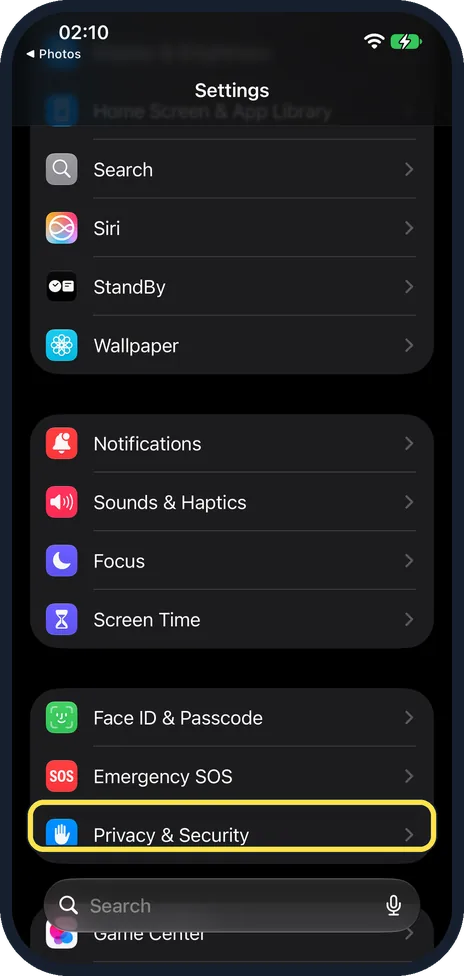
Open Settings and tap Privacy & Security
Scroll down in Settings to find it. On our iPhone 17e it is in the group with Face ID & Passcode and Emergency SOS.
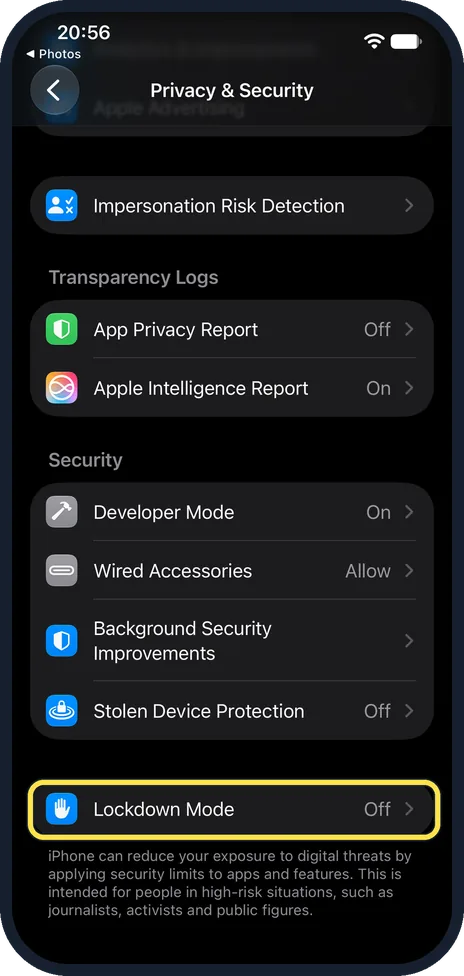
Scroll down and tap Lockdown Mode
It is the last row on the Privacy & Security page, in its own group just below the Security group, after Stolen Device Protection. Ours read Off.
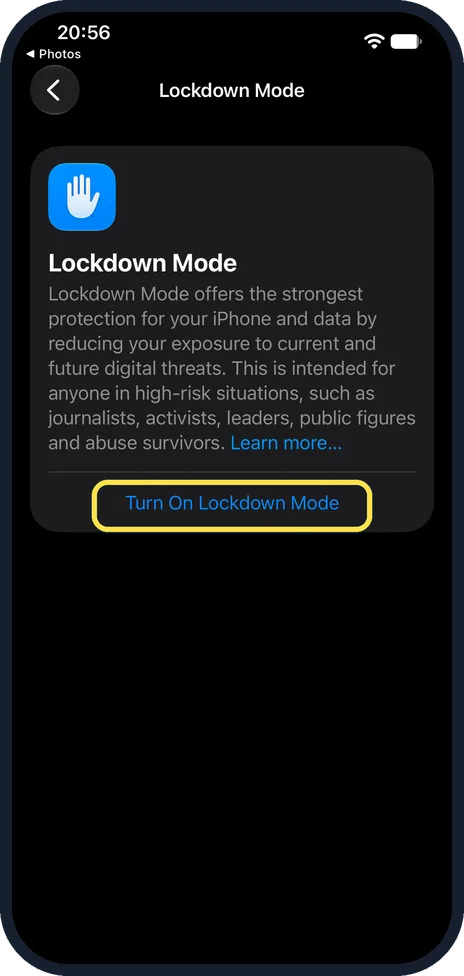
Tap Turn On Lockdown Mode
The page starts with what Apple says it is for: the strongest protection, intended for anyone in high-risk situations, such as journalists, activists, leaders, public figures and abuse survivors. The blue Turn On Lockdown Mode link is under that text.
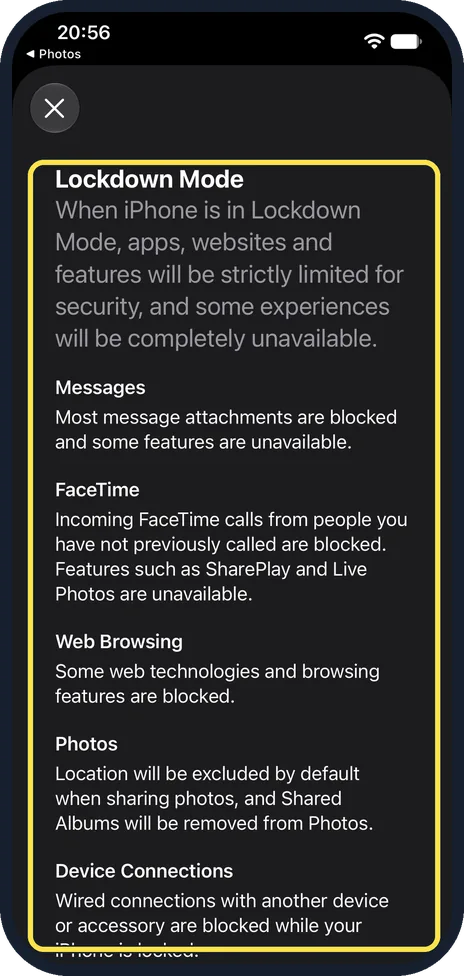
Read the summary
A sheet lists what changes, under Messages, FaceTime, Web Browsing, Photos and Device Connections. For example: most message attachments are blocked, and wired connections with another device or accessory are blocked while the iPhone is locked. The X at the top left closes it without turning anything on.
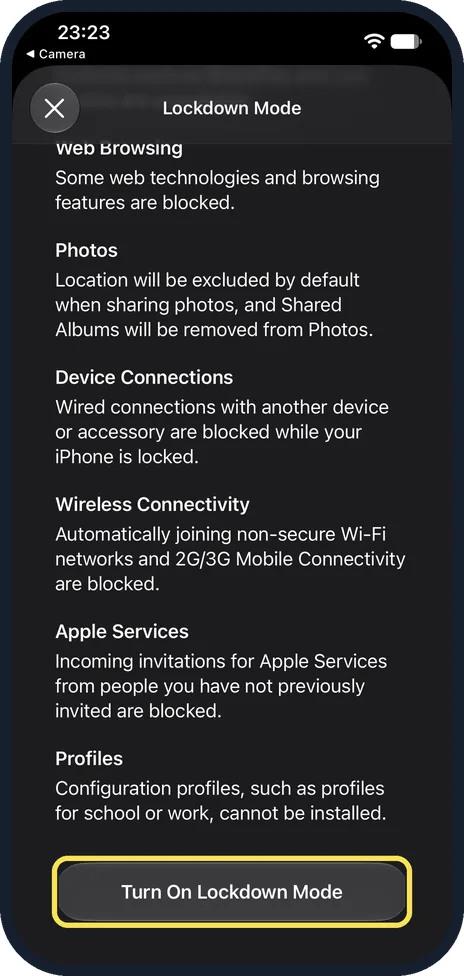
Tap Turn On Lockdown Mode, then Turn On & Restart
The button is at the bottom of the summary, below Wireless Connectivity, Apple Services and Profiles. On ours the last one said: Configuration profiles, such as profiles for school or work, cannot be installed. We did not tap the button. When you do, choose Turn On & Restart and enter your passcode. The iPhone restarts with Lockdown Mode active.
What changed: the screenshots are now our own iPhone 17e on iOS 27.0.1, dark mode, and the wording is checked against those screens.
If you do not see this option
- There is no Lockdown Mode row. Lockdown Mode needs iOS 16 or later. Update the iPhone, then look again at the bottom of Privacy & Security. Source: About Lockdown Mode
- You cannot find the options to leave out a website or app. They only appear once Lockdown Mode is on, on the same Lockdown Mode page. Source: About Lockdown Mode
If this does not work
- A website you trust does not work. In Safari, tap the page settings button, then Website Settings, and turn off Lockdown Mode for that site only. Source: About Lockdown Mode
- An accessory does not connect. With Lockdown Mode on, accessories only connect while the iPhone is unlocked. Unlock it and connect again. Source: About Lockdown Mode
About this guide
Lockdown Mode is an extreme protection that Apple designed for the very few people who may be personally targeted by sophisticated spyware, such as journalists, activists and politicians. It switches off several features to leave attackers fewer ways in. Most people do not need it.
The screenshots are our own, taken on an iPhone 17e running iOS 27.0.1, in dark mode. We scrolled the summary down to its last button and did not turn Lockdown Mode on.
Good to know
What changes: most message attachments are blocked apart from pictures, video and audio. Some websites load slowly or look wrong. FaceTime calls from people you have not called in the last 30 days are blocked. The iPhone does not automatically join non-secure Wi-Fi networks and disconnects from one when you turn Lockdown Mode on. Accessories only connect while it is unlocked.
Normal phone calls, plain text messages and emergency features keep working.
You can exempt a trusted website or app under Settings, Privacy & Security, Lockdown Mode. Each exception lowers the protection.
To switch it off, go to the same page, tap Turn Off Lockdown Mode and restart.
In short: Settings, Privacy & Security, Lockdown Mode, Turn On, Turn On & Restart.
Links checked in October 2026. Menus and features can change after software updates. These steps match the version named at the top.
Did this guide work for you?
Sorry about that. What happened?