
howtosimply.com/guides/how-to-stop-siri-using-an-app-on-an-iphone/ · Checked October 2026 · iPhone 17e · iOS 27.2
In this guide
On iOS 27.2 or later, open Settings, tap Siri, then Excluded Apps. Tap Add Apps, tick the app and tap the check mark at the top right. Apps on the list are excluded from Siri, Search and suggestions.
6 of 6 steps with real screenshots · 2 official sources below
- Device
- iPhone
- Shown on
- iOS 27.2 (iPhone 17e)
- App
- Settings
- Path
- Settings › Siri › Excluded Apps › Add Apps
- Real screenshots
- 6 of 6 steps
- Checked
- October 2026
- Sources
- 2 official, linked below
Step by step
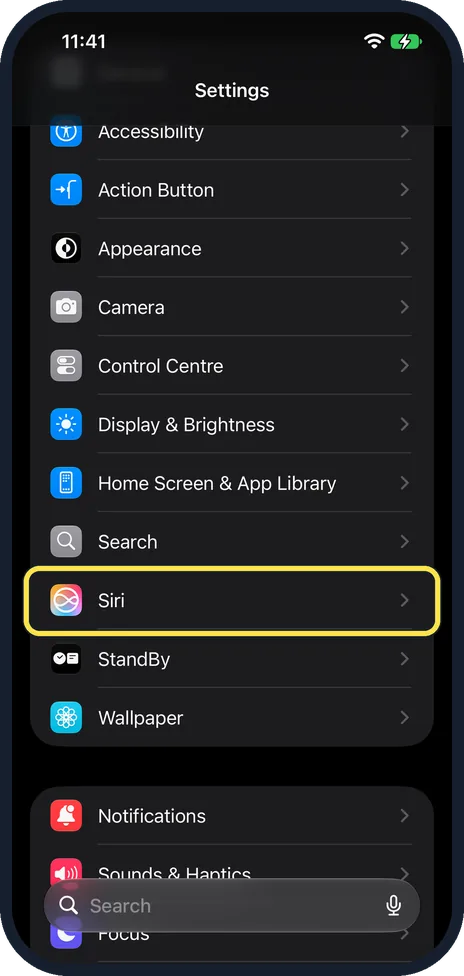
Open Settings and tap Siri
Siri is in the Settings list, below Search and above StandBy.
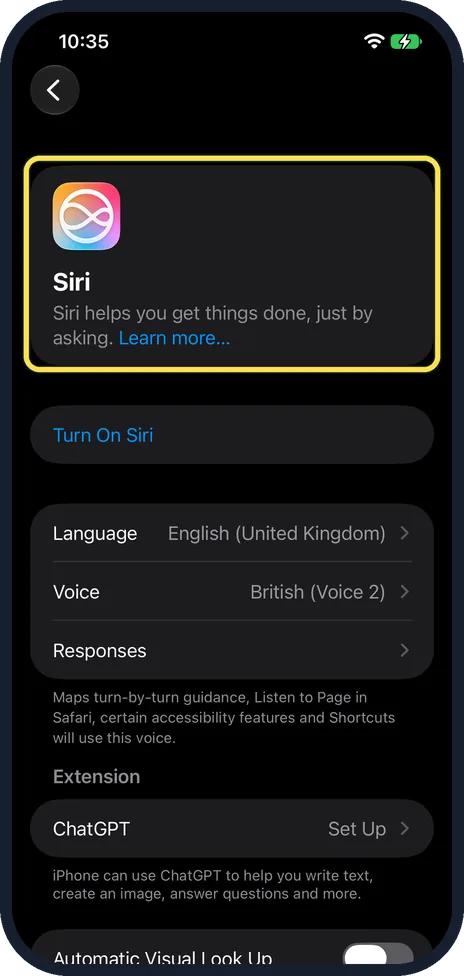
The Siri page opens
The Siri card is at the top, then Turn On Siri, Language, Voice and Responses. Ours had Siri off. Do not tap Turn On Siri: Excluded Apps works with Siri off.
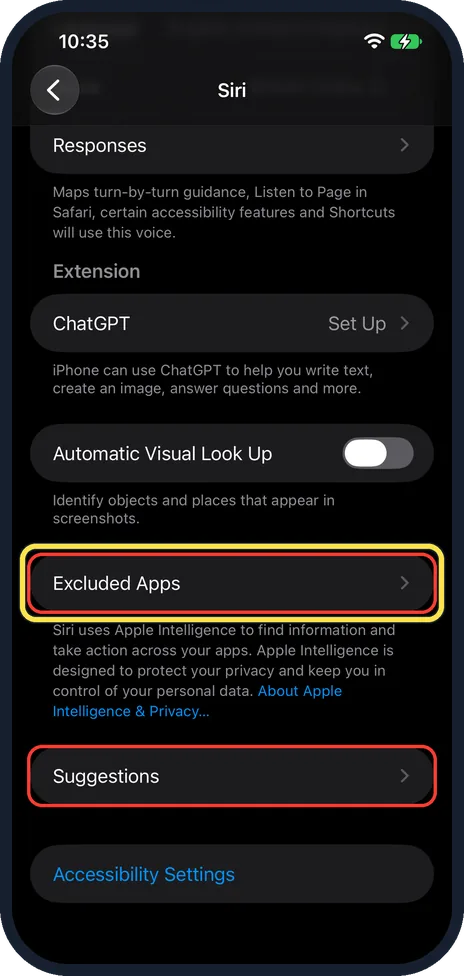
Scroll down and tap Excluded Apps
It is near the bottom, below Automatic Visual Look Up and above Suggestions. The red boxes are from our capture.
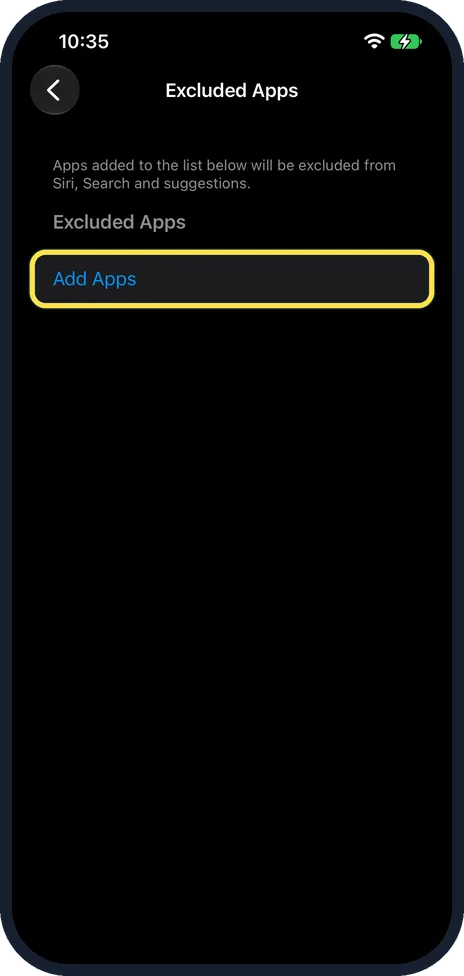
Tap Add Apps
The page says: Apps added to the list below will be excluded from Siri, Search and suggestions. Ours was empty.
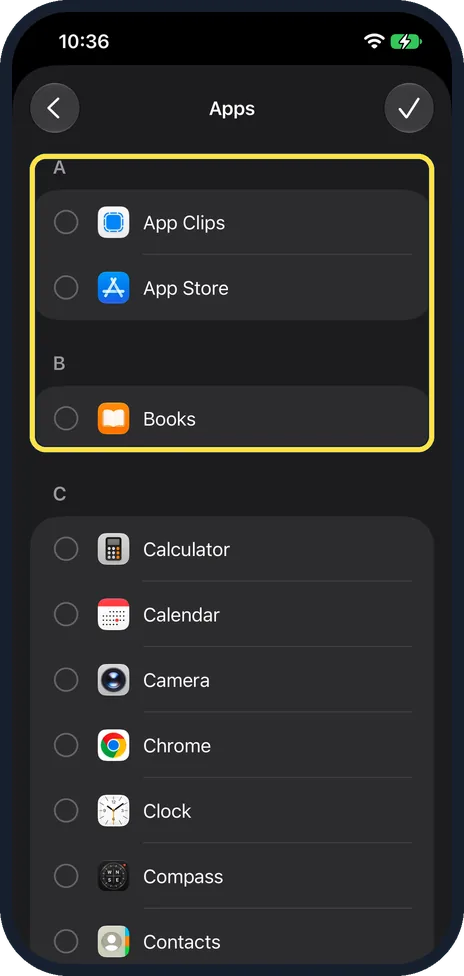
Find the app in the list
A list called Apps opens, A to Z, with a round tick box next to each app. The check mark at the top right is grey until you tick one.
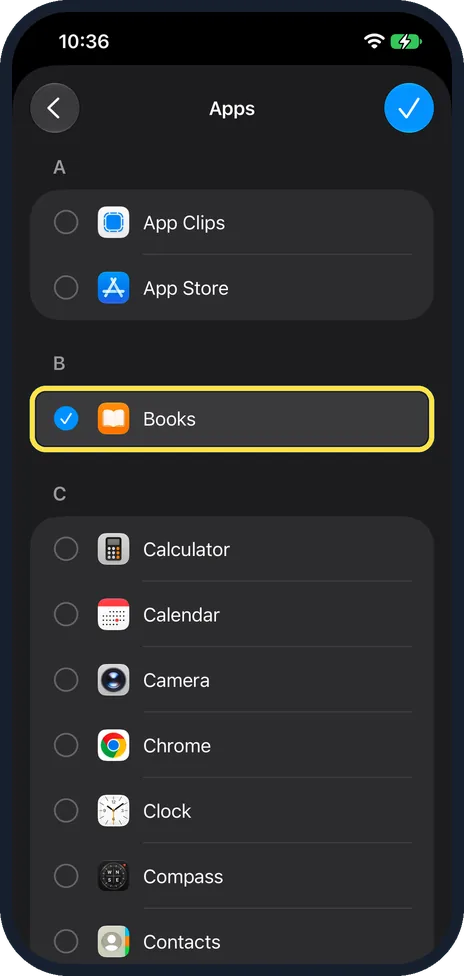
Tick the app and tap the check mark
We ticked Books, and the check mark at the top right turned blue. We tapped the back arrow instead, so nothing was added on our iPhone.
If you do not see this option
- No Excluded Apps row? Apple's iOS 27.2 notes list Excluded Apps as new in iOS 27.2, so update first under General, Software Update. You can check your version under General, About, iOS Version. Source: About iOS 27 Updates
- Not on every iPhone or in every region? Apple's iOS 27.2 notes say some features may not be available in all regions or on all iPhone models. On our iPhone 17e with iOS 27.2, Excluded Apps was there with Siri switched off. Source: About iOS 27 Updates
If this does not work
- Check mark stays grey? Tick at least one app first. On ours it was grey with nothing ticked and turned blue once Books was ticked.
- Siri is switched off? The page still opens. Ours showed Turn On Siri at the top, and Excluded Apps opened with its Add Apps button.
- Siri AI in the EU? Apple says Siri AI is not available for iOS in the EU. Excluded Apps itself was on our iPhone 17e with Siri off. Source: How to get Siri AI
About this guide
Excluded Apps came with iOS 27.2. Apple's release notes call it one setting to choose which apps Siri, Search, and suggestions can access.
The screenshots are from our iPhone 17e with iOS 27.2, in Dark mode, taken on 27 October 2026. What we did not change: we ticked Books to show the list, then went back without saving, so our list stayed empty. Siri stayed off. So we cannot show the page with an app on it.
Good to know
Our Siri page also has a Suggestions row, just below Excluded Apps. We did not open it on our iPhone.
Everything else that changed for us in iOS 27.2: what's new in iOS 27.2 on an iPhone 17e.
On a Mac the same setting is in System Settings, Siri: how to stop Siri using an app on a Mac.
In short: Settings, Siri, Excluded Apps, Add Apps, tick the app, check mark. Needs iOS 27.2.
Links checked in October 2026. Menus and features can change after software updates. These steps match the version named at the top.
📷 See real photos from the iPhone 17e in our Camera Lab, next to 10 other phones.
Did this guide work for you?
Sorry about that. What happened?