
howtosimply.com/guides/how-to-set-an-out-of-office-reply-in-the-gmail-app-on-android/ · Checked October 2026 · Samsung Galaxy A57 5G (SM-A576B), One UI 8.5, Android 16
In this guide
In Gmail open Settings, tap your account and tap Vacation responder. Switch it on, set the first and last day, type a subject and message and tap Done. Send only to my Contacts limits who gets the reply.
3 of 3 steps with real screenshots · 1 official source below
- Device
- Android
- Shown on
- Samsung Galaxy A57 5G (SM-A576B), One UI 8.5, Android 16
- App
- Gmail
- Path
- Gmail › Settings
- Real screenshots
- 3 of 3 steps
- Checked
- October 2026
- Sources
- 1 official, linked below
Step by step
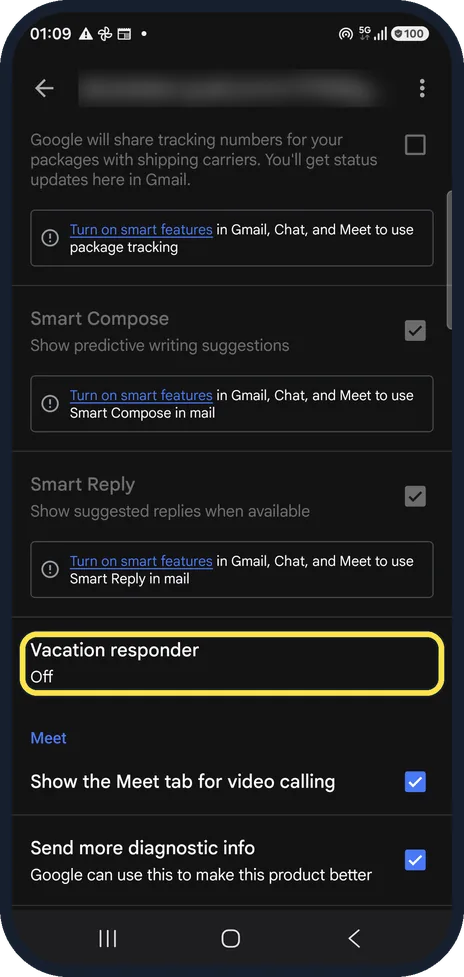
Open Vacation responder
Gmail, menu, Settings, tap your account and scroll to Vacation responder. Ours showed Off.
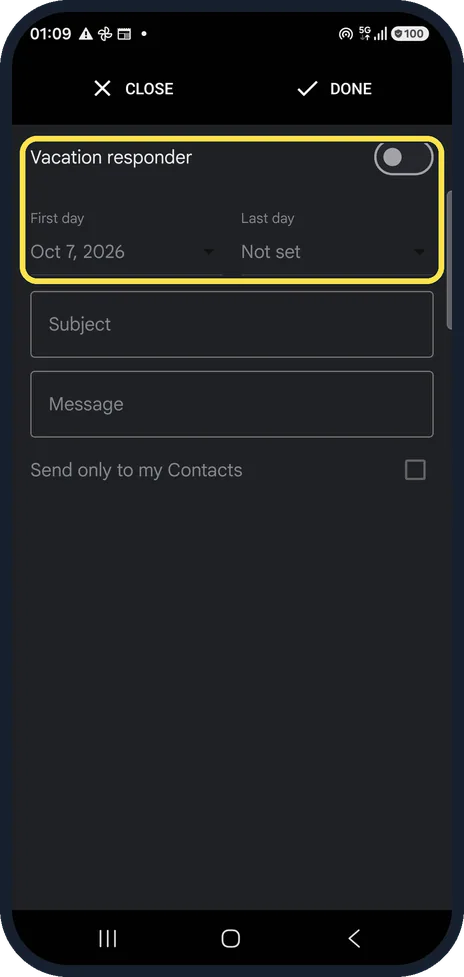
Switch it on and set the dates
Switch Vacation responder on at the top. First day was filled in with today's date; Last day is optional, Not set means it runs until you switch it off.
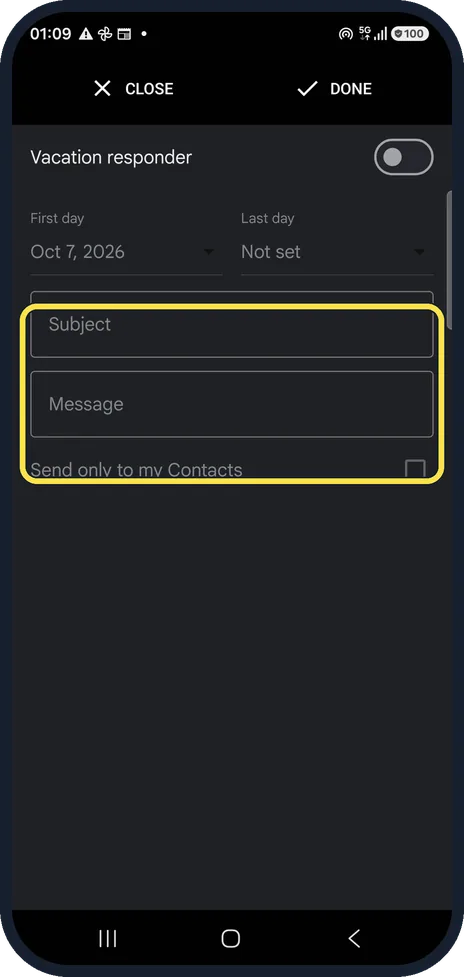
Write the reply and tap Done
Type a subject and a message. Tick Send only to my Contacts to avoid answering strangers and newsletters. Tap Done at the top; Close leaves without saving, which is what we did.
If you do not see this option
- No Vacation responder on your screen? The same screen can carry other names. On our Google Pixel 10a (Android 17) the Gmail app called it Out of Office AutoReply, with Send to my contacts only under the message. The First day, Last day, Subject and Message fields and the Close and Done buttons were the same.
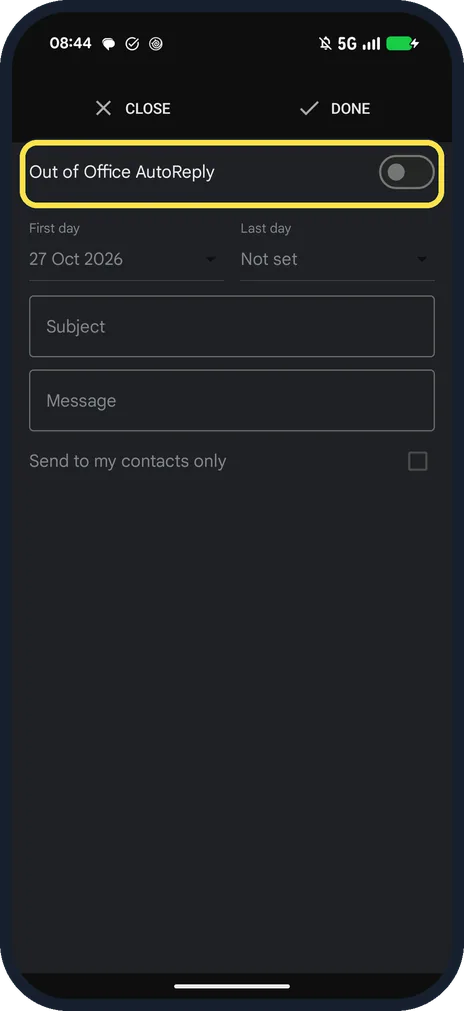
- There is no Vacation responder row Gmail Help describes it for Gmail accounts: Menu, Settings, choose your account, Vacation responder. Choose your Gmail address, not another email account you added to the app. Source: Send an automatic reply when you're out of office (Android)
If this does not work
- Someone did not get your reply Gmail Help says mail that goes to your spam folder, or that is sent to a mailing list you subscribe to, does not get the reply. In most cases a person only gets it the first time they write. Source: Send an automatic reply when you're out of office (Android)
- A colleague got the reply twice Gmail Help says the same person gets it again if they write after four days while it is still on, or after you edit the reply. Source: Send an automatic reply when you're out of office (Android)
- The reply has not started yet Gmail Help says it starts at 12:00 AM on the First day and ends at 11:59 PM on the Last day. Source: Send an automatic reply when you're out of office (Android)
About this guide
The vacation responder answers every incoming mail while you are away. You can set it from the phone; it then runs on Google's servers, even with the phone off. Our Gmail account is a real one, so addresses, senders and subjects are blurred; the only mail we touched was a test message we sent to ourselves. We did not switch it on, because it would answer real mail.
The screenshots are from the Gmail app on a Samsung Galaxy A57 5G with Android 16 and One UI 8.5, in dark mode. The app looks the same on other Android phones; only the phone's own settings screens differ by brand.
Good to know
Can you turn on an out-of-office reply from your phone? Yes. Every step above is in the Gmail app, and the reply keeps going with the phone switched off.
The responder set on the phone is the same one as on the Gmail website, so you can switch it off from either.
In short: Gmail, Settings, account, Vacation responder: on, dates, subject, message, Done.
Links checked in October 2026. Menus and features can change after software updates. These steps match the version named at the top.
📷 See real photos from the Galaxy A57 in our Camera Lab, next to 10 other phones.
Did this guide work for you?
Sorry about that. What happened?