
howtosimply.com/guides/samsung-phone-not-showing-up-on-a-computer-usb-file-transfer-fixes/ · Checked October 2026 · Samsung Galaxy A57 5G (SM-A576B), One UI 8.5, Android 16
In this guide
Connect the phone, unlock it, pull down the notification panel and tap the USB notification. Under Use USB for, choose Transferring files / Android Auto. The default, Charging phone only, hides the phone's storage from the computer. If nothing appears, try a different cable and USB port.
4 of 5 steps with real screenshots · 1 official source below
- Device
- Android
- Shown on
- Samsung Galaxy A57 5G (SM-A576B), One UI 8.5, Android 16
- App
- Settings
- Real screenshots
- 4 of 5 steps
- What we did
- Observed: looked at each screen, changed nothing
- Our phone
- Shown on Galaxy A57, One UI 8.5
- Checked
- October 2026
- Sources
- 1 official, linked below
Step by step
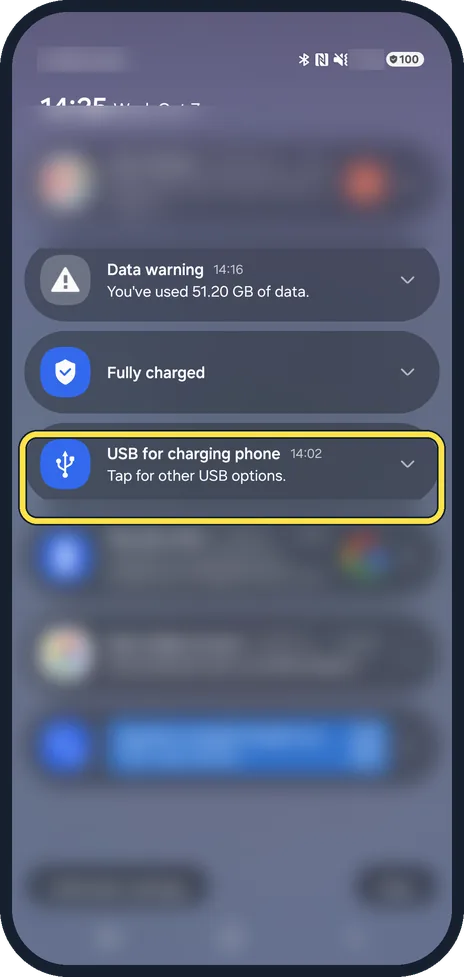
Connect and unlock the phone
Plug the phone into the computer and unlock it. A locked phone does not share its storage.
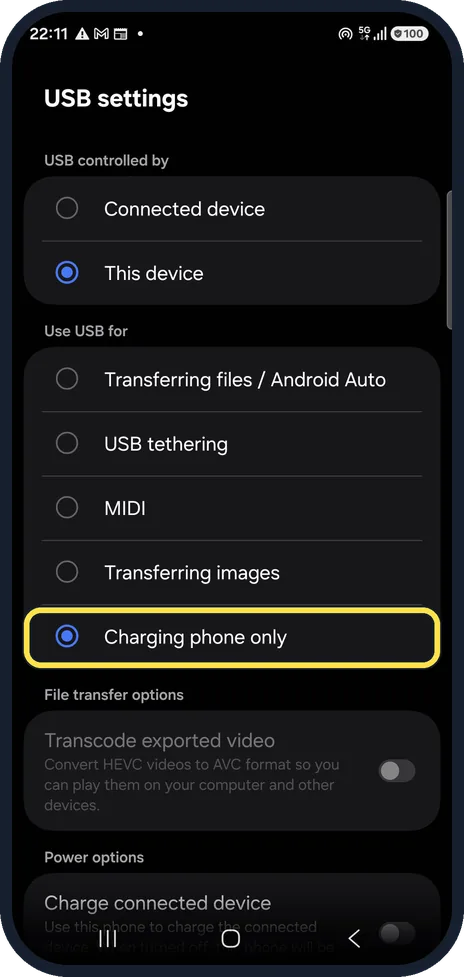
Open USB settings
Tap the notification USB for charging phone. The USB settings page opens. Ours was set to Charging phone only.
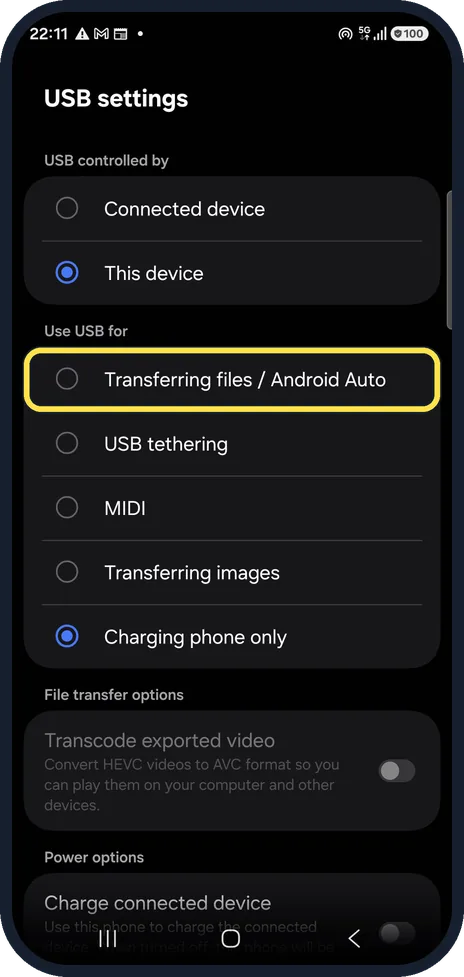
Choose Transferring files
Under Use USB for, tap Transferring files / Android Auto. The phone then shows up on a Windows PC as a device under This PC, with its internal storage inside. We left our setting as it was.
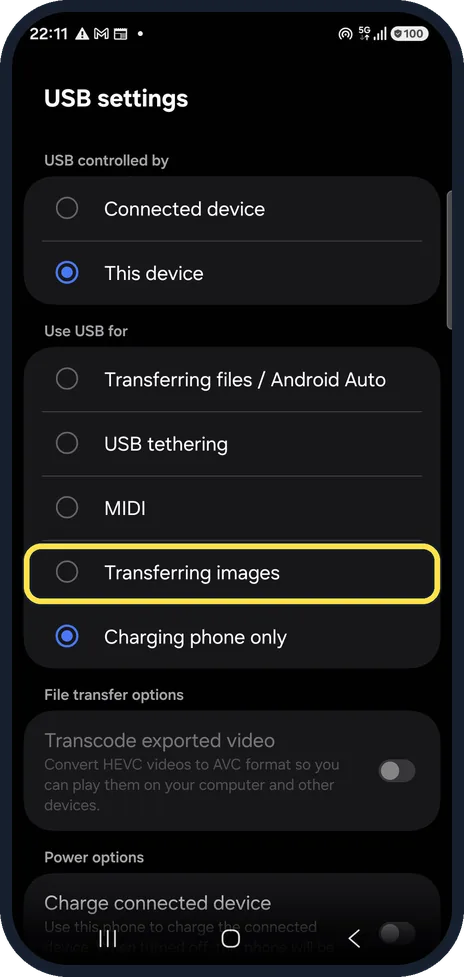
Photos only? Choose Transferring images
Transferring images shows only the camera folders, which some photo apps on the computer need.
Try another cable and port
If the notification never appears, the cable may charge only. Use the cable that came with the phone or another data cable, and a USB port directly on the computer, not a hub.
If you do not see this option
- Only the phone name shows on the computer Samsung says that in modes such as charging only, the PC may show only the device name or no folder at all. Choose Transferring files / Android Auto so the internal storage can be opened. Source: What to do if your Samsung Galaxy phone folder does not appear on PC connection
- The screens look different on your phone Samsung says device features, menu names and paths vary by model, software and app version. Look for a notification about USB in the panel after you plug in. Source: What to do if your Samsung Galaxy phone folder does not appear on PC connection
If this does not work
- The computer shows no folders Samsung says the phone asks Allow access to phone data when you connect it; the computer shows no folders until you tap Allow. Source: What to do if your Samsung Galaxy phone folder does not appear on PC connection
- The prompt never appears on Windows Samsung says to install the latest Samsung USB driver on the PC and try again, then check that it installed correctly. Source: What to do if your Samsung Galaxy phone folder does not appear on PC connection
About this guide
A Galaxy only charges from a computer until you allow file transfer on the phone. Charge-only cables, which have no data wires, are the other common cause.
Good to know
If the phone asks Allow access to phone data?, tap Allow. On a Windows PC that still does not show the phone, Samsung suggests installing its latest USB driver.
On a Mac, a Galaxy does not appear in Finder, so you need an app to copy files; Samsung's is Smart Switch for Mac.
Transcode exported video, further down the same page, converts HEVC videos so older computers can play them.
In short: Plug in, unlock, tap the USB notification, Use USB for: Transferring files / Android Auto. Otherwise another cable and port.
Links checked in October 2026. Menus and features can change after software updates. These steps match the version named at the top.
📷 See real photos from the Galaxy A57 in our Camera Lab, next to 10 other phones.
Did this guide work for you?
Sorry about that. What happened?