
howtosimply.com/guides/google-calendar-events-not-showing-in-samsung-calendar-how-to-sync/ · Checked October 2026 · Samsung Galaxy A57 5G (SM-A576B), One UI 8.5, Android 16
In this guide
Open Settings, Accounts and backup, Manage accounts, your Google account, Sync account and check Calendar is on. Then open Samsung Calendar, tap the three lines, tap the arrow next to Google, tick your calendars and tap Sync now.
6 of 6 steps with real screenshots · 4 official sources below
- Device
- Android
- Shown on
- Samsung Galaxy A57 5G (SM-A576B), One UI 8.5, Android 16
- App
- Settings
- Path
- Settings › Accounts and backup › Manage accounts › Google
- Real screenshots
- 6 of 6 steps
- What we did
- Observed: looked at each screen, changed nothing
- Checked
- October 2026
- Sources
- 4 official, linked below
Step by step
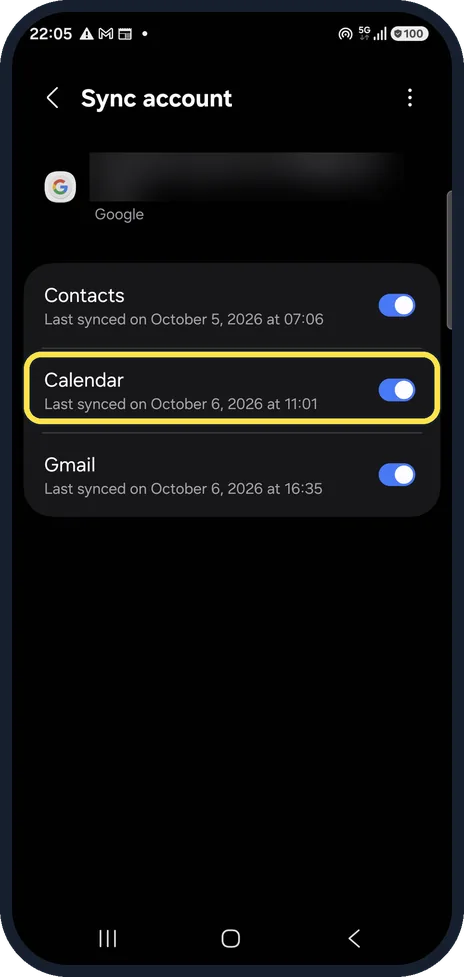
Turn on Calendar sync
Open Settings, Accounts and backup, Manage accounts, tap your Google account and Sync account. The Calendar switch must be on.
On our Galaxy, Contacts, Calendar and Gmail were all switched on, and Calendar showed Last synced on October 6, 2026 at 11:01. We blurred our email address.
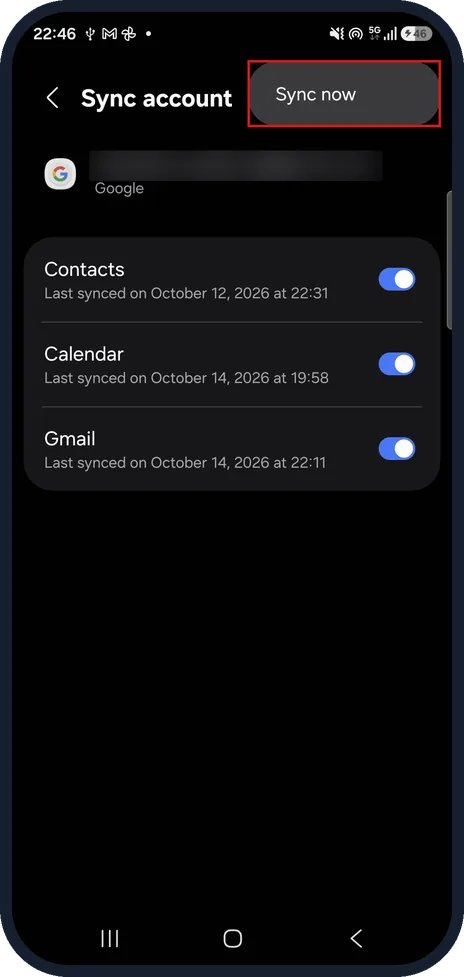
Sync now from the account
Tap the three dots at the top right, then tap Sync now to fetch events straight away.
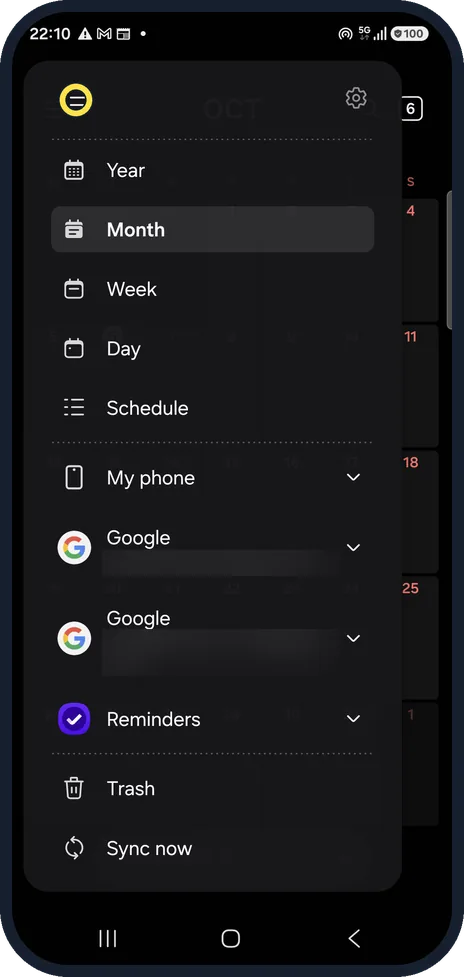
Open the Calendar menu
Open Samsung Calendar and tap the three lines at the top left to open the menu.
On our Galaxy it lists My phone, two Google sections and Reminders, then Trash and Sync now.
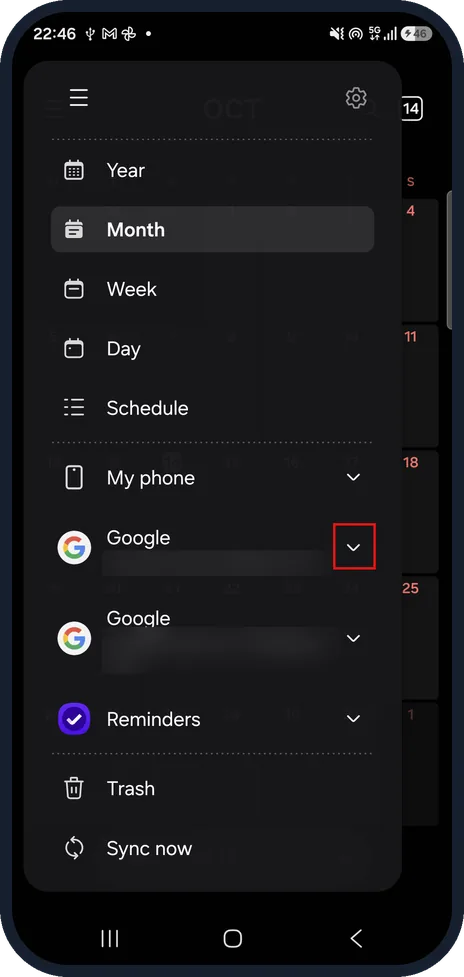
Open your Google account
Tap the arrow next to the Google account you use on your computer to show its calendars. We blurred both account addresses.
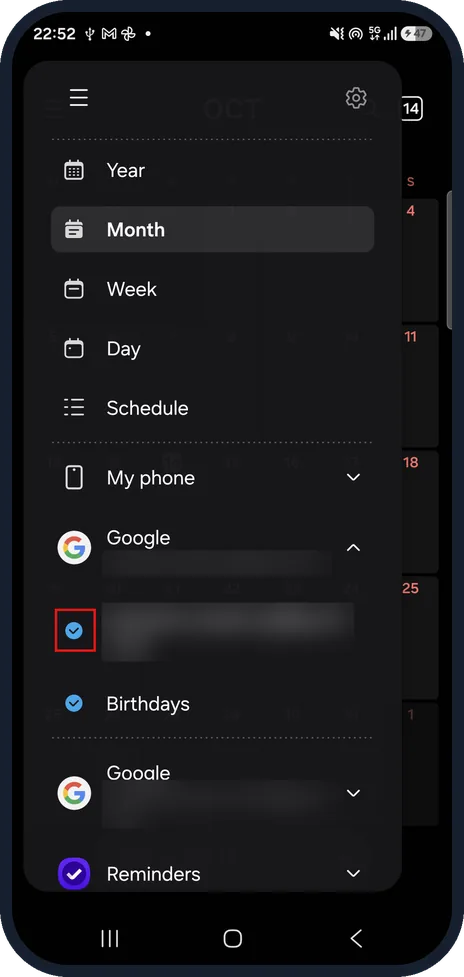
Tick the Google calendars
Tick each calendar you want to see.
On our Galaxy the account showed two calendars, its own calendar and Birthdays, and both were already ticked.
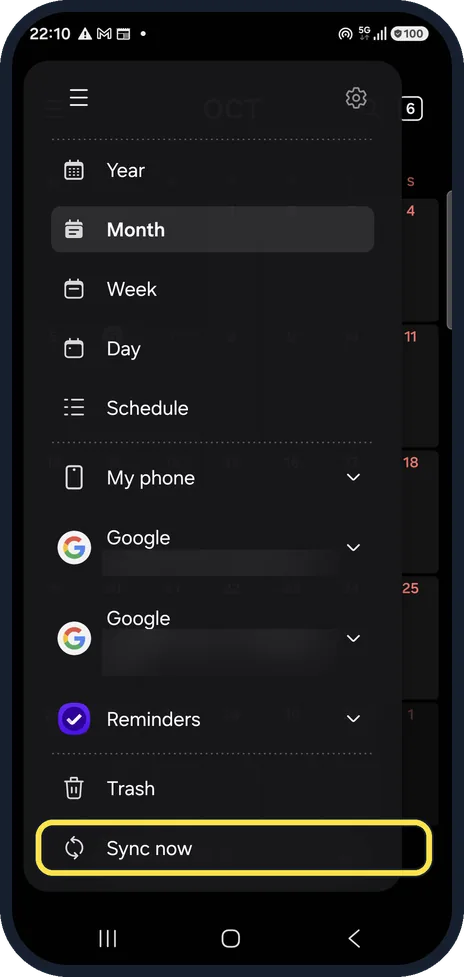
Tap Sync now
Tap Sync now at the bottom of the menu to refresh all calendars. Scroll down first if an open account list pushes it out of view.
If you do not see this option
- No Google section in the Calendar menu Go back to Sync account in Settings, make sure the Calendar switch is on, then tap the three dots and Sync now.
- No calendars under your Google account Tap the arrow next to the account name. The list stays closed until you do.
- No Sync now on the Sync account screen It is hidden behind the three dots at the top right of the screen.
If this does not work
- Events still missing after syncing Open the Calendar menu, tap the arrow next to Google and check the calendar's tick box is ticked. Sources: How to sync your Google Calendar on your Samsung Galaxy device, How to sync your Google Calendar on your Samsung Galaxy device, How can I use the Calendar app on my Samsung smartphone?, How to add and manage events using the Calendar app on your Samsung Galaxy phone
- You have more than one Google account Each account has its own Google section in the Calendar menu. Open the one you use on your computer and tick its calendars. Sources: How to sync your Google Calendar on your Samsung Galaxy device, How to sync your Google Calendar on your Samsung Galaxy device, How can I use the Calendar app on my Samsung smartphone?, How to add and manage events using the Calendar app on your Samsung Galaxy phone
- Sync seems stuck Check the Last synced on date under Calendar in Sync account. If it is old, tap the three dots and Sync now.
About this guide
Samsung Calendar shows Google events only if the phone syncs your Google calendar and the calendar is ticked in the app. Older guides send you to a Manage calendars page; on our phone the calendars are listed in the Calendar menu instead.
On other Galaxy phones and One UI versions a few names and positions may differ.
Good to know
New events made on the phone go to the calendar you pick when you save them. Events saved to My phone stay on the phone and never reach Google.
If events still do not appear, check that you are signed in to the same Google account as on your computer.
In short: Settings, Accounts and backup, Manage accounts, Google, Sync account: Calendar on, three dots, Sync now. Calendar app, three lines: arrow next to Google, tick the calendars, Sync now.
- Samsung Latin: How to sync your Google Calendar on your Samsung Galaxy device
- Samsung UK: How to sync your Google Calendar on your Samsung Galaxy device
- Samsung Latin: How can I use the Calendar app on my Samsung smartphone?
- Samsung UK: How to add and manage events using the Calendar app on your Samsung Galaxy phone
Links checked in October 2026. Menus and features can change after software updates. These steps match the version named at the top.
📷 See real photos from the Galaxy A57 in our Camera Lab, next to 10 other phones.
Did this guide work for you?
Sorry about that. What happened?