
howtosimply.com/guides/how-to-add-medical-info-and-emergency-contacts-on-a-samsung-galaxy/ · Checked October 2026 · Samsung Galaxy A57 5G (One UI 8.5, Android 16) and Samsung Galaxy A57 (One UI 9, Android 17 (build A576BXXU6BZIE))
In this guide
Open Settings, Safety and emergency. Tap Emergency contacts, Add emergency contact, and keep Show on Lock screen on. Tap Medical info to add allergies, medicines and blood type. Paramedics can then see both from the lock screen without unlocking the phone.
4 of 4 steps with real screenshots · 2 official sources below
- Device
- Android
- Shown on
- Samsung Galaxy A57 5G (SM-A576B), One UI 8.5, Android 16, Samsung Galaxy A57 (SM-A576B), One UI 9, Android 17 (build A576BXXU6BZIE)
- App
- Settings
- Path
- Settings › Safety and emergency: Emergency contacts
- Real screenshots
- 4 of 4 steps
- What we did
- Observed: looked at each screen, changed nothing
- Our phone
- Shown on Galaxy A57, One UI 8.5
- Checked
- October 2026
- Sources
- 2 official, linked below
Step by step
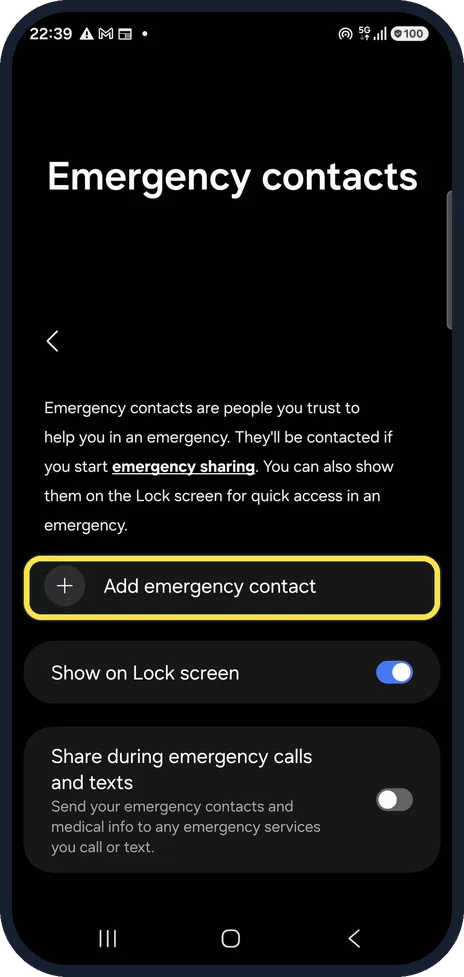
Add an emergency contact
Open Settings, Safety and emergency, Emergency contacts and tap Add emergency contact.
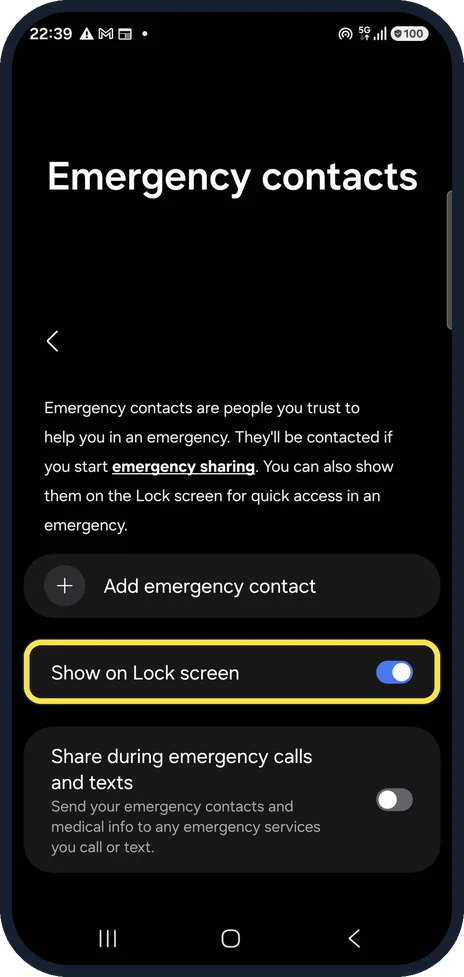
Show them on the lock screen
Show on Lock screen is on on ours, so the contacts can be reached from the lock screen's Emergency call.
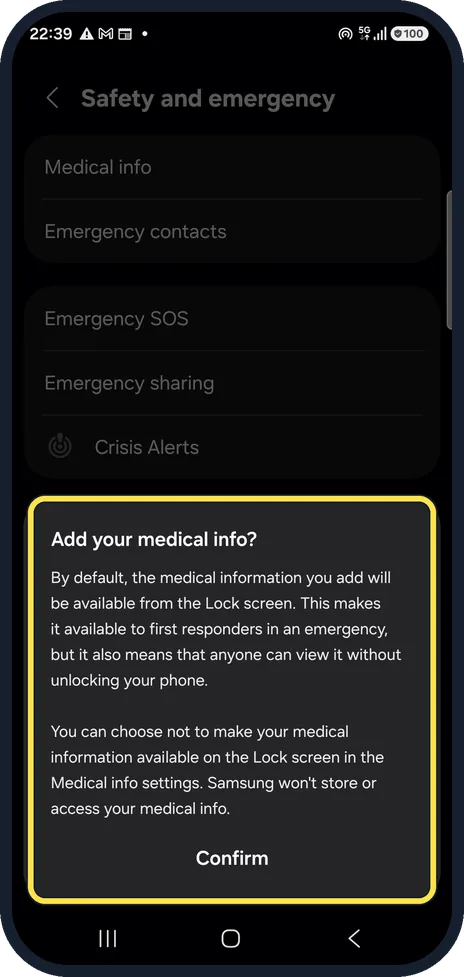
Add medical info
Tap Medical info. The phone first explains that the information will be visible on the lock screen to anyone, and that Samsung does not store it. Tap Confirm, enter your details and Save. We did not.
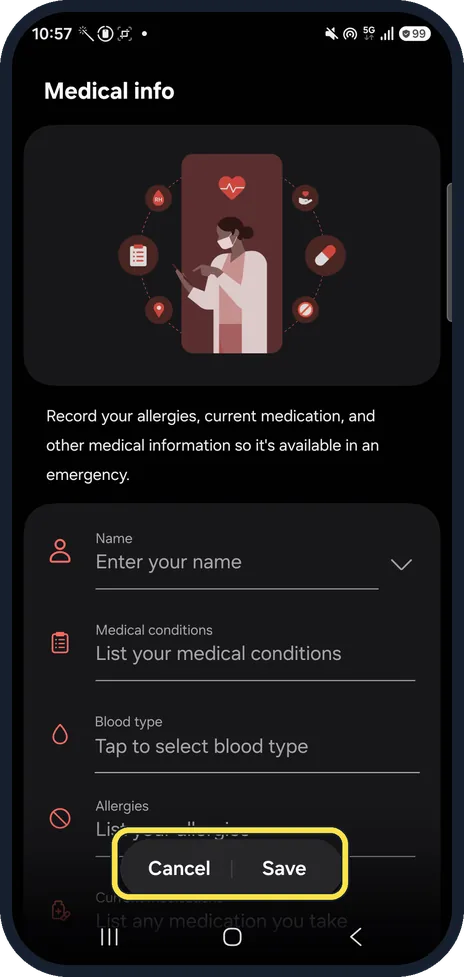
Fill in the form
After Confirm, a form asks for Name, Medical conditions, Blood type, Allergies and current medications, with Cancel and Save at the bottom. We tapped Cancel without entering anything.
If you do not see this option
- The button reads Add member Samsung's Latin American guide, written for an earlier One UI, calls the button Add member. Pick one of your existing contacts and tap Done. Source: How to use Galaxy device in an emergency to contact emergency contacts and view important medical information
- Medical info has its own lock screen switch In Samsung's guide for earlier One UI versions, Medical info has a separate Show on Lock screen switch. Turn it on after you tap Save, or the details stay hidden. Source: How to use Galaxy device in an emergency to contact emergency contacts and view important medical information
If this does not work
- You cannot find the info from the lock screen Samsung says to wake the phone, tap Emergency call on the lock screen, then View medical info. Source: How to use Galaxy device in an emergency to contact emergency contacts and view important medical information
- The contacts do not show From Emergency call, Samsung says to tap the green Dialpad icon to see the emergency contacts. If the list is empty, check that Show on Lock screen is on under Emergency contacts. Source: How to use Galaxy device in an emergency to contact emergency contacts and view important medical information
About this guide
This takes two minutes and can matter a lot. Anyone can read lock screen information, so add only what helps in an emergency.
Step 4 is from the same phone after its One UI 9 update (Android 17).
Good to know
Share during emergency calls and texts, under Emergency contacts, sends your medical info and contacts to emergency services when you call or text them. It is off on ours.
Emergency SOS, on the same Safety page, calls for help when you press the side button five times: Emergency SOS calling by accident.
In short: Settings, Safety and emergency: Emergency contacts, add, Show on Lock screen; Medical info, Confirm, fill in, Save.
- Samsung Latin: How to use Galaxy device in an emergency to contact emergency contacts and view important medical information
- Samsung US: Use your Galaxy phone or tablet in emergency situations
Links checked in October 2026. Menus and features can change after software updates. These steps match the version named at the top.
📷 See real photos from the Galaxy A57 in our Camera Lab, next to 10 other phones.
Did this guide work for you?
Sorry about that. What happened?