
What changed: added what iOS 27.0.1 fixes, from Apple's release notes of 28 September 2026.
howtosimply.com/guides/how-to-update-an-iphone/ · Checked October 2026 · iPhone 14 Pro (iOS 27.0.1) and iPhone 17e (iOS 27.0.1)
In this guide
Back up the iPhone, plug it in and connect to Wi-Fi. Open Settings, tap General, then tap Software Update. If an update is offered, Apple says to tap Download and Install. If the page says iOS is up to date, there is nothing to install.
4 of 7 steps with real screenshots · 1 official source below
- Device
- iPhone
- Shown on
- iOS 27.0.1 (iPhone 14 Pro), iOS 27.0.1 (iPhone 17e)
- App
- Settings
- Path
- Settings › General › Software Update
- Real screenshots
- 4 of 7 steps
- Checked
- October 2026
- Sources
- 1 official, 1 other, linked below
Step by step
Back up first
Back up the iPhone with iCloud or a computer. Updates rarely go wrong, but a backup costs nothing.
Plug in and connect to Wi-Fi
Connect the charger and make sure the phone is on Wi-Fi.
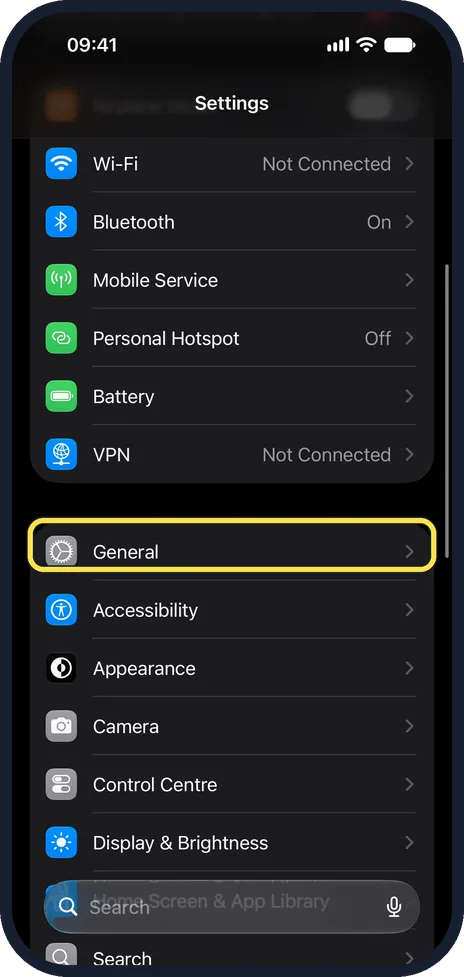
Open Settings and tap General
Scroll down past Wi-Fi, Bluetooth, Battery and VPN. General starts the next group of the main Settings list.
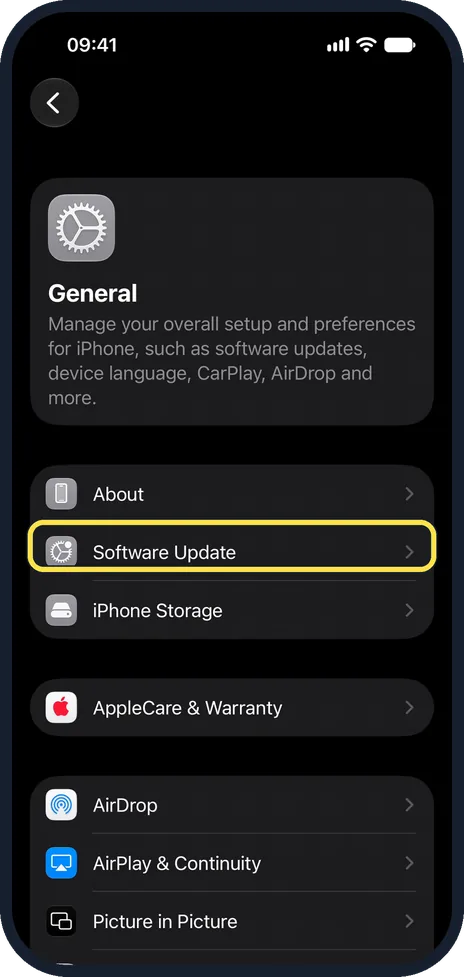
Tap Software Update
It is the row just below About.
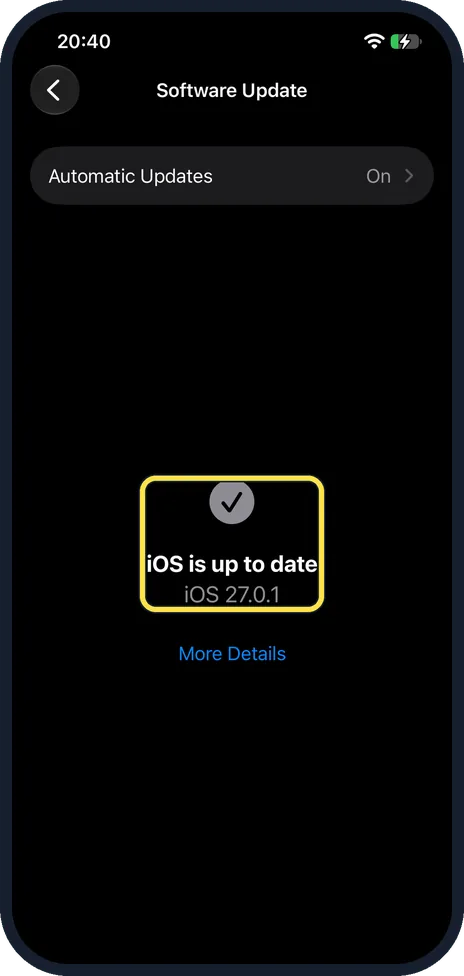
Check for an update
The page shows whether an update is available. On our iPhone 17e it read iOS is up to date, with iOS 27.0.1 underneath and More Details below, so there was nothing to install.
Tap Download and Install
When an update is offered, Apple says to tap Download and Install, enter your passcode if asked and follow the instructions on screen.
The phone downloads the update, restarts and installs it. Leave it on the charger until the Lock Screen appears again.
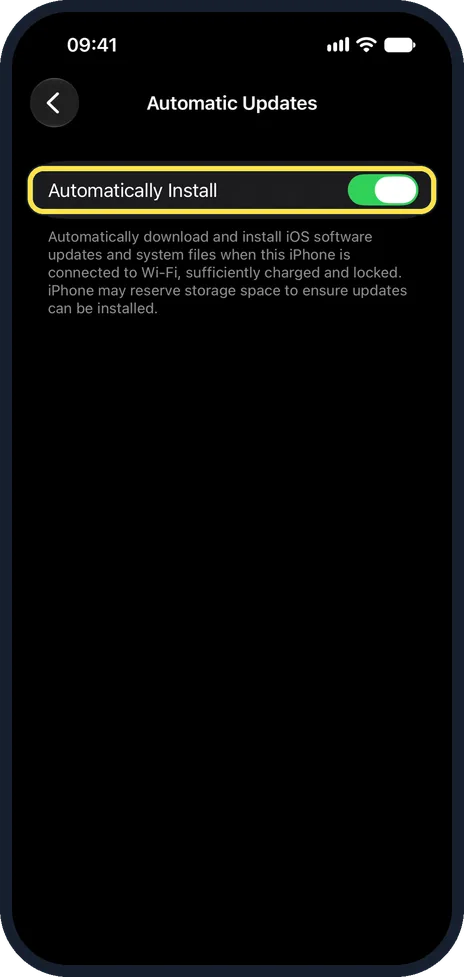
Optional: switch on automatic updates
Tap Automatic Updates at the top of the Software Update page. On our iPhone it showed On.
On iOS 27.0.1 it has one switch, Automatically Install: the phone downloads and installs updates while it is on Wi-Fi, charged enough and locked, as the text under the switch says.
What changed: added what iOS 27.0.1 fixes, from Apple's release notes of 28 September 2026.
If you do not see this option
- No Download and Install button The button only appears when an update is available. On our iPhone 17e the page showed iOS is up to date and iOS 27.0.1 instead, so there was nothing to install.
- Only one row above the status On our iPhone 17e the Software Update page had a single row, Automatic Updates, set to On, above the iOS is up to date message.
- Cannot find Software Update Open General from the main Settings list. Software Update is in the second group, just below About.
If this does not work
- Automatic updates do not install As the text under Automatically Install says, the phone only installs updates when it is connected to Wi-Fi, sufficiently charged and locked.
- Not enough space Apple says iOS can remove some apps temporarily during the update and put them back afterwards. Source: Update your iPhone or iPad · Source: Apple releases iOS 27.0.1 for iPhone
- No update over the air Apple says some updates must be installed with a computer: connect the iPhone by cable and use the Finder on a Mac or the Apple Devices app on a Windows PC. Source: Update your iPhone or iPad · Source: Apple releases iOS 27.0.1 for iPhone
About this guide
Updates bring security fixes and new features. An update can take a while. Start one when you do not need the phone for the next hour.
The screenshots are our own, taken on an iPhone 14 Pro and an iPhone 17e, both running iOS 27.0.1. The path Settings, General, Software Update is the same on iOS 26.
Good to know
What iOS 27.0.1 fixes (released 28 September 2026): Apple's notes list three fixes. Opening Notification Center and Control Center at the same time could make the touchscreen stop responding; an iPhone 18 Pro or Pro Max could restart when Face ID failed; and a colour artifact could appear on some 2x photos from a small number of iPhone 18 Pro models. If your touchscreen froze on iOS 27.0, this update is the fix.
iPhone may keep some storage free so that automatic updates can be installed. That is also written under the Automatically Install switch.
If there is not enough free space, iOS can remove some apps temporarily during the update and put them back afterwards.
A VPN or proxy connection can stop the phone from reaching the update servers. Switch the VPN off if no update appears.
Some updates are not offered over the air. In that case, update with a computer: connect the iPhone by cable and use the Finder on a Mac or the Apple Devices app on a Windows PC.
If it fails: iPhone software update failed or stuck: 7 fixes to try.
In short: Back up, power, Wi-Fi. Settings, General, Software Update. Tap Download and Install if an update is offered.
Links checked in October 2026. Menus and features can change after software updates. These steps match the version named at the top.
Did this guide work for you?
Sorry about that. What happened?