
howtosimply.com/guides/how-to-turn-off-google-maps-notifications-on-android/ · Checked October 2026 · Samsung Galaxy A57 5G (SM-A576B), One UI 8.5, Android 16
In this guide
In Google Maps tap your profile picture, Settings, Notifications. Pick a group, such as Getting around, and switch off the alerts you do not want. To silence Maps completely, open the phone's Settings, Apps, Maps, Notifications.
3 of 3 steps with real screenshots · 1 official source below
- Device
- Android
- Shown on
- Samsung Galaxy A57 5G (SM-A576B), One UI 8.5, Android 16
- App
- Google Maps
- Real screenshots
- 3 of 3 steps
- Checked
- October 2026
- Sources
- 1 official, linked below
Step by step
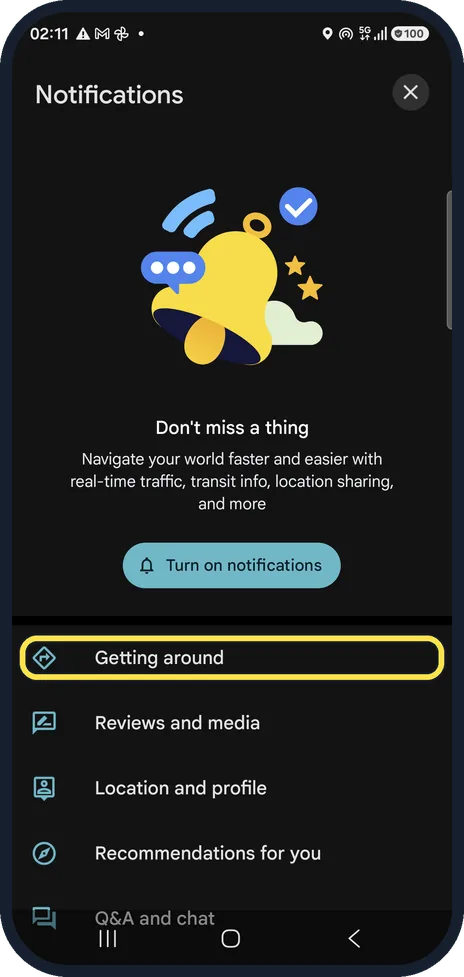
Open Notifications in Maps settings
Tap your profile picture at the top right, Settings, then Notifications. Alerts are grouped: Getting around, Reviews and media, Location and profile, Recommendations for you, Q&A and chat. Our phone blocked Maps notifications, so Maps offered Turn on notifications above the list.
Watch these steps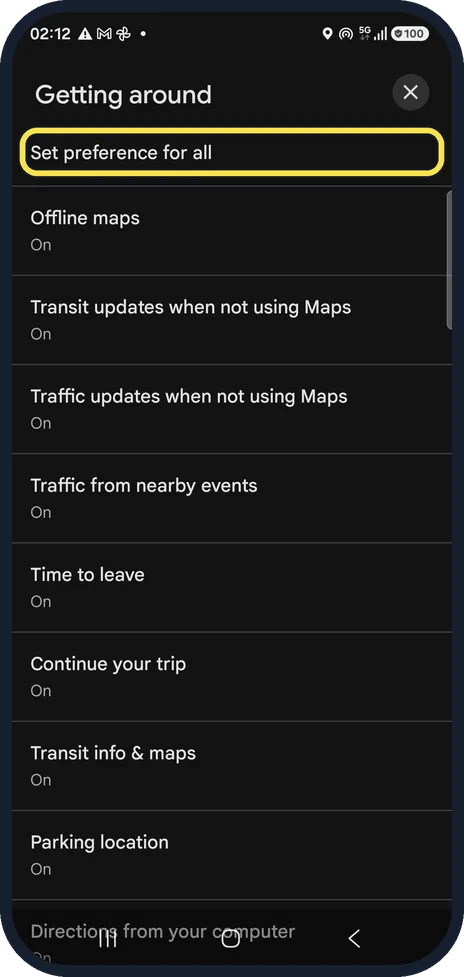
Switch off the alerts you don't want
Getting around lists Offline maps, Transit and Traffic updates when not using Maps, Time to leave, Parking location and more. Set preference for all at the top changes the whole group at once.
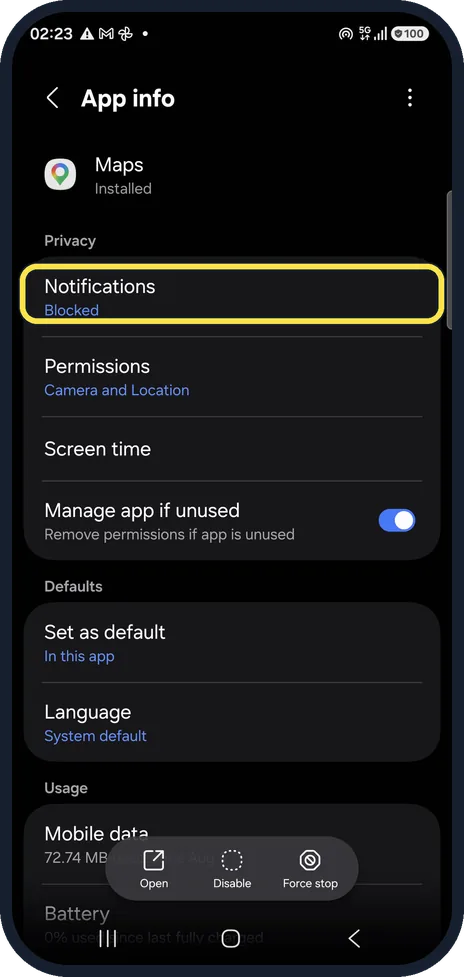
Or block every Maps notification
Open the phone's Settings, Apps, Maps. Notifications, the first row under Privacy, shows Blocked on our phone, so Maps notifications were already off. If yours does not say Blocked, tap Notifications and switch them off.
Watch these steps
If you do not see this option
- You have no profile picture in Maps Google says to tap your profile picture or your initial at the top right, then Settings, Notifications. Source: Turn Google Maps notifications on or off (Android)
- Traffic updates when not using Maps is missing Google says this alert is only offered in certain countries and regions. Source: Turn Google Maps notifications on or off (Android)
If this does not work
- Traffic alerts still arrive Google says traffic updates when not using Maps need the Traffic updates switch, the Physical activity permission and Location set to Allow all the time. Turning off any one of these stops them. Source: Turn Google Maps notifications on or off (Android)
- Alerts still come from another group Google sorts the switches by category. Open each category on the Notifications page and turn off the ones you do not want. Source: Turn Google Maps notifications on or off (Android)
About this guide
Maps can send traffic alerts, "time to leave" reminders, review requests and more. Each kind has its own switch, so you can keep the useful ones.
The screenshots are from Google Maps 26.31.02 on a Samsung Galaxy A57 5G with Android 16 and One UI 8.5, in dark mode. Maps looks the same on other Android phones; only the phone's own Settings screens differ by brand.
Good to know
The switches in Maps only matter while the phone allows Maps notifications. Ours were blocked at the phone level, which is why Maps showed Turn on notifications.
In short: Maps, profile picture, Settings, Notifications: switch off per group. Whole app: Settings, Apps, Maps, Notifications.
Links checked in October 2026. Menus and features can change after software updates. These steps match the version named at the top.
📷 See real photos from the Galaxy A57 in our Camera Lab, next to 10 other phones.
Did this guide work for you?
Sorry about that. What happened?