
howtosimply.com/guides/how-to-change-the-voice-or-mute-voice-navigation-in-google-maps-on-android/ · Checked October 2026 · Samsung Galaxy A57 (One UI 9, Android 17 (build A576BXXU6BZIE)) and Samsung Galaxy A57 5G (One UI 8.5, Android 16)
In this guide
In Google Maps tap your profile picture, Settings, Navigation. Under Sound & voice choose Muted, Alerts only or Unmuted, and tap Voice selection to pick another voice or language. During a drive, the speaker icon on the map changes the mute state too.
5 of 5 steps with real screenshots · 1 official source below
- Device
- Android
- Shown on
- Samsung Galaxy A57 (SM-A576B), One UI 9, Android 17 (build A576BXXU6BZIE), Samsung Galaxy A57 5G (SM-A576B), One UI 8.5, Android 16
- App
- Maps
- Path
- Maps › Settings › Navigation › Sound & voice: Muted
- Real screenshots
- 5 of 5 steps
- Checked
- October 2026
- Sources
- 1 official, linked below
Step by step
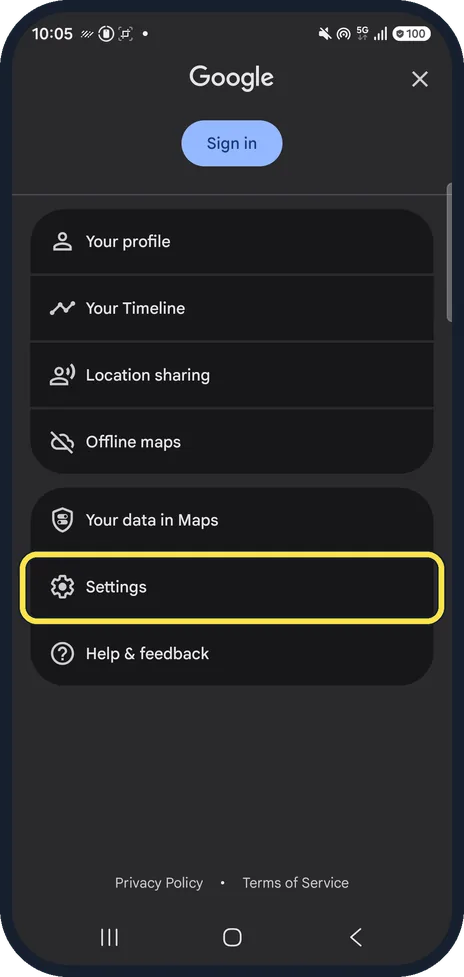
Open Maps settings
In Google Maps, tap your profile picture at the top right (an account icon if you are signed out), then Settings.
Watch these steps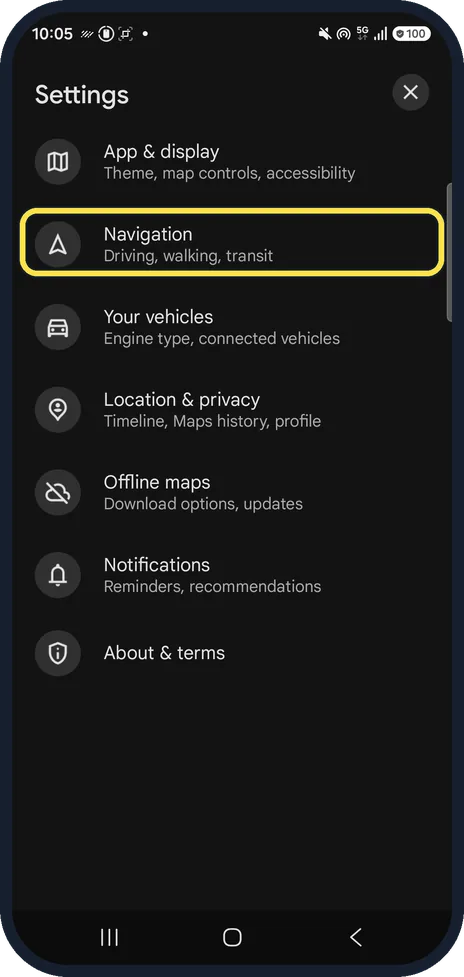
Tap Navigation
It is the second row, below App & display: Driving, walking, transit.
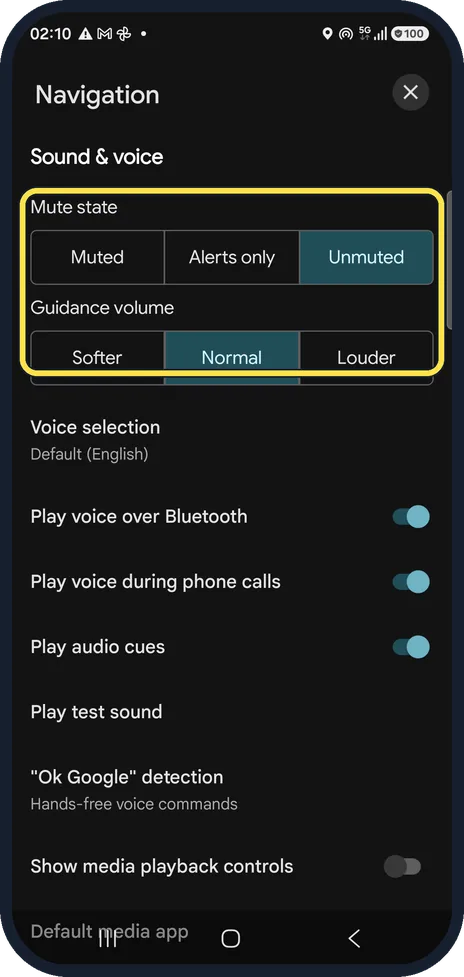
Choose the mute state
Muted stays silent, Alerts only speaks only traffic alerts, Unmuted reads every turn. Guidance volume underneath has Softer, Normal and Louder.
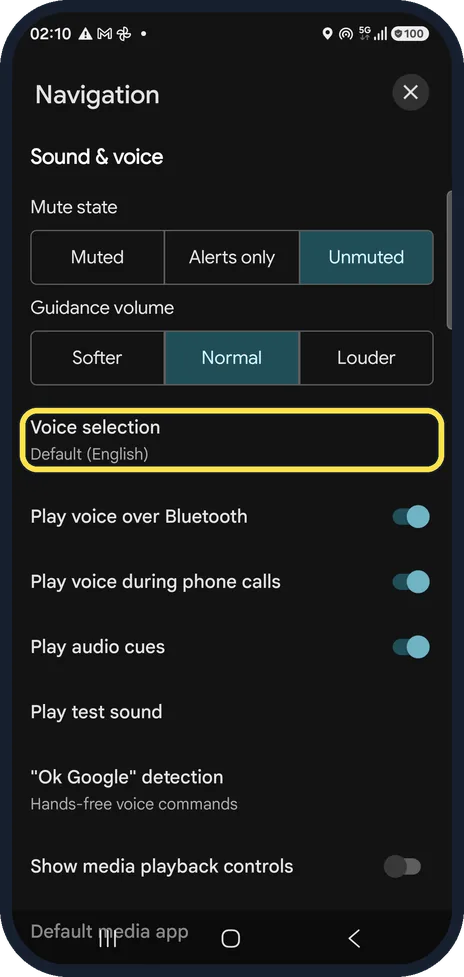
Tap Voice selection
Ours said Default (English).
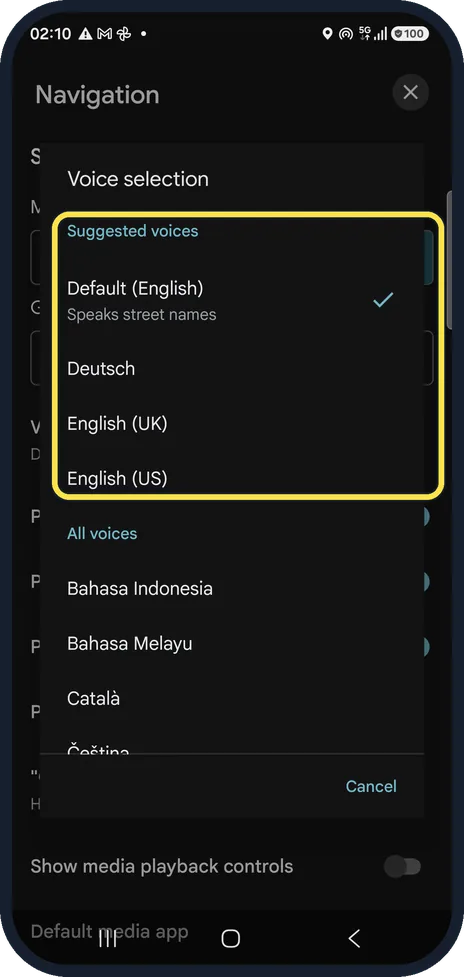
Pick a voice
Suggested voices come first; All voices lists every language. Default (English) speaks street names; some voices do not. We tapped Cancel and kept ours.
Watch these steps
If you do not see this option
- You are already driving Google says the sound icon sits at the top right of the navigation screen. If it shows muted, tap it and choose to unmute; you do not need to stop. Source: Fix voice navigation problems (Android)
- You want to hear it before you set off Google says Maps for Android 9.13 and later has Play test sound under Settings, Navigation. It says: This is what it will sound like when navigating with Google Maps. Source: Fix voice navigation problems (Android)
If this does not work
- You hear a chime instead of directions Google says the voice directions have not been downloaded yet. Stay online with Maps open while you get directions; they download in the background. Source: Fix voice navigation problems (Android)
- It is still too quiet Google says to turn up the phone's volume after you start navigation, and to choose Louder under Settings, Navigation, Guidance volume. Source: Fix voice navigation problems (Android)
- Directions do not come through the car Google says to pair the phone with the car over Bluetooth, set the car's audio source to Bluetooth, and turn on Play voice over Bluetooth. Source: Fix voice navigation problems (Android)
About this guide
The spoken directions are too chatty, too quiet or in the wrong language. All of it sits on one settings page.
The screenshots are from Google Maps 26.31.02 on a Samsung Galaxy A57 5G with Android 16 and One UI 8.5, in dark mode. Maps looks the same on other Android phones; only the phone's own Settings screens differ by brand. Steps 1 and 2 are from Maps 26.42.01 on the same phone after its One UI 9 update (Android 17), signed out: the menu then shows Sign in instead of your name.
Good to know
The same page has Play voice over Bluetooth and Play voice during phone calls, which decide whether directions come through the car speakers.
In short: Maps, Settings, Navigation, Sound & voice: Muted, Alerts only or Unmuted; Voice selection for another voice.
Links checked in October 2026. Menus and features can change after software updates. These steps match the version named at the top.
📷 See real photos from the Galaxy A57 in our Camera Lab, next to 10 other phones.
Did this guide work for you?
Sorry about that. What happened?