
howtosimply.com/guides/gmail-storage-full-on-android-how-to-find-big-emails/ · Checked October 2026 · Samsung Galaxy A57 5G (SM-A576B), One UI 8.5, Android 16
In this guide
In the Gmail app search for larger:10M to list emails bigger than 10 MB. Open the ones you do not need, delete them, then empty the Trash. Your storage is shared with Google Drive and Google Photos, so check those too.
2 of 4 steps with real screenshots · 3 official sources below
- Device
- Android
- Shown on
- Samsung Galaxy A57 5G (SM-A576B), One UI 8.5, Android 16
- App
- Gmail
- Real screenshots
- 2 of 4 steps
- Checked
- October 2026
- Sources
- 3 official, linked below
Step by step
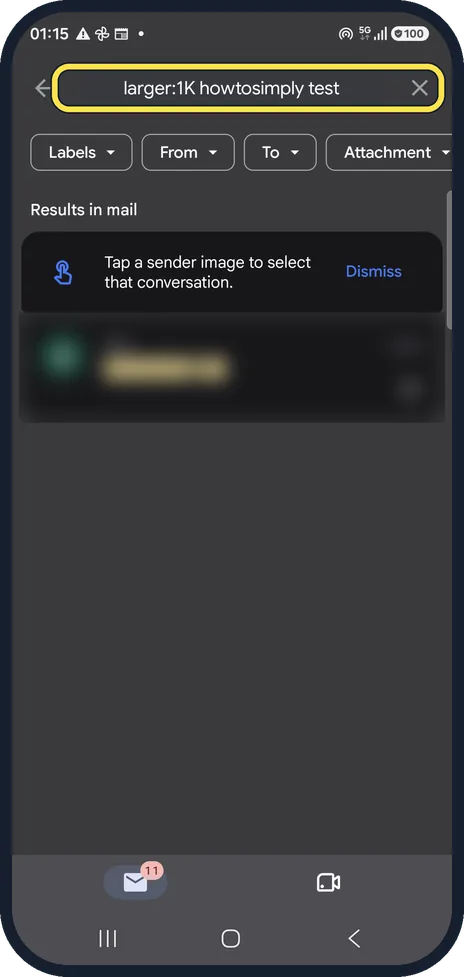
Search by size
Type larger: and a size into the Gmail search box, for example larger:10M for over 10 MB. We searched larger:1K howtosimply test so that only our test mail could match; the result row is blurred.
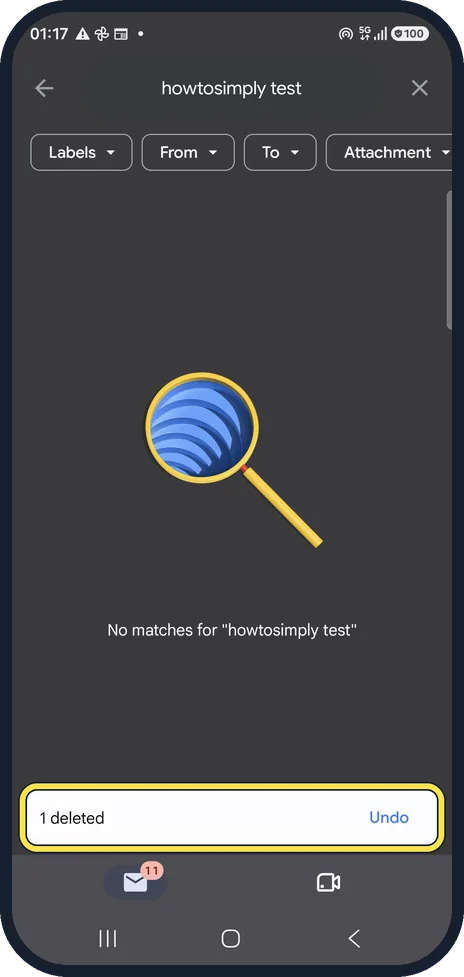
Delete what you do not need
Open a mail you do not need and tap the bin at the top of the mail. A bar at the bottom confirms the delete and offers Undo. In our picture it says 1 deleted: we deleted our test mail from the search results, so the list behind it is now empty and says No matches.
Empty the Trash
Deleted mail still counts against your storage for 30 days. Open the menu at the top left, tap Trash and then Empty trash now at the top. We did not empty ours.
Check what else uses the space
Storage is shared with Google Drive and Google Photos. The Google One app or one.google.com/storage shows the split. We did not capture that page, because it shows the account.
If you do not see this option
- There is no Empty trash now button Google puts Empty trash now at the top of the Trash itself. Open the menu at the top left and tap Trash first. Source: Delete or recover Gmail messages
- Your account is from work or school Google says some of its storage rules apply differently to Google Workspace and education plans, so your admin may set the limit. Source: How your Google storage works
If this does not work
- Storage is still full after deleting Google counts the Spam and Trash folders against your storage, so empty both. Files in Google Drive and photos in Google Photos share the same space. Source: How your Google storage works
- Mail still does not arrive Google says that while you are over your storage limit, sending and receiving email can be affected. Get back under the limit first. Source: How your Google storage works
About this guide
When your Google storage is full, Gmail stops receiving mail. Big attachments are usually the quickest win. Our Gmail account is a real one, so addresses, senders and subjects are blurred; the only mail we touched was a test message we sent to ourselves.
The screenshots are from the Gmail app on a Samsung Galaxy A57 5G with Android 16 and One UI 8.5, in dark mode. The app looks the same on other Android phones; only the phone's own settings screens differ by brand.
Good to know
Other useful searches: has:attachment older_than:1y for old attachments, or larger:5M in:sent for big mails you sent.
Mail still not arriving after you free space? Gmail not getting new emails on Android.
In short: Gmail search larger:10M, delete, empty Trash; check Drive and Photos too.
- Gmail Help: Search operators you can use with Gmail
- Gmail Help: Delete or recover Gmail messages
- Google One Help: How your Google storage works
Links checked in October 2026. Menus and features can change after software updates. These steps match the version named at the top.
📷 See real photos from the Galaxy A57 in our Camera Lab, next to 10 other phones.
Did this guide work for you?
Sorry about that. What happened?