
howtosimply.com/guides/how-to-see-who-is-connected-to-your-hotspot-on-a-samsung-galaxy/ · Checked October 2026 · SM-A576B), One UI 9.0, Android 17 (build CP2A.260605.016.A576BXXU6BZIE · Samsung Galaxy A57
In this guide
Open Settings, Connections, Mobile Hotspot and Tethering and tap the words Mobile Hotspot. Tap the devices connected line to open Manage Mobile Hotspot: Connected devices lists each device with the data it used today.
5 of 5 steps with real screenshots · 2 official sources below
- Device
- Android
- Shown on
- Samsung Galaxy A57 (SM-A576B), One UI 9.0, Android 17 (build CP2A.260605.016.A576BXXU6BZIE)
- App
- Settings
- Path
- Settings › Connections › Mobile Hotspot and Tethering › Mobile Hotspot
- Real screenshots
- 5 of 5 steps
- Checked
- October 2026
- Sources
- 2 official, linked below
Step by step
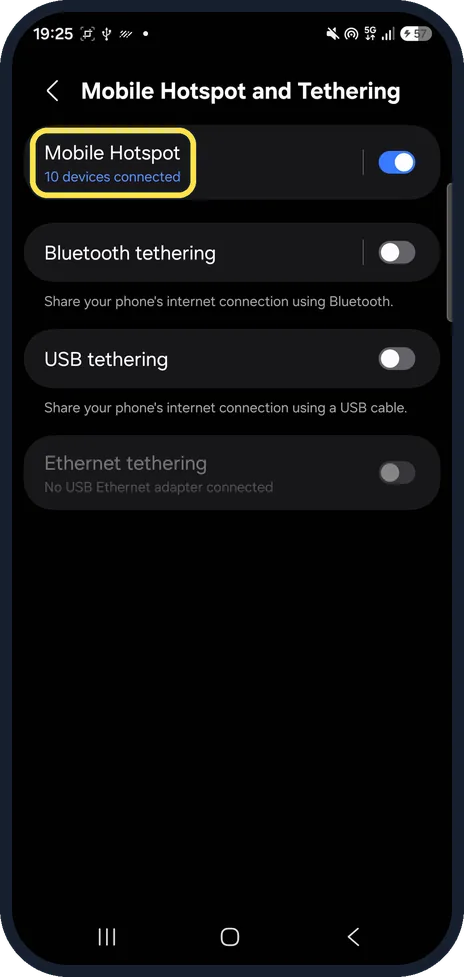
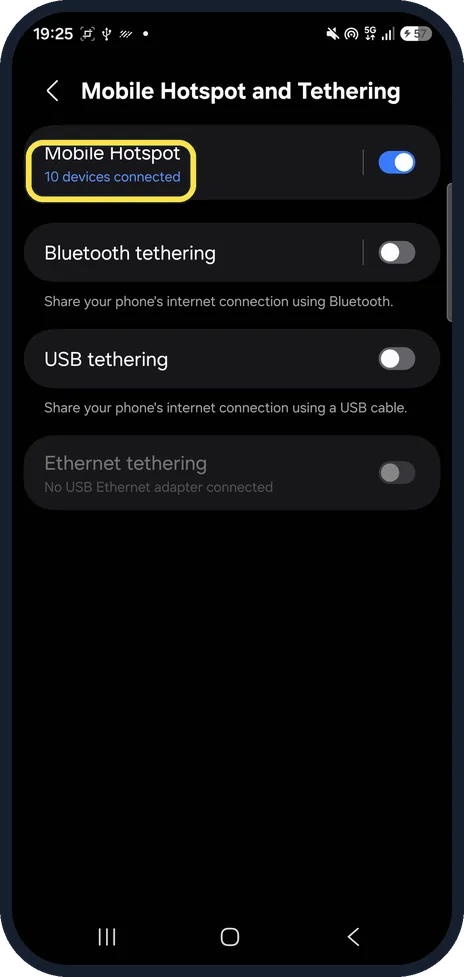
Tap the words Mobile Hotspot
Samsung gives Settings, Connections, Mobile Hotspot and Tethering. Tap the name, not the switch; the line under it says how many devices are connected.
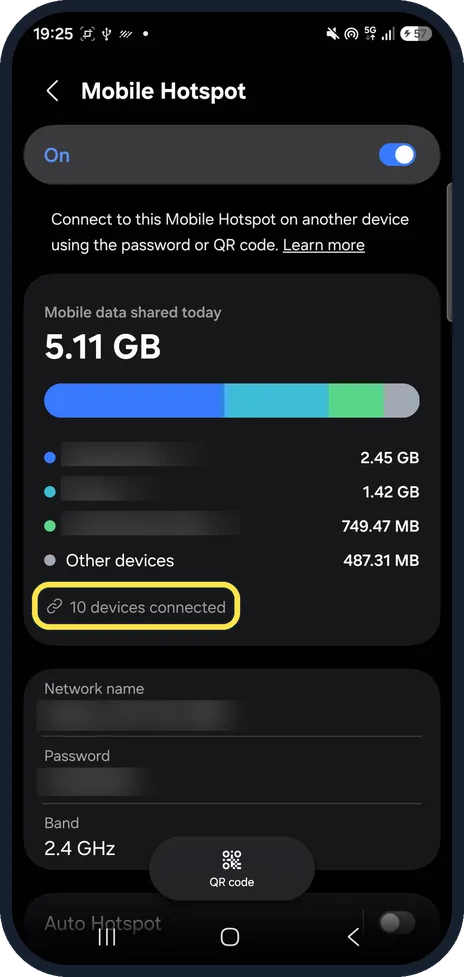
Tap the devices connected line
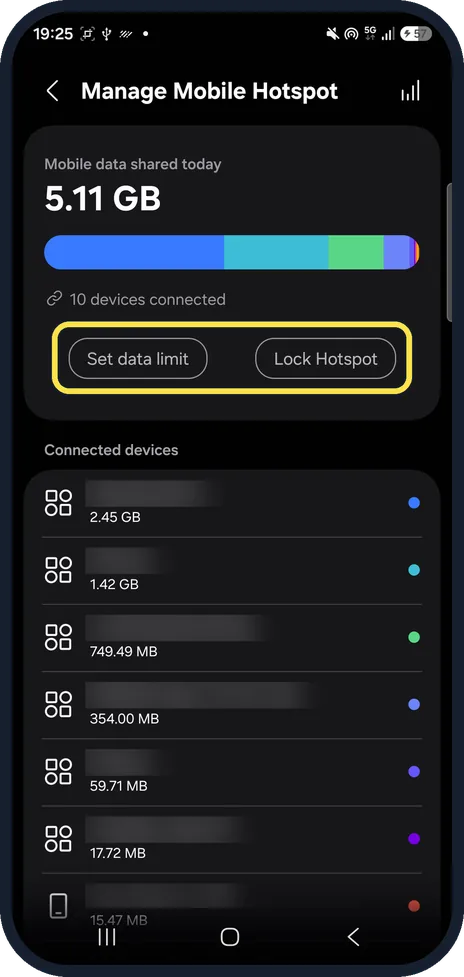
Mobile data shared today shows a bar split by device, the top three and Other devices. Below them, tap the line that says how many devices are connected.
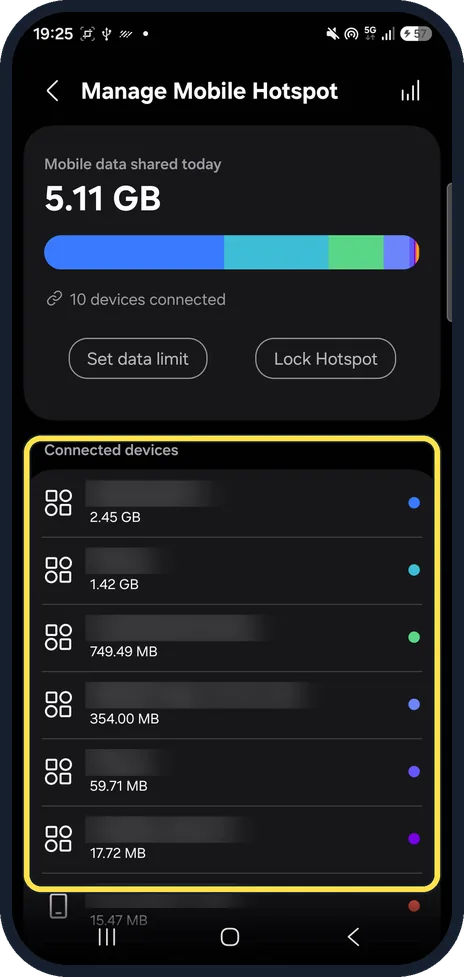
Read the Connected devices list
Manage Mobile Hotspot lists every connected device with the data it used that day.
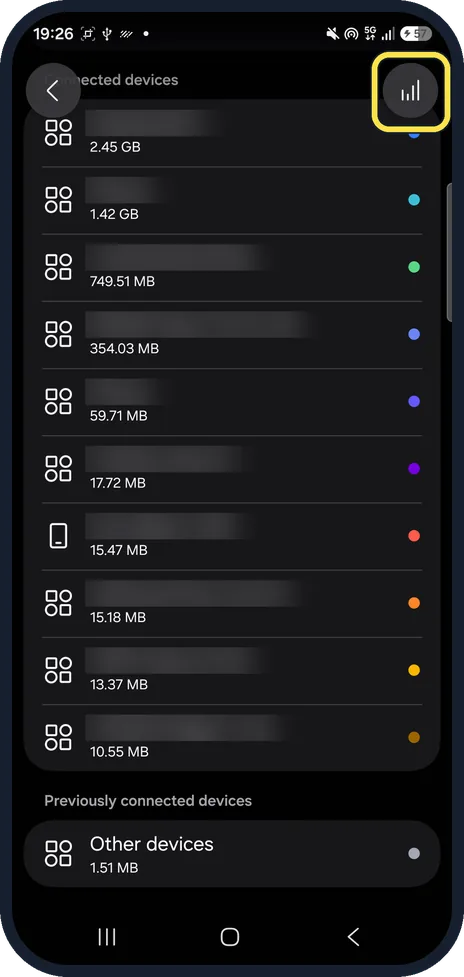
Scroll down and tap the chart icon
Below the list is Previously connected devices. The chart icon at the top right opens the usage report.
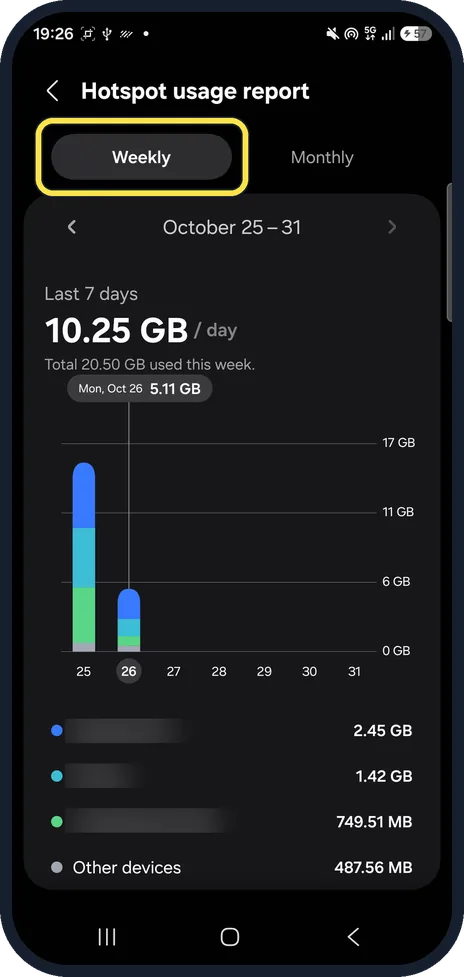
Switch between Weekly and Monthly
Hotspot usage report shows a bar per day and the data per device. Ours said 20.50 GB that week.
If you do not see this option
- No list of devices? The list is on Manage Mobile Hotspot, opened from the devices connected line on the Mobile Hotspot page. With nobody connected there is nothing to list. Source: Use a mobile hotspot on your Galaxy phone or tablet
- Where do I see the password? On the Mobile Hotspot page, under Network name. Samsung says you can view and change the password for your hotspot there. Source: Use a mobile hotspot on your Galaxy phone or tablet
If this does not work
- A device you don't know? Change the hotspot password so only people you give it to can join. Samsung says you can hide your device and adjust more options if you do not want strangers on it. Source: Use a mobile hotspot on your Galaxy phone or tablet
- Data runs out fast? Manage Mobile Hotspot has Set data limit next to Lock Hotspot; we did not use either. Samsung notes that even unlimited plans may have limitations. Source: Mobile hotspot issues with a Samsung phone
About this guide
The hotspot pages show how many devices are on your hotspot and how much data each one used. On ours, 10 devices had shared 5.11 GB that day.
The screenshots are from our Samsung Galaxy A57, model SM-A576B, with One UI 9.0 and Android 17 (build CP2A.260605.016.A576BXXU6BZIE), in Dark mode, taken on 26 October 2026. We only looked; nothing on the hotspot was changed.
Good to know
If devices can't connect, see Galaxy hotspot not working: 6 fixes.
To save data on the phone itself, see turn on Data saver on a Galaxy.
In short: Settings, Connections, Mobile Hotspot and Tethering, Mobile Hotspot, devices connected, Connected devices.
- Samsung US: Use a mobile hotspot on your Galaxy phone or tablet
- Samsung US: Mobile hotspot issues with a Samsung phone
Links checked in October 2026. Menus and features can change after software updates. These steps match the version named at the top.
📷 See real photos from the Galaxy A57 in our Camera Lab, next to 10 other phones.
Did this guide work for you?
Sorry about that. What happened?