
howtosimply.com/guides/how-to-report-a-closed-business-or-wrong-place-in-google-maps-on-android/ · Checked October 2026 · build CP3A.261005.005 · Google Pixel 10a, Android 17
In this guide
Open the place in Google Maps, scroll down and tap Suggest an edit. Tap Place is closed or not here, choose the reason (for example Permanently closed or Moved to a new location) and tap Submit.
4 of 4 steps with real screenshots · 1 official source below
- Device
- Android
- Shown on
- Google Pixel 10a, Android 17 (build CP3A.261005.005)
- App
- Google Maps
- Real screenshots
- 4 of 4 steps
- Checked
- October 2026
- Sources
- 1 official, linked below
Step by step
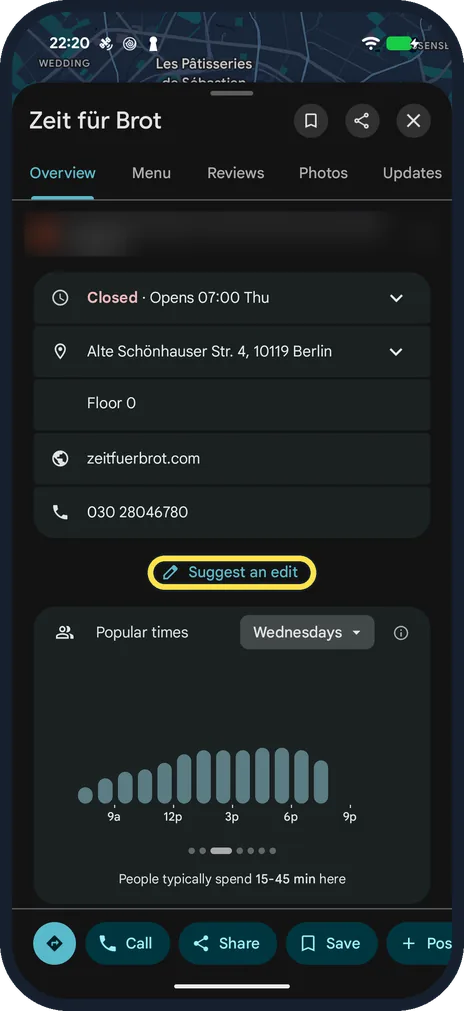
Open the place and tap Suggest an edit
Search for it or tap it on the map. We used Zeit für Brot, a bakery near Charité in Berlin, and suggested nothing about it. Suggest an edit is on the Overview tab, below the address, website and phone number.
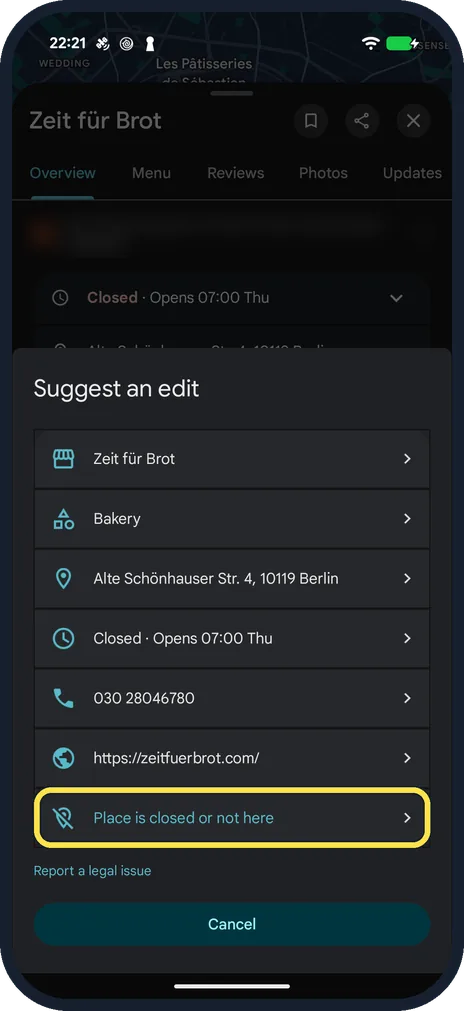
Tap Place is closed or not here
The rows above it fix the name, category, address, hours, phone number or website. A Report a legal issue link sits underneath.
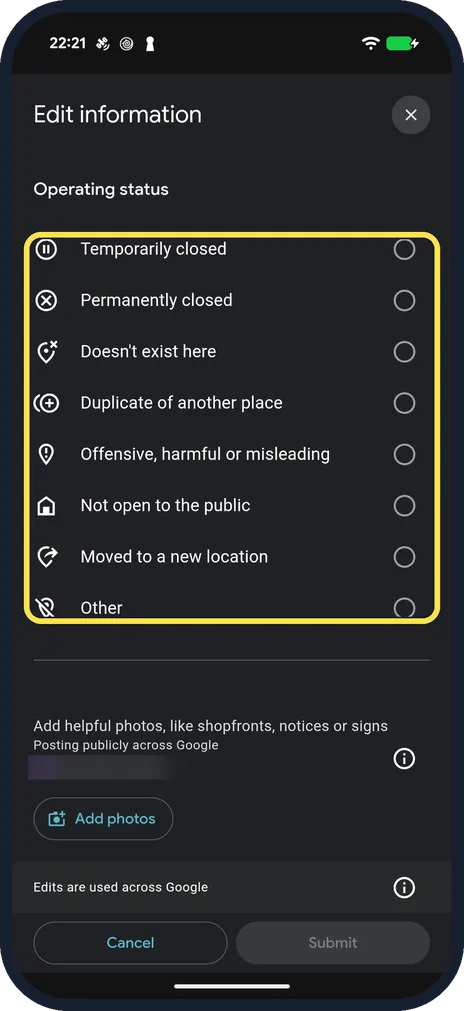
Choose the reason
Edit information, Operating status lists eight: Temporarily closed, Permanently closed, Doesn't exist here, Duplicate of another place, Offensive, harmful or misleading, Not open to the public, Moved to a new location and Other. Add photos below takes a picture of a closure notice; photos are posted publicly across Google.
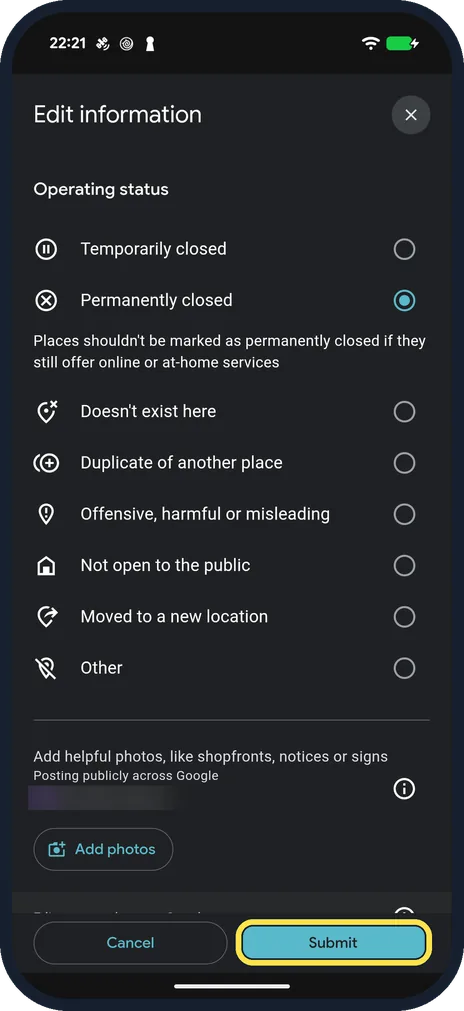
Submit
Submit turns active once a reason is picked. Permanently closed also shows a note: places should not be marked permanently closed if they still offer online or at-home services. We tapped Cancel and Discard instead.
If you do not see this option
- You cannot find Suggest an edit Scroll the Overview tab: on ours it was below the phone number, above Popular times.
- You cannot find the place by name Search for its kind and area instead; we searched for a bakery near Charité.
If this does not work
- Submit stays grey Pick one of the reasons first; ours became active only after Permanently closed was chosen.
- The place has reopened Use Suggest an edit on the same place to say so; Google covers marking a place reopened in the article below. Source: Mark a place reopened or closed on Google Maps
About this guide
Maps sends you to a shop that closed months ago, or to the wrong door. Anyone can suggest a fix; Google reviews it before it changes.
The screenshots are from Google Maps on our Google Pixel 10a with Android 17 (build CP3A.261005.005), in dark mode, signed in to a Google account. Review snippets on the place card are blurred.
Good to know
Google reviews suggested edits before they show on the map.
In short: Place, Suggest an edit, Place is closed or not here, reason, Submit.
Links checked in October 2026. Menus and features can change after software updates. These steps match the version named at the top.
📷 See real photos from the Pixel 10a in our Camera Lab, next to 10 other phones.
Did this guide work for you?
Sorry about that. What happened?